News

Get desktop-style banner notifications on your jailbroken iPad with iustum

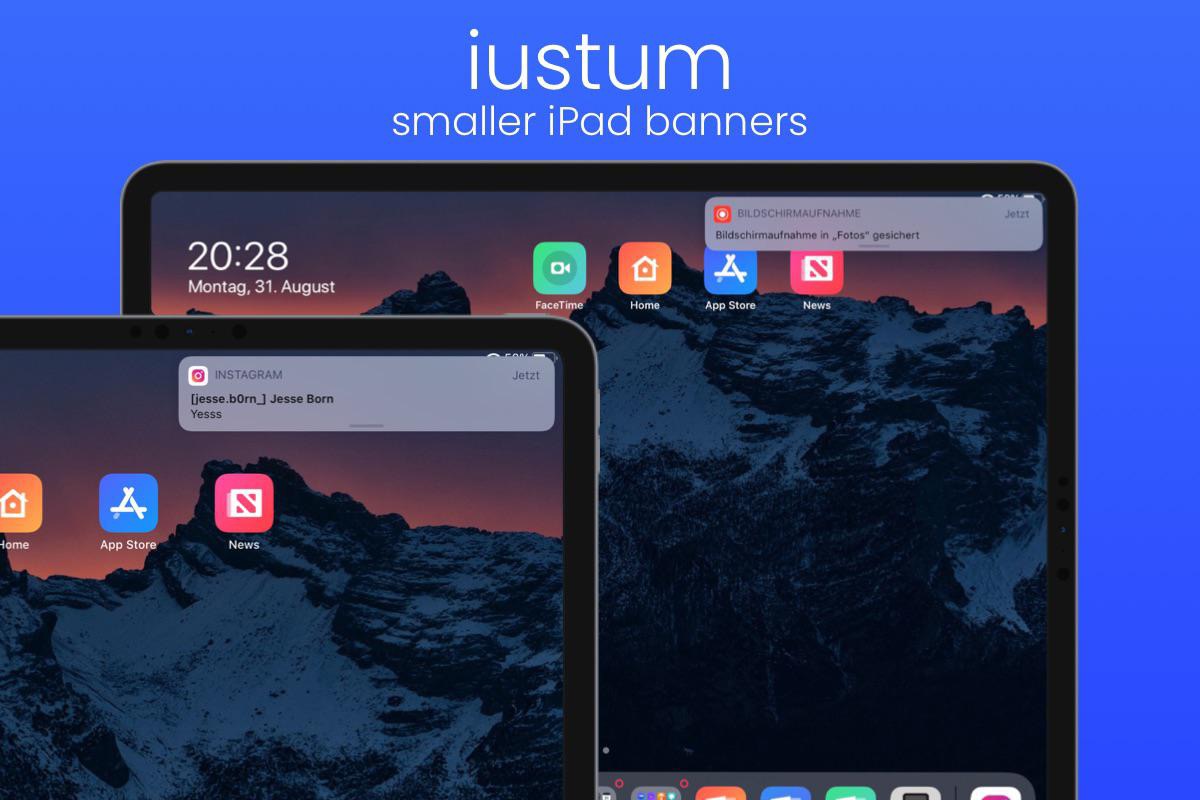
It was only last week that we showed you a new jailbreak tweak called Destra, which brought a macOS-inspired banner notification experience to the iPad and iPhone. Part form minor changes to the banner notification aesthetics, perhaps one of the other eye-catching aspects about the tweak was that it made banner notifications on the iPad feel more desktop-like by moving them over to the top-right of the display rather than displaying them in the center.

If you liked the idea of right-aligned banner notifications on your iPad, but didn’t like the price tag that Destra demanded, then you might take a liking to a newly released and free jailbreak tweak called iustum by iOS developer jesseb0rn, as it brings this notification banner-centric feature in particular to pwned iPads at no charge to the end user.

How to add Wander to the Shortcuts app to install & update the Odyssey jailbreak

Just like unc0ver, the Odyssey jailbreak app is intended to be side loaded into a compatible iPhone or iPad. To help make the process of side-loading the Odyssey jailbreak app easier, the Odyssey Team officially endorsed the brand-new Wander add-on for Apple’s Shortcuts app shortly after the tool came out of public beta.

The Wander add-on doesn’t replace side loading utilities like AltStore and ReProvision or signing services like Jailbreaks.app, but rather synergizes with them to make the process of installing Odyssey and updating to newer versions faster and less cumbersome while providing a more native user experience through Apple’s Shortcuts app in the process. In this tutorial, we’ll show you how to set up the Wander add-on with your Shortcuts app.