Music

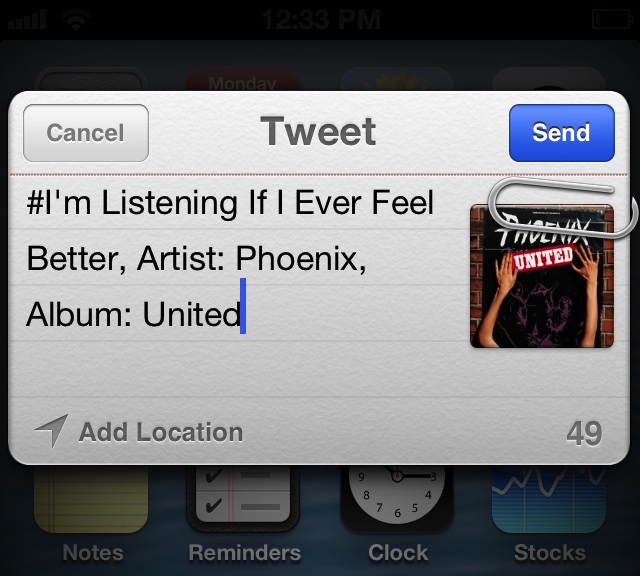
I’m Listening: Share your now playing track from anywhere

Are you finding that iOS' options are a bit limited when it comes sharing information about the music you're currently listening to? If so, then I'm Listening might be the jailbreak tweak for you.

I'm Listening is a recently released tweak on Cydia, and it allows you to customize the various sharing activities available for your currently playing song. The tweak works with the stock Music app, and also plays nice with 3rd party music apps like Spotify. I'm Listening utilizes a variety of methods: gestures in the app switcher, gestures on the Lock screen, and Activator gestures, in order to share your now playing track. Take a look inside for our hands-on video detail...

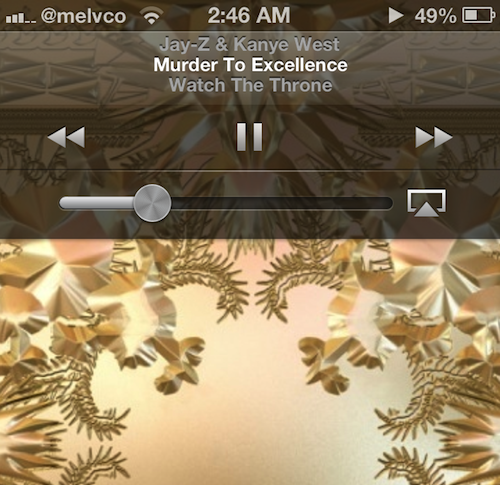
Show off your taste in music with FullScreen Album Art

Have you been looking for a way to spruce up your iPhone's Lock screen, without needing to install a bulky tweak like WinterBoard? If so, you might consider giving FullScreen Album Art by jailbreak developer bushe a shot.

The tweak's name completely gives away it's one and only function, which is to enlarge the album art image on your device's Lock screen while you're listening to music. That way, you can show off your favorite music while you rock out...

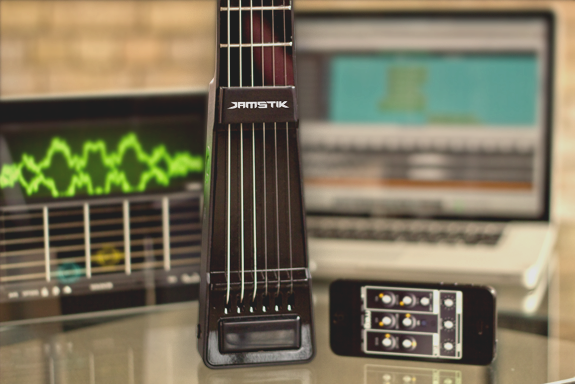
Meet JamStik, the tiny guitar that connects with your iPhone

I've always thought it'd be cool to play the drums, or the guitar, so I'm always looking for easy ways to learn how to do so. But few products deliver on their claims that they make learning to play an instrument "easy."

The Zivix team is looking to change that though, with its new musical accessory: the JamStik. It's a tiny guitar with real strings and frets that can track your hand and finger movements for instant feedback and instruction...

LSScrubbing allows you to scrub music from the Lock screen

LSScrubbing is a recently released tweak that does something so obvious, you'll wonder why it was never there to begin with. The tweak allows you to scrub audio from the Lock screen, which is basically a fancy term for moving forward or backward through a song manually.

The stock Lock screen music controls allow you to skip tracks, go to a previous track, pause, play, or adjust the volume. They also allow you to tap and hold on the previous/next buttons to rewind or fast forward, but there's no scrubbing to be found. LSScrubbing fixes that glaring omission, but you'll have to pay up to do so.

#Discover #new #artists #with Twitter #music [App Review]

Hashtags. Most people didn’t know what they were five years ago. Now, they are being used in the name of apps like they are part of our daily vernacular. How do you say the name of Twitter’s new music discovery app anyway? Is it called “Twitter music” or “Twitter ‘Hashtag’ music”? Because I am not saying “hashtag.” No way. No how.

Why, you may ask, am I talking about hashtags? Well, because the bird-branded social networking site recently launched a music discovery app called Twitter #music (note the hashtag) that allows users to follow other music fans to help discover what is hot and new.

Twitter #music is an app that aggregates new songs, albums, and artists that are trending on Twitter. You can listen to tracks, retweet your favorites and buy songs on iTunes. You’ll never be left behind in the music world now that you can stay on top of the most #popular #bands...

Twitter #music app launches on iPhone, get downloading

The popular micro-blogging turned media platform, Twitter, announced Wednesday that its new Music app is now available for Apple's iPhone and iPod touch, free of charge. Twitter's music service on the web, which has been available in limited beta to a few celebrities, will open for everyone later today. Billed as "a new way to discover music and emerging artists", the native iOS app, which is conveniently named Twitter #music, basically wants to become your default social music discovery tool.

Currently, the software pulls songs from iTunes, Spotify and Rdio, but more sources are likely to be added in the future. Anyone can listen to iTunes previews in the app, but Rdio and Spotify subscribers can log in using their credentials to enjoy full tracks that are available in those respective catalogs...

The best apps for guitar players

If you are a musician, you may not think of the iPhone or iPad as an accessory for your instrument. It may seem difficult to imagine, but your iOS device has the potential to be a better companion to your creative endeavors than your band mates.

I’ve been playing music for almost two decades now and for years I’ve have actively sought out iOS apps to help me practice my licks, record my band, and make my guitar sing like a Siren.

We’ve got a list of our favorite apps for the guitar. Whether you are a beginner looking for a cheap music tutor, or an old pro trying out new guitar sounds, this list has something for musicians of all capabilities.

New Twitter Music app launching this weekend

Twitter Thursday announced on, well, Twitter that it snapped up We Are Hunted, a music startup which tracks what songs people share the most across social networks.

But that's so yesterday. Just 24 hours later, Twitter on Friday announced its music service is crawling out of obscurity, having changed from "invite only" to "coming soon." Not much is known about the service as of yet except for a tidbit here and there.

According to some well-informed people, the micro-blogging service will be launching an app for iOS devices as well, timed to the start of the Coachella music festival this weekend. Matter of fact, if you're Ryan Seacrest, a filmstar, an influencer or some such celebrity, you could start using Twitter Music today...

Apple to sign Universal on iRadio next week, agrees to rates ‘neck and neck’ with Pandora

Another piece of the puzzle has fallen into place as a new report sourced from multiple people familiar with the matter claims that an agreement between Apple and Universal Music on iRadio is "imminent." History teaches us it only takes one major record until others others eventually back Apple's rumored Pandora-like streaming music service. Besides, Universal Music is the largest record label in the world. Warner Music is "right behind," though negotiations with Sony reportedly are not as far along...

Bump update breaks iTunes sharing at Apple’s (music biz’s?) request

If you use Bump, a cross-platform app for sharing photos, contacts, music and more between different devices, you may want to pass on today's update as it's removed the handy ability to share songs from your iTunes library.

"We're sorry, but we are no longer permitted access to iTunes audio files on the device," release notes accompanying the download read. In removing access to iTunes audio files in the file sharing section, Bump didn't just appease to Apple, it's also a little less useful now...

How to select a specific song from the Lock screen using ‘Pluck’

http://www.youtube.com/watch?v=gs9Xxc-_a6o

Pluck is a recently released tweak that places a dedicated button on the iPhone's Lock screen for selecting Music. To view the button, simply invoke the iPhone's music controls by double pressing the Home button while on the Lock screen. Tapping the button allows you to "pluck" a new track from your Music Library, instead of forcing you to unlock the device and venture into the Music app just to select a specific song.

Once the button is tapped, a new sheet featuring your Music Library is pulled in from the bottom of the screen. This sheet can also be accessed by means of an Activator gesture, which is configurable in Pluck's preferences. Check inside for a few more details.

How to add a Velox style music widget to your iPhone right now

http://www.youtube.com/watch?v=jVgRbDOiUMo

Itching to get your hands on Velox? You're not alone. In the meantime, you may want to give MusicWidget (velox style) a go. It's a free jailbreak tweak available on Cydia's BigBoss repo, that lends Velox styled music controls to the stock Music app.

There are no settings or options to configure for MusicWidget, just install it and go. It's a tweak that works only with iPhones running iOS 6.x. Once installed, a double tap on the Music app icon will reveal music controls in a style similar to the Velox tweak that we showed you earlier. The Music app can be anywhere on your Home screen, it doesn't have to stay relegated to the dock.

If you decide to take it for a ride, let me know what you think about it.