Safari

Google Chrome vs Safari speed test on iPhone

It's funny to hear so many reports about how much slower than Safari Google Chrome will inevitably be, due to its lack of access to the Nitro Javascript engine. While that may be true from a technical standpoint, and no doubt data heads will be able to show me numbers that back that fact up, in real world usage, such stats tend to be tossed to the sidelines.

I'm not going to claim that the following speed test is anything close to scientific, but it will give you a decent idea as to what to expect from Google Chrome.

So, who won our speed test? Check inside for the details...
How Safari in iOS 6 handles media uploads

Those who run WordPress blogs probably use the mobile web interface as the official app is a mess.

Unfortunately, media uploads on websites are not supported in iOS 5, which makes it tough to add images to your posts on the go.

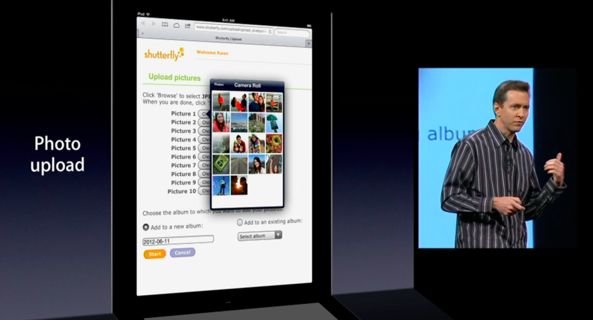
It's not just WordPress, Safari in iOS simply doesn't support media uploads. Luckily, beginning with iOS 6, Safari will finally deal with common HTML elements that web pages use to bring up the standard file browsing dialogue...

iOS 6: Safari video demonstration

[tube]http://www.youtube.com/watch?v=tK2G-uRzNV4[/tube]

Safari doesn't look that different on iOS 6, but underneath the hood you'll find some interesting changes aimed at improving your mobile browsing experience. First of all, there's the ability to browse in full screen mode while in landscape on the iPhone. Secondly, there's the ability to sync tabs across other iOS 6 devices using iCloud. Next up to bat is a new update to Reading List that allows you to read those items while offline.

Take a look at our video demonstration inside that showcases all of these new features and more. Have you found anything in addition to these items? If you do, be sure to let us know in the comments.

iOS 6 brings iCloud tabs, full-screen browsing and more to Safari

While it isn't necessarily the complete rebuild we were hoping for, Apple announced today that mobile Safari is going to be getting some improvements and a few new features with iOS 6.

The headlining new addition is iCloud Tabs, which will sync all of your open tabs from the desktop Safari app with iOS. Don't use desktop Safari? Don't worry, there's more...

iOS 6 to get Do Not Disturb for notifications, Safari tab syncing, VIP mail recipients

iOS 6, the next major release of Apple's mobile operating system slated for unveiling at the WWDC keynote next Monday, will likely bring a few new features already present in the latest build of OS X Mountain Lion.

My personal favorite: The new Do Not Disturb mode in Notification Center that should at least help alleviate that iMessage alert conundrum...

Mockup depicts enhanced Maps on four-inch iPhone 5

As you know, iOS 6 will bring an all-new Maps app said to feature Apple's own tiles and brand new in-house solution for breathtaking 3D view.

Though Google is expected to add the third dimension to its own Maps service as early as Wednesday, we've already seen screenshot mockups depicting 3D terrain in iOS 6 Maps.

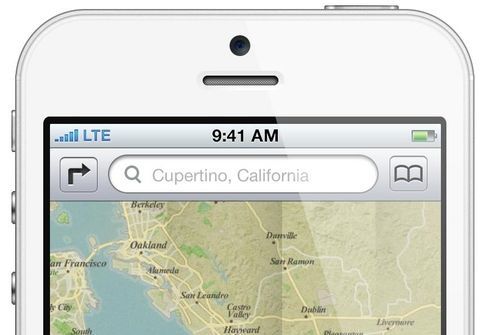
As for the enhanced two-dimensional view, here's what the new Maps app could look like on that next iPhone that by all accounts seems to feature a taller four-inch display...

An easy way to seamlessly play Safari videos in the background

Web Background Video Playback is a relatively new tweak by iOS developer Steven Troughton-Smith. The aim of the tweak is to allow video content to continue playing in Safari while it is running in the background. This is especially helpful when you're listening to video content, and seeing the video isn't necessary; for example, when watching a music video, podcast, etc.

This tweak is also handy in the cases where you wish to send a quick tweet or text message, but don't want to completely interrupt the video playback. I've noticed that it even plays nice with video that's streaming to a television via AirPlay.

Take a look at our video demonstration of Web Background Video Playback for more details...

Can’t watch YouTube videos in Mobile Safari on your jailbroken iPhone? We have a fix for that

Every once in a while we get an email or a tweet from a reader who claims not being able to play YouTube videos in Mobile Safari, and asking for a fix. The answer I give is always the same: you probably installed a jailbreak tweak (likely ProTube) that conflicts with Safari and prevents you from watching YouTube videos in the browser.

Today, thanks to iDB reader J. Louis, we get to the bottom of this problem and find the real cause and the easy solution to fix it...

Swipe Safari brings OS X Lion inspired functionality to Mobile Safari

Meet the brand new Safari. No, Apple hasn't made any upgrades to Safari themselves, but you can gain a significantly better Safari browser right now by installing Swipe Safari – a new jailbreak tweak that just touched down on Cydia's BigBoss repo.

Swipe Safari promises to bring OS X Lion's Safari navigation to the small screen, along with a host of other improved options and abilities.

The question is, is it worth its $1.50 asking price? Take a look at our video walkthrough inside and judge for yourselves...

These two tweaks make it easier to delete contacts and history items

For some strange reason Apple has made deleting contacts an overly difficult task; they've likewise made deleting individual Safari history items impossible.

Perhaps these hurdles and restrictions exists by design, but that doesn't change the fact that they're both incredibly annoying.

If you happen to be jailbroken, two tweaks — OneByOne Safari and OneByOne Contacts — seek to address this lingering issue within iOS. Full video walkthrough inside...

How to use bookmarklets to adjust font sizes in mobile Safari

For the most part, mobile Safari serves its purpose as the default web browser in iOS. But it's definitely not feature-packed. And to get more options, you typically have to either install a third party browser, or add a jailbreak tweak.

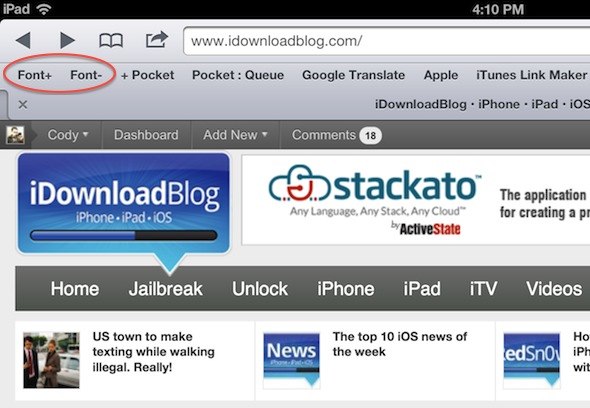
But OSXDaily points to a cool trick that makes adding a new feature to Safari as easy as creating a couple of bookmarklets. Have you ever wanted to quickly change the font size of a website on your iPhone or iPad? Well, here's how...

iOS 5.1.1 includes fix for dangerous Safari URL spoofing vulnerability

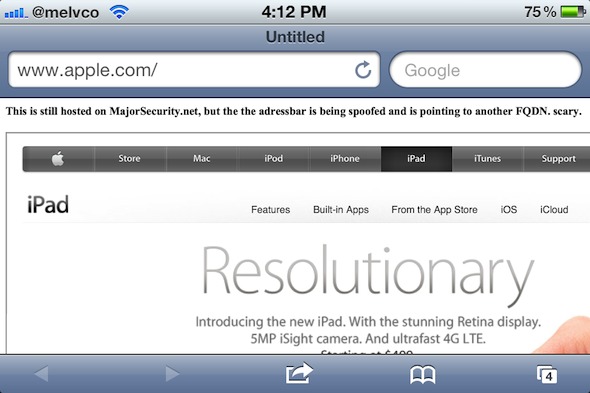
Earlier today, Apple released a new version of its mobile software: iOS 5.1.1. The update includes a number of bug fixes, and also apparently contains a patch for the dangerous URL spoofing vulnerability in mobile Safari.

We told you about the exploit, discovered by the folks at Major Security, back in March of this year. It allows web pages to spoof URLs in Safari's address bar, leading users to believe they're on a different website...