Jeff Benjamin

Jeff has been with iDownloadBlog since 2010, acting as resident video specialist, and tutorial expert. He earned his degree in Computer Network Systems back in 2001, but decided Cisco routers and the like just weren’t for him. Since then, he’s been heavily involved with online writing. He’s written for numerous tech and video game sites since the late 1990′s, and has a knack for explaining things in a simple, clear, and concise manner. Jeff works primarily from the east coast on his Retina Macbook Pro, and shoots video with a Canon DSLR. During downtime he likes to travel the world, visiting the various Apple Stores across the globe. You can email him at jeff [at] idownloadblog.com and follow him on Twitter @JeffBenjam or on Google+.

TypeStatus 1.1 supercharges the ‘now typing’ indicator in your status bar

TypeStatus will always have a special spot in my heart, because it's one of the few tweaks that I can say I envisioned. Brought to fruition by Hashbang productions' @thekirbylover, it's a tweak that allows you to see when a person is replying to an iMessage by means of an ellipses icon in the status bar.

The first iteration of TypeStatus was a very basic implementation of the idea, but it worked well. This latest version, TypeStatus 1.1, adds a ton of new features to the already excellent package. Not only can it show when someone's typing, but it can also show you the iMessage address of the person typing right on the status bar. As if all of that wasn't enough, TypeStatus 1.1 includes another new feature that let's you see when an individual has read one of your iMessages.

The tweak was already awesome before this update, but with this update it's quite possible that TypeStatus will make it on the "top jailbreak tweaks of year" lists. Want to know something even better? You can try it out right now via Hashbang Production's beta repo. Take a look inside for a few more in depth tidbits regarding the update.

LockscreenToggles lets you access your toggles directly from the Lock screen

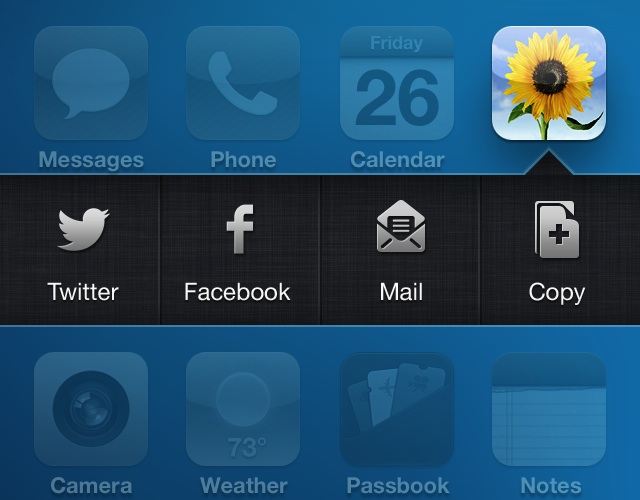
LockscreenToggles is a brand new way to toggle various functions directly from the iPhone's Lock screen. It works by using swipe gestures. For instance, a simple swipe from right to left on the Lock screen clock reveals the toggles. A simple swipe down on the toggles reveals a list of available toggles.

With LockscreenToggles, you are required to have five toggles configured to display at once on the Lock screen, and these can be selected from a list of ten different toggles. Take a look inside for more insight...

Review: Belkin Ultimate Keyboard Case for iPad

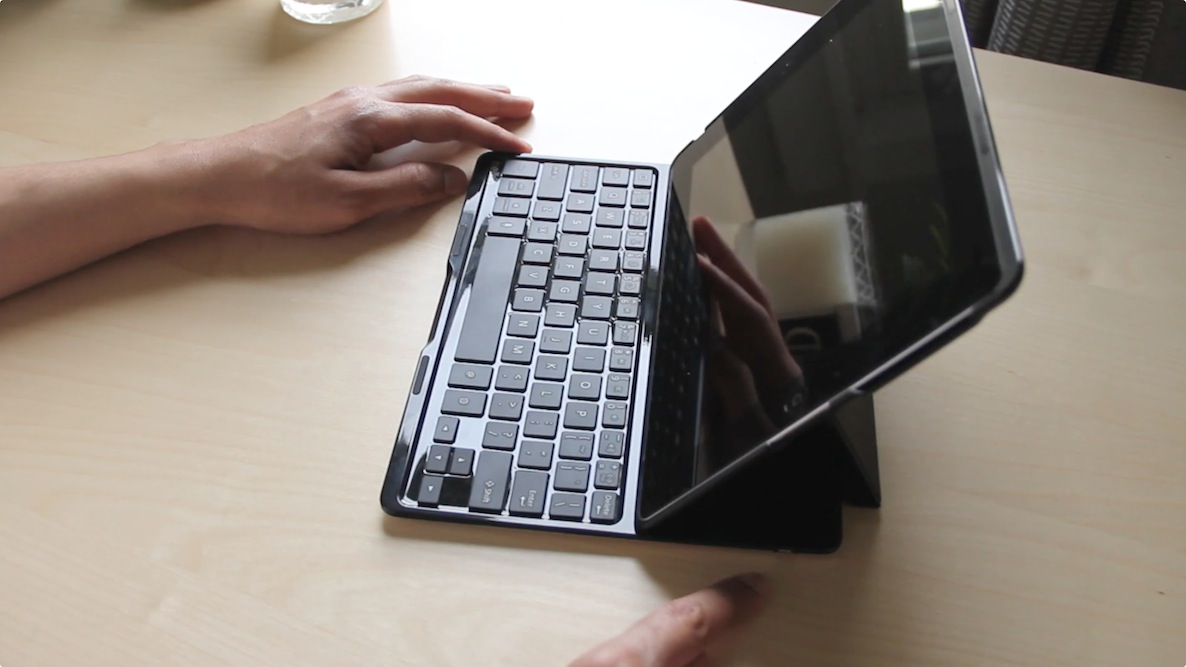
As someone who's relegated the full sized iPad to the back burner, it's admittedly a bit awkward to pull this thing back out. But the folks at Belkin have a new product for me to try, and it looks cool enough to convince me to dust off my iPad 3.

Belkin is no stranger when it comes to iOS accessories, but this — the Ultimate Keyboard Case for iPad — is perhaps its most thoughtful. The case, which officially launches in May, was created for people who want to get things done on their full sized iPads. It works with any currently available full-sized iPad, including the iPad 2, iPad 3, and iPad 4. It's not the prettiest keyboard case on the block, and perhaps not the most durable, but it screams functionality.

Belkin sent me a product sample about a month ago, and I decided that I was going to put this thing through the paces. Instead of using it for a few days and reviewing it, I wanted to see if the case actually lived up to its moniker.

LSScrubbing allows you to scrub music from the Lock screen

LSScrubbing is a recently released tweak that does something so obvious, you'll wonder why it was never there to begin with. The tweak allows you to scrub audio from the Lock screen, which is basically a fancy term for moving forward or backward through a song manually.

The stock Lock screen music controls allow you to skip tracks, go to a previous track, pause, play, or adjust the volume. They also allow you to tap and hold on the previous/next buttons to rewind or fast forward, but there's no scrubbing to be found. LSScrubbing fixes that glaring omission, but you'll have to pay up to do so.

Text Heads are coming to biteSMS [Updated]

A new feature is coming to what is arguably the best text messaging app for iOS. If you listened to our previous episode of Let's Talk Jailbreak, then you already have a good idea what it is. On the podcast, I speculated about what big new feature could be coming to biteSMS after its developer hinted about a brand new addition. My guess was Text Heads.

Today, we can confirm that, indeed, Facebook inspired "Text Heads" are coming to biteSMS. After a few hints, the confirmation came straight from the horse's mouth.

RemoteTweet lets you share the Remote app’s now playing track

RemoteTweet is a new jailbreak tweak that allows you to send a tweet advertising the song currently playing via the App Store's Remote app. The Remote app is an app that can be used to connect to local iTunes libraries on the same Wi-Fi network. This lets you control that iTunes library remotely using an iOS device.

With a combination of the Remote app and RemoteTweet, you can now easily advertise your now playing song via Twitter. This is despite the fact that the song is playing on a remote iTunes library, and not your actual iOS device.

Accentify now available on Cydia

Accentify — the jailbreak tweak that allows you accent iOS' chrome with custom colors — is now available on Cydia's BigBoss repo for $0.99. The tweak, which we previewed last week, works without needing WinterBoard.

The iOS chrome can be customized with over a dozen highly vibrant colors, and the changes take effect without necessitating a respring. Take a look inside for more information and screenshots from the release...

Reeder updated with Feedbin and standalone RSS support

As promised, Reeder is continuing to receive updates to prepare for a post Google Reader world. Today, Reeder 3.1 was released, and with it comes Feebin and standalone RSS support.

Although standalone RSS is nice to have, Feedbin is the big ticket item in this update. Feedbin, as you may well know, has gained a lot of traction lately as users seek to migrate their feeds to an alternate service ahead of Google Reader's July 1st demise.

How to get Chat Heads on iOS right now with MessageBox

Normally speaking, mainstream outlets like The Verge don't run posts on topics like jailbreaking or jailbreak tweaks, but one in a while they do. For instance, they will be happy to cover a tweak like Auxo, which transcends barriers of interests, even for those who've never jailbroken an iPhone.

Recently, another jailbreak tweak has graced the front page of The Verge: MessageBox. It's the tweak, that as I'm sure you all know by now, allows you to enable Facebook's new Chat Head feature system-wide. It, too, proved to be a very popular topic of interest in the tech community. What? Facebook's Chat Head on iOS? And so soon?

If you've been around jailbreaking for any length of time, you probably weren't surprised to see Chat Heads appear on iOS within such a short period of time. In fact, I outright predicted it in this tweet. It was even less surprising when I heard who was actually behind the tweak — Adam Bell. Adam is an excellent developer and designer, and he's come up with some of the community's most innovative releases.

Ever since MessageBox was first shown off, I've been in contact with Adam while he's been knee-deep in code. For the record, MessageBox is still in beta, but the potential for greatness is undeniable. The demand is so great that a deluge of tweets, emails, and other forms of communication have landed on Bell's digital doorstep. Now he's decided to release a beta version of MessageBox as an answer to the demand.

What should you expect? I thought you'd never ask...

Platinum helps you complete search queries in Mobile Safari

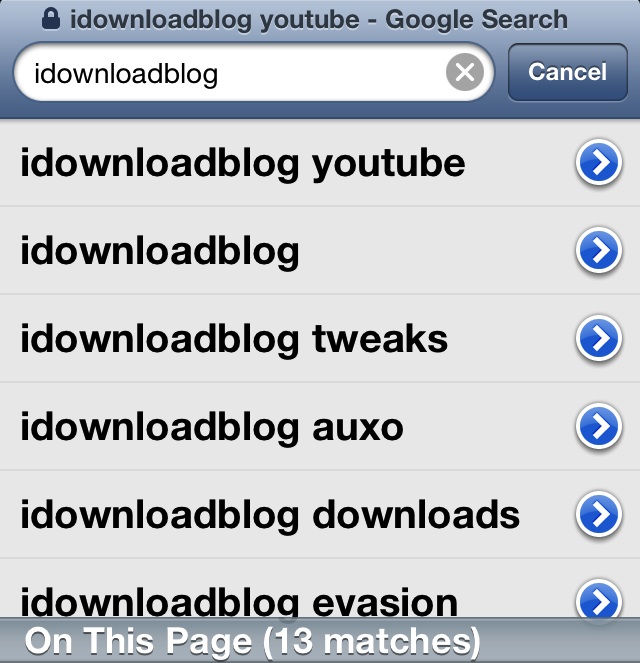
One of my favorite features found in Google Chrome for iOS is the ability to build on search queries without initiating the search. Unfortunately, stock Mobile Safari doesn't have this capability. That's where Platinum, a new jailbreak tweak available on Cydia, comes in.

Platinum allows you to complete search queries on Mobile Safari with ease. There are no settings or options to configure, just install it and go. Take a glance inside for a look into how it works...

We’ve got the latest version of Velox. Here’s a sneak peak

We've scored a 95% complete build of Velox 1.0, and considering that the tweak is a very hot topic on Twitter right now, we wanted to provide you guys with a brief update.

Apex Development is putting the finishing touches on the tweak, fixing small graphical issues and other minute bug fixes. Here is what we know thus far...

New iPhone commercial: Photos Every Day

http://www.youtube.com/watch?v=NoVW62mwSQQ

Apple has posted a new commercial on its website and on its YouTube channel, and it's one of the better ones I've seen in recent memory. The video — entitled Photos Every Day — is a montage of the many ways that people use their iPhone's to take photos in everyday situations. The commercial ends by saying: "Everyday, more photos are taken with the iPhone than any other camera."