Cody Lee

Cody Lee, iDownloadBlog.com’s longest-serving Editor, joined the site in 2008. He specializes in uncovering the best deals on Apple products, apps, and accessories. With years of experience in technology journalism, Cody helps readers save money while staying informed about the latest trends and updates in the Apple ecosystem. Cody’s history with smartphones goes almost as far back as he does. As the son of a Nokia employee, he was exposed early on to handsets like the N91 and the Communicator. He has since been involved in nearly every aspect of the mobile phone industry. While going to college, he worked at a Nokia factory, building handsets, and later moved on to a sales position at a major wireless carrier.

G-Form Extreme Sleeve Protects iPad From Airplane Drop

So you've got yourself a nice new iPad 2, what do you do next? While some folks moan at the mention of accessories, others couldn't live with out them. I've got a protective case on both my iPad and my iPhone 4.

I've dropped either device multiple times, and can't imagine what the outcome would have been, had they not been protected. You may not need a car charger, but I always recommend some sort of case.

Some users only need light protection, like an InvisibleShield. There is a lot to be said for the thin, scratch-proof protection of the Zagg product. But what if you need more protection than just a thin layer of plastic?

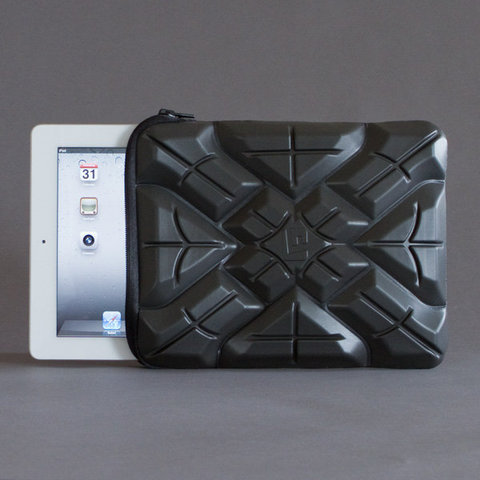
While there are dozens of heavy duty cases and sleeves, none of them can take a beating like the Extreme Sleeve for the iPad. We've seen the prototype soft-shell sleeve protect an iPad from an 8lb bowling ball, but the guys over at G-Form couldn't stop there.

Today they uploaded a video of their Extreme Sleeve's latest feat, which involves a 500 ft. drop out of an airplane. You've got to watch the video for yourself, I can't believe the iPad survives the drop.

http://www.youtube.com/watch?v=rKNdknJI53Q

The company most known for their line of extreme sports protective gear, is venturing into the consumer electronics accessory game with this soft-shell sleeve for the iPad. Although not currently available, they are accepting pre-orders and expect to start shipping May 2nd.

What do you think? What's your heavy-duty case of choice?
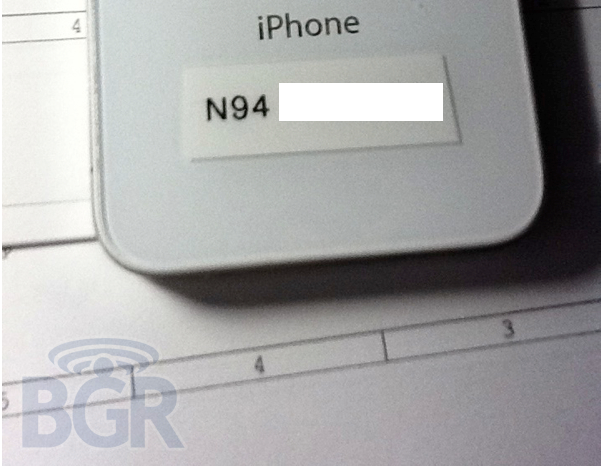
Leaked T-Mobile iPhone Could Be iPhone 4S with A5 Chip

The white iPhone 4 certainly seems to be coming this week. Mounds of evidence point to an April 27th launch date for the infamous Apple smartphone, including Best Buy inventory screenshots and even leaked photos of a T-Mobile branded white iPhone 4.

Or was it an iPhone 4? More details have come to light about the mysterious device that appeared on BGR's website yesterday. The phone looked very similar to a white iPhone 4, but appeared to be running on T-Mobile's network. Apparently its color and carrier weren't the only things that made this device unique...

How to Jailbreak iPad 4.3.2 with PwnageTool

Just like RedSn0w earlier this week, PwnageTool has been updated to support the new firmware 4.3.2 for iOS. As previously stated, there wasn't much reason for folks on the original iPad to update to this latest software.

But for the people that did, PwnageTool is recommended to jailbreak your iPad. It is simple and about as solid as it gets when it comes to jailbreak applications. If you've never done this before, or need a quick refresher, check out the tutorial below.

If you are looking for reasons to hack your iPad, check out our article, The Top 5 Reasons to Jailbreak here.

Important note: PwnageTool is for Mac OS only, for those that use Windows and want to jailbreak, check out our RedSn0w tutorial. Again this jailbreak is only for original iPads, the iPad 2 has not yet been jailbroken.

Step 1. Obviously make sure your iTunes is up to date and your iPad is on the latest firmware (4.3.2). You're also going to need to download the latest version of PwnageTool from here.

Step 2. It's a torrent, meaning you'll need a client like uTorrent to open the file once it's downloaded. After it's installed, open it up and select iPad and Expert Mode and click next. Browse to HD/Users/$urname$/Library/iTunes/iPadSoftwareUpdates and select the 4.3.2 firmware.

Step 3. If PwnageTool likes the firmware you picked, it'll take you to a menu where you can tweak the jailbreak. If you choose Cydia packages, you can preinstall tweaks and apps so when the jailbreak gets loaded onto your iPhone, its already set up.

Step 4. Once you are done tinkering, select the build option and click next. This is where PwnageTool does its magic. It'll take a bit, so be patient.

Step 5. After the custom firmware is done building, PwnageTool will have you put your iPad in DFU Mode, but don't worry, the software walks you through this.

Step 6. If you do it successfully, iTunes should recognize that you have a device plugged in and ask you to restore. Hold down the Option key while clicking restore to get the option to choose your custom firmware. Once it installs, your iPad reboots and you are finished!

Any questions?

Jailbreak Tweak Adds #NowPlaying Feature to Tweetbot

Some of the things that pop into the Cydia store amaze me. Innovation can really flourish in an environment like Cydia where there are little restrictions to hold developers back. Untrackerd is a perfect example of that innovation.

But jailbreaking is not just good for disrupting Apple's hidden tracking service, it's also good for customizing your iOS and downloaded tweaks to make your life easier. The jailbreak tweak I'm about to mention falls in the latter category, by making a great app even better...

Dev Team Releases PwnageTool to Jailbreak iPads on 4.3.2

Apparently the Easter Bunny left something else in our baskets last night besides eggs and candy. The notorious iDevice hackers released an update late yesterday to their PwnageTool software to successfully jailbreak 4.3.2 firmware.

For those who haven't been paying attention to the recent software updates, Apple pushed out 4.3.2 a few weeks ago to correct the iPad 2 Verizon 3G issues. While most original iPad users haven't had a reason to upgrade, some have by either accident or design.

The PwnageTool software has been a staple in the jailbreak community for years, and is usually the most reliable out of all the software options. The Dev Team are well known for not releasing exploits until they've worked out all the bugs.

iPad 2 owners, there's still no word on the jailbreak for Apple's latest tablet. Hackers like p0sixninja have tweeted that this is the slowest progressing jailbreak they've ever seen.

For those who are looking to hack their original iPads with 4.3.2 software, sit tight. We will post an easy step by step tutorial on how to jailbreak your original Apple tablet with the latest firmware shortly.

The Wi.U, Because Every Smartphone Deserves a Smart Charger

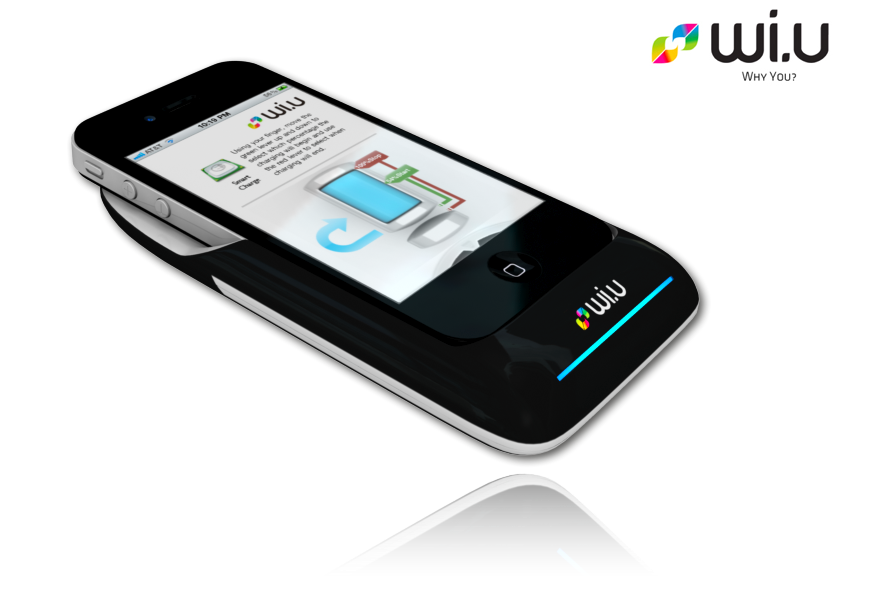
Chalk this one up to another interesting innovation involving Apple's iPhone. We've shown you the 360-degree lens and the dual sim case, now let me introduce you to the Wi.U. It's the smartest portable battery charger you've ever seen.

The Wi.U case pairs the iPhone with the battery charger through the device's 30-pin connector. The charger has the ability to detect when your iPhone battery is getting low, and will automatically start charging it up...

5 Lessons the iPad 2 Could Learn From the PlayBook

The BlackBerry PlayBook launched last week to some mixed reviews. The latest formidable iPad competitor to enter the market has certainly heard its fair share of criticism. There's very few usable applications and the operating system isn't consistent.

Although the tablet doesn't offer any kind of threat to the iPad 2 in terms of market share at this point, I hope the folks over at Apple are taking notes. There are a few things that the juggernaut could learn from the rookie tablet.

1. Flash Video

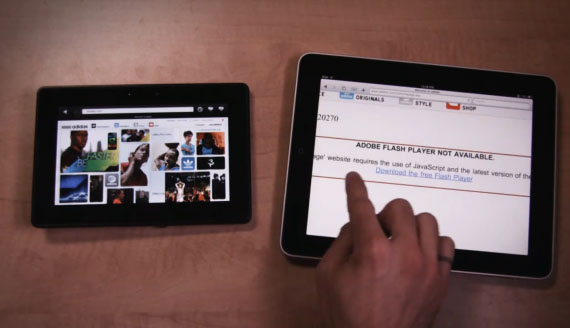
You knew it was coming, so we'll get it out of the way first. Flash. Although I've never seen Flash work properly on a mobile device, the BlackBerry PlayBook plays back Flash videos effortlessly. While I admit I probably don't encounter many problems by not having Flash these days, it'd be nice to have access to Flash-based Videos.

2. Screen Resolution

Believe it or not, those folks over at Research In Motion, known for not being on the cutting edge of technology, produced a brighter and sharper screen than the iPad 2. I'd like to see Apple increase the next iPad's screen resolution substantially. Retina anyone?

3. Worthy Native Web Browser

While a wealth of 3rd party apps make up for the features Safari lacks, they don't have the ability to be the default browser. If you open a link from an email or application, you're tossed right back into Safari. The PlayBook's web browser, on the other hand, has tabbed windows and an easy way to manage them. The Safari multi-page browsing system works nice on the iPhone, but the iPad could use a different design.

4. Stereo Speakers

So the iPad is touted as a great portable media device that allows you to play games and watch movies, but the mono speaker is so last year. The PlayBook comes with stereo speakers and sounds amazing. I've always felt Apple's iDevice products could use better quality speakers, but I'm sure they just assume accessory makers fill that void.

5. Phone Pairing Capabilities

With the PlayBook, you're able to tether your BlackBerry smartphone and access all of your information in real time. I know it's also flawed in this area by not providing native PlayBook Calendar and Contact apps, but it would be nice if the iPhone shared this feature. Imagine not having to use a 3rd party application to transfer pictures from your iPhone to your iPad.

So there you have it, a few things that the BlackBerry PlayBook did right. Obviously RIM's tablet is in its early stages and the iPad 2 is clearly winning the tablet war.  Hopefully though, we'll see some of the missing features listed above, in the next iteration of Apple's tablet.

ConnectedDrive Brings Your iPhone and Car Closer Than Ever Before

Many car makers have been looking at integrating smartphones with their latest vehicle models. Just look at the mobile application for the Chevy Volt. The app allows you to unlock and start your car via your smartphone.

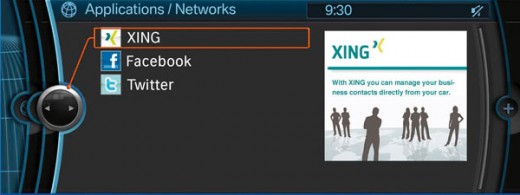
Other companies, like BMW, are trying to push the integration even further. While cars have offered iPod interfaces and hands-free systems for quite some time now, they've never compared to what the german car maker has been working on with their ConnectedDrive...

PlayStation Network has Been Down for Days, GeoHot Retaliation?

For those who who don't live for Call of Duty: Black Ops, or other popular PS3 titles, you may not have noticed how much trouble Sony has been having lately. Their free online service, PSN (Playstation Network) has been down since late Wednesday night.

We're not talking about a a minor inconvenience here, we're talking about millions of people being blocked from Sony's version of Xbox live for 4 days now. Netflix, Hulu, and several major online games are feeling the effects of Sony's crippled network...

Apple Fails Greenpeace “Dirty Data” Report

The environmental group known as Greenpeace has been keeping an eye on Apple's "Green" initiatives for quite some time. Back in 2006, the organization gave Apple an environmental rating of 2.7 out of 10. A year later, the group publicly protested the Mac-maker by shining green spotlights on Apple's flagship retail store in New York City.

More recently though, the group has commended Apple for its efforts to reduce its carbon footprint. They actually rated Apple the greenest electronics maker last year. How'd Apple do this time around?

The Ultimate iPad Stand

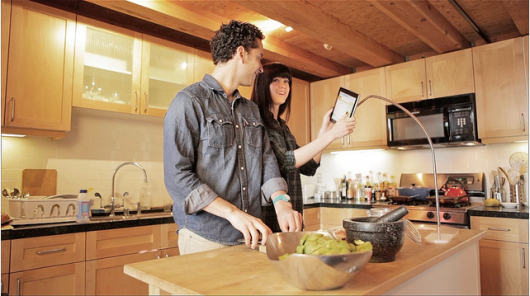
Have you ever tried looking at a recipe application on your iPad while trying to cook? Or tried to learn how to play the guitar via an iPad app? These things would be so much easier if you had someone or something to hold your tablet for you.

Enter the Kickstarter project by designer Seth Quest. It looks like him and his partner just recently raised enough money to fund production of their prototype, the Hanfree.

The iPad accessory is designed to hold your iPad for you, leaving your hands free to do other things. The Hanfree is essentially a case attached to a wide base, with a steel neck and a ball and socket joint.

This setup allows for 360 degree rotation of the iPad, so it can easily be switched from landscape to portrait mode. The see-through case securely grips your iPad as you're using it, and the stainless steel neck pivots so you can swing the device out of the way when you're not.

http://www.youtube.com/watch?v=q9VkOTONWaM

I think the design is fairly brilliant given the options of iPad stands currently available. Apparently others think so too. The Kickstarter project has exceeded its $15,000 goal and is set to be funded early next month.

Even though they've already collected enough to start production, they are still taking donations. If you pledge $50 or more, you get a Hanfree once they start shipping. Not a bad deal considering the product will retail for $79.99.

What do you think?

First White iPhone 4 Has Been Sold!

While even I'm growing tired of the constant white iPhone 4 rumors, this little tidbit was definitely worth reporting. So far sources within AT&T and Verizon have yet to see any evidence of a white iPhone 4 April launch.

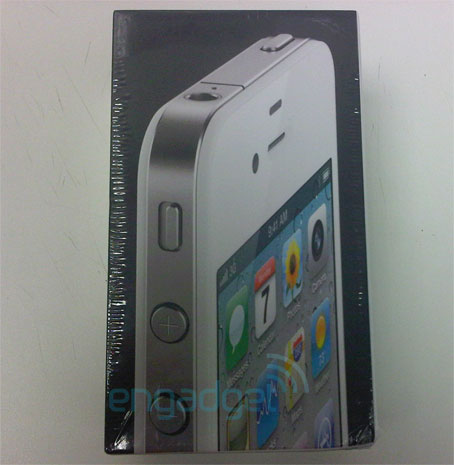
Other than the mysterious order page that showed up on a website last week, we really haven't seen any concrete evidence that the phone even exists. Well it looks like earlier today, some real proof started materializing...