Review

Review: WALTR for Mac converts & transfers any video to iPhone and iPad, no iTunes required

Getting DivX and MKV movies, FLAC audio files or audiobooks onto your iPhone, iPod touch or iPad is an incredibly cumbersome multi-step procedure, one that involves third-party apps like Handbrake to transcode “foreign” media files into iOS-friendly formats before importing them into iTunes for syncing with your iOS gadgets.

I've tried many, many apps which promise to get the job done before deciding to settle on WALTR by young European startup Softorino.

Now, I'm not exaggerating when I say that WALTR is an absolutely incredible piece of software. This nifty program literally takes the pain away from transferring media to iOS devices without worrying about file types.

Its lightning fast algorithm is hands down the best I've ever seen, on any platform, ever. I've been happily using WALTR for months now and couldn't be happier with it. And trust me when I say that you should be using WALTR, too, especially if you aren't jailbroken and want the simplest solution possible for transferring media to your device without going through iTunes.

Review: Alcatel OneTouch Idol 3 – a budget Android phone with a unique feature

It's almost unfair how many great budget smartphones there are that run Android. I think it's safe to say that there is an embarrassment of riches for Android platform users in the budget phone category.

I've already reviewed phones like the Asus ZenFone 2, and the 3rd-generation Moto G—both highly competent phones. Today, I get to go hands-on with a similar phone, as far as price is concerned, in the Alcatel OneTouch Idol 3 ($249.99 on Amazon).

Review: you don’t need Apple Watch to get reminded to stand up with this nifty Mac app

Your Apple Watch pings you when it's time to stand up and move a little and so should your Mac, except that it doesn't. Maybe you don't own an Apple Watch? Lead a sedentary lifestyle much? Hopelessly out of shape? You should make standing up a habit as standing for just three hours every day, five days a week, has the same health benefits as running ten marathons a year.

You could create a reminder to ping you every hour to stand up, but that's not an elegant solution as these alerts reach all your devices, not just your Mac.

A far better solution that I want to talk about today would be something like Stand. Stand is a simple Mac app built by developers Red Davis Hector Simpson which sends you a notification every hour to get up from your desk and move around a little.

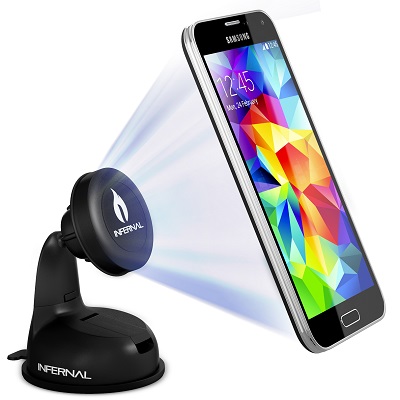
Infernal Innovations’ car mount magnetically suspends your phone

One of the many first-world problems people face everyday is having a convenient place to stow their smartphone whilst driving. Leaving it in one’s pocket seems to be the default move, but if talking while driving is legal in your area, pulling a phone from your pocket is arguably more dangerous than the phone call itself. Even for simple tasks like skipping a song, or following driving directions, there has to be a better solution.

Review: this is my ‘Next Keyboard’ for iPhone

In my December 2014 preview of Next Keyboard I wrote the app had the potential to become “the first iOS keyboard done right”.

What started out as the most funded app project on Kickstarter by Toronto-based award-winning studio Tiny Hearts Apps has become a reality.

I'm pleased to report that Next Keyboard is now available for download in the App Store.

Rather than mindlessly pile features one on top of the other like many other developers do, Next enables efficient typing in a stylish environment that's easy on the eyes, without distracting you from the task at hand.

It's got everything you've come to expect from a software keyboard, including predictive typing, lightning fast editing, playful stickers and colorful themes, instant access to all the emojis you love, including stickers, and much more.

I've spent some quality hands-on time with Next Keyboard, here's what I found.

Review: WatchWeb for Apple Watch kinda brings web browsing to your wrist

Like the Apple TV, your Apple Watch lacks the built-in Safari browser. Even though the case can be made quite easily for surfing the web on a big screen TV from the comfort of your couch, who in their right mind—and why— would want to squint at the tiny screen to read webpages?

No one, that's right. But still, what if you could browse the web from your wrist? If you argue that an Apple Watch web browser is a terrible, terrible idea, I'm with you.

But what if there was a way to quickly look up information, sports scores or anything else on the Apple Watch that Siri can't do for you? Enter WatchWeb, a web browser of sorts for the Apple Watch by Conifer Apps.

It's a novel idea that certainly has legs, but boy is it iffy. I had mixed results during my hands-on time with WatchWeb so read on my review for the full reveal.

Review: ReBoard keyboard boosts your productivity and cuts down on app switching

The biggest thing about iOS 8 for me is a productivity boost stemming from new technologies such as pervasive inter-app communications, third-party actions in system-wide Share sheets and more. But for all the good work Apple's done from a productivity standpoint, iOS (version 9 included) still has some way to go before it's capable to exceed multitasking features on Microsoft's Surface tablets or Samsung's Note phablet, for example.

ReBoard, a new software keyboard for the iPhone, iPod touch and iPad created by India's independent developer Gursimranjeet Singh, puts useful actions for performing common tasks and all sorts of look ups right into the keyboard itself so you won't need to switch back and forth between apps like an animal.

By embedding useful third-party shortcuts within the context of the keyboard, ReBoard can save you a lot of time and boost your productivity.

Hyper review: a video magazine for people with busy lives

I could literally spend hours on the Internet looking at funny, educational, and inspirational videos. However, I don't have the luxury of spending hours on the Internet. I often miss a lot of the great content that comes out regularly.

Hyper is a video magazine for the iPad that pulls together a few of the top videos every day so you won't end up going down the rabbit hole that is the Worldwide Web, unless you want to. We've got a hands-on app review of Hyper for you today.

Review: Astropad Mini turns your iPhone or Apple Watch into a pro graphics tablet for your Mac

We wrote about Astropad Graphics Tablet, an app that turns your iPad into a graphics tablet for your Mac, shortly following its February 2015 debut.

Designed and built by smart ex-Apple engineers Matt Ronge and Giovanni Donelli, the app has since been updated with support for FiftyThree’s Pencil stylus and gained other new features.

The team just released Astropad Mini, an iPhone edition of Astropad's iPad app with Apple Watch support for remote drawing into Mac apps and more.

Review: Lara Croft GO is the essence of adventure that feels unmistakably Tomb Raider-y

It only took a few minutes for me to get hooked on Lara Croft GO, a new premium title from Hitman GO creators Square Enix Montréal.

Created in partnership with Crystal Dynamics, this gorgeously done puzzle-solving adventure takes Hitman GO's turn-based strategy concept and simplicity of action to a whole new level while managing to incorporate several marquee aspects of the traditional Tomb Raider formula and gameplay.

But Lara Croft GO, a $4.99 download in the App Store, is hardly the same game as Hitman GO. More than the collection of its impressive parts—mesmerizing soundtrack, artful animations and gorgeous visuals—Lara Croft GO manages to distill the famed series down to its essence.

I spent a few hours playing and reviewing this game in the days leading up to its release, here are my hands-on impressions and findings.

Crisp: a clean and simple email template keyboard for iOS

How many times a day or a week do you send the exact same email to people? It usually is a canned reply to an often asked question, or maybe it is a tidbit of personal information such as your address. If you use email, chances are you know exactly what I'm talking about.

Crisp, a new app available in the App Store today, wants to make this better by offering a clean and simple email template keyboard for iOS.

Portal for iOS: wireless file transfers from your computer to iPhone made easy

Portal, an Android app that launched earlier this summer, is now available on your iPhone free of charge in the App Store.

Created by a company called Pushbullet which makes a namesake cross-platform notification mirroring utility, Portal for iPhone uses QR codes and takes advantage of peer-to-peer connectivity to transfer very large files and folders between your devices in a snap.

With Portal, you can transfer files from your computer to an iOS device via a simple interface that can be accessed through any web browser. The app lets you transfer as many files as you’d like and imposes no file size limits.

Here's a quick review of Portal based on my brief hands-on time with the app.