Productivity

Office for iPhone is now free for home use

Shortly after Microsoft brought the mobile edition of Office to the iPhone last summer, fans of the Windows giant's productivity software cried foul as the app came across to them as more of an Office companion for mobile than a full-blown productivity application.

Although available free of charge and with editing functionality for your Word, Excel and PowerPoint documents, the app initially required an Office 365 subscription - much like the newly released Office for iPad. But not anymore.

Started today, Microsoft is making both the iPhone edition of Office and the version for Android smartphones free for everyone, like on Windows Phone. And to reflect the updated business model, the app has been rechristened and is now simply called Office Mobile for iPhone - much shorter and easier to remember than 'Office Mobile for Office 365 subscribers', which used to be its full name before...
Microsoft launches Office for iPad, including Word, Excel and Powerpoint

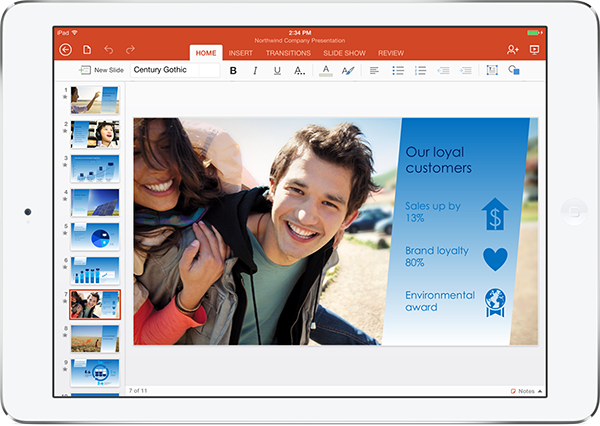
The rumors were true! Microsoft's new chief executive office Satya Nadella is hosting a press briefing in San Francisco this morning. After the CEO discussed Microsoft’s 'mobile first, cloud first' strategy, Julia White, Microsoft’s chief of Office Division Product Management, took the stage to formally reveal Office for iPad.

"This is definitely not the Windows app ported to the iPad," said White, adding that Word, Excel and PowerPoint for iPad are all native iOS apps. Microsoft Word, Excel and Powerpoint apps are now available for download in the App Store, joining Microsoft's existing OneNote for iPhone and iPad and the recently released OneNote for Mac.

Akin to Office 365 for iPhone which debuted last June, Office for iPad requires Microsoft's Office 365 subscription for editing features. The entry-level subscription tier will set you back $9.99-per-month (or $99.99 per year) for a Home Premium package, which buys you access to the Office applications for Windows, Mac and mobile on up to five devices.

A more affordable Office 365 Personal has been announced recently ($6.99 per month, $69.99 per year, limited to just one PC or Mac, plus one tablet), but it’s not available just yet. You can sign up for a free 30-day Office 365 trial and for those who don't want a subscription, Office for iPad will let you view and present Office documents, spreadsheets and presentations, but not edit the files...

Realmac teases Reminders coming to Clear to-do app in early-April

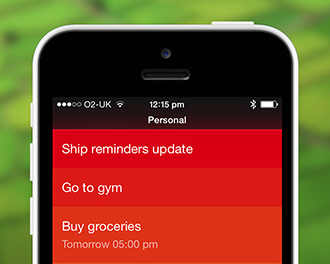
Not to be outdone by fellow developer Flexibits who yesterday teased the upcoming iPad edition of its popular calendar and to-do app, Fantastical, today Realmac Software shared a few tidbits concerning a forthcoming Clear update featuring Reminders integration.

The company is currently wrapping up work on the iOS and Mac releases of Clear with Reminders integration. They were originally shooting to launch the apps in March, but refining the Reminders functionality took longer than expected so now they're looking to release the updates in early-April.

Read on for more...

Luna Calculator puts a unique twist on a basic calculator app

I don’t normally focus too much attention on calculator apps. Some of them can be pretty cool. But for the most part, if you’ve seen one, you’ve seen them all. There has to be something special about a calculator app to catch my attention.

Luna Calculator is an app that has something special. In addition to the simple mathematical equations that the average calculator app includes, this one lets you create lists of numbers and save them for future reference…

Checkmark 2 review: this location-based reminder app gets even better

In July of 2012, Christian wrote a very positive article about Checkmark, calling it the app that Reminders should have been. Thanks to location and time-based reminders, the app made it much easier for users to be notified at the right time and place about an upcoming event or task.

Checkmark 2 just launched in the App Store. Not only has the app received a complete iOS 7 redesign, but it also now includes iCloud sync and recurring reminders. Plus, a whole slew of new features make Checkmark 2 the app that Checkmark should have been…

24me is smarter than your average personal assistant

There are hundreds of getting-things-done (GTD) and organizer apps in the App Store. The problem is finding the right one for you. Everyone manages their time differently. Some work better with very minimalist actions. Others prefer having all the bells and whistles. What about those who sit right in the middle?

24me Smart Personal Assistant is the “Baby Bear” of GTD apps. It is fairly simplistic and easy to use, but has just the right amount of bells and whistles to increase productivity without taking much time to get organized…

Reuters: Office for iOS apparently ready for release

No, not that Office. After Microsoft during Steve Ballmer's tenure balked at Apple over making iWork and iLife iOS suites free, saying the move wasn't such a big deal to begin with, the "new" Microsoft under the new CEO Satya Nadella's leadership is seemingly strengthening its commitment to the Apple platform.

We already told you that the Redmond giant is gearing up to release a long-awaited update to its Office productivity suite for Mac later this year.

Reuters is now reporting that Office for iOS is ready and the decision to release it lies solely with the CEO...

Microsoft OneNote reportedly hitting Mac soon: free, new clipper feature and more

Windows giant Microsoft is said to be bringing its note-taking app, OneNote, to the Mac later this month. The company has companion OneNote apps for the iPhone and iPad in the App Store, available free of charge. On the desktop side of things, however, the app's been exclusive to Windows.

The Verge is reporting that Microsoft, for the first time, will be making the desktop app free to both Mac and Windows users in March, unbundling it fully from the cost of Office.

The Redmond giant originally released OneNote more than a decade ago...

EasilyDo is a smart assistant that keeps you on top of things

If you thought your productivity app was good at keeping you connected to important information in your life, there may be more out there for you than you realize. Do you get notifications when important Facebook statuses are posted? When you receive an email from someone, can you automatically save it in your iPhone contacts? Can you send birthday wishes over Twitter?

You can do all of that, plus a whole lot more with EasilyDo. Get alerts for drive times, check flight statuses, track packages, auto-text contacts when you leave a location and much, much more, all from one useful app…

Documents 5 gets even more powerful with Readdle apps integration

Documents by Readdle is a popular file manager that lets you store music, videos, photos, and more. The company has recently been overhauling their entire line of productivity apps for iOS 7 and this one is no different.

Documents 5 is the completely redesigned version of its predecessor and comes with plenty of new features to make you think twice about which file manager you want to use from now on. Plus, if you have other Readdle apps on your iPad, you can access them from inside Documents…

Documents 5 launching tomorrow with Readdle apps integration

Ukrainian developer Readdle has a bunch of fine productivity apps on the App Store. After updating its Calendars app to iOS 7-friendly design in version 5 release, tomorrow will bring another major update as Documents goes iOS 7, too.

This handy file manager, media player, photo album and document viewer for the iPhone and iPad, available as a free download, is about to get a whole lot smarter by integrating with other Readdle apps and "borrowing" their functionality. Read on for the full reveal...