Mac Apps

OneNote for Mac gains enhanced OCR features and other goodies

After adding the ability search for words in images to OneNote for the iPhone, iPad and Mac last summer, Microsoft today refreshed the Mac client by enhancing the somewhat limited functionality of the optical character recognition (OCR) feature.

In addition, the software contains other perks such as the ability to hide author initials in shared notebooks from the View tab and close the OneNote window without quitting the app.

OneNote for the Mac, iPhone and iPad is available at no cost through the Mac App Store and App Store.

Google quietly removes Sparrow email client from App Store and Mac App Store

It's the end of the road for the beloved Sparrow email client as Google quietly pulled the free iPhone and Mac download from the App Store and Mac App Store, TechCrunch reported Tuesday.

The Internet giant snapped up the French startup, its apps and technology back in July of 2012, much to the dismay of the Apple community, for a reported $25 million.

Existing users who have downloaded Sparrow to their Mac through the Mac App Store, and have a copy of Sparrow for iOS in desktop iTunes, can continue using the app and should be able to install it on their other devices.

The app's been fully removed from iTunes servers and is no longer available for re-download through the Purchased tab of the App Store and Mac App Store. The Mac edition is still available directly from Sparrow’s own web site.
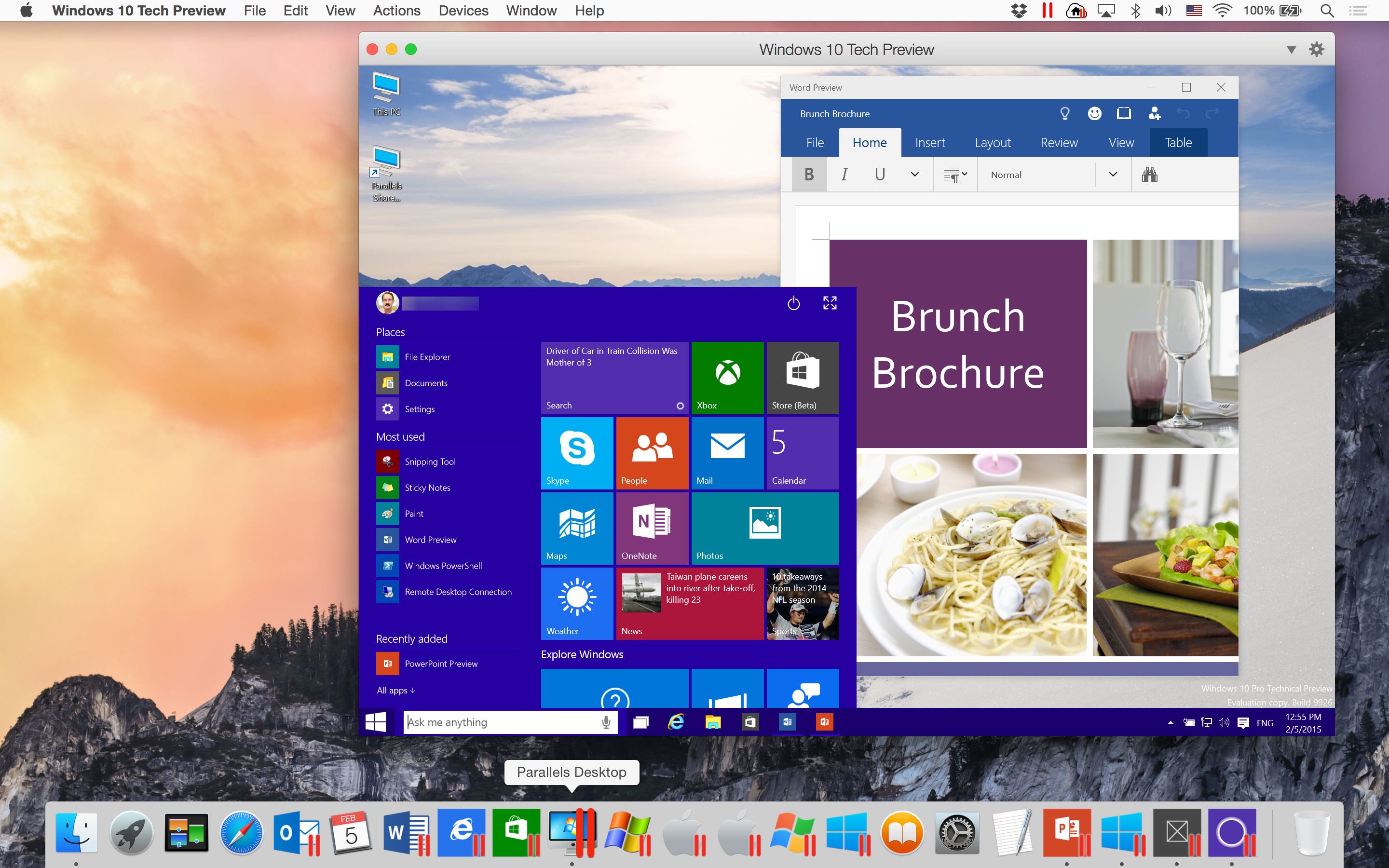
Parallels Desktop 10 gains experimental support for Office/Windows 10 Technical Preview

Our own Jeff Benjamin showed you earlier how anyone can try Windows 10 Technical Preview on their Mac for free, using VMware Fusion.

But if you use Parallels’ award-winning virtualization software, you must check out its most recent update.

Announced today, it enables experimental support for running both Office 10 and Windows 10 previews on your Mac.

How Photos for Mac handles iPhoto imports

New details continue to trickle out concerning Apple’s upcoming Photos for Mac software, as Jason Snell shared some previously unknown tidbits regarding how Photos handles iPhoto imports.

Rather than duplicate the photos during the import process, Photos creates Unix-style hard links to files, allowing for quite a few interesting features detailed further below.

Apple confirms Aperture will be pulled from Mac App Store after Photos for OS X launches

Professional photographers who rely on Aperture to manage and touch up their photos might be interested to learn that the pro-grade application will no longer be available in the Mac App Store after Photos for Mac launches in Spring.

As first noted by French blog MacGeneration, Apple’s official Aperture webpage has been refreshed with a line confirming “when Photos for OS X is available this Spring, Aperture will no longer be available for purchase from the Mac App Store.”

ControlAir: control your Mac media apps with simple gestures

Gone are the days when we had to painfully reach for the mouse, drag the cursor around the screen, and click to pause, play, or skip a song in iTunes. All sarcasm aside, there are times when it's just not that practical to either reach for the keyboard or the mouse to control the music playing on your Mac, and this is an experience ControlAir is trying to improve.

ControlAir is a new Mac app that gives users touch-free control over their media and entertainment apps. Using ControlAir, users can just lean back and control music and video applications using air gestures, without ever having to touch the keyboard or the mouse.

How to reclaim ‘Other’ storage on your iOS device

If your iPhone or iPad is running out of space, manually removing unwanted photos, videos, songs, apps and stuff like Safari's Reading List is a good way of freeing up some store space. But more often than not, this isn't enough.

The devil, as they say, is in the detail — in this case, the mysterious ‘Other’ category that iTunes displays after connecting your iOS device to a computer.

‘Other’ storage is a section iOS uses to store temporary data, cache files inside apps and items retrieved through the iOS Background Refresh feature to make apps load faster. ‘Other’ storage balloons over time and can quickly add up to anywhere between a few hundred megabytes to a couple gigabytes of wasted on-device storage.

Aside from performing a clean install of iOS or restoring your device as new, there's no easy way of manually reclaiming your ‘Other’ storage. But thanks to a brilliant new Mac app in town, created by Nice Mohawk, anyone — even novice users — can free up storage space on their iPhone and iPad in minutes. Not only does the app let you reclaim your ‘Other’ storage, but also delete caches, back up your photos and videos, as well as remove large apps and music.

Tweetbot for Mac pulled from Mac App Store over running afoul of Twitter’s token ceiling

Bad news, Tweetbot fans. Developer Paul Haddad woke up this morning to the realization that his popular Twitter client for the Mac has been pulled from the Mac App Store.

As if the app's disappearance wasn't enough, existing copies are experiencing authentication issues, allegedly over reaching Twitter’s strict limits on how many users are permitted to login to a particular application, as first discovered by 9to5Mac.

“We are aware of Tweetbot for Mac authentication issues,” reads the official tweet from developer Tapbots. “We have contacted Twitter and are waiting for a response. Thanks for your patience.”

Any.DO task manager lands on the Mac

Any.DO, the popular task management app for the iPhone and iPad, is now available for Mac computers, its creators said Friday.

Available immediately at no cost in the Mac App Store, Any.DO lets you create and manage lists, share tasks with teams and family members, attach notes and files to any task, add comments and rich media to items, collaborate in real-time and much more.

Amazon releases Kindle Textbook Creator for Mac

The online retail giant Amazon on Thursday announced a brand new application for the Mac which allows anyone to create and publish textbooks on Kindle. Currently in beta and available in English only, the applications can be downloaded to Mac or Windows PCs through Amazon's website.

Similar to Apple's iBooks Author app for the Mac, which debuted in 2012, Kindle Textbook Creator makes it easy to create textbooks and other educational material with by augmenting text with graphs, charts and equations and other graphically rich content.

In addition, the app can convert existing PDFs into a digital book, ready for distribution on the Kindle Store.

Liberate OS X’s Spotlight search with Flashlight

For years now, Alfred has been a staple of OS X workflow applications, enhancing search on the Mac and adding many features in the process. Spotlight search remained rather antiquated in comparison until Apple revived it with OS X Yosemite, but there's still much to be desired. While Alfred will continue to hold its well-deserved position as a staple Mac app, Flashlight has the potential to reach far beyond the abilities of Alfred to make OS X's native Spotlight search an incredibly powerful and useful tool.

Imagine using ⌘+SPACE as a text-based Siri, in which typing the phrase "remind me to Write Flashlight review at 2pm" or "text Mike I'm on Steam, wanna play?" will do exactly as expected. However, Flashlight not only allows reminders to be made and messages to be sent directly from Spotlight – its potential reaches much further.

Spotify4Me, the Spotify Notification Center widget for Mac

Ever since Apple updated iOS and OS X with the ability to add extensions to Notification Center, I’ve been all about the widgets. On my Mac, I’ve got weather widgets, to-do lists, countdowns, and package trackers. I love them. I want more.

Spotify4Me is a Notification Center extension that adds song skip and volume controls to your Today View. It may not do much, but what it does, it does right.