Keyboard

Fleksy keyboard clocks in a new typing speed record

Fleksy keyboard, among the first soft-keyboards for iOS 8, broke the Guinness World Record for fastest texting six months ago and now they've done it again.

As announced Tuesday, following September's release of its iOS 8 keyboard Fleksy has now made the iPhone 6 Plus the fastest phone for typing by clocking in a new typing speed record on the device.

Brazilian teenager Marcel Fernandes Filho, who is seventeen years old, used Fleksy’s iOS keyboard to break his previous record of 18.19 seconds with a new time of 17.00 seconds.

Fleksy Keyboard is a 99-cent download from the App Store.

Type Nine keyboard lets you type like it was 1998

With all of these new iOS 8 keyboards now available, there is just too much fun to be had. You can translate text with Slated, code with UniChar Picker, and use ScribbleBoard because drawing is more fun than typing. It just keeps getting better. Now, the trend is for keyboards for fat fingers.

Type Nine is a big keys keyboard for those extra thick digits. Only unlike apps like Thick Buttons, this one harkens back to before there were such a thing as keypads for smartphones. So, all you old school flip phone typers will enjoy some retro texting.

Big fingers? ThickButtons enlarges keys you’ll most likely tap next

Lviv, Ukraine based custom software development company N-iX, founded by Andrew Pavliv, has created a nice keyboard for iPhones, iPads and iPods running iOS 8 through its spin-off firm.

Named ThickButtons, it helps big-fingered users type more efficiently by using patented technology which enlarges and highlights keys you'll most likely press next while shrinking the remaining ones to reduce the chance of making an error.

Such an input method arguably makes typing with one finger more accurate, especially on four-inch iPhones. The software doesn’t require additional training and doesn’t depend on dictionary.

ThickButtons is $1.99 in the App Store.

Fleksy Keyboard can now use iOS typing shortcuts

Despite not being an avid user of third-party keyboards in iOS 8, I'm always eager to try out any new soft-keyboard that hits the App Store.

Fleksy's recent update caught my attention by making me realize that I didn't know everything there is about the scope and limitations of third-party keyboards under iOS 8.

For example, did you know soft-keyboards are allowed to use your typing shortcuts defined in Settings > General > Keyboard > Shortcuts? Fleksy's latest update has implemented just that and it works like a charm.

Fleksy Keyboard costs $0.99 in the App Store.

HandyKey: a tweak that adds a one-handed keyboard to the iPhone 6 and 6 Plus

If you find it difficult to type on large screen iOS devices like the iPhone 6 Plus and the iPhone 6, then HandyKey is a jailbreak tweak that you may derive real benefits from. The tweak, which is available for $0.99 on Cydia's BigBoss repo, brings the ability to add a one-handed keyboard for right-handed or left-handed iPhone users.

Users who use HandyKey have the option of forcing the iOS keyboard to always open to HandyKey when the keyboard is invoked, or a two-finger swipe gesture on the keyboard can be used to orientate it as needed. Have a look at our video inside for additional details and a hands-on demonstration.

Swype keyboard is temporarily free in the App Store

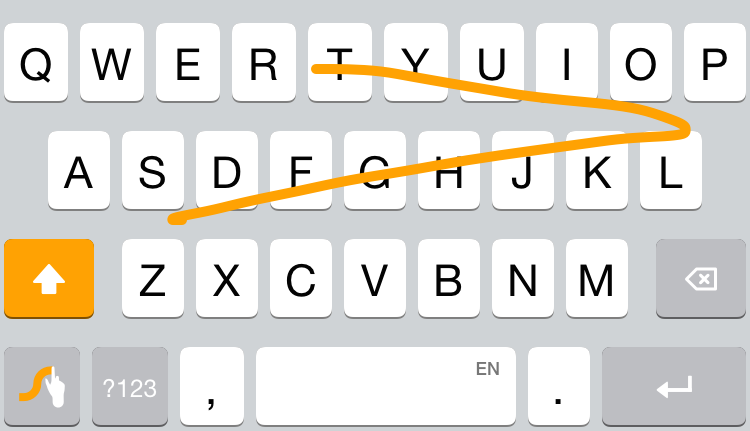
I have a love/hate relationship with third-party keyboards. On the one hand, they theoretically provide a better way to input text on your iOS device. On the other, I've found them to actually make me waste more time than I would using the stock keyboard. But I'm not giving up yet on keyboards, especially on Swype, which has been my favorite one so far.

Normally priced at $0.99, Swype is currently available for free as Apple's App of the Week in the App Store for a limited time. If you aren't familiar with Swype, check out Lory's first look at the third-party keyboard. Since she published it, the app has also been updated with support for more languages and improved iPad layout, making it an even more solid option.

Slated keyboard for iOS 8 translates text in real time

The folks at Gist have added a new third party iOS 8 keyboard for your consideration, called Slated. Admittedly, this area is starting to become crowded, but unlike the other offerings that aim to add colors or new input methods to your keyboard, it has a more serious task.

Slated has the ability to translate what you type into more than 80 languages, in real time. Simply pick a language, start typing, and watch the evolving translation appear below the text entry field. It also translates backwards, so you can participate in complete conversations.

UniChar Picker is an iOS keyboard for Unicode characters and symbols

We’ve seen dozens of colorful keyboard apps that don’t do a whole lot. We’ve tested a handful that have incredible features, but are still basic keyboards, nonetheless. We’ve even seen keyboards that let you access GIF memes so you don’t have to write actual words. How about something very unique and useful to coders?

UniChar Picker does just that. It features more than 500 Unicode characters across six different categories. Set it as your default keyboard to type in any app, or copy and paste symbols in the app to create just the right text.

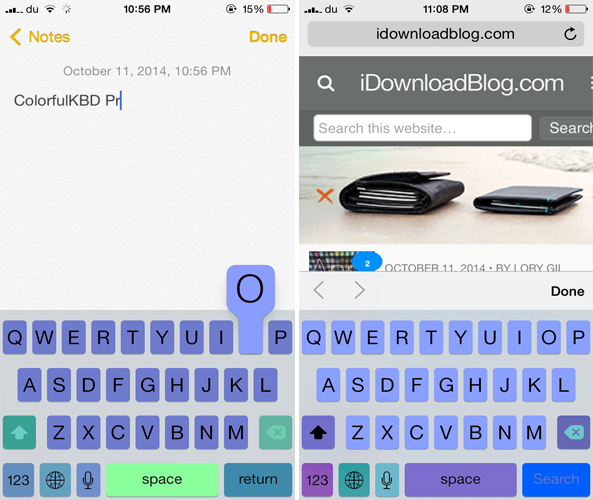
Bring your iOS 7 keyboard to life with ColorfulKBD Pro

iOS 8 is no short of third-party keyboards and we've already reviewed the noteworthy ones that bring many new features and provide more customization options. If you ever wanted to gain more control over how the keyboard looks in iOS 7, you should probably check out a new jailbreak tweak known as ColofulKBD Pro by ipon3g.

As its name implies, the tweak allows you to colorize the stock keyboard and bring a new look to it. By now, you must be thinking how this tweak is different from the remaining ones on Cydia that also allow you to customize the color of the iOS 7 keyboard.

Blink Keyboard should make typing on your gigantic iPhone 6 easier

I am one of a handful of people that did not upgrade to the iPhone 6 or iPhone 6 Plus specifically because of the size. My hands are small and I’ve gotten used to the width of the iPhone 5. I can type and play games with one hand without feeling like I’m having to stretch too far.

Blink Keyboard is a third-party keyboard app that helps iPhone 6 and iPhone 6 Plus users that are used to one-handed typing but are having trouble with the larger screen size. The app shifts the keyboard to the left or right so you can reach all the letters.

This silly keyboard lets you type using funky fonts

100 Fonts Keyboard for iOS 8 is not a new app but I just came across it earlier today while browsing the App Store. While it certainly isn't groundbreaking, I found it to be different from the other keyboards we had seen so far so I thought I'd share it with you. Before we even get started, let's clear things up. Unlike the name suggests, this app doesn't offer 100 different fonts as I counted only about 30 of them. Still, that is quite the selection.

iKeywi brings awesome jailbreak keyboard features to iOS 8 [Video]

As you've probably heard, I've been less than impressed with the initial round of third-party keyboards to hit iOS 8. I understand a lot of the problem has to do with Apple, and iOS 8's overall bugginess, but not all of the blame is squarely on its shoulders.

Many of the third-party keyboards have an average implementation, and some of them are just plain bad. With that said, there are a few keyboards that have stood above the rest, as we outlined in our best iOS 8 keyboards post a couple of days ago.

But today, I encountered a familiar name when looking for new third-party keyboards to try. iKeywi, a name that will no doubt ring a bell if you've ever been into jailbreaking, is now available as an iOS 8 keyboard.

Needless to say, I immediately paid $0.99 for the privilege to download iKeywi, and I was mighty impressed by what I found. Folks, if you're at all familiar with some of the more popular jailbreak tweaks, then iKeywi should immediately jump to the top of your must-buy list.

Don't believe me? Think a tempered version of SwipeSelection (you can't select text, but you can move the cursor using swipes). And that's not where it stops. iKeywi adds a fifth row of keys to the keyboard interface, customized key text, customized output, the ability to show letter case, and more. Watch the video inside to see what I mean.