iPod Touch

‘Other’ storage on your iPhone and iPad explained

For most users, the ‘Other’ iOS storage category—reported after connecting an iOS device to desktop iTunes—is something of a mystery. ‘Other’ storage starts at one to five percent of total device capacity but can quickly creep in to a few gigabytes.

This post will unravel the mysteries behind 'Other' iOS storage, explain what it's used for, how iOS manages it and what you can do to decrease it.

Twitter rolls out a new timeline feature

Twitter's bird logo set against a transparent background

The pressure mounts on Twitter to re-ignite growth, which has virtually come to a halt as average users increasingly find the service too confusing and difficult to use. Today, the micro-blogging service unveiled yet another refinement designed to adjust how the timeline surfaces interesting content.

Similar to the “While you were away” timeline feature which released a year ago, Twitter will now put recommended, not the newest, tweets at the top of your timeline so that you never miss important updates from people you follow.

iOS 9 adoption keeps chugging along, now standing at 77 percent

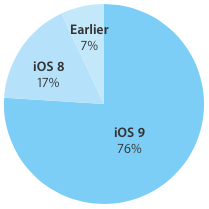
According to the latest stats published today on Apple's App Store dashboard for developers, 77 percent of devices are now using iOS 9.0 or later.

The new data point, captured by the App Store on February 8, 2016, represents a one-point increase over the adoption rate of 76 percent recorded two weeks ago and a two-point gain versus the 75 percent figure that was captured a month ago.

How to disable suggested search terms in Safari

Google Suggestions while typing in Safari address bar

Safari Smart Search Field lets you type in either an URL to visit or a search query to send to the default search engine. It's also a place where search suggestions automatically pop up as you type. With this cool feature, you can type just the first few letters of a query and rely on the search engine (Google, Bing, Yahoo, etc.) to help you complete the search term without needing to type out the rest of your query. But, certain users may not be fond of this feature for privacy reasons.

If you're among them, use the step-by-step instructions provided in this tutorial to turn off suggested search terms in Safari for iPhone, iPad, and Mac.

Final Fantasy IX hits iOS with 20% launch sale

In a surprise launch this morning, publisher Square Enix unleashed Final Fantasy IX upon the iPhone, iPod touch and iPad. This classic role-playing game, which originally released for Sony's PlayStation console back in 2000, is now available in the App Store with a special 20 percent launch sale for $16.99.

Designed to let players relive the adventures of Zidane and his crew in the palm of their hands, Final Fantasy IX brings Game Center achievements, autosave, crisp graphics with high-def movies and character models, seven game boosters like high-speed and no-encounter modes and other perks.

Vine app gains 3D Touch, caption editing and post ordering features

Vine, a Twitter owned mobile application for short-form video sharing, has been updated in the App Store this morning with three new features. For starters, owners of the iPhone 6s or iPhone 6s plus can press Vine's icon on the Home screen to access a shortcut menu with a pair of options to make a Vine or jump into the Explore feed.

In addition, you can now edit your Vine’s caption for a brief period after you post and watch an account’s Vines in any order you want.

IGN names Heroes Reborn: Enigma for iOS its Free Game of the Month

IGN has named Phosphor Games Studio's first person action-puzzle game Heroes Reborn: Enigma its free title for the month of February 2016, marking the first time the $4.99 game has gone free since its October 2015 debut.

The game has you playing as Dahlia, an evolved human with incredible powers. You must solve various puzzles and survive tests in order to escape captivity at The Quarry, a secret government facility.

Apple seeds iOS 9.3 beta 3 with Verizon Wi-Fi Calling and more

Apple on Monday seeded a third beta of iOS 9.3 to its developers. The software is available to members of the Apple Developer Program and can be deployed on the iPhone, iPod touch and iPad devices running a prior beta as an over-the-air download in Settings → General → Software Update.

A standalone installer should be available shortly through Apple's portal for developers.

The new beta has a build number of 13E5200d and adds a new Wi-Fi Calling option for Verizon customers. iOS 9.3 beta 3 arrived approximately two weeks following iOS 9.3 beta 2 and a full month since the original 9.3 beta was seeded to developers. We will update the article with a running list of enhancements in the new beta as we encounter them.

How to use bookmark folders in Safari

In Safari, you can save websites you visit frequently so you can quickly revisit them later without having to remember their URLs. Saved webpages are accessible in Safari's Bookmarks menu on the iPhone, iPod touch, iPad or Mac.

If you save a lot of bookmarks, they will clutter the Bookmarks menu over time so locating that favorite website of yours will begin to feel like finding a needle in the haystack. You can avoid this by creating themed folders for organizing your bookmarks.

This tutorial provides step by step instructions for creating new Safari bookmark folders for iOS and macOS. You will also learn how to rename, reposition and delete these folders and file websites into them, all of which will help you organize your favorite websites to your liking.
Apple boosts Maps with new Flyover cities, Traffic and Nearby data

Apple has updated its Maps backend with nearly two-dozen new cities now supporting the Flyover feature. In addition, the company has activated live Traffic data for Taiwan and added Finland to the list of countries that support iOS 9's Nearby feature. Three-dimensional Flyover data has been added to five new cities in the United States, with additional Flyover views now available in various cities across Europe, Africa and Japan.

Review: this exquisitely done astronomical clock for iPhone might cure your Apple Watch envy

It's funny how the Apple Watch's debut prompted Apple bloggers to become self-proclaimed horology experts. I never pretended to be one, but as an amateur astronomer think Apple should be credited for going to great lengths in paying homage to the traditional environment in which horology was developed by putting strong emphasis on the device's advanced timekeeping features and features like the cool Astronomy and Solar watch faces.

You don't need to own an Apple Watch if you're eager to discover the fascinating relation between time and the cosmos, all you need is a superb iPhone app by Swiss developer (how appropriate!) Celestial Dynamics, called Cosmic Watch.