Apps

Tip: find tons of messages you didn’t know existed inside Messenger’s secret folder

What if I told you that you most likely have tons of messages you didn't even know existed, stowed away in a little-known folder on Facebook?

While messages from your Facebook friends and Messenger contacts are delivered straight to your inbox, the system filters out those it deems spam and tucks them away into a hidden vault.

Some of those filtered messages could be from a distant family member trying to re-connect with you. Others might be vitally important. If you suspect Facebook is hiding messages you should've been aware of, this tutorial will teach you how to access a treasure trove of messages that you never knew you had.

Dragon Hills goes free as Apple’s App of the Week

Apple on Thursday updated its App of the Week promotion in iTunes with Dragon Hills. This means that from now through next Thursday, you’ll be able to pick up the action-packed adventurer for free—a solid savings of $2.

In Dragon Hills, players take control of a dangerous dragon to help the furious princess on her revenge mission. You'll slide down the hills jumping into and out of the ground, crashing and destroying everything on your way.

Periscope gains live-sketching feature, broadcasts come alive within Twitter for iOS

Wouldn't it be great if you could doodle over live video broadcasts on Periscope? With Periscope's latest iPhone app refresh, now you can! The latest version of the Twitter-owned app lets you draw with your finger on top of a live video feed in any color you want, like a boss.

Your drawings automatically disappear after a few moments, similar to the Apple Watch’s sketching feature, and remain visible on Periscope replays.

Google Maps for iOS gains Travel Times widget, Night mode and other new features in latest update

Google yesterday pushed an update for its native Maps application on the App Store, bringing out a few newsworthy features and enhancements.

Google Maps 4.18 for iOS introduces a new Travel Times widget which lets commuters check a live travel time estimation to their home or work right within the Notification Center's Today view.

In addition, the app's gained a new built-in option for sharing directions with contacts. Plus, there's a brand new Night mode and distance units settings in navigation.

Android TV now plays nice with iOS

If you're invested in Android TV and own a compatible TV set or set-top box, you'll appreciate that you can now control your Android TV from the comfort of your couch with an iPhone, iPad or iPod touch, as Google was kind enough to release the official Android TV app on the App Store.

The free of charge app works with all Android TV devices and includes remote functionality much like Apple's own Remote app lets you control Apple TVs with an iOS device.

This is what your Instagram app might look like soon

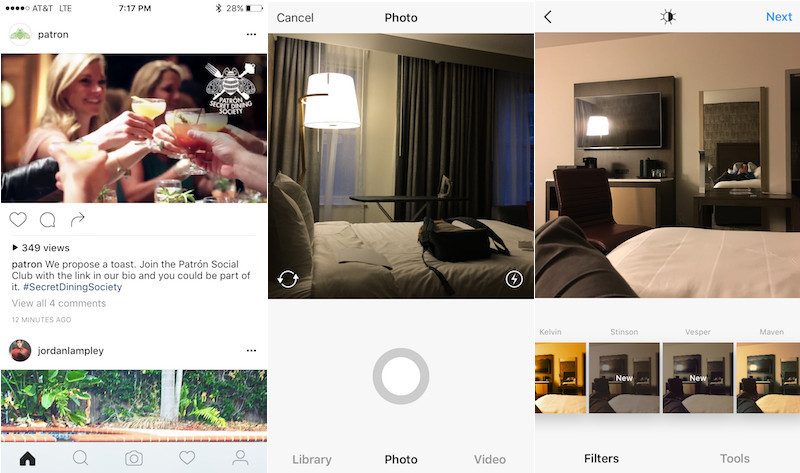
Instagram's reportedly been testing a fresh new design for its mobile application for iOS and Android, MacRumors discovered yesterday. If leaked screenshots are anything to go by, in adopting much of iOS's aesthetics the overhauled app sports a simpler, monochromatic look providing a cleaner, flatter appearance.

It's unknown when the new design will launch for everyone. For now, Instagram appears to be testing the forthcoming app refresh with a small subset of its massive user base.

Hangouts 9 for iOS drops with Low Power Mode support and share extension

Google's Hangouts application wants to become a unified communications solution for all your messaging needs despite not seeing new features in months. Now we know why: Google's been busy working on a major new version.

Now available on the App Store, the new Hangouts 9.0 brings a pair of new features, including one that'll automatically suspend video sharing during VoIP calls when an iPhone enters iOS 9’s Low Power Mode.

Unicorn sipface and coffee “emojis” are cool, but Starbucks’s iPhone keyboard needs more work

Apparently, software keyboards for the iPhone have become a must for brands. Earlier this morning, Microsoft released Word Flow for iPhone, its gestural Windows 10 keyboard with one-handed typing and predictive text input.

And now, Starbucks has jumped on the bandwagon and released an iPhone keyboard of its own.

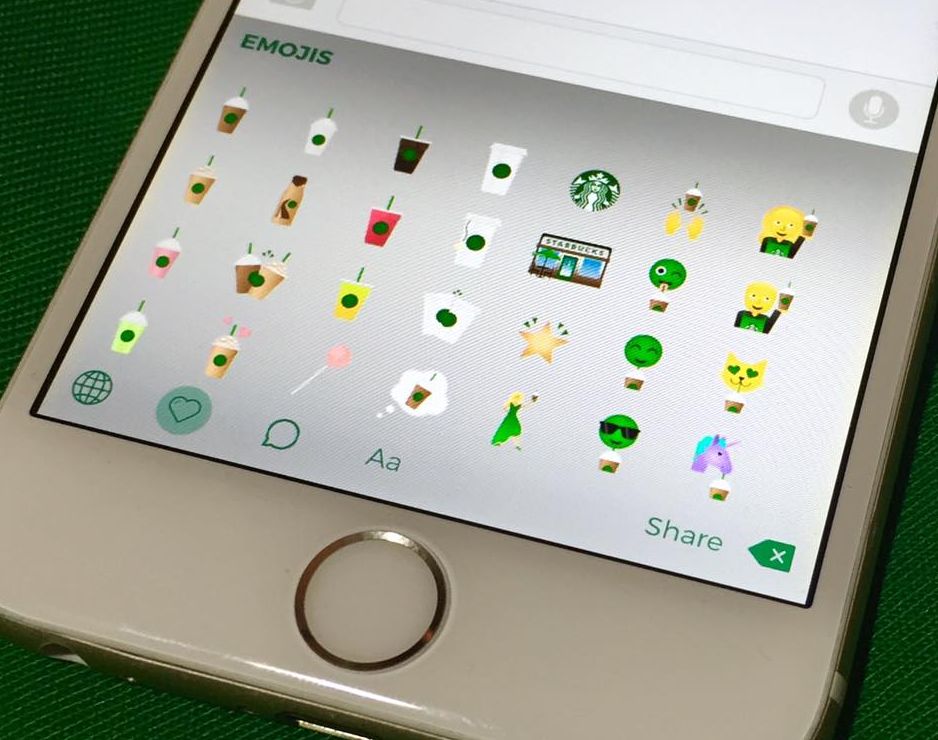
Available for free from the App Store, Starbucks Keyboard lets you add a little personality to your emails, texts, social media posts and more with branded “emojis” like Frappuccino blended beverages, iced tea, coffee and even a purple unicorn sipface.

It's a nicely done app that shows potential, but I dislike the fact that they're advertising it as an emoji keyboard because these things are more of stickers that get pasted as image attachments.

Microsoft’s Word Flow keyboard launches with one-handed mode, gestures, themes and more

After releasing an iOS edition of its Hub Keyboard last month, Windows giant Microsoft on Monday launched an iOS port of its predictive text Windows Phone keyboard, called Word Flow. The free of charge iPhone app brings many advanced features that speed up typing, like a cool one-handed mode, gesture based typing, predictive text input, custom themes and more. The Word Flow keyboard is available at no charge in the App Store.

Snapchat’s Face Swap now works with your own photos, paid Replays no longer available

A small but important update has appeared for Snapchat's free of charge mobile application in the App Store. Bumped to version 9.29, the app's expanded the utility of its popular Face Swap feature which now works with images from your Camera roll.

Face Swap is apparently a new craze. With this feature available in Snapchat in the form of a Lens, users can easily face swap with their friends. And with today's update, they can swap their face with someone else's photo stored in their Camera roll.

Apple Store app gains 3D Touch support, now available in more countries

Apple on Thursday pushed out an update for its Apple Store iOS client, bringing the app to version 3.7. The update brings about new 3D Touch features on compatible devices, and makes the app available in new countries.

As for 3D Touch support, iPhone 6s users have long been able to utilize Quick Actions on the app icon, but now the Apple Store app supports Peek and Pop. So force-pressing on a link within the app now opens up previews.