Apps

FunAppocalypse simulates the iPhone apocalypse in the skit from Apple’s WWDC keynote

When Apple kicked off the WWDC 2017 keynote this year, they presented a hilarious comedy skit that put into perspective just how important mobile apps are in our daily lives. As every iOS device went kaput, the world quickly delved into chaos.

iOS developer CPDigitalDarkroom decided it would be fun to recreate the apocalyptic scenario, and so he created a new free jailbreak tweak he calls FunAppocalypse that simulates the visual effects and sounds that were illustrated in the keynote skit.

Force Google Assistant to listen immediately after app launch with InstantAssistant

Siri is the default voice-based assistant on iOS devices, and while some people like using her, others prefer to use different voice assistants because of the features they offer or their superior fluidity.

Unfortunately, Apple doesn’t let you choose the default voice assistant, but a new free jailbreak tweak called InstantAssistant by gilshahar7 can help quell the pain.

iOS can automatically uninstall apps that haven’t been used in a while

iOS 11 included many new features and enhancements, big and small alike.

For example, a revamped storage-management section became available in Settings. Speaking of which, users can appreciate another new feature that allows them to optionally have their device automatically uninstall apps that haven't been used in a while.

If you venture to Settings  → iTunes & App Store, you'll notice a new toggle at the bottom of the screen, labeled Offload Unused Apps. Setting that switch to the ON position shall prompt iOS to delete rarely used apps from your device in order to make more room for your photos, videos, documents and so forth.

iOS uses Siri intelligence to determine your usage of apps.

The feature's description notes that documents and data belonging to uninstalled apps will be kept on your device in case the app is reinstalled. “Reinstalling the app will place back your data, if the app is still available in the App Store,” notes Apple.

This feature is disabled by default.

Rightfully so, if I may add. Had Apple enabled it by default, novice users would've been stunned discovering iOS had deleted their apps for seemingly no apparent reason.

Hands-on with iOS 11’s overhauled Podcasts app

Apple's stock Podcasts app has undergone some visual changes in iOS 11. Functionally, a few things have moved around and some new features have been added.

For example, the Unplayed, My Podcasts, Featured, Top Charts and Search tabs lined up alongside the bottom of the interface have been replaced with a new and simpler tab layout: Listen Now, Library, Browse and Search.

Our resident video editor Andrew O'Hara has put together a quick video for you guys to see for yourselves Apple's new design for the Podcasts app on iOS 11.

Watch Andrew's video right below, then meet us in comments.

https://www.youtube.com/watch?v=LFsAlcnlmSo

Subscribe to iDownloadBlog on YouTube

The Listen Now tab combines podcasts you're subscribed to (previously in the My Podcasts tab), recently played episodes (previously in the Unplayed tab) and shows other people like.

Under the new Library tab, you can easily browse all of the audio and video shows you're subscribed to, as well as individual podcast episodes, ones that have been download to the device and the recently updated episodes of any shows you're following.

The Browse tab is your storefront to the Podcasts section on iTunes.

There, you can swipe through featured podcasts Apple's editors highlight at the top, access the full Featured section, see charts-topping audio and video shows, access the list of major podcast providers and browse all podcasts by category.

The Search tab now lets you choose between searching across podcasts in your library or all shows on iTunes. As evidenced by the screenshots, the redesigned app has adopted a bold font with much bolder headings and other visual cues borrowed from Apple Music on iOS 10.

Another feature iOS 11's Podcasts app has borrowed from Apple Music is a completely revamped mini-player that can be now pressed with 3D Touch to access quick shortcuts pertaining to the currently playing episode.

Other tidbits worth mentioning include larger artwork and other visual tweaks to match the look and feel of other apps inside of iOS 11, as shown on the screenshot top of post. The official Podcasts widget has remained unchanged.

For those wondering, Apple still does not provide Podcasts for Apple Watch.

How do you like these Podcasts app changes on iOS 11?

Let us know by posting a comment below.
iOS 11 drops support for 32-bit apps

During Monday's keynote talk at the Worldwide Developers Conference, Apple introduced iOS 11, the next major software update for iPhone, iPad and iPod touch. As previously suspected, the mobile operating system has dropped support for legacy 32-bit apps.

Attempting to launch a 32-bit app on iOS 11 now yields a message, saying “The developer of this app needs to update it to work with iOS 11”. You can tap OK to dismiss the prompt or tap Learn More to open the full list of 32-bit-only apps that are currently installed on the device.

Apple's Clips app, for example, requires a 64-bit iOS device and the new Files app is optimized for 64-bit computing. Starting with iOS 10.3, Apple began naming and shaming legacy apps via a new App Compatibility section in Settings → General → About → Applications.

TUTORIAL: How to identify legacy 32-bit apps on your iOS device

Any previously installed 32-bit apps are no longer available for re-download through the App Store's Purchased tab. Moreover, 32-bit app no longer appear in App Store search.

The time is right to drop support for non-64-bit apps because running legacy 32-bit apps alongside 64-bit ones slows down the system as iOS has to load both 32-bit and 64-bit versions of the kernel and system frameworks in the RAM.

Devices with the Apple-designed A7 or newer chips are 64-bit, including the sixth-gen iPod touch and every iPhone and iPad from their respective iPhone 5s and iPad Air models onward.

In fact, iOS 11 itself won't run on a non-64-bit iPhone, iPad or iPod touch, meaning iPhone 5s, iPad Air and the sixth-generation iPod touch are now the entry-level devices for iOS 11.

Now watch Apple’s WWDC videos promoting HomePod speaker, 10.5″ iPad Pro & iMac Pro

With the WWDC keynote wrapped up, Apple has now posted latest product introduction videos to its official YouTube channel, including one aptly titled “Apocalypse” that highlights the importance of mobile apps (it was played as an opening intro for WWDC attendees).

Some of the hardware products and updates announced today are available immediately, like the refreshed Mac desktops and notebooks, while others will arrive later in the year, like the firm's Siri-powered smart speaker, called HomePod, and the new iMac Pro.

Apocalypse

“Ever wonder what life would be like if all our apps suddenly disappeared? Enter the Apocalypse,” reads the videos description.

https://www.youtube.com/watch?v=FC0pT9xg1oI

Song: “All Right” by Christopher Cross

Introducing HomePod

“Immersive hi-fi audio. All the music you love. And the intelligence of Siri. Welcome HomePod.”

https://www.youtube.com/watch?v=1hw9skL-IXc

As we told you, HomePod will be available beginning this December. To learn more about Apple's Siri-enabled smart speaker with HomeKit support and more, visit apple.com/homepod.

The New iPad Pro—On Any Given Wednesday

“With the world's most advanced display, the powerful A10X Fusion chip, and a new 10.5-inch model, the new iPad Pro is everything you want modern computing to be.”

https://www.youtube.com/watch?v=UR5ODc5Wbbo

Productivity-enhancing OS 11 features shown in the video will be available this fall.

To learn more about what the new 10.5-inch iPad Pro has to offer check out my colleague Cody's write-up, then visit apple.com/ipad-pro.

iMac Pro—Power to the Pro

“Packed with powerful technologies for the creative professional. The new iMac Pro. Power to the pro.”

https://www.youtube.com/watch?v=XPIrnAcmCSk

To learn more about the upcoming iMac Pro, visit apple.com/imac-pro.

Apple promoting WWDC 2017 with themed Snapchat geofilters

With the live-streamed WWDC keynote almost upon us, Apple has now created a bespoke Snapchat geofilter to help promote this year's developers conference. The sponsored WWDC 2017-themed geofilter automatically appears for Snapchat users who find themselves near the McEnery Convention Center in San Jose.

As first noted by 9to5Mac, the filter is available when sharing photos or videos with other Snapchat users. Simply choose it from the list of Snapchat filters to have Apple's official WWDC 2017 banner design applied to your item. Again, this is a filter that uses geofencing so only people attending this year's developer conference will see it in Snapchat.

The same stickers can be found in iMessage via Apple's official WWDC app, as shown above.

Snapchat is available at no charge from App Store.

App Store placeholder listing for Apple Files app appears briefly ahead of WWDC keynote

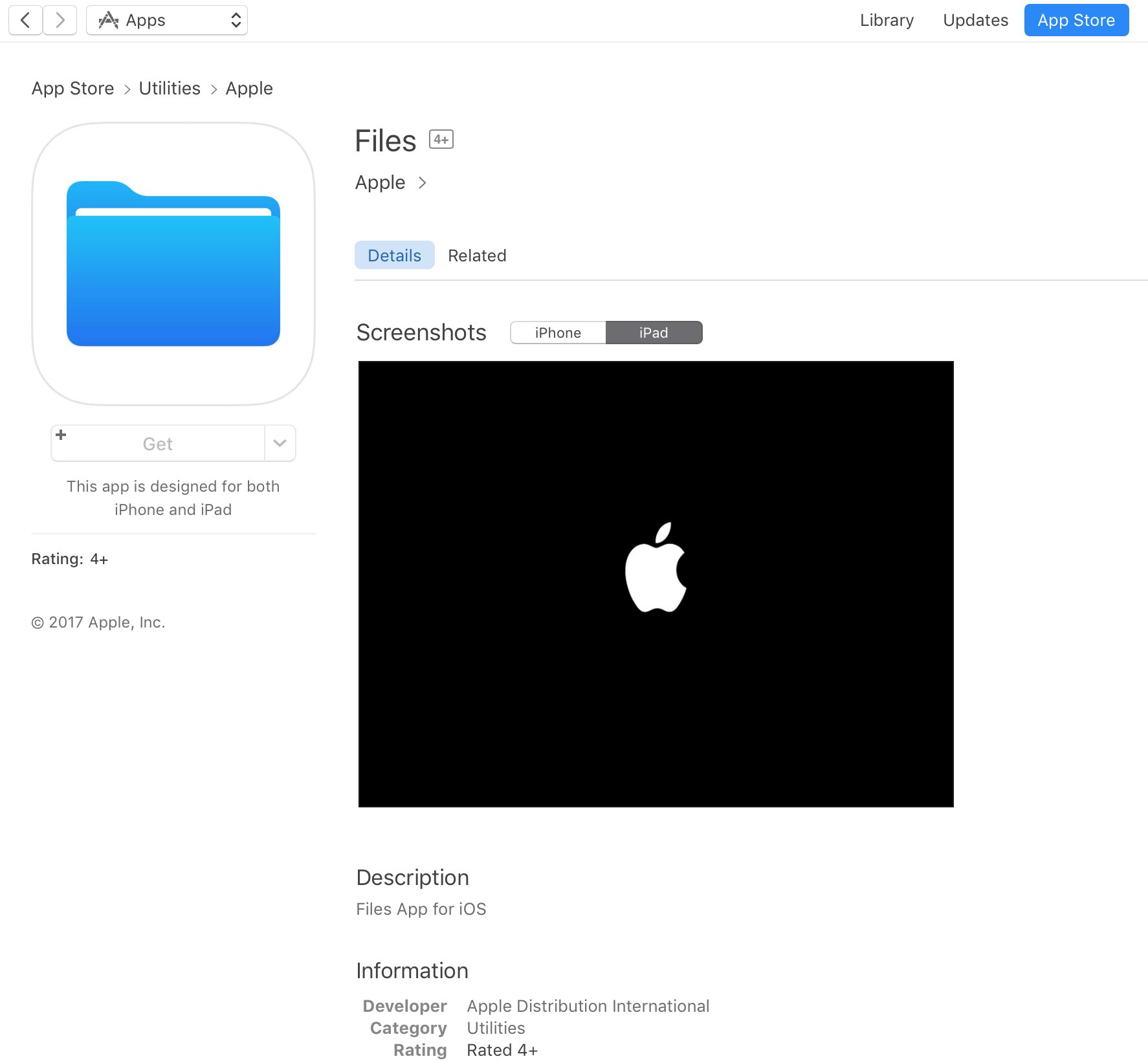
A placeholder listing for a new Apple Files app has briefly appeared on App Store ahead of today's live-streamed WWDC keynote, as spotted by iOS developer Steven Troughton-Smith late Sunday. It's surfaced in the Utilities section of App Store and has since been removed.

No screenshots or the official description were provided.

The app requires iOS 11 and 64-bit support and is designed for both iPhone and iPad. It sports a blue file folder icon resembling the design for folder icons in macOS. It's entirely possible that the new Files app is really just a rebranded version of the existing iCloud Drive app.

It's unclear if the forthcoming app will be a new stock item in iOS 11 or an optional download. If I had to guess, I'd say it will likely come pre-installed with iOS 11. Since iOS 10, Apple has allowed users to hide most of the stock apps from their Home screen.

To help users easily re-install any removed stock apps, Apple has provided all of its first-party iOS apps that are removable as downloadable App Store items. iOS 11 will be previewed at WWDC later today along with tvOS 11, watchOS 4 and macOS 10.13.

Expand iPad’s Picture-in-Picture feature with PiPifier

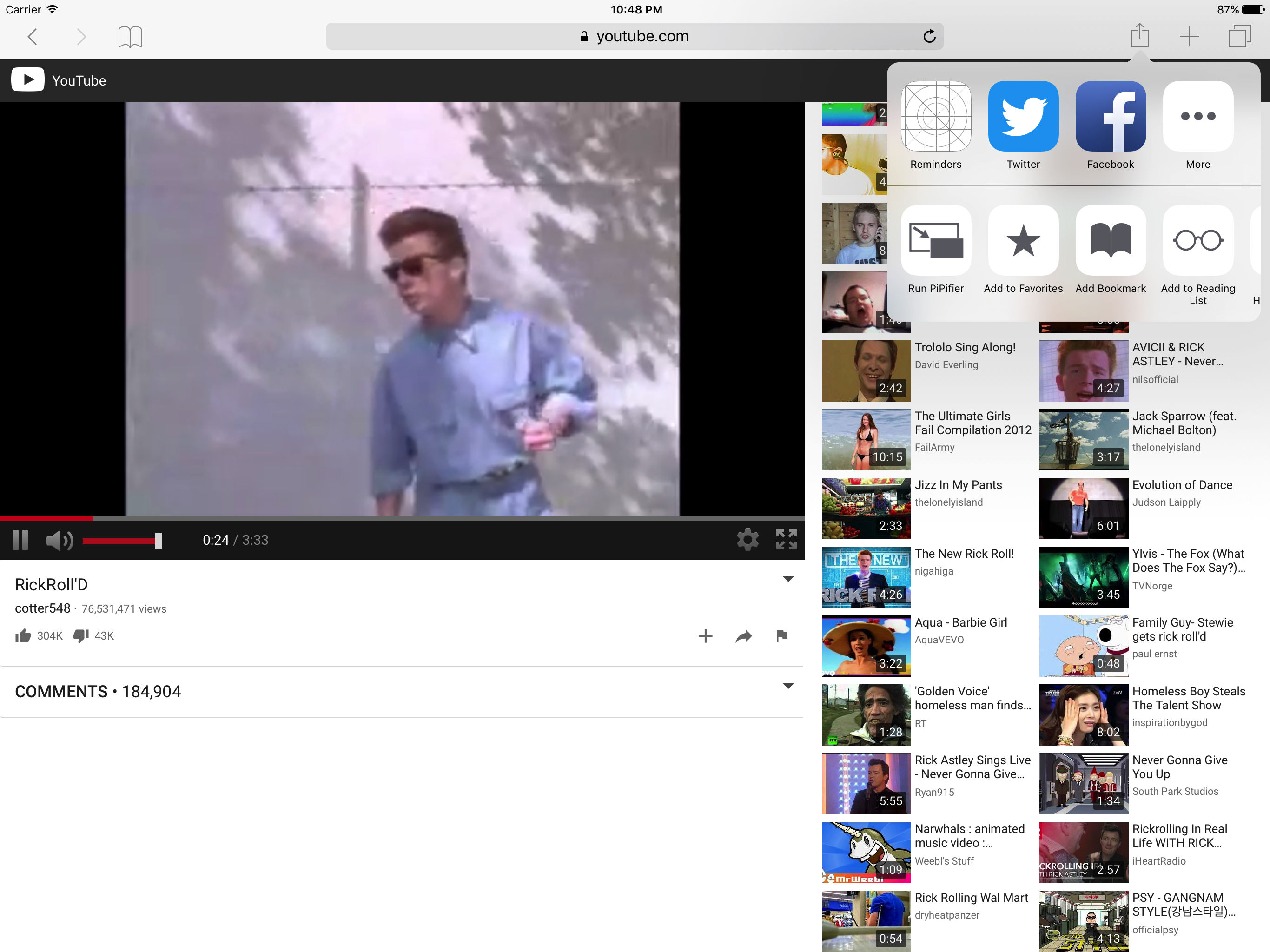
The iPad's Picture-in-Picture feature can really come in handy—when it works. Unfortunately, some pages such as YouTube use custom video players that don't have a dedicated PiP button, rendering the feature useless. That's where the app PiPifier comes into play.

PiPifier lets you view every HTML5 (which is basically every web video on iOS) in Picture-in-Picture mode. It uses a Safari Action extension, so all you have to do is open Safari to your preferred web video, tap on the Share Menu, and select the Run PiPifier option.

As you can see in the screenshots, doing this puts your video into native PiP mode. This allows you to watch your clip in a resizable window that you can place virtually anywhere on your iPad's screen, all while performing other tasks, such as replying to emails and texts.

PiPifier is available for free.

Apple updating Swift Playgrounds with support for robots, drones, and instruments

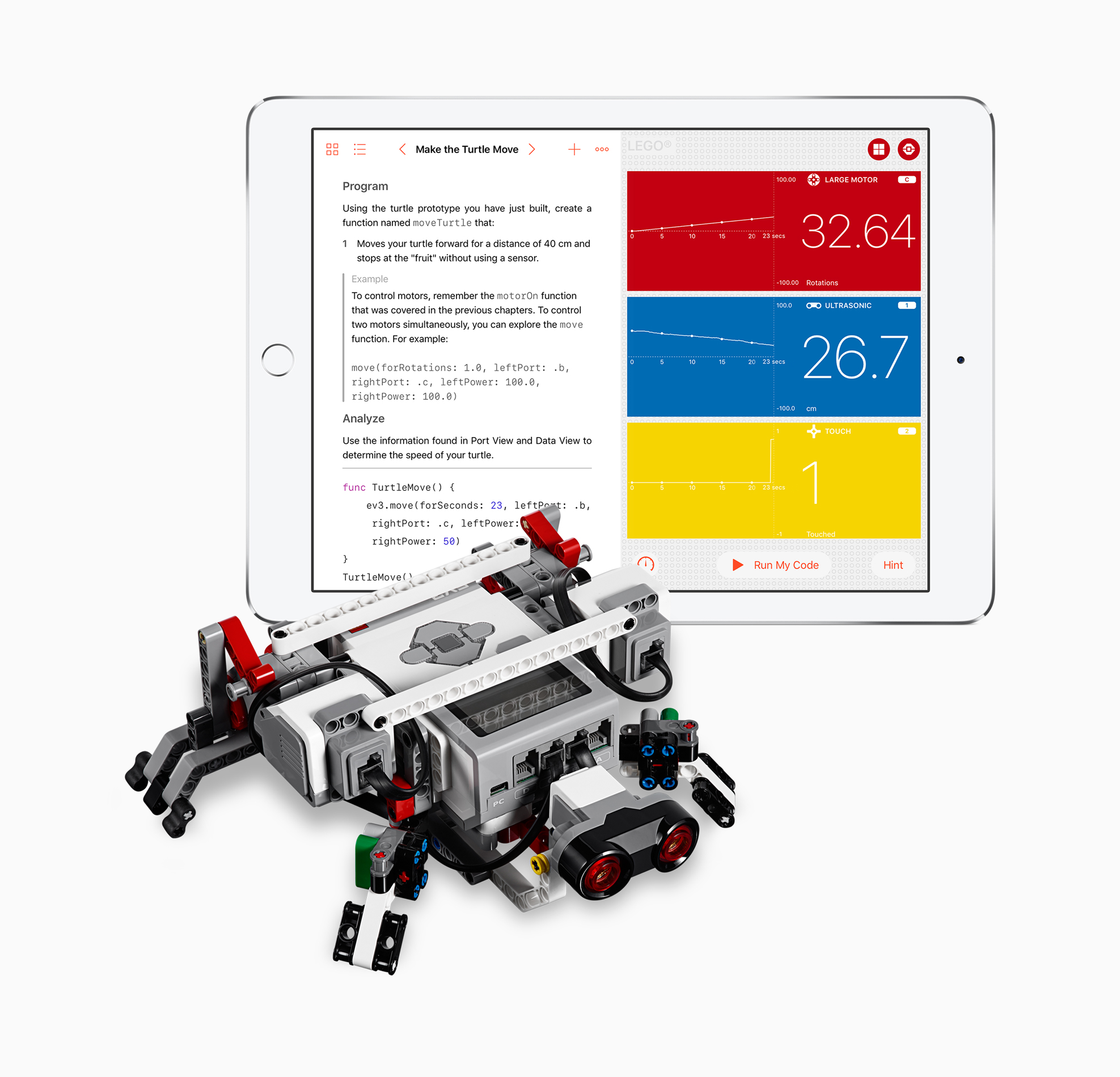
Apple today announced a significant update for its iPad app Swift Playgrounds. The app, which is geared towards teaching beginners to code in a fun and interactive environment, will soon work with robots, drones and musical instruments.

Scheduled to be released next week, Swift Playgrounds version 1.5 will support programming a slew of new devices including the Sphero SPRK+ ball, UBTECH Jumu Robot MeeBot Kit, Wonder Workshop's Dash, Parrot drones and LEGO Mindstorms.

“More than 1 million kids and adults from around the world are already using Swift Playgrounds to learn the fundamentals of coding with Swift in a fun and interactive way,” said Craig Federighi, Apple’s senior vice president of Software Engineering. “Now they can instantly see the code they create and directly control their favorite robots, drones and instruments through Swift Playgrounds. It’s an incredibly exciting and powerful way to learn.”

“Today we’re combining efforts with Apple to provide even more students around the world with the opportunity to learn how to code,” said Esben Stærk Jørgensen, president, LEGO Education. “We’re pairing the familiar LEGO bricks and our hands-on approach to playful learning found in LEGO MINDSTORMS Education EV3 with Swift Playgrounds' powerful learning platform so now anyone can program their LEGO MINDSTORMS creation with real Swift code.”

Swift Playgrounds 1.5 will be a free update for the app and will be released June 5.

Source: Apple

Plex app gets live TV support and DVR enhancements

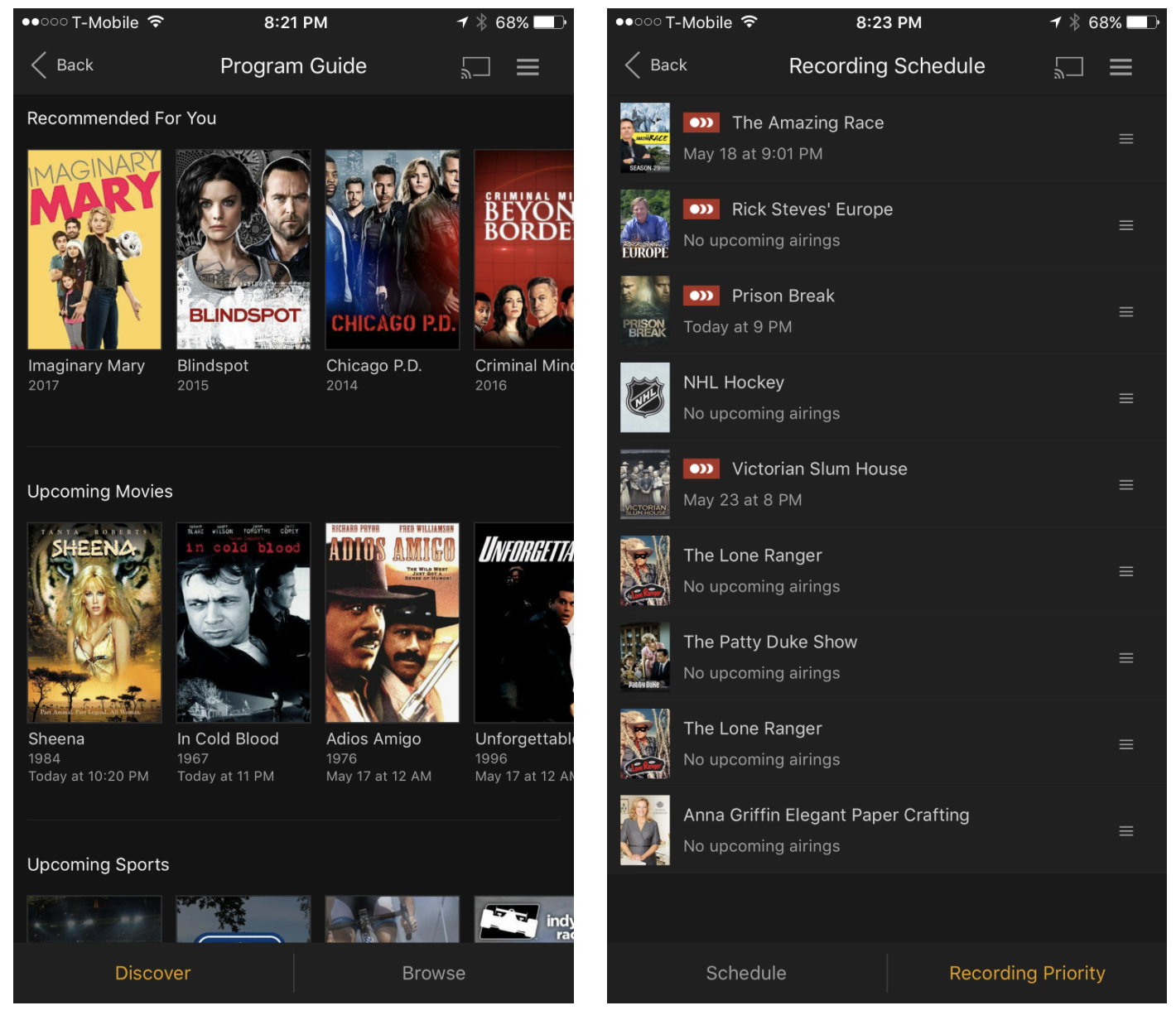
Plex on Thursday announced that they're rolling out support for live TV to their various Plex apps. They're starting with Android TV and iOS, and say updates for other platforms like tvOS will follow suit.

The live TV feature is built right into the Media Server, so you'll be able to stream everything from game shows to sporting events in real time, from pretty much anywhere in the world.

The app is also getting other improvements: in-app DVR management, meaning you can now browse the program guide and manage recordings directly from within the app, and expanded tuner support. Last September Plex announced support for the HDHomeRun tuner line, and now it's opening up to tuners from Hauppauge, AVerMedia and many more.

Plex Live TV and DVR are available immediately for Plex Pass users only. The service costs $5 per month, $40 per year, or $120 for life (20% off for a limited time). It's a bit pricey, but it's definitely worth looking into if you're thinking about cutting the cord.

Source: Plex

Apple: App Store developers earned over $70 billion in revenue since debut

Apple announced Thursday morning that developers all over the world for its platform have generated over $70 billion in total revenue, a new record since the launch of the App Store almost nine years ago in 2008.

The number 70 appears to be Apple’s lucky number this year, as app downloads have also soared 70% in the last 12 months, illustrating interest in numerous new app titles that took the App Store by storm.