Apps

Watch new ARKit demos: Minecraft and measuring tape

The website madewitharkit.com dedicated to highlighting cool apps made with Apple's new ARKit framework, was updated today with a pair of new video demonstrations showing off some of the augmented reality possibilities coming to iPhone and iPad with iOS 11 this fall.

The first demo has the user selecting two spots in the real world, as viewed through an iPhone's lens, to calculate the distance between them, transforming the device into a working tape measure. That's a great example of the power of the ARKit framework.

https://www.youtube.com/watch?v=z7DYC_zbZCM

The app was built by Laan Labs and, like other ARKit-enabled apps, uses an iOS device's camera along with sensor data to precisely find horizontal planes in the real world, such as tables, floors and other objects.

You can beta-test the app by signing up at armeasure.com.

Measure distances with your iPhone. Just because you can. Clever little #ARKit app by @BalestraPatrick https://t.co/b2mXe2FS84 pic.twitter.com/pyoHp99Yts

— Made With ARKit (@madewithARKit) June 25, 2017

Laan Labs has other examples of proof-of-concept apps built using ARKit on their Twitter, like the following example of impressive 3D drawing in augmented reality.

https://twitter.com/laanlabs/status/878692051889655808

As for an AR-enabled Minecraft, we don't know if Minecraft creator Mojang is working on one, but that didn't stop developer Matthew Hallberg from recreating Minecraft in AR using the ARKit framework and the Unity engine.

By superimposing Minecraft building blocks on top of the real-world, and taking advantage of ARKit's super accurate tracking, the user is able to walk around their environment and place Minecraft blocks at arbitrary spots. “I love that you are able to place life size objects because the tracking with ARkit is so good,” Matthew said.

https://www.youtube.com/watch?v=qFGx9QcE5Gk

Apple is also using ARKit tracking for an impressive virtual reality mode in Apple Maps on iOS 11. The Cupertino giant is even helping Ikea build an ARKit-powered app which will let you try out virtual furniture at home before purchasing it.

ARKit requires a device with an Apple A9 or A10 chip because those processors deliver “breakthrough performance that enables fast scene understanding and lets you build detailed and compelling virtual content on top of real-world scenes,” as per Apple.

How do you like the aforementioned ARKit demos? Are you looking forward to augmented reality-enabled apps, and why? Chime in with your thoughts in the comments section.
Instagram testing private sharing feature

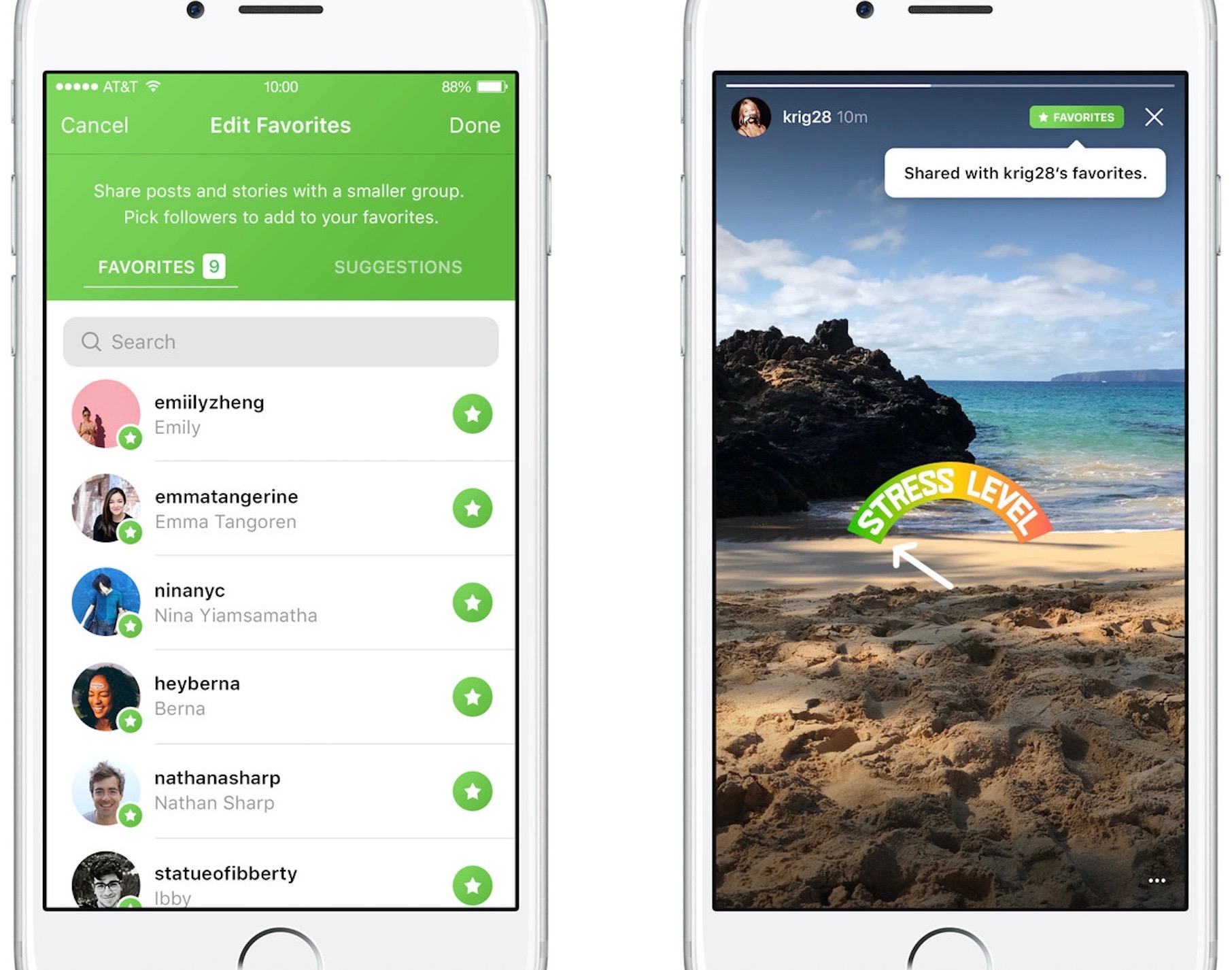
Photo-sharing service Instagram on Friday kicked off a small test for a new private-sharing feature. Called Favorites, it should roll out to all users over the next few months.

Instagram's product lead Robby Stein told The Verge that they've been working on the new private-sharing feature for more than a year.

Privately shared content is denoted by a green Favorites badge on the post.

By hand-picking followers for the new Favorites section, users can easily create a more limited group of the closest friends with whom they can privately share posts and Story updates.

Anyone not in the Favorites list won't be able to see your privately shared posts.

You'll be able to browse all the non-ephemeral posts you’ve shared to your Favorites over time by tapping a new Favorites tab on your Instagram profile.

According to The Verge:

No one gets notified when you add or remove them to the list. They’ll know they’re your favorite only when they see a green Favorites badge at the top of your posts. They can’t request to be added to your list through the app.

And if you remove them from your Favorites, they lose access to all of your private posts. If they visit the Favorites tab in your profile, it will appear to be empty.

There is currently no way to share Instagram posts with select friends only.

You can set your Instagram account to private at any time to personally approve follow requests from a handful of your closest friends, but that approach has many flaws of its own.

According to Stein, people with private accounts often approve hundreds of follow requests due to social pressures and are using Instagram less as a result. “People are trying to hack Instagram to create smaller audiences, and we’re trying to recognize that,” said Stein.

It remains to be seen if Instagram Favorites will come to all users. Given they've been working on this feature for more than a year, I'll be surprised should they decide to pull it.

Will you use the Favorites feature when it rolls out, and why?

Do chime in with your thoughts in the comments section!

Google prepping new app for backing up your Mac to Drive

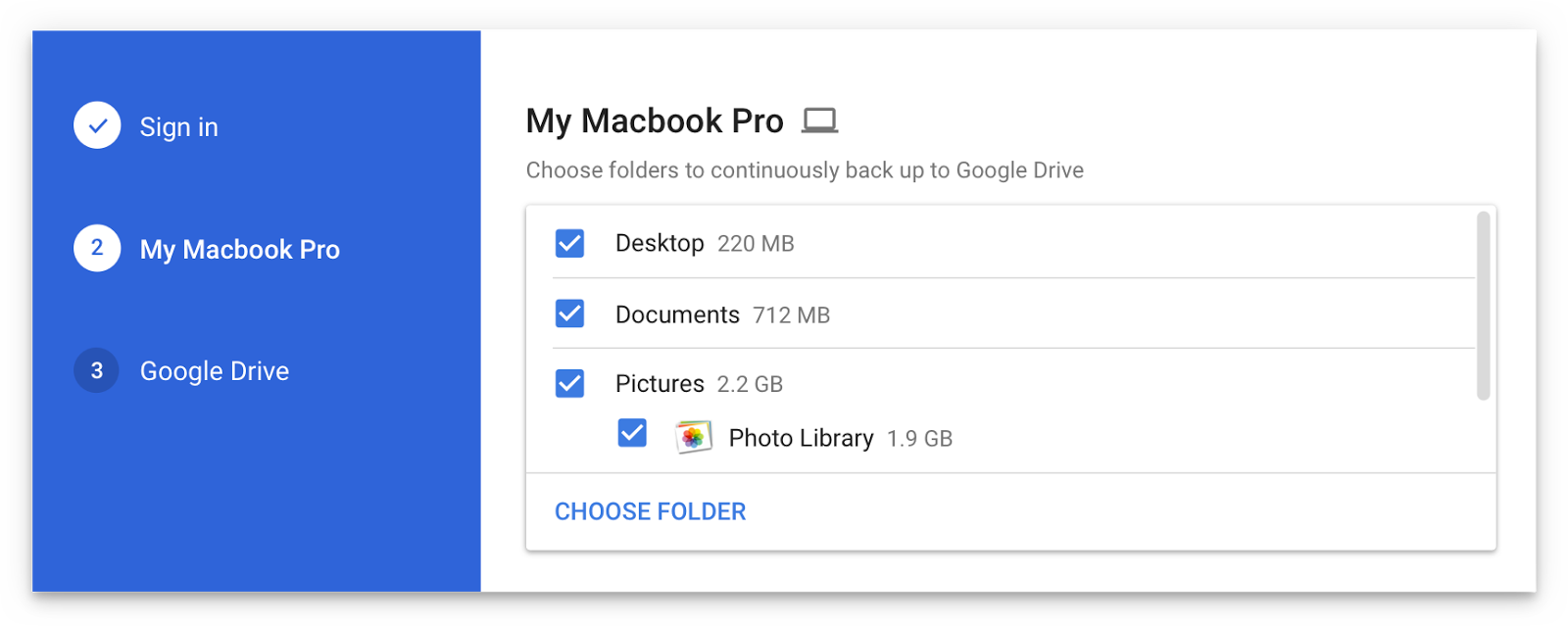
Are you a fan of Drive, the search giant's cloud-storage service? If so, a new app from Google will soon let you back up any folder(s) on your computer to Drive and keep them in sync.

This is welcome news because Drive's current desktop client does not allow for selective sync of any folders that don't live inside of the Google Drive folder on your Mac or Windows PC.

The forthcoming Backup and Sync app is better integrated with your computer than the existing client and will replace it on Wednesday, June 28.

According to the search firm, Backup and Sync is intended to “help everyday users back up files and photos from their computers, so they’re safe and accessible from anywhere”.

As mentioned, you'll be able to continually back up any items found in custom folders on your computer, like the Desktop, Photos, Documents and so forth.

Backup and Sync will replace Google's existing desktop uploader for Photos, too.

Basically, you could use the new app to back up and sync your entire Mac account's home folder to Drive and use Google's powerful search engine via Drive's web interface to quickly identify that needle in the haystack you were looking for.

However, you'll probably need to upgrade your cloud storage to keep your Mac safely backed up to Drive. Each Google account gets 15GB of free Drive storage versus Apple's 5GB free tier.

If you need more storage, you can upgrade to one of the paid Drive tiers:

100GB for $1.99 per month 1TB for $9.99 per month 10TB for $99.99 per month

And here are Apple's recently refreshed iCloud storage upgrades:

50GB for $0.99 per month 200GB for $2.99 per month 2TB for $9.99 per month

Google Drive for Mac and Windows is available via google.com/drive/download.

Google Drive for iPhone and iPad is a free download from App Store.

Do you use Google Drive? If so, are you looking forward to backing up your Mac to the Google cloud? If not, what's your preferred online service for storing files, documents and other data?

Tell us in comments!

IBM’s new Garage initiative aims to accelerate development of iOS enterprise apps

Building upon the Apple-IBM enterprise mobility partnership established three years ago, Big Blue (that's a nickname for IBM) today announced a new initiative to help accelerate the development of MobileFirst enterprise apps for iPhone and iPad.

Upcoming app development studios, called Garages, will soon go online in Shanghai, China and Bucharest, Romania, in addition to IBM's existing MobileFirst for iOS studio in Bangalore, India.

IBM's other app studios and Garages can be found in US cities Atlanta, Cupertino, Toronto and Chicago. Plus, the company has committed to establishing new app studios in Shanghai, China and Bucharest, Romania. Lastly, mobile enterprise apps designed by IBM can now be embedded with the cognitive capabilities of its Watson cognitive system.

Bridget van Kralingen, Senior Vice President, IBM Industry Platforms, said:

Four years ago, we made enterprise mobility a reality, and we’ve seen how transformative mobile can be. Today, companies are now reigning in mobile faster than ever, creating a critical need for powerful innovations that will reinvent how they do business. We’re combining the power of mobile with cognitive and analytics to continue to push the market forward.

IBM has officially named some of the clients adopting iOS enterprise apps for their own employees, such as Lufthansa Group, City Furniture, Singapore Airlines and Japan Airlines.

Since its introduction three years ago, the partnership between Apple and IBM has resulted in several billion dollars in signings with more than 3,800 client engagements supported by market-ready and custom iOS apps designed for professions across all industries, including store associates, flight attendants and field technicians.

Twitter revamped with dynamically updated Reply/Like/Retweet counts, Safari Reader support & more

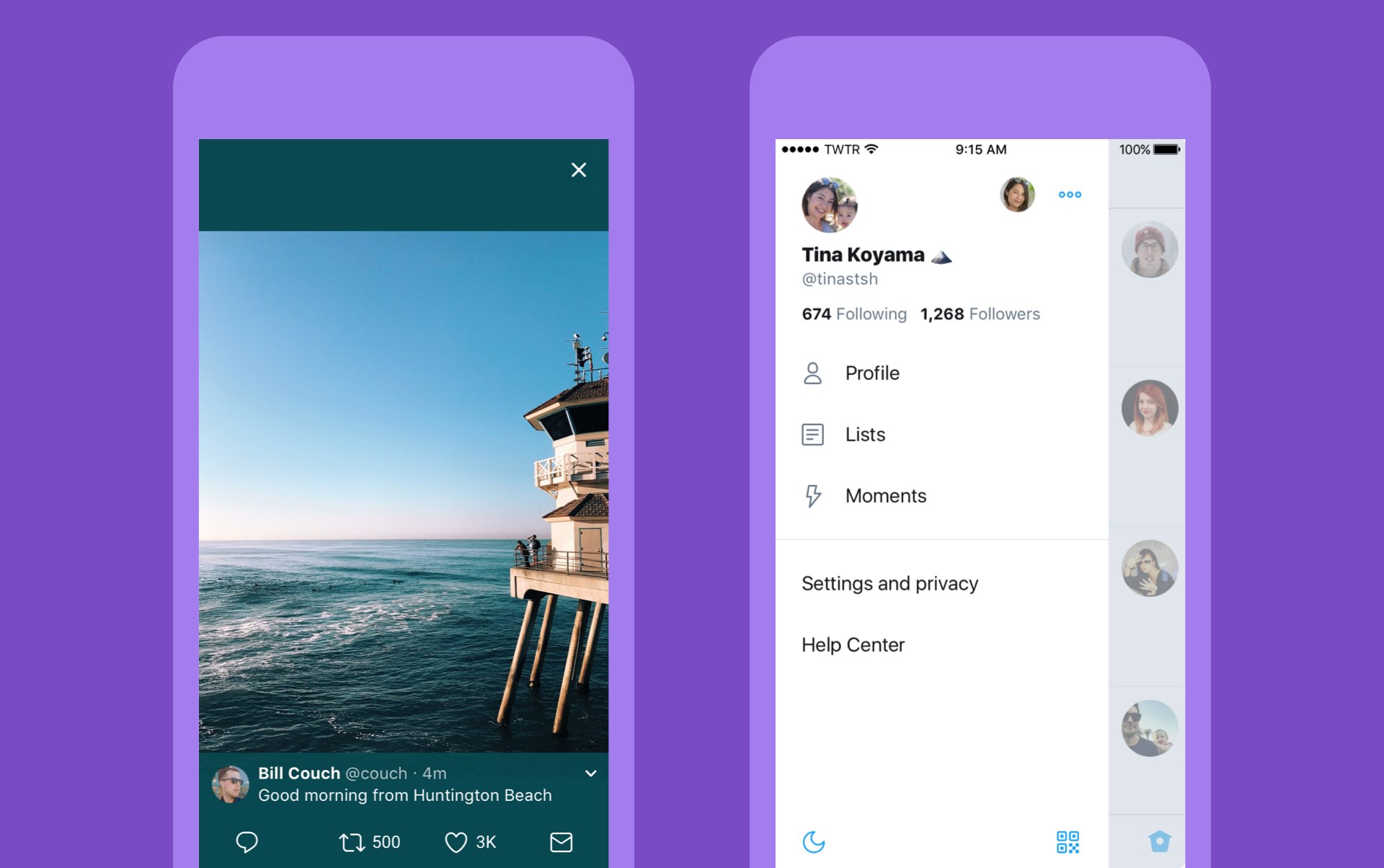
Twitter today announced a major overhaul, making the app feel lighter, faster and easier to use with faster navigation via a new side menu, bolder headlines, revamped icons and more.

The new side navigation menu lets you quickly access your profile, accounts, settings and privacy. As a bonus, you can now add filters and stickers on your profile image, if you'd like.

Tweets now update dynamically with Reply, Retweet and Like counts so that you can easily see conversations as they’re happening, in real-time. The app now features support for opening links to articles and websites in Safari’s in-app viewer.

This lets you log in to websites using your saved Safari passwords and enjoy articles in the browser's Reader mode, all within the Twitter app.

New switches in Twitter's settings interface let you turn on increased color contrast, decided whether or not you'd like links to open in Safari's Reader View and more.

Accessibility settings are now in a more prominent location.

So fresh. So clean. So live.

Check out our new look.https://t.co/ClWbwi8CEH pic.twitter.com/nR27POQkEi

— Twitter (@Twitter) June 15, 2017

Here's an overview of the new features and design:

Profile, additional accounts, settings and privacy—all in one place. A new side navigation menu and fewer tabs at the bottom of our app=less clutter and easier browsing. You told us you loved this change on Android last year and we’re excited to now bring it to iOS. Links to articles and websites now open in Safari’s viewer in the Twitter app so you can easily access accounts on websites you’re already signed into (iOS only). We’ve refined our typography to make it more consistent and added bolder headlines to make it easier to focus on what’s happening. Also, rounded profile photos make it clearer to see what’s being said and who’s saying it. More intuitive icons make it easier to engage with Tweets—especially if you’re coming to Twitter for the first time. For example, people thought the Reply icon, an arrow, meant delete or go back to a previous page. We switched to a speech bubble, a symbol most know and love. We also made the icons lighter for more seamless interaction Tweets now update instantly with Reply, Retweet and Like counts so you can see conversations as they’re happening, live (not available on twitter.com and Twitter Lite).

The aforementioned changes are rolling out across twitter.com, Twitter for iOS, Twitter for Android, TweetDeck, and Twitter Lite over the coming days and weeks.

Twitter for iOS is a free download from App Store.

Facebook for iOS now lets everyone use animated GIFs in comments

Facebook today announced that users of its mainland mobile app can now use animated GIFs in comments. This sought-after feature has been enabled for all people on Facebook globally.

“We know people love communicating with GIFs on Messenger and we’re also making it easier to use GIFs on Facebook,” said the social network. When making a comment in Facebook for iPhone, iPad or iPod touch, tap the new GIF button to spice up your message with animations.

Additionally, Facebook rolled out some new and exclusive GIFs they’ve created featuring some of the Internet’s biggest stars, including DNCE, Logan Paul, Amanda Cerny, DREEZY, Patrick Starr, Violet Benson, Wuz Good, Brandi Marie and Landon Moss.

To use them, search #GIFparty when sharing a GIF on Facebook or Messenger or visit GIPHY.com/Facebook.

Since rolling out support for animated GIFs on Messenger back in 2015, users have sent nearly thirteen billion GIFs in the last year alone via the messaging app, or nearly 25,000 GIFs every minute. GIF sends on Messenger have tripled in the past year and New Year’s Day 2017 was the most popular day ever for GIF sends on Messenger, with more than 400 million GIF sends.

Facebook for iOS is available at no charge in App Store.

iWork apps gain editing improvements, 500 shapes & more in latest update

Apple's iWork productivity suite was updated today on Mac App Store and App Store with several new editing features and other improvements available across iPhone, iPad, iPod touch and Mac devices.

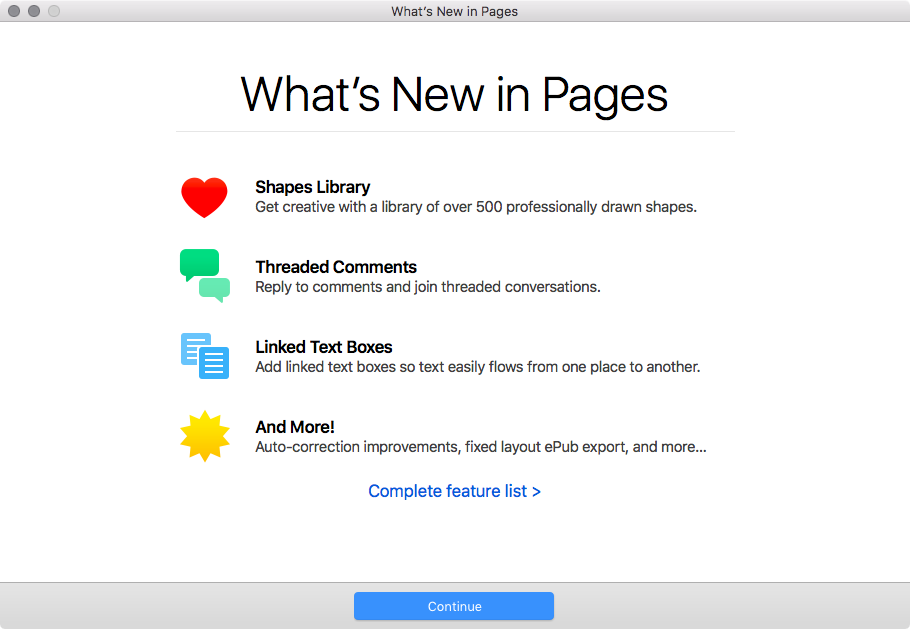
For starters, Pages, Numbers and Keynote for Mac, along with their iOS counterparts, now come with a brand new library of over 500 professionally drawn shapes that you can readily use in your documents, spreadsheets and presentations.

Across all the iWork apps, users can now reply to comments and join threaded conversations, making collaborative editing even easier than before, while new auto-correction and text replacement options save time while typing.

In Numbers, the new Insert Stock Quote feature and the Stock and Currency functions let you get data from the previous market day’s close. Keynote now lets you scroll like a pro on your Mac's trackpad with new pan and zoom options and your presenter notes can be edited while displaying slides in Light Table view.

Here's the full list of new features, fixes and enhancements in Pages 6.2, Numbers 4.2 and Keynote 7.2 for Mac, iPhone and iPad listed in release notes accompanying these downloads:

What's new in Pages 6.2 for Mac Enhance your documents using a library of over 500 professionally drawn shapes Reply to comments and join threaded conversations Add linked text boxes so text easily flows from one place to another New auto-correction and text replacement options save time while typing Export documents as fixed layout ePub books Change margins, headers, footers and paper size while collaborating Improved support for Hebrew and Arabic languages

Learn more about the new Pages for Mac features on Apple's website.

What's new in Numbers 4.2 for Mac Enhance your spreadsheets using a library of over 500 professionally drawn shapes Reply to comments and join threaded conversations Support for print preview in collaborative spreadsheets New auto-correction and text replacement options save time while typing The Insert Stock Quote feature and the Stock and Currency functions now return data from the previous market day’s close

Learn more about the new Numbers for Mac features on Apple's website.

What's new in Keynote 7.2 for Mac Enhance your presentations using a library of over 500 professionally drawn shapes Reply to comments and join threaded conversations New auto-correction and text replacement options save time while typing Scroll anywhere with new pan and zoom options Edit presenter notes while displaying slides in Light Table view Improved support for Hebrew and Arabic languages The Stock and Currency functions now return data from the previous market day’s close

Learn more about the new Keynote for Mac features on Apple's website.

What's new in Pages 3.2 for iOS Enhance your documents using a library of over 500 professionally drawn shapes Reply to comments and join threaded conversations Add linked text boxes so text easily flows from one place to another New auto-correction and text replacement options save time while typing New page thumbnail view allows you to easily navigate your document Export documents as fixed layout ePub books Change margins, headers, footers and paper size while collaborating

Learn more about the new Pages for iOS features on Apple's website.

What's new in Numbers 3.2 for iOS Enhance your spreadsheets using a library of over 500 professionally drawn shapes Reply to comments and join threaded conversations Support for print preview in collaborative spreadsheets New auto-correction and text replacement options save time while typing The Insert Stock Quote feature and the Stock and Currency functions now return data from the previous market day’s close

Learn more about the new Numbers for iOS features on Apple's website.

What's new in Keynote 3.2 for iOS Enhance your presentations using a library of over 500 professionally drawn shapes Easily rearrange your slides with the new Light Table view Edit presenter notes while viewing slides Reply to comments and join threaded conversations New auto-correction and text replacement options save time while typing Improved support for Hebrew and Arabic languages

Learn more about the new Keynote for iOS features on Apple's website.

These apps used to be paid downloads, but Apple recently made them free for all users.

Grab Pages, Numbers and Keynote for free from Mac App Store.

Pages, Numbers and Keynote for iPhone and iPad are available free on App Store.

Facebook could let you subscribe to news publications directly from the app

Facebook is working on a new feature to permit users to subscribe to news publications directly from its mainland mobile app. According to a report this morning from The Wall Street Journal, many details remain up in the air as discussions are currently underway.

The company is allegedly leaning toward a model that would let you read certain articles for free every month, before being prompted to pay. There's a catch: Facebook is said to limit this to the stories published natively through its Instant Articles service.

With that in mind, it may be no coincidence at all that Facebook recently launched new tools to help publishers make their Instant Articles compatible with the Apple News format as well as with Google's Accelerated Mobile Pages system.

This new functionality could roll out by the end of 2017, sources said. People familiar with the matter pointed out that the upcoming feature has long been requested by publishers.

While users currently can follow different news organizations, the rumored feature would permit them to use their credit card information on file with Facebook to directly subscribe to a news publication and have any subscriber-only content delivered to them through the app.

The development, if true, should pose some additional challenges to Google News platform as more and more people turn to Facebook for their daily news.

Image: Facebook's recent redesign of Trending pages.

Basic analytics coming to iOS 11’s Podcasts app

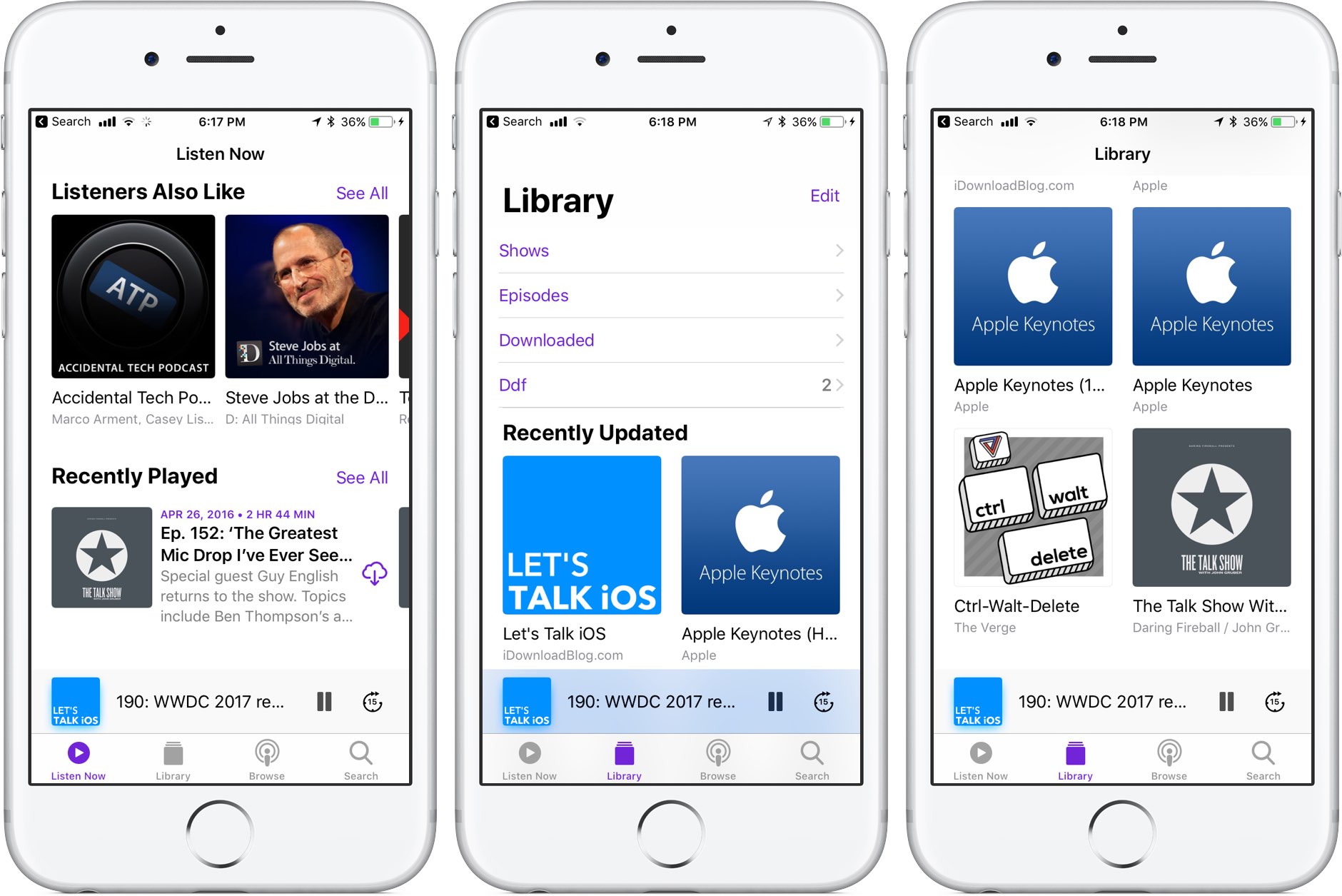
Like many stock apps in iOS 11, Apple's Podcasts app has been redesigned around an Apple Music-style appearance with consolidated tabs, bigger thumbnails and more.

As reported by Recode's Peter Kafka and Six Colors' Jason Snell, Apple is also making some notable changes to the way podcast feed works so that both podcast creators and advertisers can see what listeners actually like.

As for users, they'll be able to download full seasons of their favorite podcast shows and the Podcasts app will determine if a podcast should be played in chronological order.

There are other updates focused on making podcast creators' lives easier as well. According to Apple's own spec sheet regarding the Podcasts app updates in iOS 11, the updated Apple Podcasts specification now provides the following features:

Podcast creators can now provide clear, concise titles. Improvements to how episodes are ordered and recommended within a season. The ability for new subscribers to receive the full current season in their Library. Quick play lets users pick up listening where they left off.

Podcasts will be able to define individual seasons and explain whether an episode is a teaser, a full episode or bonus content. Snell explains that these extensions will be read by the Podcasts app and used to present a podcast in a richer way than the current linear approach in iOS 10.

https://www.youtube.com/watch?v=LFsAlcnlmSo

Subscribe to iDownloadBlog on YouTube

As explained, Apple is going to share more data with podcast creators and advertisers.

With basic analytics, podcast creators will have the ability to see when listeners play individual episodes, what part of individual episodes they listen to, which parts they skip over and when they stop listening. To protect your privacy and prevent targeted advertising, Apple will provide aggregated, anonymized performance data that cannot be tracked to individual users.

Currently, podcast creators can see when someone has downloaded an individual episode, but that's about it when it comes to analytics.

How do you like these changes coming to the Podcasts app?

Share your opinion in the comments section below.

AppLocker lets you secure apps with a password

AppLocker by iOS developer Ori Kadosh, is one of the most popular app security jailbreak tweaks in Cydia, and it has been updated this week with full support for iOS 10.

AppLocker lets you create a password that you will use to access your apps; it's requested every time you launch an app, and if you can’t provide it, you can't use the app.

QuickTrust makes it easier to trust sideloaded app certificates

Depending on how advanced of an iOS user you are, you may sideload apps from time to time.

In many circumstances, sideloading third-party apps via Impactor or Xcode involves trusting a certificate – a process you should be familiar with if you've jailbroken with Yalu102 or Pangu for iOS 9 – but iOS doesn’t make the trusting process easy or straightforward out of the box.

Here to fix that problem is a new free jailbreak tweak called QuickTrust by iOS developer 1GamerDev, which adds a “Trust” button directly to the certificate pop-up alert, as shown above.

Apple now allowing developers to implement digital tip jars via In-App Purchase mechanism

Apple recently asked WeChat and other popular social networking apps in China to disable the popular tipping feature, and now we know why—the Cupertino giant has introduced an officially-sanctioned way for iPhone and iPad users to tip content creators in apps via the standard In-App Purchase mechanism.

Like with other In-App Purchases, tipping content providers is subjected to Apple's 70:30 revenue sharing scheme, meaning the company will keep 30 percent of any proceeds to itself.

According to TechCrunch, the updated App Store Review Guidelines now include a clause that deals with tips, here's a relevant excerpt:

Apps may use in-app purchase currencies to enable customers to “tip” digital content providers in the app. Apps may not include buttons, external links, or other calls to action that direct customers to purchasing mechanisms other than In-App Purchases.

According to the report, developers have the freedom to decide how much of the tips are passed to the content creators themselves (after Apple's 30 percent cut, of course).

At any rate, Apple was smart to implement this cool new feature.

Tipping content creators like musicians, comedians, e-sports athletes and others is tremendously popular in China. The company has lacked a tipping system for iOS apps, meaning it couldn't get in on the action to process such transactions through its own iTunes billing system.

With tips now being officially supported via the familiar In-App Purchase mechanism, many customers who were previously reluctant to use PayPal or their credit card for tipping their favorite content creators will now be able to do so, directly in the app.

And by taking tipping out of the grey area, as TechCrunch observes, more developers might implement digital tip jars— without fearing repercussions from Apple—as an alternative way to get creators paid without having to offer ad revenue sharing.

In turn, the feature may create a whole new revenue stream for Apple at a time when the company is monetizing its huge user base in an attempt to boost its ever-growing Services revenue.