Headphones

HeadphoneLauncher: launch apps from your Lock screen when headphones are detected

Wouldn't it be cool if the iPhone immediately enabled the media controls on the Lock screen upon the detection of headphones? Indeed, it would.

HeadphoneLauncher borrows this idea and takes it one step further; not only will it bring up the Lock screen media controls, but it will also bring up an application launcher that you can use to launch your favorite apps.

Check out our video walkthrough of HeadphoneLauncher inside...

This mod will make your iPhone shine, literally

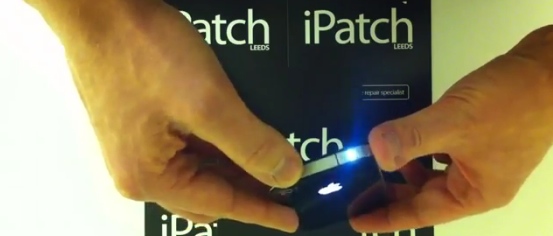
This is pretty cool. The folks over at iPatch, a UK-based iPhone repair shop, have come up with an interesting hardware mod that turns the headphone jack on your iPhone 4/4S into an LED flashlight.

If you recognize the name iPatch, it's probably because it's the same team that brought us the glowing Apple logo mod for the iPhone 4 last year. And now it's back with the "headphone jack torch..."

‘Plugication’ will automatically restart music when headphones are connected

Tweaks like these are the reason why I love jailbreaking so much. Jailbreaking allows you to add obvious features to the iPhone that Apple may have looked over, or purposely omitted.

Plugication is the perfect example of what I'm talking about. It's a jailbreak tweak that forces your music to resume when you plug your headphones back into your device.

Check out our full video demonstration of Plugication inside...

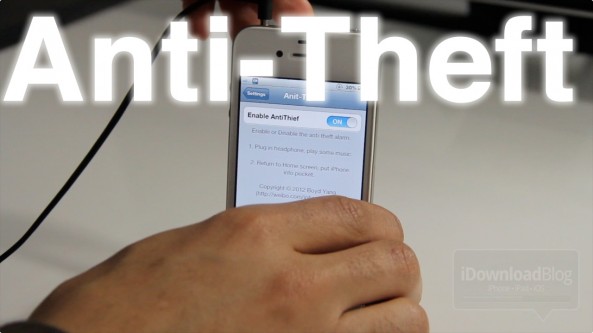
‘Anti-Theft’ sounds an alarm when your iPhone is stolen

Afraid a thief might try to snag your iPhone while out an about? Well, don't look for Anti-Theft to help you. By the time you hear the alarm sounded by this jailbreak tweak, any such thief will be long gone.

Anti-Theft can, however, assist you in a small classroom or work environment. Maybe. Okay who are we kidding? If you're relying on a tweak like this to keep your iPhone secure, it's probably already gone by now.

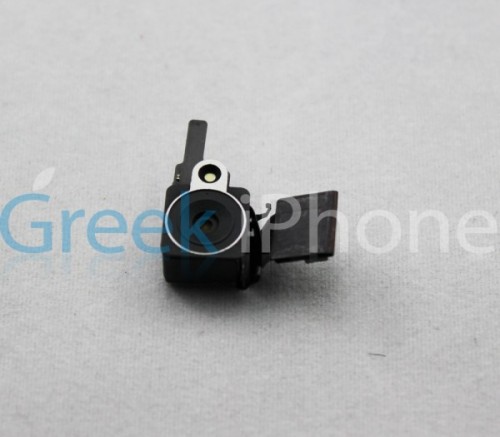
Finally, Leaked iPhone 5 Components that Matter

Apple is expected to unveil its new iPhone (or phones) in the next few weeks, and as usual the rumor mill is on fire. Also right on schedule are the flurry of purported next-gen components we're seeing pop up all over the web.

But so far, the parts haven't really amounted to much. Although some differences have been noted, the pieces in general look very similar to those found in the iPhone 4. Finally, some parts have surfaced that actually matter...

The Anatomy of an iPhone 4

This is the first of an ongoing series of videos that will provide in-depth coverage of the iPhone. Initially we will be targeting basic iPhone usage, such as the device's anatomy, guides on how to keep the iPhone in great shape, and other essential, but basic information.

Our goal is to provide a one-stop and comprehensive resource for all iPhone users, including those of you who are new to the wonderful world of iPhone. We hope that you will find these guides, walkthroughs, and tutorials beneficial, and encourage community feedback so that you can assist new ones.

Without further ado, let's talk about the basic anatomy of the iPhone 4, shall we?

Inception, There’s An App For That

It's not that often that an app like Inception comes along. That's right, Christopher Nolan's masterpiece film has its very own iPhone app!

The Inception app pioneers the use of augmented reality with sound. It synchronizes an augmented layer of music and ambient noise with the world around you.

This groundbreaking app experiment is the project of Christopher Nolan, Michael Breidenbrücke and Hans Zimmer. In case you didn't know, Christopher Nolan was the writer and director of the Inception movie and Hans Zimmer wrote and produced the movie's score...

5 Controversial Features We Could See on the iPhone 5

Everyone has their list of must have features for the iPhone 5, but a lot of them are of the obvious variety. Things like more storage space, a better camera, and more RAM. Boring!

Apple has always been a company that pushes the envelope, so it makes sense that the iPhone 5 could be a device that Apple is willing to take a gamble on. If you don't adapt well to change, you just might want to take a deep breath before reading this...

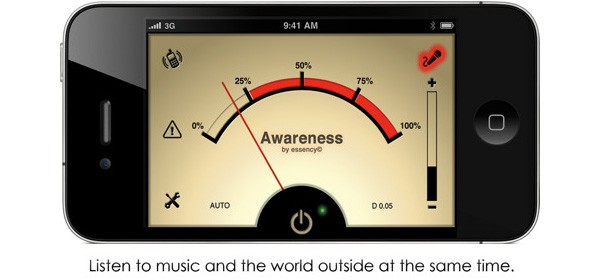
Awareness iPhone App Filters Out Unwanted Noise in Your Headphones

Just for the record I have yet to publish an article for an app that has been sponsored or paid for in any way. I say that so when you see that I'm writing about an app, that I actually find it worthy or ridiculous enough to mention. This one falls under both categories.

Engadget has a little write up about a new selection in the App Store called Awareness! (punctuation theirs). Awareness sets up a noise threshold to your headphones, then disallows those noises from entering your state of consciousness. At least that's what it says...

Learn Something New Everyday

So maybe I'm an idiot, and if I am, then Sebastien will be sure to let me know. But I had no idea the iPhone headphones were so versatile. I knew that you could click and double click your way through songs, but I had no idea that 3 quick clicks would take you back a song. This is very handy for when you can't access your iPhone's GUI right away (jogging, squished in an an airplane seat).

The folks over at macosxhints.com said this was just added in 2.1, so I can't be that far out of it.

Also another interesting fact about the wonderful iPhone headphones, (these are always good ice breakers at awkward get togethers) , they are compatiple with the new macbook line Apple launched today. They will be able to control iTunes via the "clicker" and offer another input with its built in microphone.

Don’t overlook those iPhone earbuds

If you are like me, you look at the iPhone earbuds and leave them in the box.  The ones I got with my previous iPods were pretty non-descript and very basic.

It wasn't until i started reading the manual (ughh) that I realized that these earbuds are not the typical iPod headphones. They come with a special switch/microphone that lies between the earbuds and the place where the two separate wires join together. You can use this switch to do all sorts of things. And it even works when the iPhone is locked.

When you are listening to music:

Click once to pause, and again to play. Click twice quickly to skip to the next track

If you get a call while the headset is plugged in, you can hear the ringtone through both the iPhone speaker and the headset. HERE IS THE COOLEST PART. If you are listening to music when the phone rings, The music pauses itself and then resumes when you hang up.

When the phone rings:

Click once to pick up the call. The microphone allows you to talk with just the headphones on. You can also reject the call. Press and hold for about two seconds, then let go. When you let go, two low beeps confirm you declined the call. (you can also do this by pressing the on/off button at the top of the phone)

When you are already on a call:

Click once to end a call

When you are already on a call, and you get a second call:

Click once to switch to an incoming or on-hold call and put the current call on hold. Click again to switch back to the first call. Press and hold for about two seconds, then let go to switch to an incoming call and hang up the first call. When you let go, two low beeps confirm you ended the first call.