App Store Apps

The 10 best photography apps of 2013

The year is coming to a close. We’ve spent the past 52 weeks talking about jailbreaks, rumors, new products, gear, Apple news, and apps. Apps are my specialty around here. I find them, test them, and tell you all about them.

That’s why it is my job to tell you about apps and games that the writers of iDownloadBlog think are the cream of the crop for the entire year. For the rest of this year, and probably into 2014, we will have lists of our favorite apps in the most popular categories that released in 2013. This week, the category is photography…

Infuse iOS media player gets thorough iOS 7 makeover, now free

I'm a big fan of Infuse, a versatile iOS media player by jailbreak developers FireCore, the same team that brought you aTV Flash Black for the Apple TV. Why? Because consuming video in file formats that are foreign to iOS is high maintenance. I'm just reluctant to waste my precious time figuring it all out. Infuse elegantly takes the pain out of messing with the dull file conversion, syncing and hunting for subtitles and replaces that whole mind job with an enjoyable movie-watching experience.

Infuse supports 14 non-iOS video formats, features high-performance playback for 1080p content and has auto-download of cover art and other metadata from TheMovieDB and TheTVDB, with one-tap subtitle downloads from OpenSubtitles.org. It also implements the best AirPlay subtitle streaming I have ever seen on an iOS device, hands down. That Infuse supports multiple audio tracks/subtitles and integrates with trakt.tv to scrobble plays back to your account, submit ratings and post shouts doesn't hurt either.

As not everyone was down with Infuse costing five bucks, not many people got a chance to enjoy Infuse goodies. Not anymore. Starting today, Infuse 2 for iPhone and iPad is free in the App Store, with advanced features available as an in-app purchase upgrade. Infuse used to rely heavily on skeuomorphism so I was curious to see how developers would transition its graphics-heavy interface to clean iOS 7 aesthetics...

Readdle rolls out PDF Expert 5 with iCloud, shared folders, new Review mode and more

The Ukraine-based app maker Readdle today released a big update to its PDF management app, PDF Expert for iPad. The software makes reading, annotating or editing PDF documents on your iPad a snap, with advanced capabilities like highlighting and handwriting support, the ability to sign your PDFs digitally (useful for contracts and other legal documents), insert text and stamps and more.

PDF Expert can even merge multiple PDF documents into one so it's much like the OS X Preview app feature-wise.

The fifth major iteration offers such enhancements as the new shared-folder capability, AirDrop sharing, a revamped file manager, iCloud storage and sync for your PDFs and lots more. The full breakdown is after the break...

Amazon Cloud Player now available in BMW Apps and MINI Connected-equipped vehicles

In time for today's rumored iOS in the Car launch across select Honda vehicles, Amazon has announced a new version of its free Cloud Player for iPhone and iPad which integrates straight with the dash. Cloud Player is the online retail giant's official cloud-storage client which lets you access your MP3 files residing in the Amazon cloud. Today's update makes it easy for music lovers to play songs through their BMW Apps and MINI Connected-equipped vehicles' in-dash system...

Ember, digital scrapbook Mac app, is now available for iPhone and iPad

In keeping with its promise to bring Ember to iOS in December, Realmac today released the iPhone and iPad version as a free download in the App Store. Basically a companion for Realmac's Ember for Mac, the iOS app features iCloud sync, photo collections with advanced natural language search, the handy ability to automatically sort screenshots imported from your iOS Camera Roll into Phone and Tablet collections, sharing via Mail, AirDrop, Messages, Twitter and Facebook, and lots more.

Jump past the fold for the full breakdown...

Get inspired to take photographs with OKDOTHIS

It happens to everyone. You’ve got your fancy DSLR camera and a brand new lens that you’ve only used once. It sits by the front door, waiting for you to take it with you the next time you head out for a walk, but it seems like the only time you take pictures anymore is when you go on vacation.

OKDOTHIS is a photography app that inspires you to go out and take pictures that are outside of the box. It is not just for DSLR enthusiasts either. If you enjoy iPhone photography, this app could inspire you as well…

WhatsApp iOS 7 update is out with new design, broadcast lists and more

The highly anticipated iOS 7 update for WhatsApp finally landed in the App Store this afternoon. The update brings the iOS client for the popular messaging service to version 2.11.5, and includes an all new design, new features and various improvements.

One of the big new features in 2.11.5 is called broadcasts lists, and it allows you to send messages to many people simultaneously. So say for instance you have a list of your classmates or work colleagues, you can message them all at once instead of individually...

Paper by FiftyThree picks up palm rejection, erase and blend features for Pencil

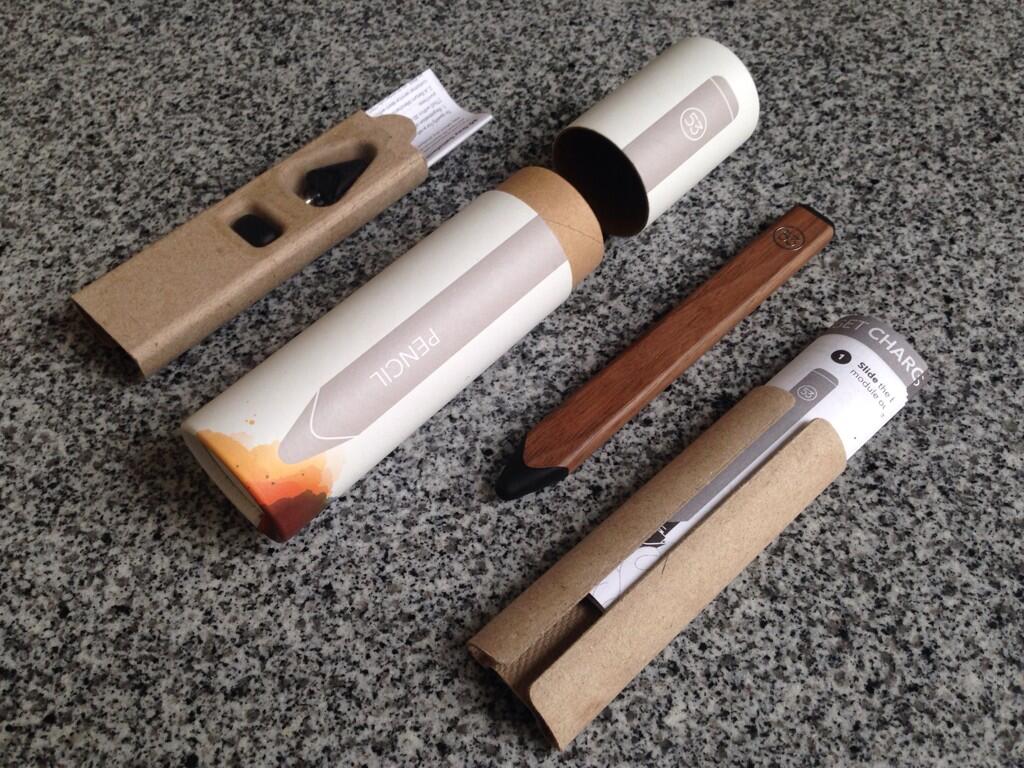
FiftyThree, the fine people who brought you the excellent iPad drawing program aptly named Paper, have been taking pre-orders for their companion high-quality stylus, the Pencil, for more than a month now. As we explained in the announcement post, the Pencil uses power-efficient Bluetooth 4.0 technology to communication with the application running on your iPad.

But it's the marriage of high-quality Pencil hardware and premium Paper software which enables seamless features such as the ability to carve away parts of your drawing using a built-in eraser, without having to switch in-app tools first.

With first Pencil shipments arriving later this week, FiftyThree has refreshed Paper for iPad with hardware-specific support for the advanced blend/erase capabilities and the palm rejection feature which disregards spray input when drawing on the iPad's touch-sensitive screen...

Following complaints from Apple, TextExpander gives up Reminders trickery

Over time, I've managed to purchase a lot (too many?) of apps for my iOS devices and Macs. But if you asked me to name one instant purchase I have never, ever regretted, I'd easily pick TextExpander by Smile Software in a heartbeat.

This handy utility doesn't come cheap: the Mac edition will run you $34.99, and then an additional $4.99 for the touch-optimized version for the iPhone, iPod touch and iPad.

Despite dropping forty bucks on this particular app, I've recouped my investment many times over in just a few short months, by cutting down on the time spent typing common terms and phrases. TextExpander lets me create handy shortcuts which automatically expand during text entry.

For example, I have the 'iDB' shortcut set up to auto-expand to 'iDownloadBlog'. Same with common URLs, brand names and other oft-used snippets of text. The problem is, the curious little trick the app employs to manage and sync those snippets across third-party iPhone and iPad apps that integrate with TextExpander hasn't sat well with Apple.

The App Store review team has refused to approve a recent update on the grounds that Smile's use of the stock iOS Reminders app for shared snippet storage is no longer acceptable. In response, Smile has introduced a new snippet-sharing method and updated an accompanying SDK for third-party app makers...

iDB’s Cyber Monday Deals Roundup

Folks who chose to skip all of the Black Friday mayhem this weekend will be happy to hear that a new wave of deals on apps, consumer electronics and other products are on the way. And there's no crowd-fighting or line-waiting required.

Tomorrow is known as Cyber Monday, a marketing term created for the Monday after Thanksgiving to promote online shopping. And once again, a number of retailers and manufacturers will be offering major discounts on their products.

And again, iDB has you covered, as we've collected all the best offers and put them in one, easy-to-read list. Presenting our Cyber Monday Deals Roundup...

We Play: Super Hexagon

The iPhone and iPad are serious gaming devices. If you ask me, games are one of the best perks about owning an iOS device. The problem is that, just like with virtually every other genre of app on the App Store, there's an abundance of games available and many of them can be quite terrible.

With that in mind, I've decided to start a new series showcasing some of the games available on iOS. Unlike a normal post, I'll actually add video along with commentary of myself playing the game. By doing this, you'll be able to better gauge whether or not the game is right for you.

I'll be doing this a lot with new releases, but I'll also dig back in my stash of previous gems that everyone should know about. The first game in this series is a game that's been available for quite some time now—the legendary Terry Cavanagh's Super Hexagon. This is far and away one of my favorite games for iOS, because it has the perfect mix of drama and replay-ability. Watch me play Super Hexagon after the break.

Boxie goes free: everyone can now prettify their Dropbox

As a Dropbox power user on a daily basis, I am very dissatisfied with their mobile app because it leaves a lot to be desired in terms of advanced capabilities, so much so that I've recently become a Boxie convert and never looked back.

This awesome Dropbox client for the iPhone and iPad used to cost two bucks so I imagine the price tag must have put off a lot of would-be users, especially give Dropbox’s own official iPhone and iPad client is free in the App Store and good enough for most of casual Dropbox users.

Those who depend on Dropbox will be happy learning that developer Tapwings has now completely removed barrier to entry because starting today, you can download Boxie free from the App Store (the price cut is permanent).

Dropbox fans would be wise to immediately treat themselves to this awesome app which will soup up your Dropbox experience with the elegant user interface while allowing for some advanced features not supported by Dropbox’s own app.

I'm talking stuff like moving an item in a folder via drag-and-drop, per-folder sorting, ZIP archive extraction, direct Dropbox-to-Dropbox transfer and lots more...