Firmware

Apple posts iOS 6.1.1 firmware fixing iPhone 4S reliability, 3G issues
Right on cue, Apple has rushed out the new iOS 6.1.1 firmware update to the iPhone 4S owners to fix 3G connectivity issues, enterprise problems and quite possibly squash a few reliability related bugs. iPhone 4S owners can apply an over-the-air update by going to Settings > General > Software Update. Of course, if you're already jailbroken, do not update to iOS 6.1.1 until it becomes clear whether or not it breaks the jailbreak...

How to save SHSH blobs for iOS 6.1

Every time there's a new jailbreak, the same message is preached: Save your SHSH blobs! In fact, even when there is not a jailbreak, it's a good practice to always save your SHSH blobs. These files are absolute must haves if there ever opens up the possibility to downgrade back to iOS 6.1 once newer firmware is released. If you don't save your blobs for a specific firmware, then the possibility of ever being able to downgrade to that firmware is slim to none.

So please, be proactive. Save your SHSH blobs right now. That way, when Apple drops iOS 6.1.1, or whatever its next firmware will be called, you will already have your blobs saved. Apple has been quick about closing its firmware signing window as of late, so once the new firmware is released, it might be too late to save the iOS 6.1 blobs.

If you haven't already done so, there's no need to feel ashamed, but act now. Take a look at our easy to follow step-by-step walkthrough inside, and we'll show you just how simple the process is.

Apple TV updated: use Bluetooth keyboards, queue up songs, access purchased music

Hot on the heels of releasing the new iOS 6.1 software with iTunes Match improvements, Siri movie ticket sales and enhanced LTE carrier support, Apple just posted a matching firmware update for its $99 Apple TV set-top box.

As indicated back in December 2012, one of the biggest new features the new software brings out is awesome support for Bluetooth keyboards, making the little hockey-puck much more than a "hobby" device. Other improvements include enhanced iTunes in the Cloud and iTunes Up Next. Go past the break for the full breakdown...

Apple rolls out 5.1.1 Apple TV software with iTunes Up Next

Hot on the heels of posting the eagerly anticipated iTunes 11, a major revamp of the jukebox app focused on iCloud integration and cleaner navigation, Apple of California also started pushing an incremental update to the Apple TV, its $99 set-top box. The iOS 5.1.1 firmware number with a build number of 10A831 is now available as a Software Update for both the second and third-generation Apple TV. To apply it, just choose Settings > General > About on your Apple TV...

Apple releases iOS 6.0.1: fixes keyboard glitch, improves Wi-Fi and more

Apple has this morning released an update to its mobile operating system, iOS 6.0.1. The update comes just a day before the official launch of Apple's new 4th gen iPad and iPad mini.

In iTunes, updating to 6.0.1 is business as usual. But if you have an iPhone 5, you'll likely see the above screen asking you to install an 'Updater' before you receive the actual update. As it states, the Updater fixes a bug that prevents the iPhone 5 from installing updates wirelessly over the air.

So what's new in iOS 6.0.1? We've got the full change log after the break...

How to downgrade iOS 6 to iOS 5.1.1 on A4 devices

Have an iPhone 4, iPod touch, or below running iOS 6, and would like to downgrade back to iOS 5.1.1? Doing so is easy is you have your SHSH blobs saved for iOS 5.1.1 and can follow the steps inside. Unlike the beta period of iOS 6, you must have your SHSH blobs for iOS 5.1.1 save for you device now, because Apple has stopped signing iOS 5.1.1.

To downgrade, you will need the latest public version of RedSn0w. We will use the SHSH Stitching feature to combine the appropriate IPSW file for 5.1.1 and your corresponding SHSH blob for the device you wish to downgrade. It may sound a bit confusing, but it's extremely easy if you follow along carefully.

Take a look inside for the full walkthrough and video how-to.

Apple releases an updated version of iOS 5.1.1 for the iPhone 4 GSM

As 9to5 Mac first reported, Apple has released an updated version of iOS 5.1.1 for the iPhone 4 GSM. The build for this latest version is 9B208, while the previous version was 9B206. Interestingly enough, the release is only for the iPhone 4 GSM, and it's likely a small bug fix given its slight build number difference.

Either way, we recommend that you hold off on updating until given the all clear is sounded with regard to jailbreak compatibility. Make sure your save your iOS 5.1.1 SHSH blobs so that you can take advantage of a future downgrade if need be.

Sn0wBreeze v2.9.2 released to jailbreak iOS 5.1 on Windows

Hot off the heels of Thursday's RedSn0w iOS 5.1 compatibility update comes Sn0wBreeze v2.9.2, which makes the popular Windows jailbreak tool compatible with iOS 5.1.

If you're familiar with previous iterations of Sn0wBreeze, then you're not going to find any surprises here. It's still about creating a custom IPSW and restoring via iTunes to accomplish the jailbreak.

One of the advantages that you have with Sn0wBreeze is that it will preserve your baseband for those interested in maintaining an existing unlock.

This updated for Sn0wBreeze is compatible with A4 devices and below, and is of course, a tethered jailbreak. Check out more details inside...

Apple has stopped signing iOS 5.0.1

If your iOS device (or devices) is jailbroken, we hope you heeded our warnings not to update to iOS 5.1. As expected, the latest software update for Apple's mobile OS breaks both the Corona untether and the Absinthe exploit in one fell swoop.

Even though Apple released iOS 5.1 on Wednesday, alongside the announcement of its new iPad, it continued to sign 5.0.1 firmware over the last 48 hours or so. Well, now it looks like that window has closed...

How to jailbreak iOS 5.1 with Redsn0w 0.9.10b6

iOS 5.1 has finally dropped, and for the most part we totally recommend staying away from the update if you care anything about your jailbreak, as does the iPhone Dev Team.

That being said, for those with older A4 devices, it is possible to enjoy a tethered jailbreak on iOS 5.1 and still downgrade back to previous firmwares if you have your SHSH blobs for those firmwares.

With A5 devices like the iPad 2, and the iPhone 4S, it is impossible at the moment to downgrade to any older iOS 5.x firmware, even if you have your SHSH blobs saved. So don't upgrade to 5.1, especially if you care about your iPhone 4S jailbreak.

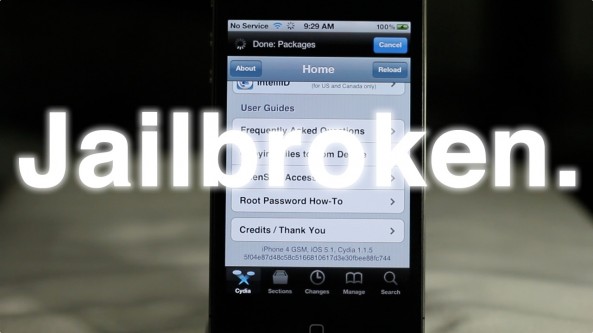
If you have an iPhone 4, iPod touch, iPhone 3GS, or original iPad, then check inside for a tutorial on how to perform a tethered jailbreak on iOS 5.1...

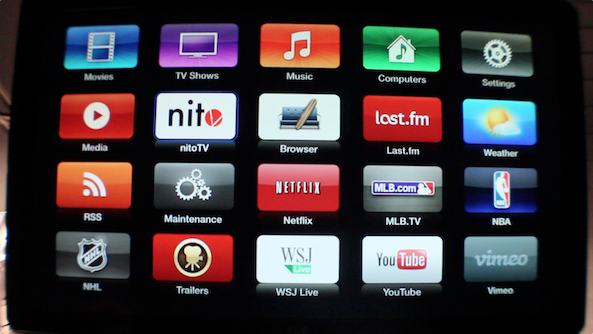
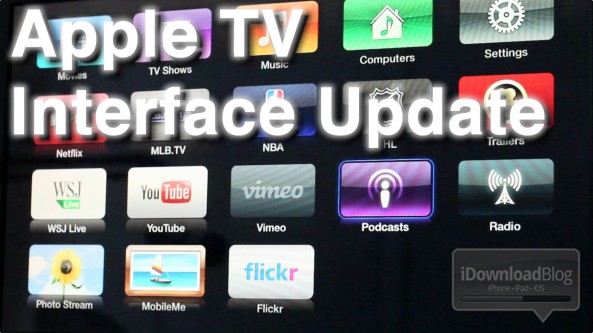
Hands on with the new Apple TV interface [Video]

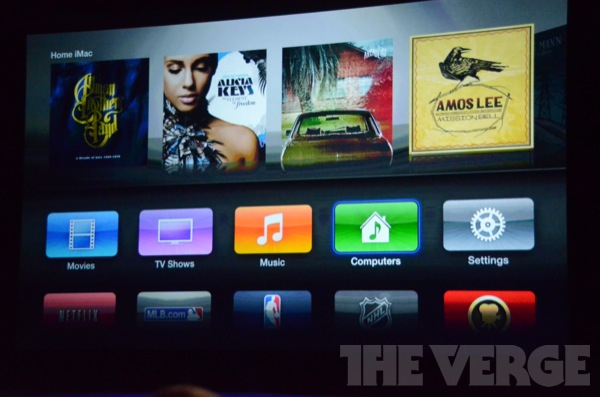
The Apple TV received an update to its interface, shortly after today's iPad media event.

The interface, while nice at first glance, does little more than spiffy up the Apple TV's Home screen. Underneath the friendly bubble based interface, you'll find the same text-based menus of old.

It's basically just a shiny coat of new paint on top of the Apple TV's plain jane UI. It's certainly not a sole reason to purchase an Apple TV, or negate your jailbreak just to enjoy the new UI...

New Apple TV interface will be available for existing Apple TV’s via software update

Feeling a little blue about the Apple TV refresh now that you see it got a nice new interface along with 1080p? Don't fret, current Apple TV owners will be able to bask in the glory of that new interface as well via a software update later today.

Of course, if you're an Apple TV jailbreaker we advise you to hold off on updating if you want to maintain your jailbreak, but we have to admit it will be mighty hard not to give into the curiosity of the new UI update.