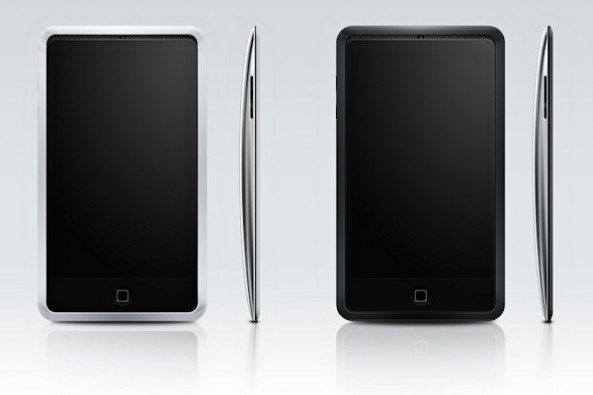
Rumor: iPhone 5 Will Launch at End of June

A report from the Korean site ETNews.co.kr claims that Apple will release the iPhone 5 on the 4th week of June. This rumor directly opposes the previous claim from TechCrunch that Apple would push back the iPhone 5 announcement to later this fall.

ETNews bases this report on inside knowledge that Korean wireless providers SK Telecom and KT will be the first to carry Apple's next iPhone. Will we see an iPhone 5 hardware announcement at WWDC this summer after all?

Jailbreak Your Apple TV2 on 4.3.1 with PwnageTool [Tutorial]

For those of you who own an Apple TV2 and have been looking to jailbreak it, the time has arrived. Although the ATV2 has been hacked before, this is the first official solution available for those who have the latest iOS 4.3 software.

Even the tutorial we released last week on jailbreaking your Apple TV 4.3 with Seas0nPass wasn't an official release. It was extremely buggy and required you to connect your ATV2 to your computer every time it restarted.

Well, thanks to the hard work of the Dev Team, Saurik and NitoTV, we finally have an official jailbreak solution for iOS 4.3. So for those interested in hacking their Apple TVs and adding tons of extra capabilities to that little black box, let's get started.

Important Note: This is only for 2nd generation Apple TVs, the black one. Also this particular tutorial is only for Mac users, as it uses PwnageTool which is currently only available for Mac OS.

Before we start hacking, you want to make sure your Apple TV is on the latest software version. You can do this by connecting the device to a computer with iTunes or from the Apple TV main menu. Just go to Settings > General > Update Software.

Step 1: You will need a micro-USB cable. This are the most common USB cables and are typically used to charge smartphones. Also you will need the latest version of iTunes. Finally, you need PwnageTool 4.3, which can be downloaded here. I always download tools to my desktop so I can keep track of them.

Step 2: If you updated your software via the Apple TV itself, you will still need the firmware file which you can get here. If you updated through iTunes, move along to step 3.

Step 3: Open up PwnageTool and select your device. Obviously for this tutorial we want the Apple TV2. Click the blue arrow and let the software find the file. When it's done, select the Apple TV firmware file and click next.

Step 4: PwnageTool will now create a custom jailbroken file out of the firmware, so give it some time. Once it's done working its magic, plug your Apple TV into your computer using the micro-USB cable. Make sure your power and HDMI cables are left unplugged.

Step 5: The software will walk you through the DFU process, which will prep your Apple TV for the custom firmware. If successful, it should look like this:

Step 6: You can now close PwnageTool and open up iTunes. With your Apple TV plugged in, iTunes should immediately go to the ATV page. You'll see a big button that says restore. While holding down your Mac's Option key, click restore. This should launch a Finder window and allow you to choose the custom firmware, that PwnageTool made, from your desktop.

Step 7: Let iTunes do its thing and once it says completed, you're done. Unplug your Apple TV from your computer and back into your TV set. If you see the NitoTV option in the main menu, you're jailbroken!

From here you can begin to experiment. Stay tuned to our blog as we post more tutorials on some of the cool things you can do with your new jailbroken Apple TV, such as browse the web and even watch Hulu.

Jailbreak Your iPad on 4.3.1 with PwnageTool [Tutorial]

The long-awaited jailbreak for Apple's iOS 4.3.1 is finally here. It is the first official jailbreak since Apple released iOS 4.3 almost a month ago. Those with iDevices wanting to take advantage of some of the new features in 4.3, haven't been able to upgrade without losing their jailbreaks.

That all changed in the wee hours of last night, when the Dev Team members finally released the anticipated software. The exploit is available in 2 different forms of software: PwnageTool, which is for Mac users only, and RedSn0w, which will work on either Windows or Mac.

This step by step tutorial will show you how to jailbreak your iPad on iOS 4.3.1, using PwnageTool. This software is for Mac users only. If you are on a PC, follow our RedSn0w tutorial here.

Important Note: Just remember this is not for the iPad 2, there is no jailbreak available for this device yet.

Before we get started, you want to make sure your iPad is on iOS 4.3.1. Backing up your iPad to iTunes is also recommended, better safe than sorry. But don't worry, the process is super simple and will have your iPad jailbroken in no time.

Step 1: For this tutorial, you'll need PwnageTool 4.3, which you can download here. Make sure you select the 4.3 version, as it is the only one that will work. I always download my tools to my desktop so they're easier to find.

Step 2: Load up PwnageTool, select the iPad/Apple TV option and click the blue arrow. With this method, PwnageTool should actually locate your iPad firmware on your hard drive for you, so there is no need to download the .ipsw file.  Select the iPad firmware and click next.

Step 3: Sit tight as PwnageTool does its thing, it can take a while. It is taking the file you selected and jailbreaking it. Then we will load the jailbroken firmware onto your iPad.

Step 4: Once done, you will be prompted to connect your device via usb. PwnageTool will now help you put your device into DFU mode. If you don't get it the first time, don't fret. Just wait until it's finished giving DFU instructions, and click try again. If you did it correctly, it should look like this:

Step 5: Now you can close PwnageTool. Open iTunes with your iPad still connected, and you should receive this message:

Step 6: Don't just click restore because you will just install Apple's original firmware. While holding down your Mac's Option key, click restore. This should open up a window for you to browse for the file. Select the custom firmware from your Desktop that PwnageTool just created, and restore it.

Step 7: It may take a while for iTunes to install the custom firmware on your iPad. But once completed, your iPad should restart itself and the Cydia icon should be on your home screen.

That is how you jailbreak your iPad on 4.3.1 with PwnageTool, any questions?

Jailbreak Your iPad on 4.3.1 with RedSn0w [Tutorial]

The long-awaited jailbreak for Apple's iOS 4.3.1 is finally here. It is the first official jailbreak since Apple released iOS 4.3 almost a month ago. Those with iDevices wanting to take advantage of some of the new features in 4.3, haven't been able to upgrade without losing their jailbreaks.

That all changed in the wee hours of last night, when the Dev Team members finally released the anticipated software. The exploit is available in 2 different forms of software: PwnageTool, which is for Mac users only, and RedSn0w, which will work on either Windows or Mac.

This step by step tutorial will show you how to jailbreak your iPad on iOS 4.3.1, using RedSn0w. If you are a Mac user and prefer to use Pwnage Tool, stay tuned. We will provide a tutorial for that software shortly. Either method is extremely easy, and will have your iPad jailbroken in no time.

Important Note: Just remember this is not for the iPad 2, there is no jailbreak available for this device yet.

Before we get started, you want to make sure your iPad is on iOS 4.3.1. Backing up your iPad to iTunes is also recommended, better safe than sorry.

Step 1: For this tutorial, you'll need RedSn0w which you can download here. Make sure you select version 0.9.6rc9, as it is the only one that will work. I always download my tools to my desktop so they're easier to find.

Step 2: For this method, you will need the actual 4.3.1 firmware file. If you don't know where to find it on your hard drive, just download it to your desktop from here. Make sure you download the iPad file, 4.3.1.

Step 3: Launch RedSn0w and click Browse. Find your 4.3.1 firmware from the previous step and select it.

Step 4: The software will then give you a few options before continuing. For most of us, all we need is the Cydia icon. Make sure there is a checkmark by Install Cydia and click Next.

Step 5: Plug in your device to your computer and turn it off. Now get ready to follow some onscreen instructions. RedSn0w will walk your through a few steps to put your iPad into DFU mode.

Step 6: If you're successful, RedSn0w will start its magic. Don't worry if it doesn't happen right away, just turn your iPad off, click back and try it again.

Step 7: Once the software is done loading the exploit, your iPad will restarted, and your home screen should load up with the Cydia icon installed. Success!

That is how you jailbreak your iPad on iOS 4.3.1 with RedSn0w. Any questions?

AT&T Increasing Early Upgrade Pricing For iPhone?

If you're a person that likes to upgrade to the newest iPhone each year, still having not completed the previous 2-year commitment you signed, AT&T offers an early upgrade price. That upgrade price is usually about double that of the full 2-year contract pricing for new customer/eligible ugprades.

The guys over at AndroidCentral seem to have obtained an internal AT&T document that shows early upgrade price increased for the iPhone by $50.

Analysts Claim iPhone is Thriving, Verizon iPhone Most Acquired Handset in the Month of February

Although they are still far behind other companies like Nokia and Samsung in total mobile market share, Apple is making a name for itself in the smartphone industry. Because of its popularity, Apple's products and sales garner a lot of speculation from marketing research firms. These companies do tons of research and conduct poles to analyze a company's performance.

This data is useful for a number of reasons, such as, guiding investors who are looking to make large stock purchases. Popular tech intelligence company comScore has done some number crunching that should give anyone contemplating Apple stock the green light.

Not only did Apple gain more mobile phone market share in the last 6 months than any other company, their Verizon branded iPhone was the most acquired handset in the month of February....

Dev Team Releases Jailbreak for iPads on iOS 4.3.1


After weeks of waiting, a jailbreak solution for Apple's latest firmware has finally been released. The announcement that so many iDevice hackers have been waiting for, arrived extremely early this morning courtesy the Dev Team.

The jailbreak released is for iOS 4.3.1. It covers the iPhone 4, iPhone 3GS, the latest 2 generations of the iPod touch, the Apple TV2, and of course the iPad. As we've reported previously, the iPad 2 cannot be jailbroken with this software.

But don't worry, if you have an iPad 2 and are itching to customize it, known iPad hacker Comex is hard at work to bring you an iPad 2 jailbreak solution. We are told he has a working exploit, but hasn't figured out how he wants to package it for mass distribution. We will certainly let you know when we have more information on his progress.

If you have an original iPad, and are wanting to jailbreak it, feel free to go ahead and upgrade to iOS 4.3.1 via iTunes.You will also want to make sure that your iTunes is updated to the latest version. If you've done both of those already, sit tight, we will bring you a complete step by step guide on how to jailbreak your iPad shortly.

Is anyone ready to jailbreak their iPad?

How to Update to iOS 4.3.1 and Preserve iPhone 4 1.59.00 Baseband [Tutorial]

Now that Redsn0w 0.9.6rc9  finally provides the long awaited iOS 4.3.1 untethered jailbreak, many iPhone 4 owners with unlocked iPhones’ have been advised to hold off upgrading to 4.3.1 as you will lose the ability to unlock, since the newer firmware will update your baseband.

Furthermore, as we've mentioned earlier this morning, the new iOS 4.3.1 firmware currently is incompatible with the Dev Team's ultrasn0w unlock tool. It is recommended that you wait for the Dev Team to update this tool before upgrading and jailbreaking.

But for those anxious to update to the new iOS 4.3.1 firmware and still preserve their iPhone 4 1.59.00 baseband so they can be guaranteed an unlock when the Dev Team updates their ultrasn0w tool, follow our tutorial below. 

iOS 4.3.1 Causing WiFi Issues?

Hot off the heels of the new iOS 4.3.1 untethered jailbreak, there seems to be word going around that the jailbreak causes WiFi issues.

@i0n1c, the hacker who found the untethered kernel exploit for iOS 4.3.1 which the Dev Team intergrated into the RedSn0w jailbreak utility, clears up some confusion regarding the WiFi issues...

Jailbreak iPhone iOS 4.3.1

After much anticipation, the iOS 4.3.1 jailbreak was released early this morning, but I guess the actual time depends on where you live.

This is the first untethered jailbreak solution for iOS 4.3.1. There have been other jailbreaks for iOS 4.3.1 but they were tethered and had issues with stability.

Finally, we have a stable and working iOS 4.3.1 solution; actually we have many solutions, as you'll see below. Big thanks to @i0n1c for his untether, and the iPhone Dev Team for their hard work at making this a reality...