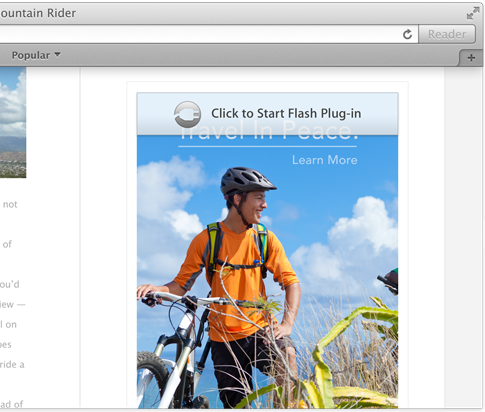
Have you ever opened a web page, and somewhere on the page a Flash video starts blasting sound? I'm sure almost everyone who's used a computer in the last few years has experienced that unfortunate occurrence. There are browser plugins and extensions to prevent such a thing, but Apple is now waging a direct assault on rogue plugins.
Safari Power Saver is a new feature exclusive to OS X Mavericks, and its job is to prevent plugins from auto starting while surfing the web. While that sounds good on paper, in practice this could potentially cause problems when you want to watch legit content that utilize certain plugins like Flash. The good news is that Safari Power Saver is smart enough to know which content is legit content that you want to use, and which content is stuff that you probably don't care to use.
I took a few minutes to put together a video demonstration of Safari Power Saver. Check inside for the full video walkthrough and detailed analysis.