Safari

TypeTab brings faster address entry to new Safari tabs

When you open a new tab in Safari, the default behavior is to showcase your favorites. You can then tap a favorite, or you can tap the address bar to manually insert a web address. TypeTab makes it so that the cursor is automatically inserted into the address bar and that the keyboard is exposed. Therefore, it's quicker to begin typing a web address when opening a new tab.

Apple fixes long-standing keyboard issue in iOS 8.3 beta

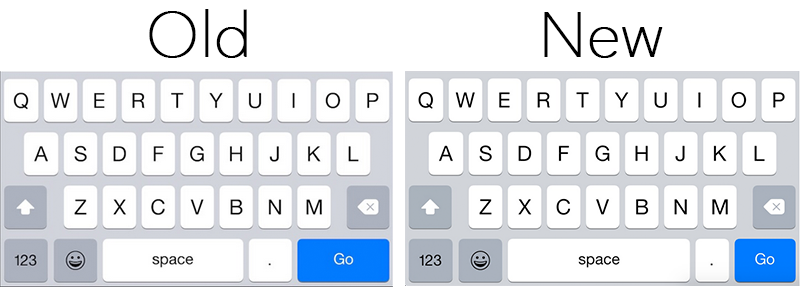
It appears Apple plans to fix a long-standing keyboard issue which caused users to inadvertently tap the period key when aiming for the space bar in Safari. As noted by MacRumors, beta versions of iOS 8.3 feature a design change that should resolve the problem.

In 8.3, Apple has made the space bar longer on the keyboard that pops up when inputting text in Safari's omnibar, and the 'Go' button shorter. This should make it less likely for users to encounter accidental period key presses when typing out their web searches.

How to make Safari for Mac’s status bar more minimal and useful

I like my browsers minimal. Safari for Mac admittedly boasts an aesthetically pleasing, clutter-free interface. But if there's one thing I've always hated about Apple's browsers, it's that status bar at the bottom of the Safari window.

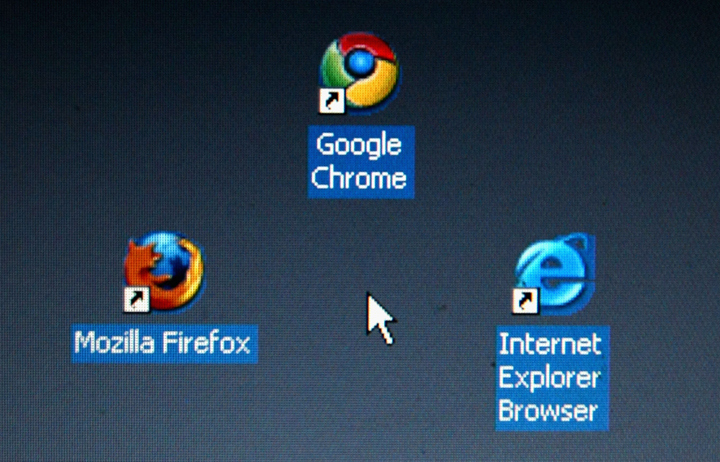
Though it conveniently lets you know where a URL will take you, once turned on it annoyingly just sits there whether you actually need it or not. I prefer Google's approach better: Chrome's status bar discreetly shows only when hovering over a URL.

Wouldn't it be great if Safari had a similar only-on-hover status bar? That's what Minimal Status Bar, a new browser extension by San Francisco-based developer Visnu Pitiyanuvath, does for you.

Glimpse lets you check your favorite webpages from Notification Center

Glimpse is a new app that lets you pin one or more favorite webpages to the Today tab of Notification Center, allowing to have a quick glance at your most visited websites, without having to launch Safari. The Notification Center extension is particularly handy to check news-focused websites where information is often time sensitive, and where a quick look is usually enough to get an idea of what is going on, without necessarily unlocking the device and opening up the full web browser.

Apple posts Safari updates for OS X Yosemite, Mavericks and Mountain Lion

After releasing then pulling a update for the desktop Safari browser on OS X last week, Apple on Thursday posted Safari 8.0.2 for Yosemite.

In addition to allowing Yosemite users to import username and passwords from Mozilla's Firefox browser, Safari 8.0.2 fixes a few annoying issues, among them history not syncing across devices if iCloud Drive is disabled and another one prevent a saved password from being autofilled after two devices are added to iCloud Keychain.

The update is available through the Mac App Store's Updates tab. A standalone installer should be available shortly from the Apple Support website. Safari 7.1.2 for OS X Mavericks and Safari 6.2.2 for OS X Mountain Lion were also released on Thursday.

Mozilla planning to develop Firefox for iOS to ‘be where our users are’

Mozilla has long stayed away from bringing its Firefox web browser to iOS, however it's looking to change its plans to "be where our users are".

The company's release manager, Lukas Bakk, took to Twitter on Tuesday announcing the company will develop Firefox for iOS. He didn't provide word on when it may be released, or if it's even in development yet, but it's definitely comforting words for the Firefox fans out there - which includes our own Sebastien Page. 

How to access Google’s Inbox service on Safari

A month ago, Google launched a new iPhone app called Inbox, a different take on email which uses Sparrow-like gestures to help you achieve Inbox Zero nirvana and surface the most relevant items that tend to get lost in an avalanche of unwanted emails users get bombarded with.

Available on iOS, Android and Chrome, Inbox leaves fans of Apple's Safari browser in the dark. It's fortunate that there's a quick workaround to that, let me show you how.

Inbox is available free in the App Store.

How to add pull-to-refresh to Safari in iOS 8

For a large screen device like the iPhone 6 Plus or even the iPhone 6, it takes some serious thought when designing apps. That's because it's much more difficult to reach certain part of the screen using one hand, so developers have to design their apps with one-handed users in mind.

But where such thought may be lacking, a jailbreak tweak can go a long way towards enhancing the usability of certain apps. That's definitely the case with this latest tweak called SafariRefresh. It adds a simple pull-to-refresh mechanism to Apple's stock web browsing app, and the result is a much more usable refresh function on large screen devices.

Safari on iOS 8 found to support animated PNGs

Safari on iOS 8 has been found to support animated PNG images (APNG), a standard conceived as a replacement for animated GIF, as discovered by MacRumors on Monday.

The Animated Portable Network Graphics file format was proposed in 2004, but failed to take off as a replacement for the animated GIF file format widely used to embed short animations online.

Unlike animated GIFs, APNG files support 24-bit images and 8-bit transparency not available for GIFs.