Reminders

Clear goes free one last time so you can migrate from Clear+ to Clear

In an attempt to fix the confusing mess surrounding seemingly same versions of its to-do app for the iPhone and iPad, Clear and Clear+, developer Realmac Software last month announced it would make the former app temporarily free so people who previously bought Clear+ could migrate to Clear without having to purchase that app, too.

Making true on its promise, Realmac on February 27 slashed Clear to $0. As the promotion ran for only 24 hours, not everyone was aware of the price cut. Those who missed their chance to save $4.99 by grabbing this nicely done gesture-driven app for zero bucks needn't despair - Realmac has again made Clear free for the next 24 hours.

What are you waiting for, get downloading...

Realmac adds iPad support to Clear for iPhone, migrates Clear+ users to Clear for free

Realmac Software has finally added native iPad support to its popular Clear to-do application for the iPhone and iPod touch. They're also moving customers from Clear+ back to Clear for free.

These changes are in response to user confusion amid complaints from people who were uncertain which version to buy, with some even mistakenly buying the iPhone edition when they really wanted the universal version that natively supports all form-factor iDevices.

Clear for iPhone with the newly added iPad support is now available in the App Store for $4.99. Clear+ remains a separate $4.99 download, though it's going to be offered free of charge for a limited time to allow Clear+ owners to migrate to Clear without being forced to buy the app twice...

Fantastical 2 now honors your iOS 7 Bold Text setting, improves navigation and more

Fantastical, Flexibits' popular calendar and to-do application for the iPhone and Mac, received its mandatory iOS 7 refresh two months ago. Though a separate purchase (currently 60 percent off: only $1.99 for a limited time), Fantastical 2 justifies its asking price by managing to build upon the already strong feature set of the original release with its nicely redone interface and a host of new capabilities that help take the way you create, edit and view calendar events on iOS and OS X to the next level.

In today's quick refresh, Fantastical version 2.0.4 brings out support for Bold Text accessibility option in iOS 7, along with improved reliability of the app icon badge, a pair of UI and navigation tweaks and mandatory fixes and under-the-hood improvements...

Remino review: a simple task reminder for keeping you focused

Lists, lists, lists. I love lists. The more the merrier. Not really. Actually, too many lists can be confusing and make you feel even less organized. The best way to make lists efficiently is to keep it simple.

Remino is an app the does one thing. It reminds you to do something. There are no categories, additional buttons, or priorities. If you need to create a quick reminder, you’ll have one in seconds…

Calendars 5 review: one of the best calendar apps for iOS

A few days ago, Readdle launched a brand new calendar app in the App Store. No, this is not just an update to Calendars + with a new skin. This is a brand new app with brand new features.

Calendars 5 is an iOS 7 friendly productivity app that lets you sync with your Google or iOS calendar, add reminders from your iOS Reminders app, and the best part, it is a universal app for both iPhone and iPad…

‘Overview’ allows you to manage mail, reminders, and events in one place

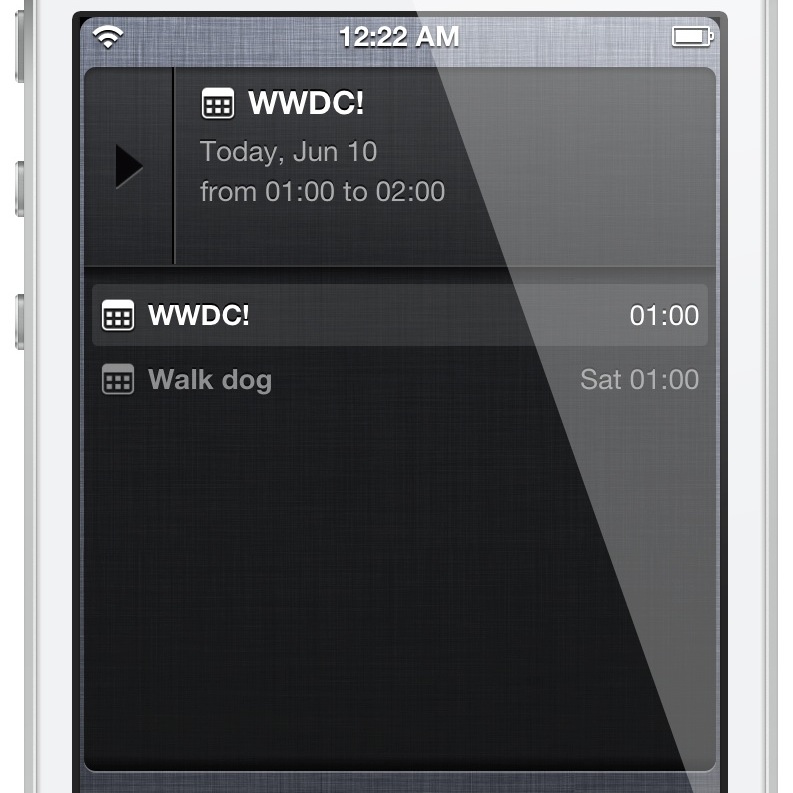
Overview is a brand new jailbreak tweak that provides a Notification Center widget containing email, reminders and calendar events. All of these items can be viewed directly via Notification Center. As you'll see, it's a really awesome design and concept, and it's from the same developer that brought us Tap to Widgets: Alan Yip.

You can easily scroll through all of the events, reminders, and email via the Overview widget. By tapping and holding on any of the items, you'll be taken directly to that item's full app. For example, if you tap and hold on an email within the widget, you'll be taken directly to the individual email message within the Mail app.

I've been testing out Overview for a few days now, and I'm confident that you'll like what you find, especially if you liked Tap to Widgets. Want to see how it looks in motion? If so, check out my full video walkthrough after the break...

More Evernote awesomeness: native reminders launch in iOS/Mac client

What started out as a simple note-taking solution is quickly becoming the Internet's favorite information management platform.

We're talking about Evernote, of course, the Jack of all trades, at least when it comes to note-taking, and I'm using the term loosely here. But if there's one feature that's been notably absent from Evernote it's the concept of time - but no more.

Thanks to a major update issued earlier today, Evernote users on iOS and OS X can now take advantage of reminders, right in their notes. With this helpful new feature, Evernote just leveled up in a major way.

Reminders sync across devices seamlessly, facilitate to-do lists, deliver in-app and email alarms, can be notebook-specific and allow for a range of interesting capabilities not possible before. Let's get down to the nitty-gritty, shall we?

How to share Reminders lists with others

I have to admit that ever since I discovered Wunderlist, I stopped using my Reminders app for the most part. I love Apple’s Reminders application and had used it for a while on all of my devices. I think I just wanted to try something new when Wunderlist came out and it satisfied my listing needs.

When Sebastien asked me to write a how-to guide for sharing Reminders on iCloud, it rekindled my love of the simple list-making app. Not only is it easy to create and edit reminders, but you can also share and collaborate on lists with anyone else in the world, even if they don’t have an Apple device with them. All they need is their iCloud account.

Update: While still correct, this article is slightly outdated. We have published a new tutorial on how to share reminders from iPhone, Mac, or a web browser. Click on that link for the most up-to-date way to share reminders with others.

Set intervals for the Reminders app with RemindMeAgain

A new tweak was just submitted to the Cydia store today, and it is called RemindMeAgain. As its name alludes to, RemindMeAgain works with the Reminders app to provide you with Reminders for tasks at preset intervals. RemindMeAgain will continue to bug you at the interval you set, until the task is checked as being complete.

Take a look inside for a brief look at the tweak...

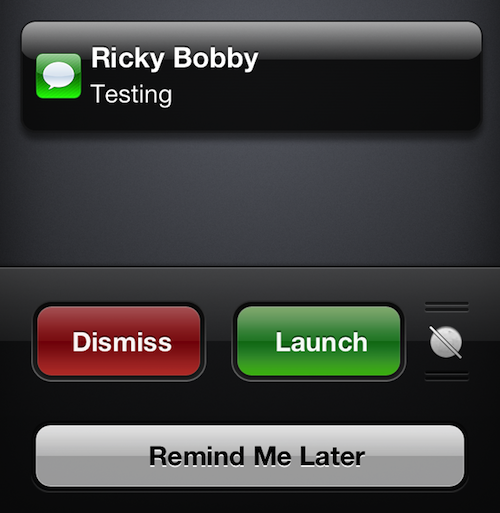
AnyReminder brings ‘Remind Me Later’ feature to Mail, Messages and more

In iOS 6, Apple introduced a handy new feature called Remind Me Later. It allows you, among other things, to set a time or location-based reminder when declining phone and FaceTime calls, so you don't forget to return them.

But what if you wanted to set similar reminders when declining messages or other notifications? Unfortunately, you can't. Apple has limited the feature to just the Phone app. Which is why, ladies and gentlemen, we jailbreak...

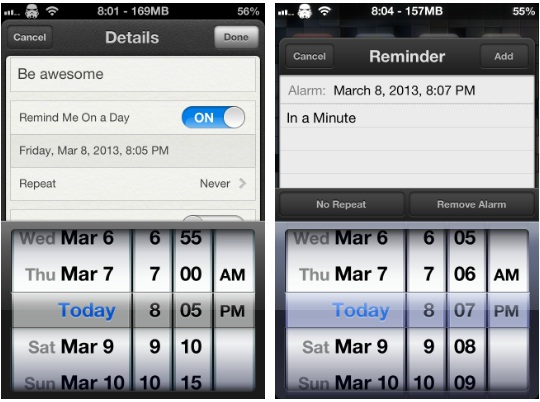
“In a Minute” lets you be very particular about when you’re reminded about things

If you're a heavy user of Apple's Reminders app, then you'll quite possibly have nudged up against one particular issue that some find irritating while others will likely have never even noticed.

The issue in question is Apple's assumption that people will only want to set reminders in five minute increments, meaning you can't set a reminder for 09:13, for example, unless you're creating the reminder with Siri's help. It might not sound like much, but if you want to manually set a few reminders to alert inside a five minute window, then you're out of luck.

That is, unless you install a new jailbreak tweak that popped up in Cydia today...

Pin Lock screen reminders to a non-jailbroken iPhone with ‘Task Paper’

We know that some of our readers who updated to iOS 6, or those of you who upgraded to the iPhone 5, get annoyed when we feature jailbreak tweaks. In for each article about tweaks we get at least one comment along the lines of, "Why are you covering tweaks when there's no jailbreak!?!" It's totally understandable, since you can't take advantage of all the awesome tweaks we've showcased. Lucky for you, the clever developers at Renegade Apps have found a way to add functionality to the Lock screen without relying on MobileSubstrate.

Task Paper (not to be confused with the similarly named TaskPaper) is a to-do list app, available in iTunes, that allows users to create persistent Lock screen reminders through generated wallpapers. These wallpapers provide functionality similar to the Reminders+ tweak, all without a jailbreak...