Mac Apps

Review: take a Quick Look inside OS X installer packages with Suspicious Package for Mac

I download apps for my Mac from the Mac App Store whenever possible. Going through the Mac App Store gives me a piece of mind knowing Apple screens all submissions and keeps harmful software at bay.

But every once in a while, an app comes along and gets distributed outside the Mac App Store's safe haven. True, one can verify signing information for non-Mac App Store apps in Terminal, but it isn't for the faint-hearted.

That's precisely the kind of problem that a nifty little Mac app, called Suspicious Package, solves in one fell swoop.

Created by a company called Mothers Ruin Software, the free of charge app is actually a plug-in for the Mac's Quick Look feature, allowing you to easily and quickly inspect contents of  a .PKG installer file after you've downloaded it but before it's launched.

Plaaying for Mac review: a better way to share what you’re listening to

Some people like to share what they are listening to with others. You might see a half-dozen tweets in an hour from a friend, but then nothing for the rest of the day. What gives? Did he stop listening to music, or just forget to share it?

Plaaying for Mac is a third-party music player that has a customizable auto-sharing feature so you can let your friends know what you are listening to without having to actually share it manually. We've got a full app review of Plaaying for Mac for you today.

Helium brings Picture in Picture options to the Mac

Picture in Picture mode is a cool new feature for the iPad on iOS 9. As we showed you earlier today, you can even take advantage of Picture in Picture mode on the iPhone, if you're willing to jailbreak.

But what about the Mac?

Fortunately there's a Mac app called Helium that does a pretty good job of emulating the Picture in Picture effect on the desktop. It's especially handy for watching YouTube videos. Watch our hands-on video to see what I mean.

1Password for Mac gains large type option, changing secondary vault password and more

AgielBits' popular password-management utility, 1Password, was refreshed in the Mac App Store today with several notable enhancements. For starters, the app has brought out a new large type option to make those passwords easier to read on huge monitors and Macs with high-resolution Retina screens.

People who happen to manage multiple vaults in 1Password should jump with joy as they can at last change passwords for secondary vaults, too.

The top layout view has seen some changes as well with rich item icons and customizable columns. Last but not least, 1Password 5.4 for Mac includes security updates to address the dreaded XARA vulnerabilities.

Pixelmator for Mac gains all-new Photos extension, Split View multitasking and more

The popular Photoshop alternative for the Mac, Pixelmator, was updated this morning in the Mac App Store. Bumped to version 3.4, the app includes full support for OS X El Capitan and iOS 9's Split View mode so you can use Pixelmator with another app in El Capitan's new side-by-side multitasking mode.

More importantly, Pixelmator now includes a brand new extension for Apple's stock Photos app that lets you edit images within the context of the Photos app using Pixelmator's Metal-based Distort tools.

Flume review: view your Instagram feed in a dedicated Mac app

Most people view their Instagram account via the official mobile app. However, you can check out your feed right from the Internet in most web browsers, and it looks pretty cool because the pictures are much bigger.

Flume is a dedicated Instragam viewer for Mac that creates a lovely experience different from what you see on the official website. We've got a full app review of Flume for you today.

CheatSheet brings iOS 9’s keyboard shortcuts overlay to the Mac

iPad power users received a nod from Apple this year with iOS 9’s new feature set. Aside from Split View and Slide Over, anyone using a physical keyboard in conjunction with their iPad can now hold down the Command key to get a list of all the shortcut key presses available in the currently running app. This is an excellent way for users to discover non-obvious key combinations in order to help speed up their workflow.

In OS X, discovering hotkeys is a bit more difficult than iOS 9's new simplified method, as many are hidden in crowded drop down menus, while others can be even harder to find. CheatSheet is a Mac app that brings iOS 9’s Bluetooth keyboard feature to OS X, adding the same hotkey-sheet functionality when holding down the Command key.

Fantastical 2 for OS X gains El Capitan support with split-screen multitasking and more

Developer Flexibits today rolled out an update to Fantastical for Mac, its reminder and calendar replacement available on both iOS and OS X.

Fantastical 2.1, the first major update to the Mac edition, features full support for Macs running OS X El Capitan ahead of its release next week, including support for El Capitan's split-screen multitasking.

A host of other changes and improvements have found their way into this release of Fantastical, such as swiping to delete events on El Capitan systems.

People on Yosemite and earlier versions can now scroll to a specific day or week in the Week and Month views with a trackpad and organize Reminders by list, but that's just tip of the iceberg.

Review: Mia for Gmail is the perfect replacement for Google Notifier

If you need a fast and lightweight email client for Gmail without the bells and whistles (and bloat) of Apple Mail, you should give Mia for Gmail a whirl. Mia is a minimalist desktop email client for OS X by Stéphane Quéraud.

As opposed to copious minimalist Gmail clients that however wrap the web interface inside native OS X code, Mia provides the full native experience and sits right in your Mac's menu bar rather than run in Safari or Google Chrome.

In addition to showing you most recent emails, Mia allows you to compose new messages and jump through all your inboxes with unbelievable quickness. All in all, it's the perfect replacement for Google's defunct Gmail Notifier app.

Review: WALTR for Mac converts & transfers any video to iPhone and iPad, no iTunes required

Getting DivX and MKV movies, FLAC audio files or audiobooks onto your iPhone, iPod touch or iPad is an incredibly cumbersome multi-step procedure, one that involves third-party apps like Handbrake to transcode “foreign” media files into iOS-friendly formats before importing them into iTunes for syncing with your iOS gadgets.

I've tried many, many apps which promise to get the job done before deciding to settle on WALTR by young European startup Softorino.

Now, I'm not exaggerating when I say that WALTR is an absolutely incredible piece of software. This nifty program literally takes the pain away from transferring media to iOS devices without worrying about file types.

Its lightning fast algorithm is hands down the best I've ever seen, on any platform, ever. I've been happily using WALTR for months now and couldn't be happier with it. And trust me when I say that you should be using WALTR, too, especially if you aren't jailbroken and want the simplest solution possible for transferring media to your device without going through iTunes.


Review: you don’t need Apple Watch to get reminded to stand up with this nifty Mac app

Your Apple Watch pings you when it's time to stand up and move a little and so should your Mac, except that it doesn't. Maybe you don't own an Apple Watch? Lead a sedentary lifestyle much? Hopelessly out of shape? You should make standing up a habit as standing for just three hours every day, five days a week, has the same health benefits as running ten marathons a year.

You could create a reminder to ping you every hour to stand up, but that's not an elegant solution as these alerts reach all your devices, not just your Mac.

A far better solution that I want to talk about today would be something like Stand. Stand is a simple Mac app built by developers Red Davis Hector Simpson which sends you a notification every hour to get up from your desk and move around a little.

VMware updates Fusion for Mac with support for El Capitan and Windows 10 with Cortana

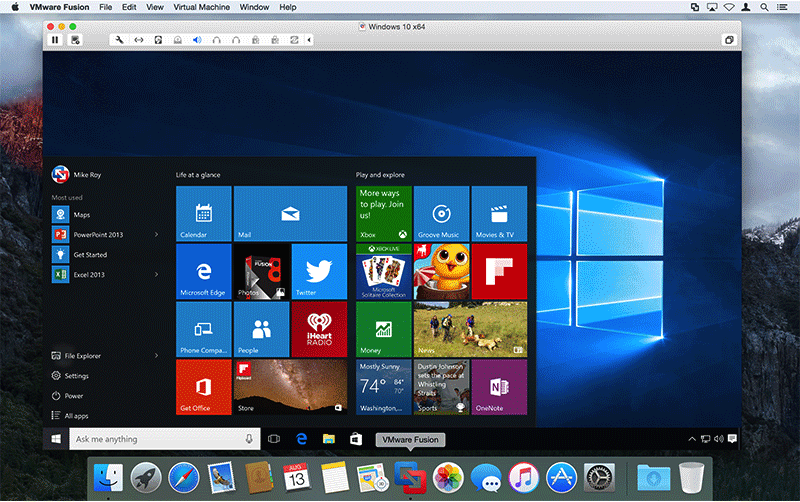
VMware today released Fusion 8 and Fusion 8 Pro with support for running Windows 10 with Cortana on OS X 10.11 El Capitan Macs.

A virtualization solution, VMware allows you to run OS X and Windows 10 side-by-side as opposed to dual-booting between the two operating systems.

Fusion 8 and Fusion 8 Pro also support native display resolution of the iMac with 5K Retina display, the USB-C port and Force Touch trackpad of Apple's 12-inch MacBook and sport other enhancements.

The company said existing Fusion 6 or Fusion 7 customers can upgrade to Fusion 8 for $49.99 or Fusion 8 Pro for $119.99. And if you're a Parallels Desktop for Mac user, VMware will treat you to a cool forty percent discount on Fusion 8 and Fusion 8 Pro.