Jailbreak Apps & Tweaks

These are the latest jailbreak apps and tweaks available for your iPhone or iPad. We save you time by highlighting only the best tweaks.

AnyBoard: switch between any keyboard with ease

AnyBoard is a brand new tweak available free of charge on Cydia's BigBoss repo. It allows you to quickly switch between any of the installed keyboards on iOS using a tap and hold gesture on the globe icon to the right of the '123' key.

Unlike the stock keyboard options, AnyBoard doesn't just allow you to switch to the keyboards you have enabled in your device's keyboard settings, but you can switch between any available keyboard in an instant. Watch our full video walkthrough after the break to see how it works in action.

How to locate app icons from Spotlight search

Spotlight search is cool and all, but I've always found it a little frustrating that you can only launch applications from Spotlight and not open the location where the apps reside. I'm happy to report that this "oversight" has been solved with a new jailbreak tweak called Icon Finder.

Icon Finder is a brand new and free jailbreak tweak that allows you to use a simple tap and hold gesture on your Spotlight search results. The tap and hold gesture will quickly reveal the exact location of the app in question, which could be a folder, or another page on the Home screen.

Have a look at our full video walkthrough of Icon Finder inside to see how it works.

How to use the Lock screen passcode screen to dial phone numbers

Have you ever wanted to use your Lock screen passcode for more than just unlocking your iPhone? If so, then boy, do I have a jailbreak tweak for you.

PassDial is a brand new tweak that allows you to assign a speed-dial number to a passcode of your choice. For example, I can assign the passcode '1-2-1-2' to phone number 1-888-888-8000, and any time I enter that specific passcode, the number assigned will be dialed.

We've created a hands-on video to show you how PassDial works in action. Take a look inside to see what this jailbreak tweak is all about.

How to look up dictionary definitions via Control Center

Define for iOS 7 is a jailbreak tweak that allows users to look up definitions from the convenience of iOS 7's Control Center overlay panel. The tweak, which is available right now on Cydia's BigBoss repo for $0.99, was created by well-known developer ravirajm.

If you're looking for a quick and easy way to search for dictionary definitions or Wikipedia entries, it doesn't get much simpler than Define for iOS 7. Have a look at our full video walkthrough inside for all of the details.

Weasel: a system-wide search and shortcut utility for iOS

One of my favorite OS X utilities is Alfred. Alfred is a search utility, launcher, and workflow executer rolled into a simple interface that's accessible from anywhere via a keyboard shortcut. It's a tool that has saved me countless hours of time, and it's among the first apps that I install on my Mac whenever I do a system restore.

Weasel is sort of like Alfred for iOS. Obviously, it's doesn't feature as wide of a scope as Alfred, but it does its best to mimic some of the features that makes Alfred, or any launcher utility, so nice to have. Have a look at our walkthrough inside for more details.

Cylinder: a promising Barrel clone that makes your icons dance

I've always thought of Barrel as one of the flagship jailbreak tweaks that define why jailbreaking is so cool. I was vindicated in my reasoning when Saurik admitted to using Barrel on his own device.

Barrel, as you know, is the jailbreak tweak that allows you to have crazy app icon animations on your Home screen whenever you swipe between pages. It's a legendary tweak, and it's been updated for iOS 7.

In my opinion, no jailbreak tweak has ever really come close to challenging Barrel's feature-set and ease of use, and that remains the case to this day. But there is one interesting jailbreak tweak from developer Reed Weichler that you should definitely keep your eye on. The tweak is called Cylinder, and while it doesn't (yet) have all of the animations contained in Barrel, it does a good job at allowing for similar effects.

Arco brings an animated “now-playing” indicator to iOS 7

Arco is a jailbreak tweak that's been recently updated to support iOS 7. It's from the minds of the dynamic duo behind Auxo—my favorite jailbreak tweak—but it's simpler and smaller in scope.

Though it isn't on the same level of Auxo, Arco is a good tweak in its own right. It brings a useful animated now-playing indicator to the iOS 7 status bar. Have a look at our video walkthrough inside for more details on what makes Arco such a special release.

How to automatically submit complex passcodes in iOS 7

One of the downsides to using complex passcodes, outside of the fact that they generally take more time to enter than the standard 4-digit passcode, is that complex passcodes aren't auto-submitted upon entry. Unlike the standard passcode, which automatically unlocks your device upon correct entry, complex passcodes force you to tap the 'Done' button once you're finished typing.

AutoOK7 is an updated version of the original AutoOK tweak that we reviewed several months back, and it serves to eliminate the need to manually submit complex passcodes after typing them. It's not a tweak that will save you loads of time, but as the saying goes, every little second helps. Have a look at our full video walkthrough inside for a demonstration of how it works.

How to get rid of low power alerts when your battery dips to 10 or 20 percent

The low power alerts that pop up at the most inopportune times when using your iPhone need to die. At least that's according to developer hiroshit, the creator of a new jailbreak tweak dubbed NoLowPowerAlert.

NoLowPowerAlert is an extremely simple tweak with no options to configure. It allows you to completely disable the low power alerts that pop up on your iOS device when your battery hits 20 or 10 percent of remaining power. Have a look at our walkthrough inside to see how it works in action.

TinyGrid: customize folder mini-grid icons in iOS 7

TinyGrid+ is a new jailbreak tweak that lets you customize the look of the folder app mini-grid icons in iOS 7. Not only can you customize the mini-grid layout, but you can also adjust the icon size, spacing, and background alpha settings.

It goes without saying that TinyGrid+ is the perfect jailbreak tweak companion for themers and anyone else who wishes to change up the look of folders on the Home screen. We've taken TinyGrid+ for a spin on video, so have a look inside as we walkthrough each of the tweak's features.

FolderBoard: full screen folders for iOS 7

FolderBoard is a new jailbreak tweak that allows you to have a full screen view for your folders. The tweak, which doesn't add any additional functionality to your app folders, eschews the modest square boxed folder view in favor of a more dominant offering.

While FolderBoard may sound nice on paper, and may even look good while folders are open, it fails in a few key areas. Have a look inside as we break down FolderBoard's shortcomings...

How to add a circular battery indicator to the iPhone’s status bar

I've been a big fan of Alkaline—the jailbreak tweak that allows you to theme the battery indicator—since it was first released. Not only does it comes bundled with a couple of great looking battery themes, but it has also lead to the contribution of various other themes from members of the jailbreak community.

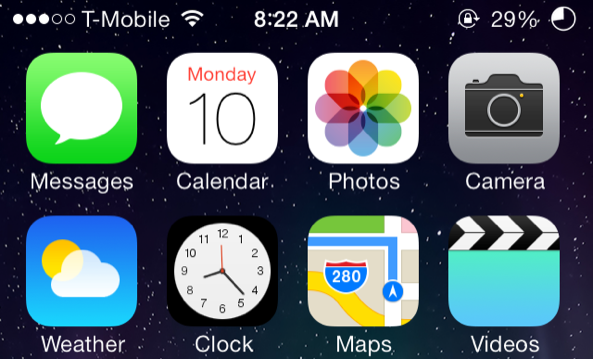
The latest Alkaline theme to hit Cydia is called Circular Battery, and as its name suggests, it provides users with a circular battery indicator. If you're looking for an easy and subtle way to change up the look of your iPhone's status bar, then this is it. Check out our video for Circular Battery after the break.