iPod Touch

Google upgrades YouTube Capture with 1080p video uploads

http://www.youtube.com/watch?v=l0sOzdXce6o

When Google in December released the YouTube Capture iOS app, the company instantly goy my attention. I love its sleek design, simplified user interface and the effectiveness of having an app dedicated to recording and uploading video clips to YouTube. It would be a must-have if not for the inexplicable lack of support for 1080 uploads - the software would limit any upload to 720p.

Not anymore. Today, a new maintenance released has been pushed which now lets you upload footage in the full HD 1,920-by-1,080 pixel resolution, along with a few other tweaks. More details right after the break...

Twitter launches Vine, a 6-second video sharing iPhone app

The popular micro-blogging service, Twitter, Thursday launched a brand new iPhone and iPod touch app called Vine. Twitter also officially confirmed it has acquired the startup behind Vine. Little wonder that it's hailing the new software as "the best way to see and share life in motion".

In a nutshell, the app lets you capture and share 6-second looping videos in a simple manner and share them with your friends and family. It supports the iPhone 3GS and higher and iOS 5 or later, is optimized for the iPhone 5 and can be downloaded from the App Store right now, free of charge. Go past the fold for more info...

Catch big airs with the ESPN X Games app

What is the best part of winter? Winter X games! I am a huge X games fan, particularly the Winter X competition, and the best way to keep up with the details is the free iPhone and iPad apps. In true ESPN fashion, the app just updated last week and the games start tomorrow. So, consider this your public service announcement...

TwelveSouth’s PlugBug goes on a world tour

TwelveSouth makes wonderful accessories for Apple devices and their charging add-on called PlugBug is the perfect epitome of their design approach: not only is the accessory useful, it's damn cute, too. For the uninitiated, the PlugBug will charge your MacBook and iPhone (or iPad or iPod touch) at the same time. The charming little red thingie piggy-backs onto your MacBook's power adapter and has a 10W USB port to connect and charge your iDevice as the MacBook adapter simultaneously juices up your notebook.

How cool is that? Today, a year and half following its debut, TwelveSouth has announced the PlugBug World, an international version with five swappable prong adapters supporting power sockets in the United Kingdom and rest of Europe, Australia, New Zealand, North America, Hong Kong, China and a bunch of other markets...

Twitterrific gains new features, push notifications still being worked on

https://vimeo.com/57871805

As you can see in the clip above, Iconofactory today released an update to its Twitter client on the App Store, Twitterrific. The app has some loyal following - in fact, both TweetBot and Twitterrific are my favorite go-to Twitter clients for iDevices. Twitterrific fans should appreciate half a dozen new features and a bunch of improvements in this release.

Most notably, the new Twitterrific version 5.0.2 now has a simplified in-app web browser and reading mode supporting Instapaper or Readability. It also lets you find tweets in all timelines via History, preview images directly in the timeline and so forth. Push notifications, you say? Read on for the full breakdown...

HypedMusic: listen to millions of tracks for free

Rdio, Pandora and Spotify are all nice options to stream unlimited music rather than buy individual tracks (so last century). But these services cost north of ten bucks per month, which amounts to a $100+ annually. With so many music tracks readily available on the Internet for free, in the form of music videos and what not, Luke Li launched the HypedMusic web site in January 2011 as a legally compliant option to enjoy music on your computer free.

And with an iPhone app launched yesterday, HypedMusic has become a whole lot more useful an alternative to the commercial streaming music services. I've included additional info and a few more screenies right past the fold...

iSpy Tank: an iPhone-controlled tank with built-in spy cam

http://www.youtube.com/watch?v=moQgUQruTsk

iHelicopters, the makers of such iPhone-controlled toys as the iUFO, RC cars and helicopters, has a new toy on the market, an iDevice-assisted miniature tank (looks like a sci-fi car to me). In addition to a free app which lets you control the vehicle by tilting your device, the iSpy Tank features a built-in camera.

You can control the camera angle via the app and even beam video feed from the toy straight to your device's screen, in real-time: perfect for spying on your neighbors or checking on your cat while you're at work. Turn the volume down before playing the promo clip above...

Another freebie: Rovio’s Amazing Alex is now available for $0 with some ads

http://www.youtube.com/watch?v=xk7vezL36IU

Finnish developer Rovio made headlines earlier today announcing that the popular Angry Birds Rio and Angry Birds Rio HD have been made Apple's Free App of the Week, meaning both titles are now free downloads for a limited time. As the iPhone version normally costs 99 cents and the high-definition iPad version is an additional $3, that's a $4 saving for you right off the bat. But if you've grown tired of Angry Birds and think the series has long run its course, Rovio has another deal for you.

Today, the company released a free, ad-supported version of Amazing Alex for the iPhone and iPod touch and Amazing Alex HD for iPads. The game, one of the finest physics-based puzzlers available for iOS devices, is based on Casey’s Contraptions which Rovio licensed and challenges you with building contraptions by combining various objects to solve a bunch of levels...

Dolphin gets browser sync, easier sharing, Evernote integration

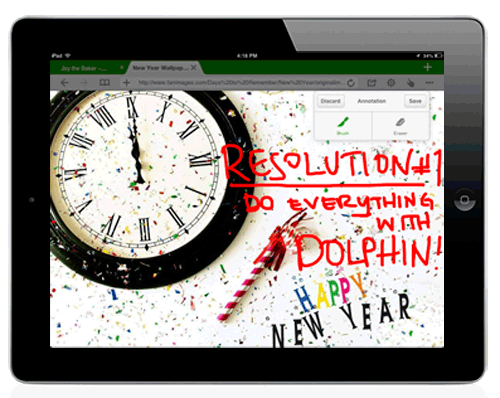
Dolphin, the popular third-party browser for iOS and Android, received a major update today. In addition to the obligatory stability and performance improvements, developers added a few new features you'll be excited about. For starters, Dolphin now has browser sync that keeps your environment and settings flawlessly consistent across desktop and your mobile devices powered by iOS or Android.

You can also send tabs, images, phone numbers and directions from a mobile device to your computer, share to social networks and email articles. And if you live in Evernote, Dolphin now lets you grab any web content and save it directly to your Evernote (or Box) account, useful for saving a particular article or document for later, especially if you are not a huge fan of Instapaper or a similar read-later service...

Amazon optimizes MP3 Store for iPhone

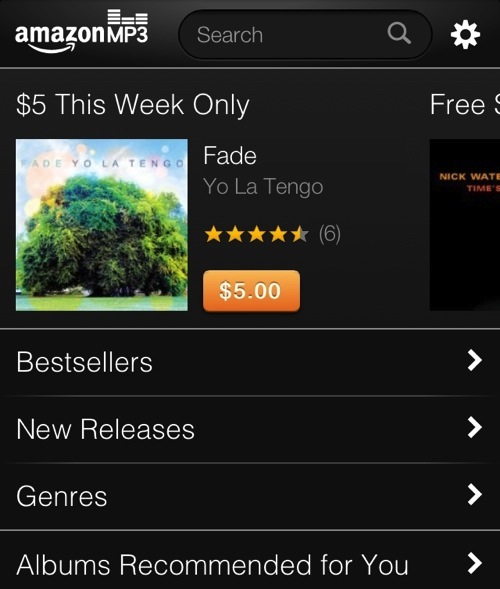
Amazon's been really stepping up its game in the digital music business over the last 6 months. Last fall it overhauled its Cloud Player service to make it more competitive with iTunes Match, and earlier this month it introduced AutoRip.

It's work continues today, with a new announcement that it has just optimized its MP3 Store for the iPhone and iPod touch. That's right, you can now purchase music from Amazon from your Apple device, with tracks starting at just $0.69...

Temple Run 2 now available in the App Store

The second installment to the popular run'n'jump game should be hitting Apple's iTunes servers in New Zealand and Australia just about any minute now. Like it's predecessor, Temple Run 2 is a free download for the iPhone, iPod touch and iPad devices and Android smartphones and tablets. Those with a US account on the App Store should check the store at around 11pm Eastern, 8pm Pacific Time, when Temple Run 2 is due to hit US shores. The original Temple Run hit over a hundred million downloads across iOS and Android, with more than 75 million downloads in 2012 alone. Admittedly, the sequel should prove just as popular...

UPDATE: Temple Run 2 now available in the US

Easily post reminders to the lock screen with Reminders+

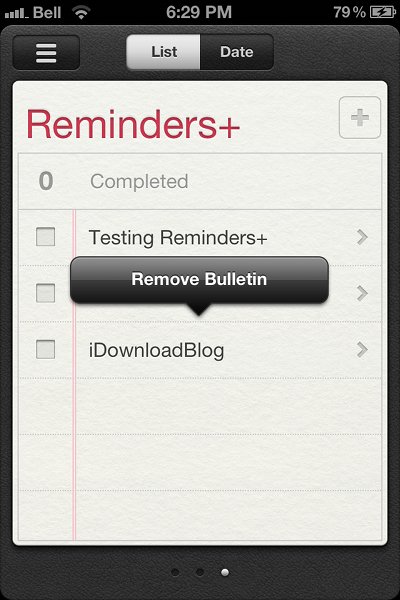
Reminders+ is a new jailbreak tweak recently added to Cydia that allows users to pin bulletins from Reminders+ to the lock screen. With the tweak installed, your reminders will stay on the lock screen; these notes won't be dismissed if you unlock your iPhone or go into the Reminders app.

To pin notes on the lock screen, all you need to do is go into the Reminders app, find a reminder you want to pin down, and then press down on the text. An Action Menu prompt for adding a bulletin will appear on top of the selected reminder. Once you tap the prompt, the reminder will appear on your lock screen...