Learn how to change the default Safari homepage to automatically open your favorite website when you click the Home button or open a new browser window or tab.
How to change your Safari Homepage on Mac, iPhone and iPad
Stay up-to-date on the latest iPhone news and learn new tips and tricks with our comprehensive tutorials. From software updates to new features, we’ve got you covered.
Learn how to change the default Safari homepage to automatically open your favorite website when you click the Home button or open a new browser window or tab.
It was only yesterday that Apple unveiled macOS 10.15 Catalina and launched the first developer beta, and it didn’t take long for beta testers to report that Saurik’s Cydia Impactor tool wouldn’t open on the newfangled macOS operating system due to its 32-bit nature.
Fortunately, this is no longer an issue. Saurik has updated Cydia Impactor on Tuesday with 64-bit support, which as you might come to expect, makes the popular side-loading software fully-compatible with Apple’s upcoming macOS Catalina update.
The Camera app in iOS 13 has received some love, too, although not as much as we've been hoping for. There are two main new user-facing enhancements. First, a new monochromatic image effect is available in-camera during capture, creating a classic look by setting a monochromatic subject agains an all-white background. The other new feature allows you to adjust the intensity of any Portrait Lighting shooting mode, while taking an image.
iOS 13's Photos app brings new ways to browse and edit not just images, but videos too.
A long-rumored Dark Mode for iPhone and iPad has finally surfaced after its Mac debut in macOS Mojave last year. It's coming to everyone via a free iOS 13 software update in the fall.
No other feature is more important to iPhone users than iOS's vaunted smooth performance. While some iOS releases did make our devices run slower, that has changed with iOS 10 which laid the groundworks three years ago for what would come in iOS 12 the following year: significant speed gains. iOS 13 continues on that trajectory with additional under-the-hood tweaks and optimizations that bring notable speed advances over iOS 12.
Apple launched the first developer beta of iOS 13 just this afternoon after the WWDC 2019 Keynote presentation came to an end, and despite how new this beta software is, talented security researchers are already findings ways to crack it.
In a Tweet shared just this evening, @iBSparkes flexed his l33t hacking skills by sharing what appears to be a demonstration of an undisclosed 0day vulnerability:
AnyTrans, a comprehensive Mac and Windows app by iMobie for transferring, backing up and managing your iOS, Android and cloud content, was updated recently with several new features, including comprehensive iOS backup enhancements with the selective restore and automatic wireless backup features, plus the ability to move WhatsApp and Viber chats between devices and support for downloading videos from 1,000+ online sources.
Learn how to add frequently accessed websites to your Safari favorites on an iPhone, iPad, and Mac so you can quickly revisit them with just a tap or click.
Veteran iOS users probably still remember the day when Apple introduced notification banners to their mobile operating system to replace the intrusive notification alerts that used to pop up in the middle of your display. But it seems like modern banner notifications are a lot taller than they need to be.
Those interested in shrinking down the size of their handset’s incoming banner notifications will come to appreciate a newly-released and free jailbreak tweak called Nanobanners by iOS developer Nepeta. This tweak takes a no-BS approach to making your handset’s banner notifications more tolerable, as shown in the screenshot example above.
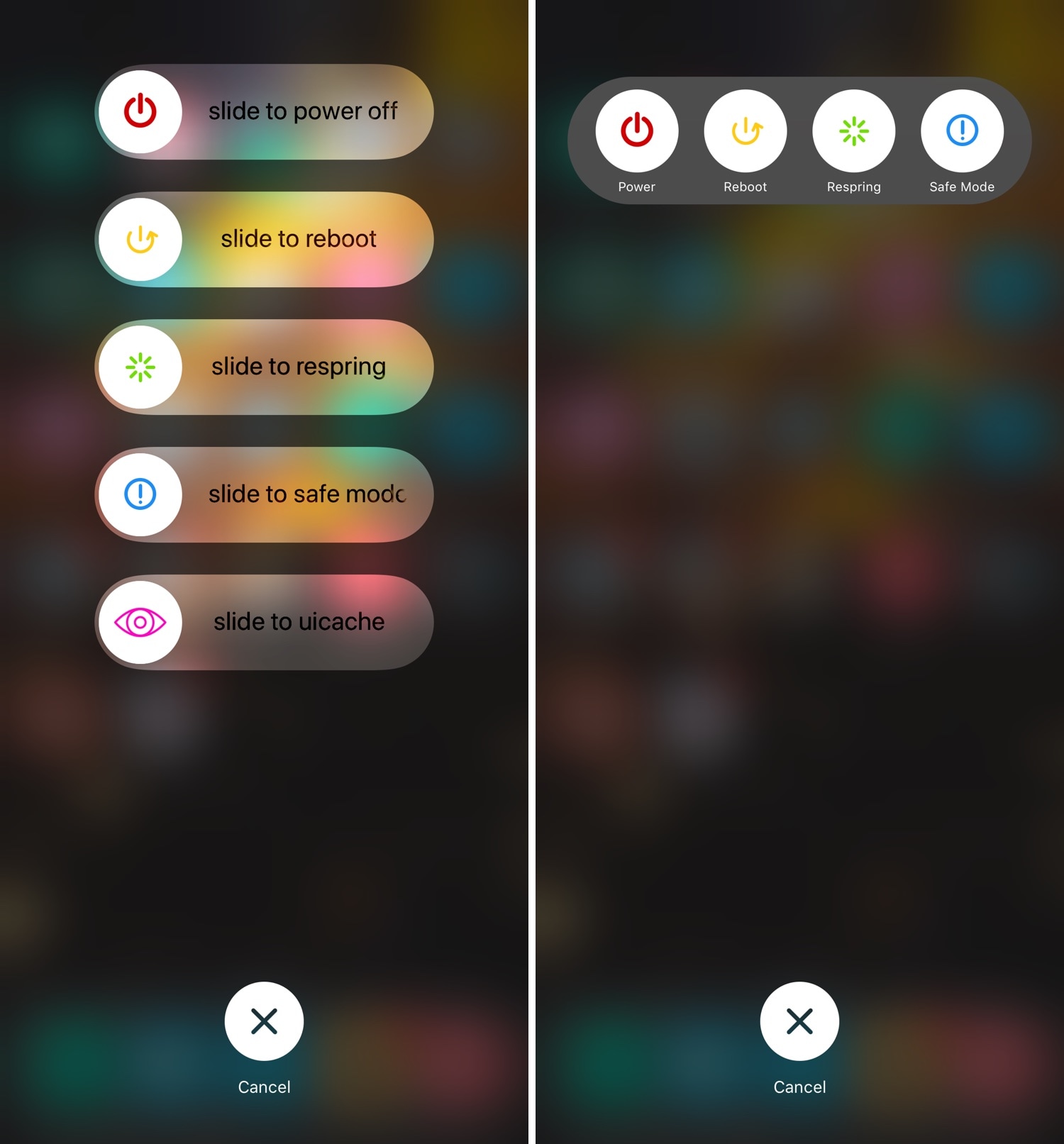
You can access the power down screen on any iOS device with a hardware button gesture that varies depending on the handset, and while it comes in handy at times, many would agree that the interface is somewhat lacking and leaves a lot to be desired.
Here to help in this department is a newly-released jailbreak tweak called SamsungPowerDown by iOS developer DevNTNghia, which as the tweak’s name implies, gives your handset’s native power down screen a Samsung-esque makeover.
It was only yesterday that Pwn20wnd released unc0ver v3.2.0 with a completely designed user interface and native dark mode, but today, the hacker and project lead developer is updating the iOS 11.0-12.1.2-centric jailbreak tool once more with a slew of additional bug fixes and improvements.
Pwn20wnd announced the release of unc0ver v3.2.1 just this morning via Twitter, noting that it would resolve several known issues: