Apps

Basic analytics coming to iOS 11’s Podcasts app

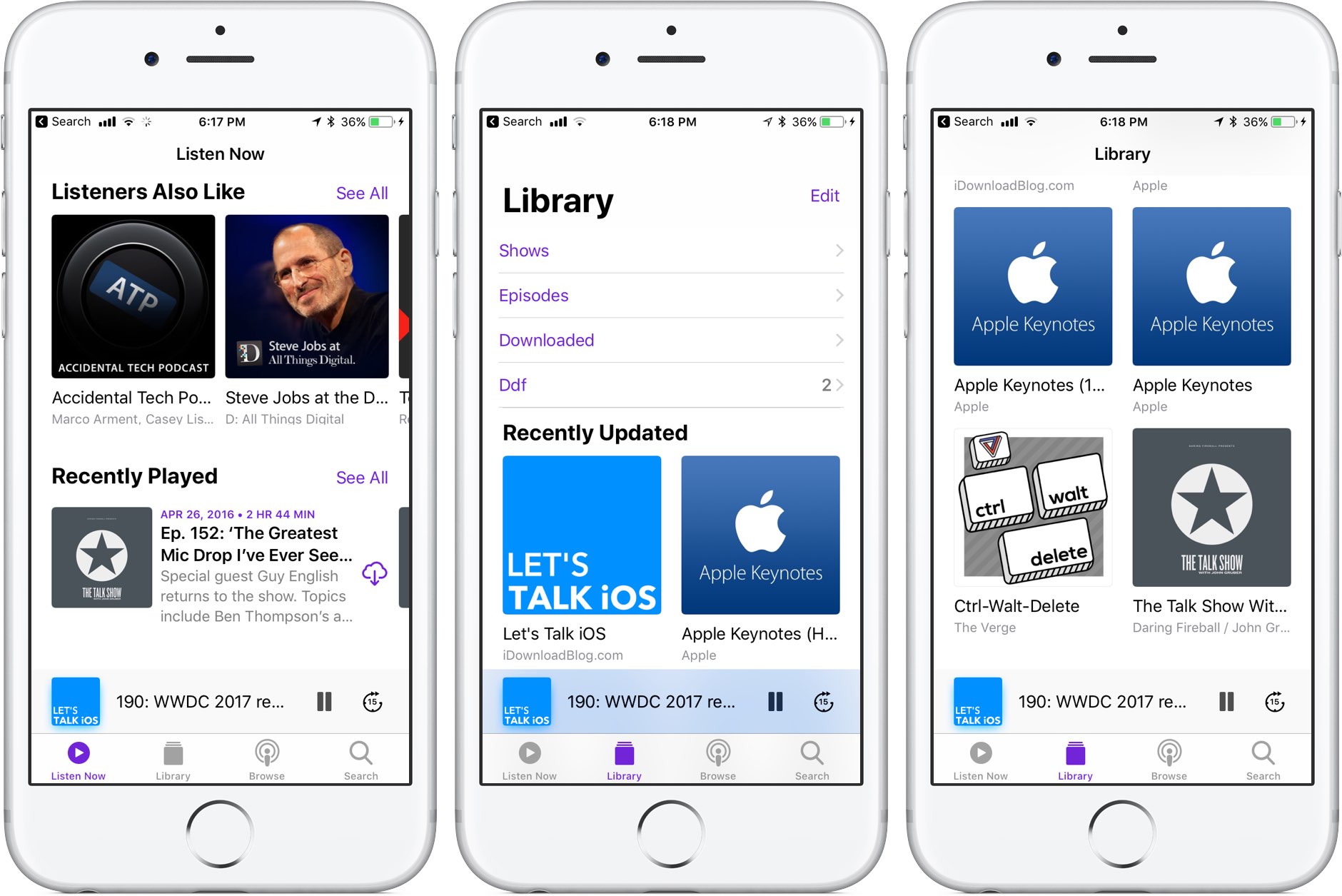
Like many stock apps in iOS 11, Apple's Podcasts app has been redesigned around an Apple Music-style appearance with consolidated tabs, bigger thumbnails and more.

As reported by Recode's Peter Kafka and Six Colors' Jason Snell, Apple is also making some notable changes to the way podcast feed works so that both podcast creators and advertisers can see what listeners actually like.

As for users, they'll be able to download full seasons of their favorite podcast shows and the Podcasts app will determine if a podcast should be played in chronological order.

There are other updates focused on making podcast creators' lives easier as well. According to Apple's own spec sheet regarding the Podcasts app updates in iOS 11, the updated Apple Podcasts specification now provides the following features:

Podcast creators can now provide clear, concise titles. Improvements to how episodes are ordered and recommended within a season. The ability for new subscribers to receive the full current season in their Library. Quick play lets users pick up listening where they left off.

Podcasts will be able to define individual seasons and explain whether an episode is a teaser, a full episode or bonus content. Snell explains that these extensions will be read by the Podcasts app and used to present a podcast in a richer way than the current linear approach in iOS 10.

https://www.youtube.com/watch?v=LFsAlcnlmSo

Subscribe to iDownloadBlog on YouTube

As explained, Apple is going to share more data with podcast creators and advertisers.

With basic analytics, podcast creators will have the ability to see when listeners play individual episodes, what part of individual episodes they listen to, which parts they skip over and when they stop listening. To protect your privacy and prevent targeted advertising, Apple will provide aggregated, anonymized performance data that cannot be tracked to individual users.

Currently, podcast creators can see when someone has downloaded an individual episode, but that's about it when it comes to analytics.

How do you like these changes coming to the Podcasts app?

Share your opinion in the comments section below.
AppLocker lets you secure apps with a password

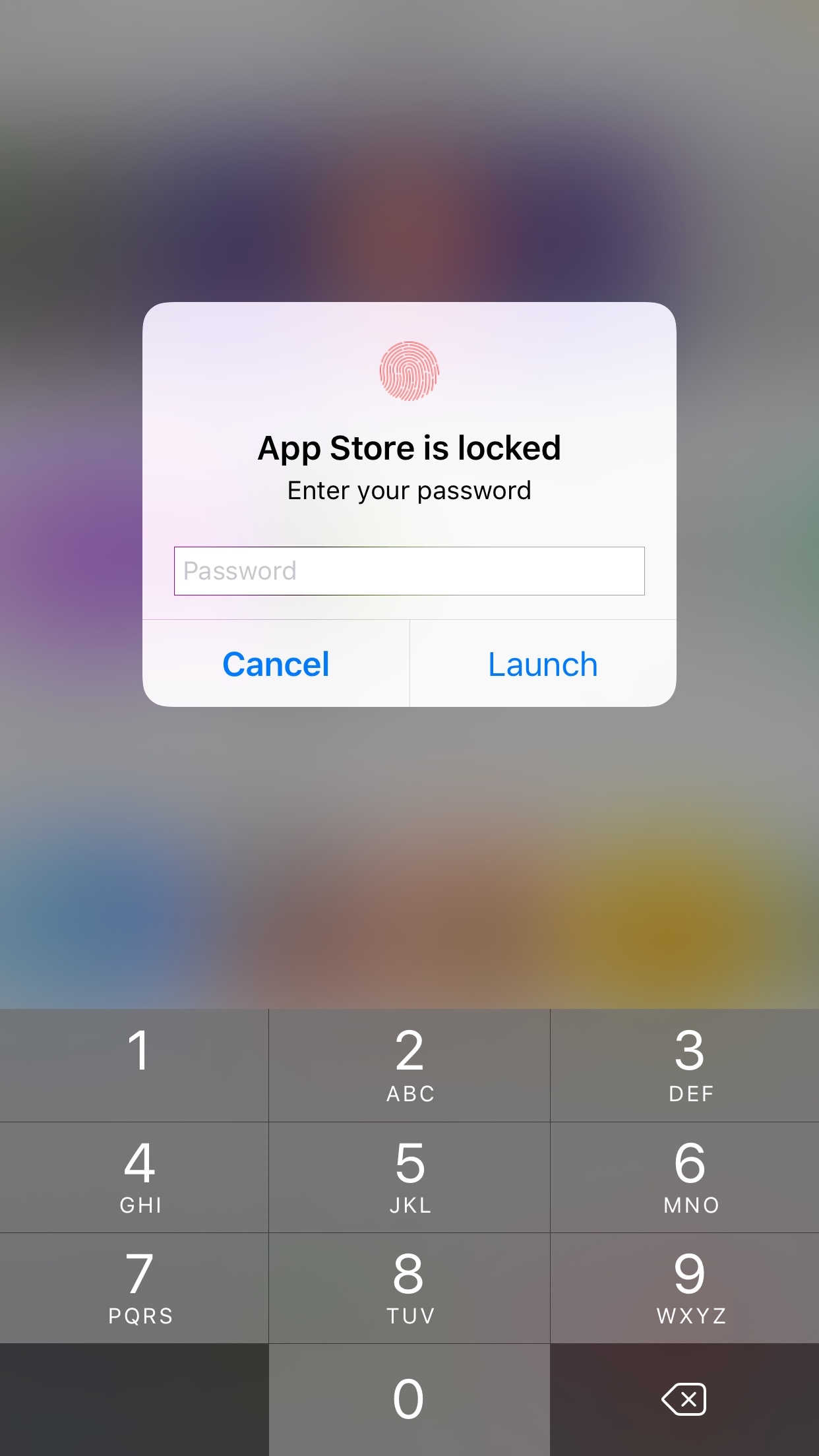
AppLocker by iOS developer Ori Kadosh, is one of the most popular app security jailbreak tweaks in Cydia, and it has been updated this week with full support for iOS 10.

AppLocker lets you create a password that you will use to access your apps; it's requested every time you launch an app, and if you can’t provide it, you can't use the app.

QuickTrust makes it easier to trust sideloaded app certificates

Depending on how advanced of an iOS user you are, you may sideload apps from time to time.

In many circumstances, sideloading third-party apps via Impactor or Xcode involves trusting a certificate – a process you should be familiar with if you've jailbroken with Yalu102 or Pangu for iOS 9 – but iOS doesn’t make the trusting process easy or straightforward out of the box.

Here to fix that problem is a new free jailbreak tweak called QuickTrust by iOS developer 1GamerDev, which adds a “Trust” button directly to the certificate pop-up alert, as shown above.

Apple now allowing developers to implement digital tip jars via In-App Purchase mechanism

Apple recently asked WeChat and other popular social networking apps in China to disable the popular tipping feature, and now we know why—the Cupertino giant has introduced an officially-sanctioned way for iPhone and iPad users to tip content creators in apps via the standard In-App Purchase mechanism.

Like with other In-App Purchases, tipping content providers is subjected to Apple's 70:30 revenue sharing scheme, meaning the company will keep 30 percent of any proceeds to itself.

According to TechCrunch, the updated App Store Review Guidelines now include a clause that deals with tips, here's a relevant excerpt:

Apps may use in-app purchase currencies to enable customers to “tip” digital content providers in the app. Apps may not include buttons, external links, or other calls to action that direct customers to purchasing mechanisms other than In-App Purchases.

According to the report, developers have the freedom to decide how much of the tips are passed to the content creators themselves (after Apple's 30 percent cut, of course).

At any rate, Apple was smart to implement this cool new feature.

Tipping content creators like musicians, comedians, e-sports athletes and others is tremendously popular in China. The company has lacked a tipping system for iOS apps, meaning it couldn't get in on the action to process such transactions through its own iTunes billing system.

With tips now being officially supported via the familiar In-App Purchase mechanism, many customers who were previously reluctant to use PayPal or their credit card for tipping their favorite content creators will now be able to do so, directly in the app.

And by taking tipping out of the grey area, as TechCrunch observes, more developers might implement digital tip jars— without fearing repercussions from Apple—as an alternative way to get creators paid without having to offer ad revenue sharing.

In turn, the feature may create a whole new revenue stream for Apple at a time when the company is monetizing its huge user base in an attempt to boost its ever-growing Services revenue.

FunAppocalypse simulates the iPhone apocalypse in the skit from Apple’s WWDC keynote

When Apple kicked off the WWDC 2017 keynote this year, they presented a hilarious comedy skit that put into perspective just how important mobile apps are in our daily lives. As every iOS device went kaput, the world quickly delved into chaos.

iOS developer CPDigitalDarkroom decided it would be fun to recreate the apocalyptic scenario, and so he created a new free jailbreak tweak he calls FunAppocalypse that simulates the visual effects and sounds that were illustrated in the keynote skit.

Apple honors select app developers in its 2017 Design Awards

Unlike the name might imply, Apple’s Design Awards are not exclusively dedicated to chasing the pinnacle of visual design, but more comprehensively appraise other app elements such as user interface innovation, sound design and also gameplay for apps offering unique gaming experiences. The latter, games, have easily stolen the show this year with 5 out of the 12 winners coming from said category.

In a slightly embellished press release, Apple announced the names and links of all twelve winning applications, each coming with a punchy story to explain and celebrate the selection in addition to screenshots and pictures of each developer team.

Force Google Assistant to listen immediately after app launch with InstantAssistant

Siri is the default voice-based assistant on iOS devices, and while some people like using her, others prefer to use different voice assistants because of the features they offer or their superior fluidity.

Unfortunately, Apple doesn’t let you choose the default voice assistant, but a new free jailbreak tweak called InstantAssistant by gilshahar7 can help quell the pain.

iOS can automatically uninstall apps that haven’t been used in a while

iOS 11 included many new features and enhancements, big and small alike.

For example, a revamped storage-management section became available in Settings. Speaking of which, users can appreciate another new feature that allows them to optionally have their device automatically uninstall apps that haven't been used in a while.

If you venture to Settings  → iTunes & App Store, you'll notice a new toggle at the bottom of the screen, labeled Offload Unused Apps. Setting that switch to the ON position shall prompt iOS to delete rarely used apps from your device in order to make more room for your photos, videos, documents and so forth.

iOS uses Siri intelligence to determine your usage of apps.

The feature's description notes that documents and data belonging to uninstalled apps will be kept on your device in case the app is reinstalled. “Reinstalling the app will place back your data, if the app is still available in the App Store,” notes Apple.

This feature is disabled by default.

Rightfully so, if I may add. Had Apple enabled it by default, novice users would've been stunned discovering iOS had deleted their apps for seemingly no apparent reason.

Hands-on with iOS 11’s overhauled Podcasts app

Apple's stock Podcasts app has undergone some visual changes in iOS 11. Functionally, a few things have moved around and some new features have been added.

For example, the Unplayed, My Podcasts, Featured, Top Charts and Search tabs lined up alongside the bottom of the interface have been replaced with a new and simpler tab layout: Listen Now, Library, Browse and Search.

Our resident video editor Andrew O'Hara has put together a quick video for you guys to see for yourselves Apple's new design for the Podcasts app on iOS 11.

Watch Andrew's video right below, then meet us in comments.

https://www.youtube.com/watch?v=LFsAlcnlmSo

Subscribe to iDownloadBlog on YouTube

The Listen Now tab combines podcasts you're subscribed to (previously in the My Podcasts tab), recently played episodes (previously in the Unplayed tab) and shows other people like.

Under the new Library tab, you can easily browse all of the audio and video shows you're subscribed to, as well as individual podcast episodes, ones that have been download to the device and the recently updated episodes of any shows you're following.

The Browse tab is your storefront to the Podcasts section on iTunes.

There, you can swipe through featured podcasts Apple's editors highlight at the top, access the full Featured section, see charts-topping audio and video shows, access the list of major podcast providers and browse all podcasts by category.

The Search tab now lets you choose between searching across podcasts in your library or all shows on iTunes. As evidenced by the screenshots, the redesigned app has adopted a bold font with much bolder headings and other visual cues borrowed from Apple Music on iOS 10.

Another feature iOS 11's Podcasts app has borrowed from Apple Music is a completely revamped mini-player that can be now pressed with 3D Touch to access quick shortcuts pertaining to the currently playing episode.

Other tidbits worth mentioning include larger artwork and other visual tweaks to match the look and feel of other apps inside of iOS 11, as shown on the screenshot top of post. The official Podcasts widget has remained unchanged.

For those wondering, Apple still does not provide Podcasts for Apple Watch.

How do you like these Podcasts app changes on iOS 11?

Let us know by posting a comment below.

iOS 11 drops support for 32-bit apps

During Monday's keynote talk at the Worldwide Developers Conference, Apple introduced iOS 11, the next major software update for iPhone, iPad and iPod touch. As previously suspected, the mobile operating system has dropped support for legacy 32-bit apps.

Attempting to launch a 32-bit app on iOS 11 now yields a message, saying “The developer of this app needs to update it to work with iOS 11”. You can tap OK to dismiss the prompt or tap Learn More to open the full list of 32-bit-only apps that are currently installed on the device.

Apple's Clips app, for example, requires a 64-bit iOS device and the new Files app is optimized for 64-bit computing. Starting with iOS 10.3, Apple began naming and shaming legacy apps via a new App Compatibility section in Settings → General → About → Applications.

TUTORIAL: How to identify legacy 32-bit apps on your iOS device

Any previously installed 32-bit apps are no longer available for re-download through the App Store's Purchased tab. Moreover, 32-bit app no longer appear in App Store search.

The time is right to drop support for non-64-bit apps because running legacy 32-bit apps alongside 64-bit ones slows down the system as iOS has to load both 32-bit and 64-bit versions of the kernel and system frameworks in the RAM.

Devices with the Apple-designed A7 or newer chips are 64-bit, including the sixth-gen iPod touch and every iPhone and iPad from their respective iPhone 5s and iPad Air models onward.

In fact, iOS 11 itself won't run on a non-64-bit iPhone, iPad or iPod touch, meaning iPhone 5s, iPad Air and the sixth-generation iPod touch are now the entry-level devices for iOS 11.

Apple promoting WWDC 2017 with themed Snapchat geofilters

With the live-streamed WWDC keynote almost upon us, Apple has now created a bespoke Snapchat geofilter to help promote this year's developers conference. The sponsored WWDC 2017-themed geofilter automatically appears for Snapchat users who find themselves near the McEnery Convention Center in San Jose.

As first noted by 9to5Mac, the filter is available when sharing photos or videos with other Snapchat users. Simply choose it from the list of Snapchat filters to have Apple's official WWDC 2017 banner design applied to your item. Again, this is a filter that uses geofencing so only people attending this year's developer conference will see it in Snapchat.

The same stickers can be found in iMessage via Apple's official WWDC app, as shown above.

Snapchat is available at no charge from App Store.

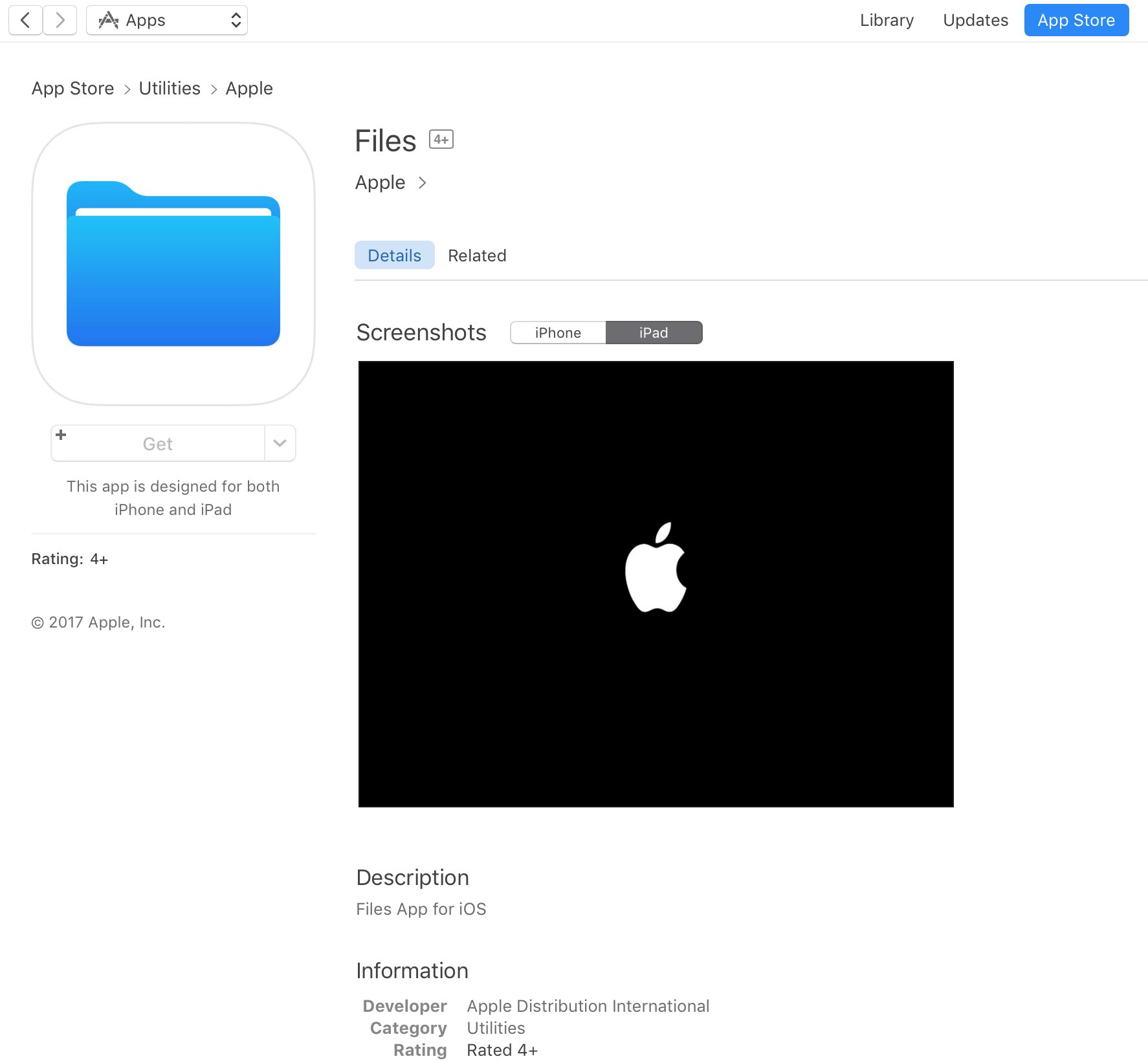
App Store placeholder listing for Apple Files app appears briefly ahead of WWDC keynote

A placeholder listing for a new Apple Files app has briefly appeared on App Store ahead of today's live-streamed WWDC keynote, as spotted by iOS developer Steven Troughton-Smith late Sunday. It's surfaced in the Utilities section of App Store and has since been removed.

No screenshots or the official description were provided.

The app requires iOS 11 and 64-bit support and is designed for both iPhone and iPad. It sports a blue file folder icon resembling the design for folder icons in macOS. It's entirely possible that the new Files app is really just a rebranded version of the existing iCloud Drive app.

It's unclear if the forthcoming app will be a new stock item in iOS 11 or an optional download. If I had to guess, I'd say it will likely come pre-installed with iOS 11. Since iOS 10, Apple has allowed users to hide most of the stock apps from their Home screen.

To help users easily re-install any removed stock apps, Apple has provided all of its first-party iOS apps that are removable as downloadable App Store items. iOS 11 will be previewed at WWDC later today along with tvOS 11, watchOS 4 and macOS 10.13.