Apps

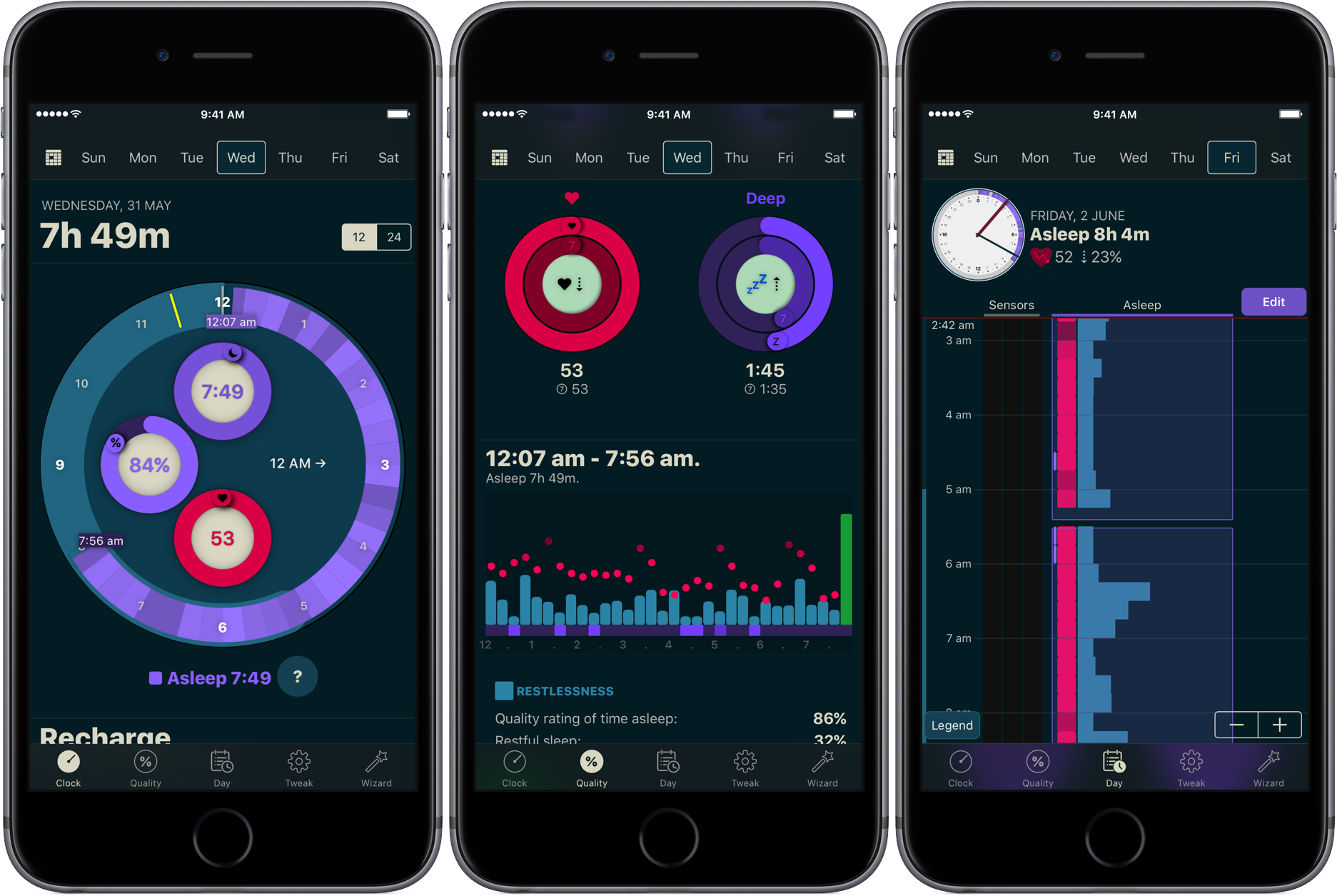
How to track your sleep using AutoSleep

You don’t have to be a scientist to know that a good night’s sleep is conducive to your overall wellbeing and health. On that note, a while ago we have screened the App Store for the best sleep trackers available on iPhone and Apple Watch so as to make it easy for you to pick and choose your new sleep companion.

While varying in looks and features, all of the apps listed serve the same purpose: record how you slept and explain possible discrepancies in perceived quality of sleep and your actual rest. With the hands-off roundup in mind, we decided to select the most requested and popular app featured - AutoSleep - and throw a complementary hands-on tutorial on sleep tracking into the mix. Want to learn more about how to track your sleep using your iPhone, Apple Watch, and the AutoSleep app? Then join us for the tour!

Apple to announce Siri support for larger variety of apps at WWDC

Apple is expected to announce plans next week to make Siri work with a larger variety of apps, reports Reuters. Currently the digital assistant integrates with apps from just six categories: ride sharing, messaging, photo search, payments, fitness and auto infotainment.

The move will make Siri more competitive against other assistants, such as Amazon's Alexa, which is capable of handling some 12,000 different tasks. Apple has taken criticism for lagging behind other tech giants in the AI space, and next week it looks to close the gap.

In addition to announcing improved app support for Siri, Apple is also expected to unveil an Echo-like speaker featuring the assistant. Reports have said that it is cylinder in shape, like the latest Mac Pro, and it features a high-end sound system and a dedicated touch panel.

Apple's WWDC keynote begins on Monday, June 5 at 10am PDT. Be sure to join us as we cover the event, and all subsequent announcements, live. Also make sure you check out our inaugural WWDC Fantasy Draft.

Source: Reuters

Skype is getting a major redesign with Snapchat-like features

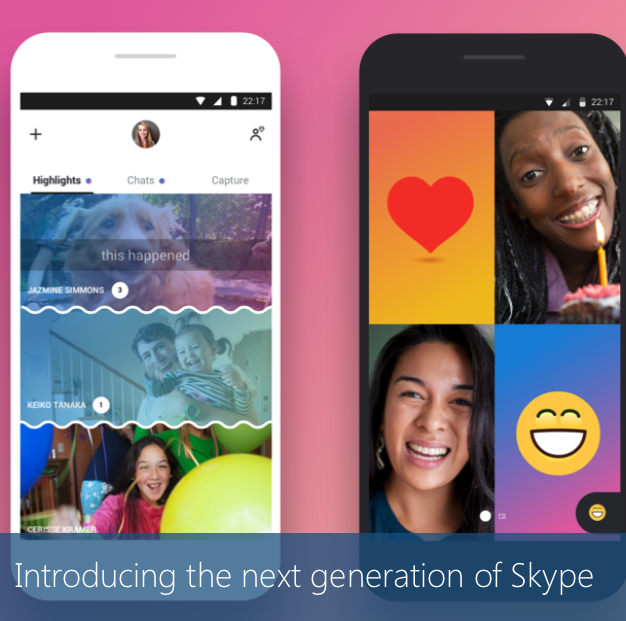
Microsoft on Thursday unveiled a major redesign for its Skype video conferencing app. Rebuilt from the ground up, the company says the new app vastly improves the ways you can connect with your favorite people, putting chat front and center.

Early reactions to the new design have pointed out that the interface has kind of a Snapchat vibe. Group chats are more lively, expressive and personalized, and there's a new Stories-like Highlights section that allows you to share a photo or video.

Highlights can be decorated with emojis and text, and they remain available for a full week instead of the usual 24 hours. They can be viewed by anyone who follows you on Skype, or you can choose to send your Highlights to a specific group or user.

https://www.youtube.com/watch?v=RU9w41tPXyc

Other new features include Facebook-like reactions to Highlights and chats, in-video chat overlays for emojis, text, stickers and photos, and the addition of smart assistant Cortana. Skype is also adding bots from Bing, Expedia, YouTube and others.

The Skype update hits Android first, later today, iOS within the next few weeks, and Mac and Windows devices within the next few months.

Source: Skype

Plex app gets live TV support and DVR enhancements

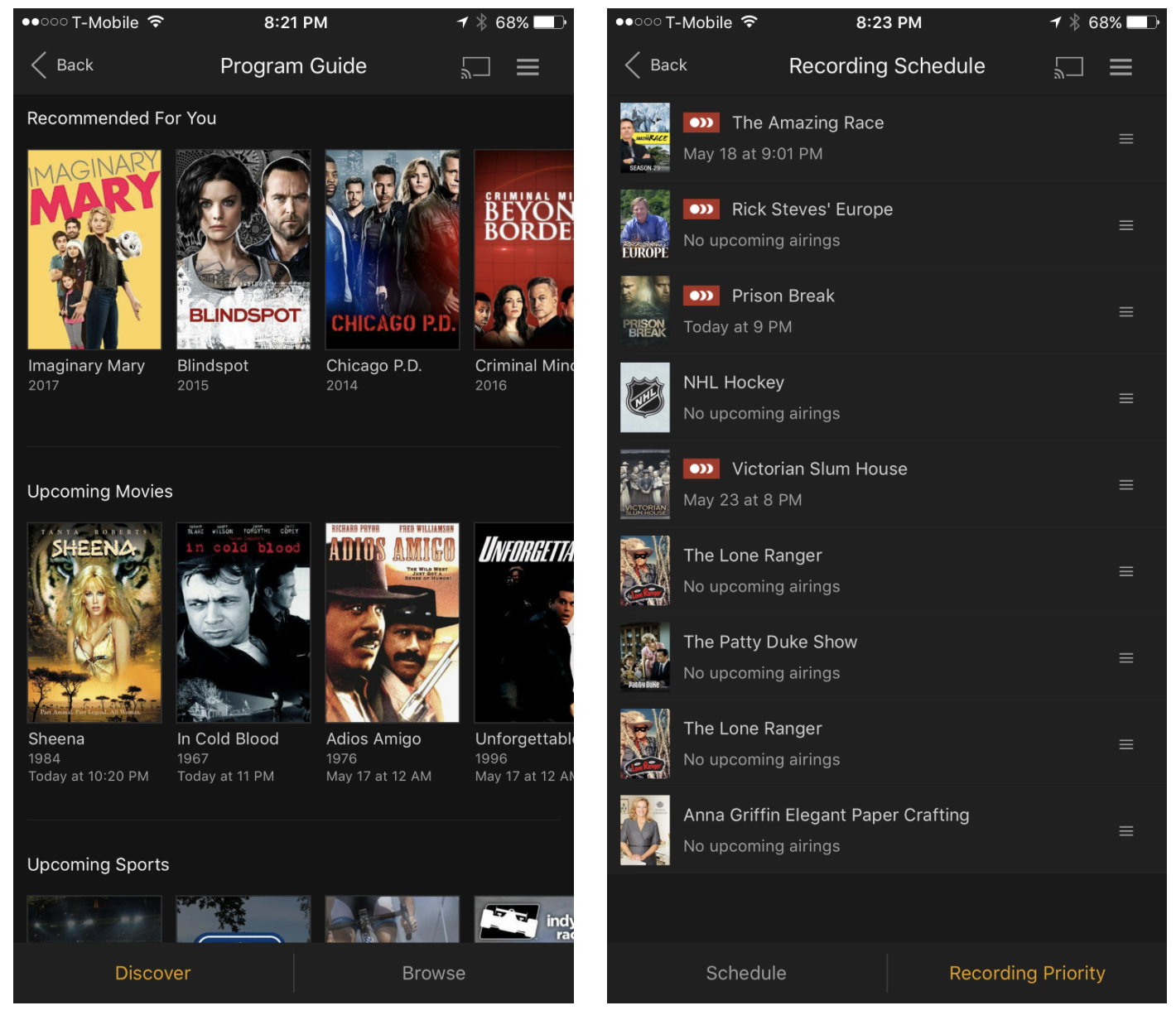
Plex on Thursday announced that they're rolling out support for live TV to their various Plex apps. They're starting with Android TV and iOS, and say updates for other platforms like tvOS will follow suit.

The live TV feature is built right into the Media Server, so you'll be able to stream everything from game shows to sporting events in real time, from pretty much anywhere in the world.

The app is also getting other improvements: in-app DVR management, meaning you can now browse the program guide and manage recordings directly from within the app, and expanded tuner support. Last September Plex announced support for the HDHomeRun tuner line, and now it's opening up to tuners from Hauppauge, AVerMedia and many more.

Plex Live TV and DVR are available immediately for Plex Pass users only. The service costs $5 per month, $40 per year, or $120 for life (20% off for a limited time). It's a bit pricey, but it's definitely worth looking into if you're thinking about cutting the cord.

Source: Plex

Apple: App Store developers earned over $70 billion in revenue since debut

Apple announced Thursday morning that developers all over the world for its platform have generated over $70 billion in total revenue, a new record since the launch of the App Store almost nine years ago in 2008.

The number 70 appears to be Apple’s lucky number this year, as app downloads have also soared 70% in the last 12 months, illustrating interest in numerous new app titles that took the App Store by storm.

Easily manage all your YouTube notifications via all-new Activity tab

Google is rolling out a small update to its mobile YouTube app for iPhone and iPad, bringing out an all-new Activity tab where you can easily find and control all of your notifications.

Now you can see your notifications, opt-out of receiving alerts from specific accounts and more—all in one central place just a tap away no matter where you happen to be in the app.

The new tab joins the app's existing tabs: Home, Trending, Subscriptions and Library.

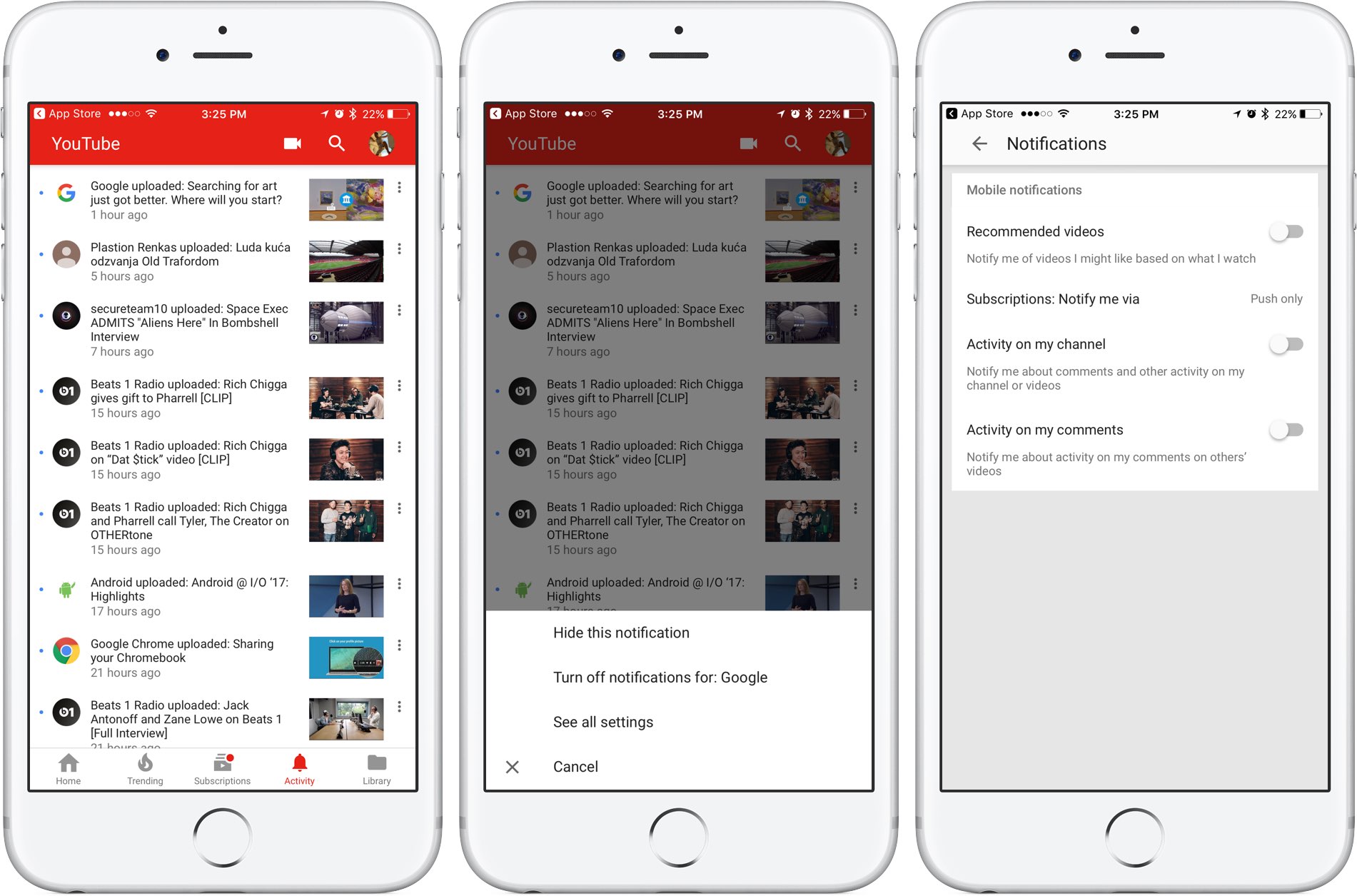
Before today, accessing notifications was a multi-tap affair: you were required to tap your profile picture in the app's top-right corner, then hit Notifications (see the screenshot below).

Functionally, nothing has changed drastically—the new Activity section still shows notifications from your favorite accounts in the order they were received.

The old way of managing your YouTube notifications was a multi-tap affair.

Tapping the three dots next to a notification allows you to hide that particular notification, just like before, as well as elect to turn off all future notifications for that account and more.

Tapping the option See All Settings takes you to settings where you can turn notifications on or off for any recommended videos, choose whether you'd like to be notified about activity on your comments or others' videos, select how you'd like to be notified and more.

The new Activity tab requires YouTube for iOS version 12.20 or later.

Grab YouTube for iOS for free form App Store.

Twitter’s inbox now separates out messages from people you don’t follow

Twitter's bird logo set against a transparent background

Twitter is rolling out a new inbox section which it says is designed to separate direct messages from people you do and don’t follow, making it easier to accept or delete unsolicited chats.

“If you’ve opted-in to get Direct Messages from anyone, messages from people you don’t follow will go into Requests in the Messages tab,” wrote the company in a tweet yesterday.

New group chats you’re added to by people you don’t follow will also appear in Requests.

Upon entering the chat, you'll be asked to either Delete or Accept the message. Accepting the chat moves it to your inbox, allowing you to continue the conversation with that person.

“Please note that they will not know you have seen the message until you have accepted their request,” said Twitter. All media will be hidden prior to accepting the message.

If you wish to view any hidden media, tap the View Media option.

https://twitter.com/Twitter/status/869608493548011520

Conversely, deleting the message removes it from the inbox although that account is still able to message you in the future unless you block or report it. These new features are available on the mobile Twitter app for iOS and Android and on twitter.com.

TUTORIAL: How to find Messenger chats you didn't know existed

Facebook-owned Messenger introduced a similar feature back in October 2015, replacing the “Other” inbox with a Message Requests section that brought all the messages from people you’re not friends with on Facebook in one central place, separate from your regular chats.

Grab Twitter for iOS for free from App Store.

WWDC app updated with curated video playlists, interactive venue and street maps & more

Apple today updated its WWDC app for iPhone, iPad and Apple Watch with curated video playlist, interactive venue and street maps and other content ahead of the June 5 keynote.

“We’ve made several app updates to improve your experience in 2017, whether you’re attending or following along remotely,” reads the changelog accompanying the download.

Bumped to version 6.0, the app lets you watch curated video playlists focused on featured themes, as well as view interactive venue and street maps of San Jose McEnery Convention Center and access other important venue information through the new Venue tab.

Unlike before, you can now use all app features without signing in.

Lastly, Apple has given the app an Apple Music-like facelift with bold headings, larger images and simplified navigation, as evidenced by the screenshots.

The WWDC app supports all form-factor iOS devices natively and includes a sticker pack for iMessage and an Apple Watch component.

You can download it free on App Store.

The keynote will be live-streamed through the Apple Developer website and on the WWDC app.

The Cupertino giant could unveil its own Siri speaker at WWDC and potentially unveil hardware updates to the iPad Pro lineup and a next-generation Apple TV with 4K video support.

Check out our WWDC 2017-themed wallpapers for your Apple hardware.

Even if you plan on watching the keynote, be sure to join us here at iDownloadBlog that Monday as we’ll be covering all things WWDC throughout the entire week.

SpotAngels, Ditty, Gaia GPS, and other apps to check out this weekend

This week's edition of our Apps of the Week roundup includes an app for preventing parking tickets, a musical meme-maker, and an off-road GPS app. And as usual, we have two great new games for you to check out this weekend.

SpotAngels

This isn't a new app, but it's worth checking out for those who aren't familiar with it. SpotAngels detects when you park and sends you alerts if and when you have to move your car. It does this by using your phone's motion sensors and Bluetooth (as it disconnects from your car) to know that you've parked, and then it checks your location against its data base of trouble spots. These include meters, to away zones, street cleaning, permit parking and other rules in dozens of major cities like New York, Dallas and Portland. The app also helps you find free parking around you, and since it's crowd-sourced, anyone can submit an update. SpotAngels is available for free.

Ditty

Here's another not-so-new app that you might find fun to play with this weekend. It's called Ditty, and it allows you to make goofy songs and music videos using a mix of GIFs, photos, videos and more. The app will actually sing anything you type, and there are tons of famous songs to choose from, with new content added weekly. Add your friends to follow their feeds, or post a Ditty yourself for a chance to be featured in the app. Ditty is available for free (with some IAPs).

Gaia GPS

Established GPS apps like Apple Maps and Waze do a nice job of getting you around the streets. But what about getting you around off road? That's where Gaia GPS comes in. This app features a beautiful and well-thought out interface that makes navigating the backcountry simple. Features include worldwide topo, road and satellite maps, syncing of photos, tracks and waypoints, a database with hiking trails, parks and other natural sights, and several customization options. This is a freemium app, and unfortunately most of the features are tucked behind an in-app purchase. But, Gaia has a great track record in this space and the app is getting rave reviews. If you need something like this, check it out. Gaia is available for free (with some IAPs).

Zombie Gunship Survival

The long-awaited sequel to Zombie Gunship is here! Zombie Gunship Survival has you as one of the few survivors in a devastating zombie apocalypse. To stay alive, you must take the gunner seat aboard a heavily-armed AC-130 ground attack aircraft and blow up the undead in this intense, high-definition shooter experience. You'll build up your remote airfield as a base for operations, defend that base, deploy your troops to annihilate the undead, and try to survive one of the most hostile environments ever. This is another freemium title, so there are a lot of in-app purchases, but the game itself has nearly a 5-star App Store rating on 1,200 reviews. Zombie Gunship Survival is available for free.

Goat Simulator PAYDAY

The goat is back! Goat Simulator: Payday is the most criminally realistic goat simulation ever! There are 3 new thugs, including a flying flamingo that can control people's brains, a wheelchairing dolphin that can climb almost any surface, a spitting camel, and of course the goat. You can meet up with your Pranknet crew, buy masks to disguise your identity, carry out "jobs" to collect cash to buy things, and you can even steal and drive cars. There's no real elaborate story line here, just a GTA-style open world adventure game that encourages you to inflict the maximum amount of destruction. Goat Simulator PAYDAY is available for $4.99.

More apps to check out Apple’s free app of the week: klocki You can now drag and drop files on iPad between Readdle’s productivity apps 1Password’s Travel Mode protects your private data from unwarranted searches Not to be outdone by Instagram, Snapchat unveils custom Stories of its own Duet Display brings even more desktop power to your iPad drawing experience YouTube TV app gains AirPlay support New Pokémon game is based on Magikarp, the weakest Pokémon ever At long last, Konami’s Pro Evolution Soccer 2017 hits App Store

You can now order photo books and archive images on Google Photos

At its annual developers conference earlier in the month, Google announced three new features for its Photos app: automatically curated albums, photo books and sharing suggestions.

Today, the company pushed an update to its Photos app for iOS, Android and the web, bringing support for ordering printed photo books comprised of your best photographs. You can make a photo book in minutes with automatic photo curation and easy customization.

Photo books

To order a printed photo book, select the images you’d like to fill your album with. Google’s machine learning picks the best shots for your, removing duplicates and poor quality images.

In fact, the app will even offer personalized suggestions for photo books, like your trip to the Grand Canyon, time with family during the holidays, your puppy and so forth.

You can order a seven-inch square softcover book for $10 a piece or its nine-inch hardcover version for twice as much. Each has twenty pages though you can buy additional pages if you'd like:

Softcover—$0.35 per additional page Hardcover—$0.65 per additional page

Photo books are currently available to users in the US only.

However, the search company has made promises to bring them to more countries soon.

Google photo books key highlights:

Quickly find your best shots— Start from an album or search for a person, place or thing. Then, Google Photos can automatically pick out your best photos—helping you save time. Perfect your book in minutes—Easily move around your photos, add a book title and tweak your cover design. Beautifully crafted for you—Just choose a size and get started on your phone or computer. Photo books are made in the USA from premium, responsibly sourced materials.

Apple's Photos app supports photo books, too. As a matter of fact, ordering photo books has been part of the now phased-out iPhoto app for almost a decade.

Archive photos

Aside from photo books, today's update includes the Archive feature.

Chances are your photo library includes not only your selfies, food shots and cherished memories, but the more mundane pictures as well, like recipes, receipts, scanned documents and so forth.

Now you can move images to the app's new Archive section to tidy up your photo grid.

To get started, simply select a few photos you'd like to archive, tap the Menu icon and choose Archive from the popup menu. This simply moves the selected photos to your archive rather than delete them. Any archived images and videos remain visible in search and albums.

Aside from the image archival feature and photo books, this update includes performance improvements and reduces the amount of on-device storage space used by the app.

Instagram Direct now lets you send links and images in landscape and portrait orientations

Instagram yesterday announced a pair of minor updates for Direct, a direct-messaging feature built into its mainland mobile app for iOS and Android. For starters, Instagram Direct now supports sending images and videos in portrait and landscape orientations.

Plus, Instagram is just now offering support for sending links in direct messages.

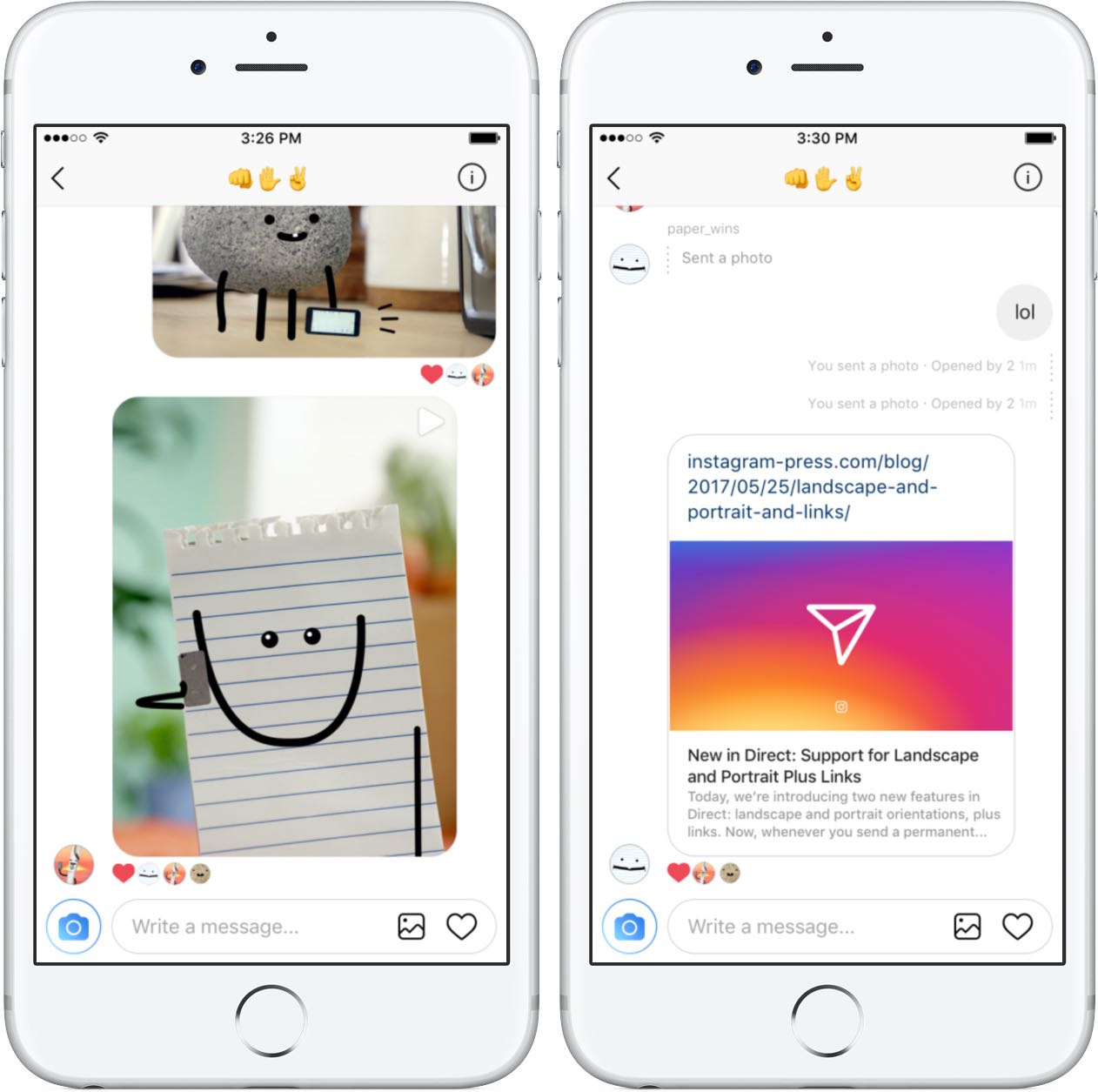
The ability to send a permanent photo or video in landscape and portrait orientations through Direct means you no longer have to worry about weirdly cropping it as it will now show up properly in its intended orientation.

“We’ve added support for links in Direct,” noted the company. “You can share website links with friends and preview them directly from your thread.” As a bonus, the team also has implemented automatic links to phone numbers and addresses send through Direct.

Landscape and portrait uploads in Direct are available today on iOS, with Android coming soon. Links in Direct messages are available today on both iOS and Android.

Today's features are part of Instagram's version 10.22 update.

Grab Instagram for free via App Store.

You can now drag and drop files on iPad between Readdle’s productivity apps

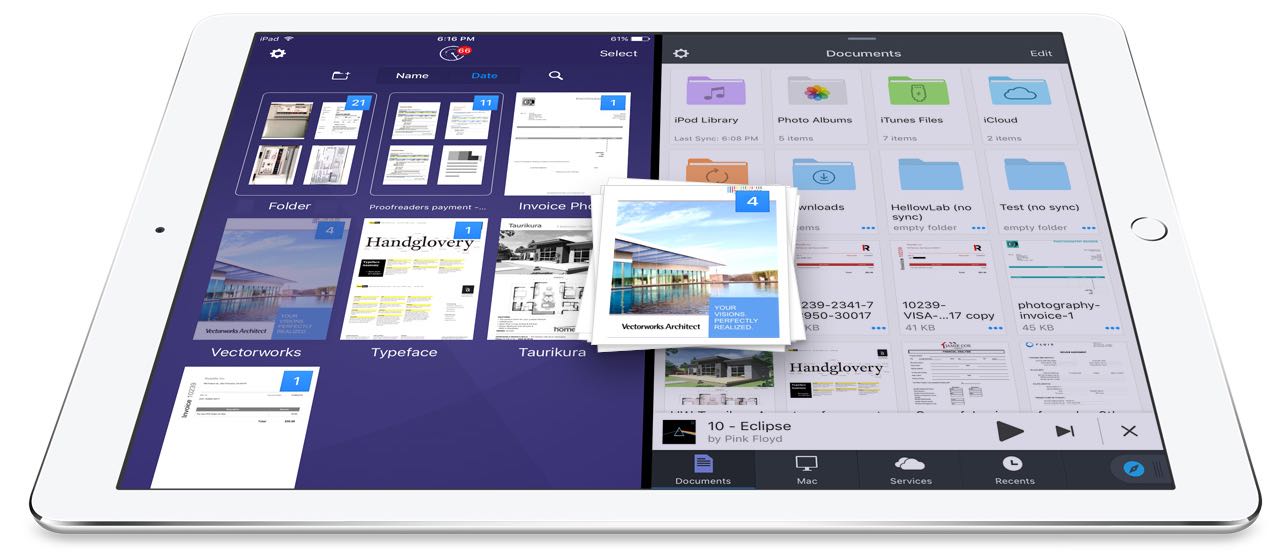
Readdle, Ukrainian makers of fine productivity software for iPhone, iPad and Mac, today announced that, for the first time ever, they're making it possible to drag and drop items in the split screen mode on iPad between its most popular productivity apps: Documents, PDF Expert, Scanner Pro and Spark.

In addition to cross-app drag and drop in Split View multitasking mode, Readdle's excellent Documents app has received a major update that turns it into a Finder on iOS of sorts.

Cross-app drag and drop

Drag and drop between Readdle apps works like a charm, really.

For instance, you can drag a file from Documents and drop it on Spark to instantly create a new email message with an attachment. Or, you can drag and drop scans from Scanner Pro to PDF Expert for further editing.

How about moving that attached contract from Spark to PDF Expert to sign it before sending the signed document back to Spark as a reply? You can do all that—and much, much more—across the aforesaid Readdle apps on your iPad.

The promo video below showcases drag-and-dropping files between Readdle apps.

https://www.youtube.com/watch?v=epzh9-rd-AI

True, some third-party iOS apps do support direct manipulation of content within the app.

That being said, however, the ability to drag and drop files and other content between multiple apps has not been utilized on iOS at all. While Apple could enhance iOS's Split View multitasking mode in the future with useful interactions like drag and drop, Readdle has already found a way to make cross-app drag and drop work.

Denys Zhadanov, Readdle's Vice President of Marketing, said via email:

We see it as a major improvement of iOS and this is how all iPad apps should work between each other. It’s so freaking awesome—glues all our apps into a phenomenal productivity ecosystem.

“The Readdle Team hopes that Apple will introduce their own implementation of inter app drag and drop one day,” developers noted. “That will support other apps and make iPad a much better productivity device than it is now.”

New features in Documents 6

As mentioned earlier, Readdle's capable (and free) file manager, called Documents, is getting a major update today turning it into the iOS Finder you’ve always wanted. The update brings out various enhancements, including an overhauled design with Spark-like quick actions, an easier way to import files, improved file management, an all-new media player, on-the-fly editing of cloud files, music and video streaming and more.

https://www.youtube.com/watch?v=i-314ezmBgE

According to Readdle:

iOS has always been a 'no-file-manager' system. Everything is taken care of by the apps. That’s a blessing and a curse at the same time.However, some of us are very comfortable with controlling things on our devices, especially when it comes to getting real work done.

This is why we created Documents, an extremely powerful, versatile hub for all of your files on iPhone or iPad. It’s your Swiss knife that removes iOS file management woes.

Documents has always been a powerful iOS file manager and now it's gotten even better.

The completely rethought user interface is very functional.

As the screenshots attest, you can now easily edit, zip, tag, move or sync your files with fewer taps than before. Bigger file preview thumbnails give you a better idea of the content of that Excel spreadsheet or PPT presentation before you even open it.

A prominently featured “+” button lets you quickly import files, including documents from your computer, Dropbox, Google Drive, Box, WebDAV or any other cloud-based storage source. Files are now organized into folders exactly the way you are comfortable with.

Just select one or a few of them and easily drag them to the right location. And with cross-app drag and drop support, you can move a single or multiple files between Documents and Spark, Scanner Pro or PDF Expert.

“The best part is that you can access any of the locally stored files in any app with the ‘Open in’ option,” notes Readdle. “This is a unique experience on iOS, and it’s what finally gives you that Finder feel on your iPhone or iPad.” Now you can work directly with your cloud files in Documents and even stream photos, videos and music from any cloud storage without needing to download the files to your device.

The new media player helps you organize your music into playlists, with the ability to shuffle and loop your favorite tracks. And if you have PDF Expert installed on your device, Documents will let you annotate and edit PDFs, fill out forms, sign applications and more.

If you haven't played with Documents before, you should really give it a try.

Acting a central hub for all of your files, it lets you view almost any file format natively, store your files directly on the device or connect to the popular cloud storage service to keep everything together in perfect sync.

Availability

Spark and Documents are available at no charge from App Store.

PDF Expert is $9.99 on App Store.

Scanner Pro is $3.99 on App Store.

You should really download the latest version of Spark, Documents, Scanner Pro and PDF Expert and see for yourself what kind of a productivity device your iPad can be with proper drag and drop support.