iOS

Why and how to use a VPN on your iOS device or Mac

A virtual private network, commonly referred to as a VPN, is a type of connection you can use over the internet that helps to secure your identity as you surf the web.

Often times, they're used to improve your security and privacy on public Wi-Fi networks, but they're also used for a wide variety of other reasons. If you've been considering using a VPN on your iOS device(s) or Mac(s), then you've come to the right place. We're going to tell you all about why you should consider using one and how to use a VPN on iPhone, iPad, or Mac to your advantage.

How to disable suggested search terms in Safari

Google Suggestions while typing in Safari address bar

Safari Smart Search Field lets you type in either an URL to visit or a search query to send to the default search engine. It's also a place where search suggestions automatically pop up as you type. With this cool feature, you can type just the first few letters of a query and rely on the search engine (Google, Bing, Yahoo, etc.) to help you complete the search term without needing to type out the rest of your query. But, certain users may not be fond of this feature for privacy reasons.

If you're among them, use the step-by-step instructions provided in this tutorial to turn off suggested search terms in Safari for iPhone, iPad, and Mac.

How to manage multiple accounts in Instagram

Instagram officially announced support for logging into more than one Instagram account at a time in its free iOS and Android apps on Monday, and many of you that use Instagram on a daily basis are probably wondering how you can get your hands dirty with the feature.

Although signing in with multiple Instagram accounts is a feature that is still currently rolling out to all users, it's possible to force your app to allow you to sign in with multiple accounts right now.

Once you get your Instagram app updated to the latest version and are ready to get started with using multiple user accounts in the app, you can follow this tutorial on how to manage all your Instagram accounts from the app.

Apple seeds iOS 9.3 beta 3 with Verizon Wi-Fi Calling and more

Apple on Monday seeded a third beta of iOS 9.3 to its developers. The software is available to members of the Apple Developer Program and can be deployed on the iPhone, iPod touch and iPad devices running a prior beta as an over-the-air download in Settings → General → Software Update.

A standalone installer should be available shortly through Apple's portal for developers.

The new beta has a build number of 13E5200d and adds a new Wi-Fi Calling option for Verizon customers. iOS 9.3 beta 3 arrived approximately two weeks following iOS 9.3 beta 2 and a full month since the original 9.3 beta was seeded to developers. We will update the article with a running list of enhancements in the new beta as we encounter them.

How to make the most of 3D Touch in Phone app

Our 3D Touch tutorial series has so far covered various user interface shortcuts and 3D Touch Peek and Pop gestures in several Apple stock apps like Messages, Safari, Mail, iBooks and Apple Maps.

Today, we're going to discuss how pressure-sensing screens enhance the Phone app, one of the most frequently used stock apps on iPhones. Here's how to make the most of 3D touch and the Phone app.

Link your Spotify account with Shazam to enable full song previews & more

The Shazam app for iOS comes with the ability to link your Spotify account so you can stream the music you tag via Spotify directly from the Shazam app itself. A recent update to the app included a complete rewrite for this feature, so it's now more stable than ever before.

All you have to do is connect your Spotify account to the Shazam app, and the app will take care of the rest for you, allowing you to listen to full tracks in Shazam instead of just 30-second song previews.

In this tutorial, we'll be showing you how to link your Spotify account to the Shazam app in iOS.

Jailbreak tweaks of the week: Gravitation, Snakebite, & more…

This week, we've gone through a bit of a lull in new jailbreak tweak releases in Cydia. Despite the slowness, there are some releases worth taking a look at.

We'll show you our favorite jailbreak tweak releases this week first, and then outline all of the rest of the jailbreak tweaks launched in Cydia. Our favorites are the ones we thought were either the most fun to use, or made the biggest impact on how we use our devices.

Get the classic iOS camera shutter animation back with this tweak

Starting with iOS 7, Apple redesigned the Camera app and it got an all-new shutter animation. Some would argue it's a little bit boring compared to the realistic camera shutter animation we had with iOS 6 and earlier.

Fortunately, anyone who's feeling a little nostalgic now have a way to get it back by way of a new free jailbreak tweak in Cydia's BigBoss repository called ClassicShutterAnimation.

12 great 3D Touch jailbreak tweaks you should try

3D Touch is the flagship new feature of Apple's iPhone 6s handset. It's a part of the display that is capable of capturing forceful touches and performing actions based on how firmly you're pressing, and Apple has done a great job creating a range of features throughout iOS that take advantage of this display technology.

But for those that feel iOS leaves a lot to be desired, the jailbreak community has come up with a variety of new uses for 3D Touch, whether your iPhone supports 3D Touch or not. And in this roundup, we're going to show you a number of tweaks that we think really help compliment the 3D Touch experience on a jailbroken iPhone.

This tweak displays Siri suggestions in all iOS Spotlight interfaces

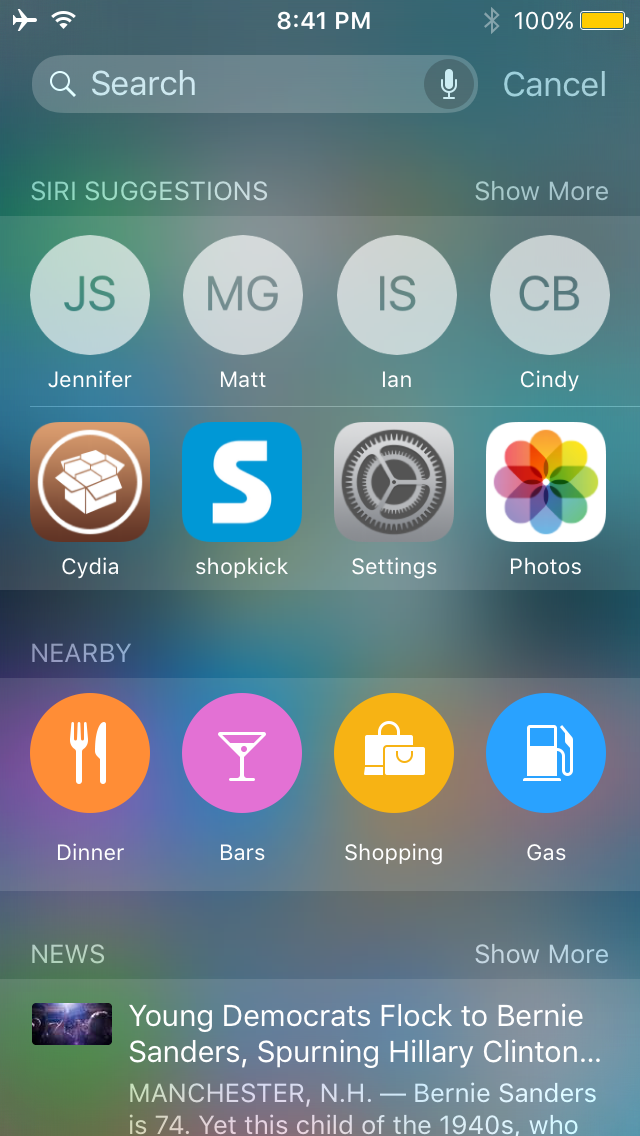
Starting in iOS 9, Apple introduced Siri Suggestions in the updated Spotlight interface, which is accessed to the left of the first Home screen page.

Interestingly, despite the new Spotlight interface, Apple kept the original Spotlight interface that you can access by pulling down from the top of the screen, and as you might imagine, it doesn't have all the new bells and whistles the new Spotlight interface does.

A new jailbreak tweak called NearbyNews is now available in Cydia's BigBoss repository for $0.99 that will let you bring these features to the original Spotlight interface in iOS 9.