iOS

This jailbreak app for iOS shows all your Wi-Fi network passwords

Most of you probably use a Wi-Fi network on your iPhone, iPad, or iPod touch, and some of them may even require a password to gain access to.

Have you ever been in a predicament where you've needed to use someone's Wi-Fi network and they wouldn't tell you the password for it to your face, but they had no problem typing it in for you so you could use the network without knowing what the password was? Or, have you just plain forgotten the password to one of your most-used networks when you have a new machine or device you want to use to connect to it?

If you've been in either of these situations, then a new jailbreak app called Wifi Passwords List, which is a free download from Cydia's BigBoss repository, could be of use to you. It'll show you the password of any secured Wi-Fi network you've ever used on your iOS device.

Office Lens converts scanned paper documents to editable Word files

For those of you that still use hard copies for all your important documents, or have physical business cards, photographs, whiteboards, and other important information that are looking for a way to digitize it and even modify it after the fact, Microsoft's Office Lens app will be your best friend.

Office Lens, which is a free download from the App Store, allows you to scan these kinds of information and media and can create software versions of them to make sharing and editing easier so you can get rid of the filing cabinet taking up space in your home or office.

In this tutorial, we'll give you some background on the app and show you how you can use it to scan and then edit documents in Word.

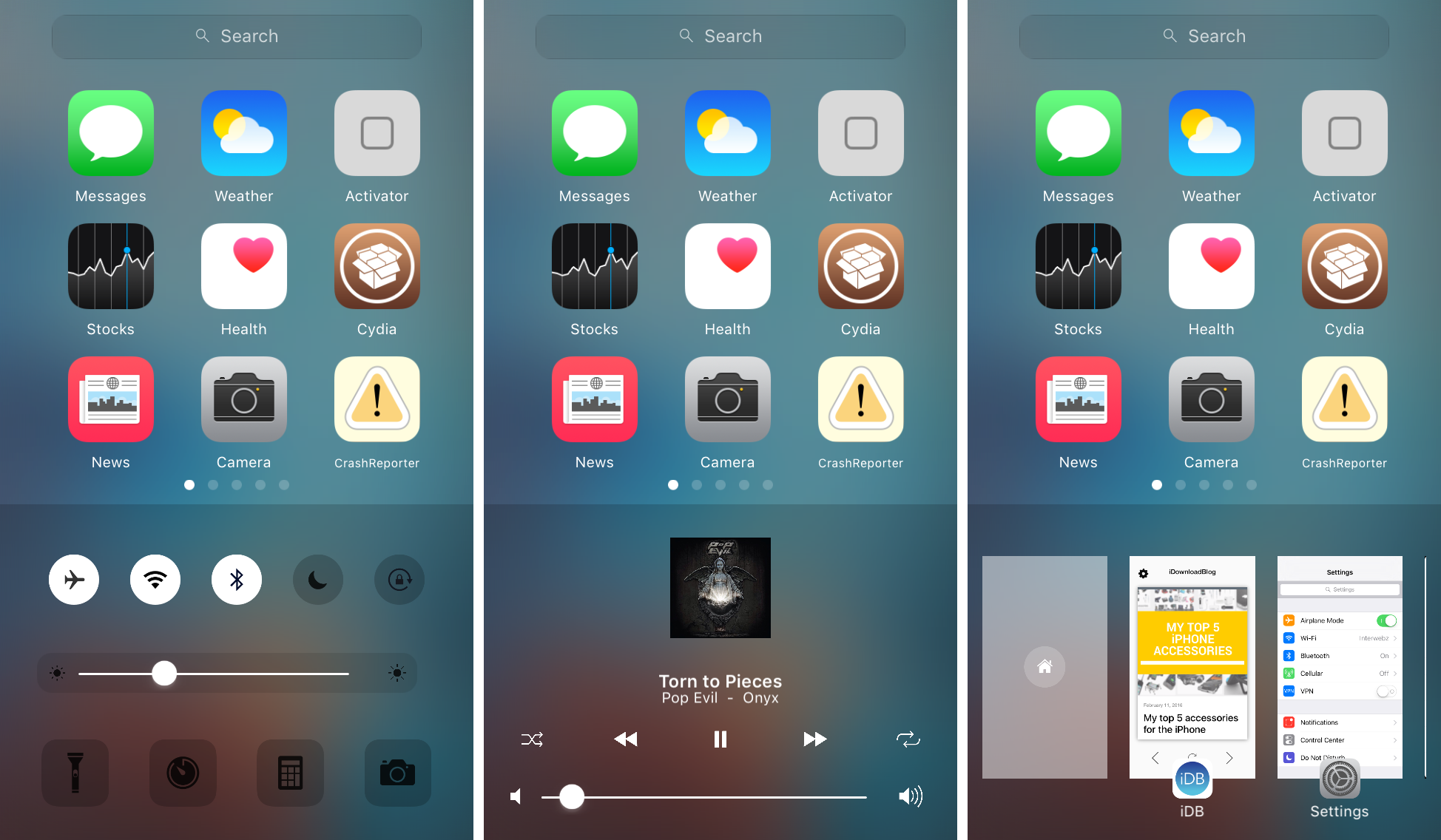
Zentrum offers an omni-interface for accessing multitasking, music controls, system toggles & shortcuts

In iOS, the Control Center and App Switcher interfaces are separate from one another and this means to get to one or another, you have to use a different gesture. It seems like some improvements could be made by merging the two interfaces into one, as we've seen with the popularity of previous jailbreak tweak releases such as Auxo 2 & 3.

A new jailbreak tweak called Zentrum is now available in Cydia's BigBoss repository for $1.99 and it introduces users to an all-new omni-interface for multitasking, viewing music controls, and accessing system toggles & shortcuts, but it even bakes into the mix a quick app launcher, which you can configure to your liking.

How to view, search and edit Safari passwords

If you're tired of always having to log in, Safari will happily save web passwords in your keychain. Even better, the browser can automatically fill in your user names and passwords the next time you visit your favorite websites.

And with the iCloud Keychain feature, your saved passwords can be synchronized across devices in a safe, secure manner. In this tutorial, you're going to learn how to search saved Safari passwords without needing to visit their websites, view your saved logins, as well as add, delete and manage saved passwords. 

My top 5 accessories for the iPhone

There are seemingly endless choices for iPhone accessories out there, and I've got to tell you, I go through iPhone accessories like candy. One day I like something I'm using, and another day I find it to be a nuisance and I end up leaving it at home and buying something completely different to suit my needs.

Regardless, there are still some accessories that I still use on a day-to-day basis, and in this piece, I'll show you my top 5 favorite iPhone accessories that I actually use on a daily basis and why.

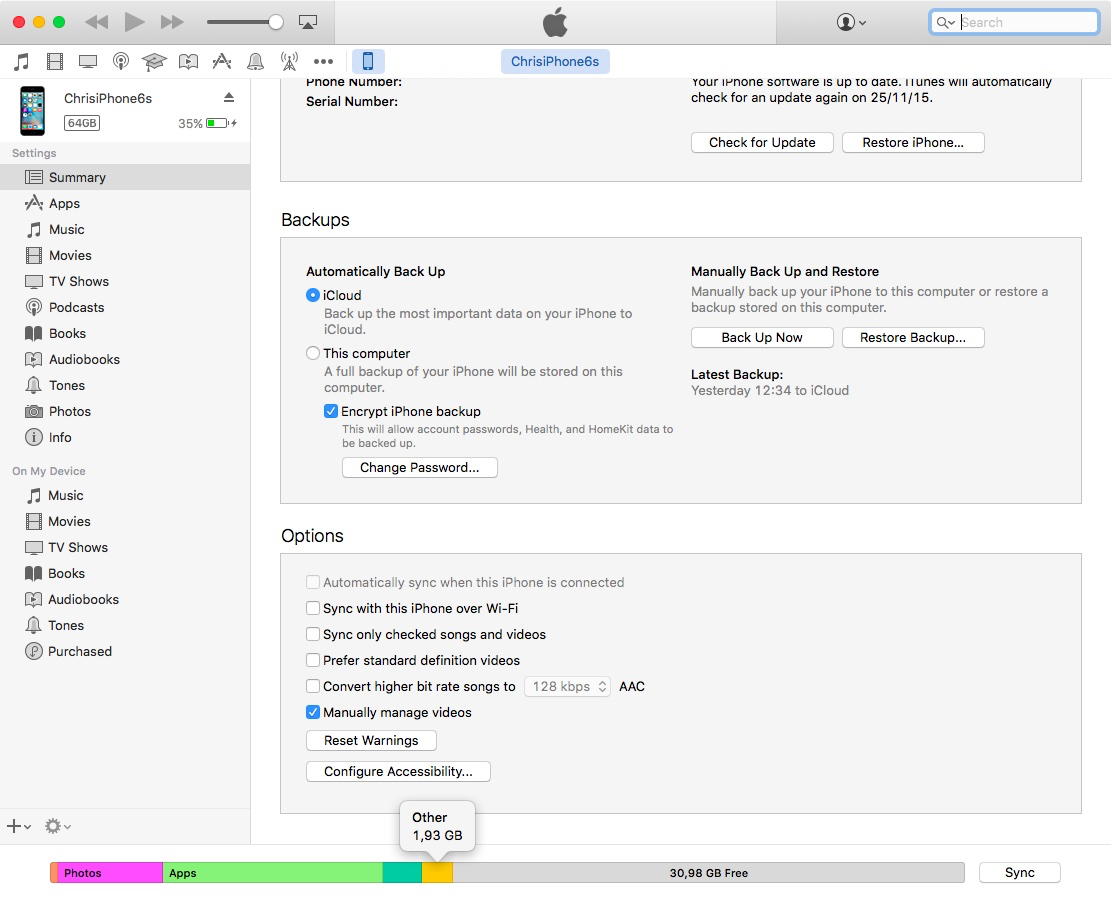
‘Other’ storage on your iPhone and iPad explained

For most users, the ‘Other’ iOS storage category—reported after connecting an iOS device to desktop iTunes—is something of a mystery. ‘Other’ storage starts at one to five percent of total device capacity but can quickly creep in to a few gigabytes.

This post will unravel the mysteries behind 'Other' iOS storage, explain what it's used for, how iOS manages it and what you can do to decrease it.

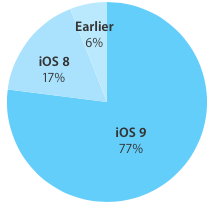
iOS 9 adoption keeps chugging along, now standing at 77 percent

According to the latest stats published today on Apple's App Store dashboard for developers, 77 percent of devices are now using iOS 9.0 or later.

The new data point, captured by the App Store on February 8, 2016, represents a one-point increase over the adoption rate of 76 percent recorded two weeks ago and a two-point gain versus the 75 percent figure that was captured a month ago.

Why and how to use a VPN on your iOS device or Mac

A virtual private network, commonly referred to as a VPN, is a type of connection you can use over the internet that helps to secure your identity as you surf the web.

Often times, they're used to improve your security and privacy on public Wi-Fi networks, but they're also used for a wide variety of other reasons. If you've been considering using a VPN on your iOS device(s) or Mac(s), then you've come to the right place. We're going to tell you all about why you should consider using one and how to use a VPN on iPhone, iPad, or Mac to your advantage.

How to disable suggested search terms in Safari

Google Suggestions while typing in Safari address bar

Safari Smart Search Field lets you type in either an URL to visit or a search query to send to the default search engine. It's also a place where search suggestions automatically pop up as you type. With this cool feature, you can type just the first few letters of a query and rely on the search engine (Google, Bing, Yahoo, etc.) to help you complete the search term without needing to type out the rest of your query. But, certain users may not be fond of this feature for privacy reasons.

If you're among them, use the step-by-step instructions provided in this tutorial to turn off suggested search terms in Safari for iPhone, iPad, and Mac.

How to manage multiple accounts in Instagram

Instagram officially announced support for logging into more than one Instagram account at a time in its free iOS and Android apps on Monday, and many of you that use Instagram on a daily basis are probably wondering how you can get your hands dirty with the feature.

Although signing in with multiple Instagram accounts is a feature that is still currently rolling out to all users, it's possible to force your app to allow you to sign in with multiple accounts right now.

Once you get your Instagram app updated to the latest version and are ready to get started with using multiple user accounts in the app, you can follow this tutorial on how to manage all your Instagram accounts from the app.