Apps

Pebble 2.3 firmware now live with notification skipping with a double-click

Nearly a month into its most recent firmware update which has brought out a much-needed music volume control and Launcher item ordering, the maker of the Pebble smartwatch on Tuesday issued another firmware update while refreshing its companion iOS app with smaller changes.

The Pebble 2.3 software update brings improved Bluetooth performance and, more importantly, enables the ability to quickly skip to the next notification by double clicking, in addition to other tweaks...

Emojli is an emoji-only network that could be the next Yo

As if there weren't already enough ways to communicate with others, this month has now been witness to two different outside of the box messaging platforms. The first was a quirky new app called Yo that took the App Store by storm earlier this month with over one million users in just days. The two-character app is a simple and efficient messaging tool that solely consists of sending and receiving notifications that say Yo.

Emojli is the second, an emoji-only network looking to replicate the success of Yo from a few weeks ago. Forget text messages, hashtags, spam and trolls, and communicate solely with emojis. Emojli is now accepting username reservations on its website, which are also entirely in emoji. While the app seems like satire, its creators Matt Gray and Tom Scott claim it will be launching on iOS soon and other platforms later… 

1Password with Touch ID authentication and Safari Share sheet support shown off

A big part of what makes iOS 8 so great is how Apple is finally opening up its mobile operating system to developers, more than ever before.

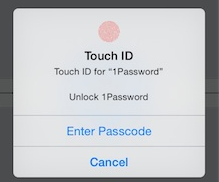
Take Touch ID, for example. With a little help from the iOS 8 SDK and the new Local Authentication Framework, third-party apps can tap Touch ID to authenticate a user in a safe manner as fingerprint data is protected and never accessed by iOS or apps.

Brands such as PayPal have pledged to update their apps with Touch ID authentication when iOS 8 gets released for public consumption this Fall and now a beta tester has posted screenshots and a short video of Touch ID integration in 1Password for iOS, the popular password management program by AgileBits...

Apple announces iTunes U 2.0 with new creation tools and discussion feature on iPad

Apple on Monday announced a major new version of its iTunes U educational app with a number of new creation and discussion features for iPad. The new iTunes U 2.0 app, due July 8, will enable teachers to create, edit and manage entire courses directly on iPad for the first time, while students will get to take advantage of some interesting new collaboration capabilities, including the ability to start class discussions and ask questions right from their iPad...

The best apps for taking selfies

I actually hate the word “selfie.” It is one of those trendy words that has stuck around much longer than it was supposed to. It caught on, like a virus, and spread across the world. Even the President of the United States uses it.

I have to admit defeat here, and use the word to describe this list. We know you love to take pictures of yourself with a new outfit, a funny hat, or while eating a burrito. So, here is our list of best apps to take selfies.

Shutter stores every photo you take in the cloud for free

We’ve all been there. We are on vacation or at an event, snapping pictures or shooting video clips of our kids doing something funny, when we run out of storage space on our iPhone. There are plenty of options for saving pictures on social networking sites or in iCloud. However, we don’t necessarily want to share hundreds of pictures of the 5K we just ran on Facebook and Apple’s free iCloud storage is limited. Even Dropbox limits your free storage to 2GB.

Shutter by StreamNation aims to solve our storage needs by allowing users to take photos and video from within the app and automatically store content in an unlimited free cloud-based service…

Upopa brings their Hopeless Blobs to the World Cup

Being a cute, glowing, terrified Blob is a tough job. Those little guys have been lost in dark caves, abandoned in outer space, and now they are faced with angry mobs as they take on the job of goalie at this year’s “Football Cup.”

Hopeless: Football Cup brings all of the excitement of the biggest football tournament in the world to an isolated spot on the play field. Help protect the blobs from a barrage of balls as furious football fans express their true feelings…

Watchup provides video news based on your interests

With news aggregates like Flipboard and Pulse, we have the blogging world at our fingertips. However, we don’t always want to read the news. Sometimes we want to veg out watching bite-sized stories that interest us the most.

Watchup: Your Daily Newscast brings together popular video clips of news that is relevant to your personal taste. Instead of turning on CNN only to watch hours of boring segments in hopes of seeing something that interests you, this app lets you tailor your news-watching experience…

Apple updates its pro apps: Compressor, Final Cut Pro, MainStage and Motion

As we continue to chew on the ramifications of Apple's eyebrow-raising decision to stop development of Aperture and iPhoto for OS X and focus exclusively on the upcoming Photos for OS X Yosemite (due in 2015), the Cupertino firm has just issued a round of updates to its pro apps: Compressor, Final Cut Pro, MainStage and Motion.

New versions of these apps are now available in the Mac App Store under the Updates tab. I've included release notes for each app right after the break...

Weekly helps you keep track of tasks and goals

There are some tasks that need to be taken care of only once. Those can easily be listed in any format, including the good old-fashioned pencil and paper method. Other tasks are meant to be done every day. They are more like goals than tasks. Nonetheless, they still need to be tracked.

Weekly is a task tracker that makes it incredibly simple for you to add content, update activities, and see your progress at a glance. We’ve got an app review of Weekly for you today to see if it is something you’d be interested in…

Fly brings multi-cam video editing to iPhone

The App Store is home to some of the best photography and video editing apps on any mobile platform so there are plenty of choices for video editors and mobile podcasters, from Apple's own iMovies app to innovative third-party solutions like MixBit by YouTube creators, Pinnacle Studio by Corel and Chromic, to name a few.

If you're really serious about editing video on the go and want to compose advanced edits with professional-looking effects that go beyond ready-made templates, look no further thanFly by Fly Labs, an innovative and fast video editor that supports multi-device video capture function.

Available free of charge in the App Store, Fly brings multi-cam editing to your iPhone and lets you compose videos with picture-in-picture and split-screen effects using simple and intuitive gestures...