App Store Apps

Periscope gains live-sketching feature, broadcasts come alive within Twitter for iOS

Wouldn't it be great if you could doodle over live video broadcasts on Periscope? With Periscope's latest iPhone app refresh, now you can! The latest version of the Twitter-owned app lets you draw with your finger on top of a live video feed in any color you want, like a boss.

Your drawings automatically disappear after a few moments, similar to the Apple Watch’s sketching feature, and remain visible on Periscope replays.


Google Maps for iOS gains Travel Times widget, Night mode and other new features in latest update

Google yesterday pushed an update for its native Maps application on the App Store, bringing out a few newsworthy features and enhancements.

Google Maps 4.18 for iOS introduces a new Travel Times widget which lets commuters check a live travel time estimation to their home or work right within the Notification Center's Today view.

In addition, the app's gained a new built-in option for sharing directions with contacts. Plus, there's a brand new Night mode and distance units settings in navigation.

Android TV now plays nice with iOS

If you're invested in Android TV and own a compatible TV set or set-top box, you'll appreciate that you can now control your Android TV from the comfort of your couch with an iPhone, iPad or iPod touch, as Google was kind enough to release the official Android TV app on the App Store.

The free of charge app works with all Android TV devices and includes remote functionality much like Apple's own Remote app lets you control Apple TVs with an iOS device.

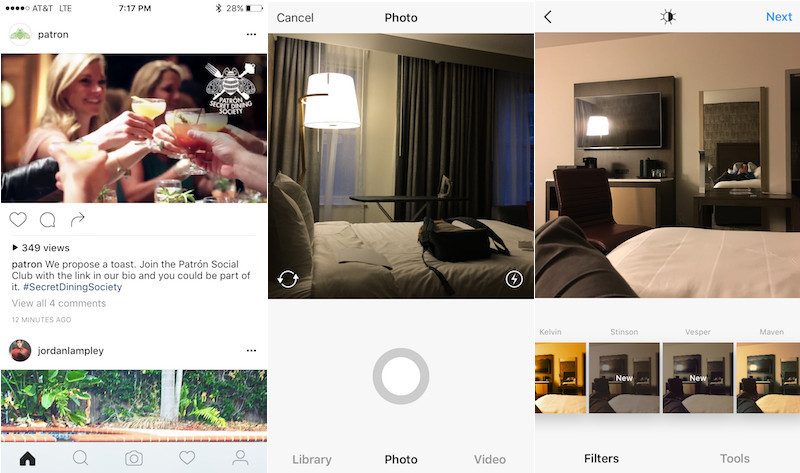
This is what your Instagram app might look like soon

Instagram's reportedly been testing a fresh new design for its mobile application for iOS and Android, MacRumors discovered yesterday. If leaked screenshots are anything to go by, in adopting much of iOS's aesthetics the overhauled app sports a simpler, monochromatic look providing a cleaner, flatter appearance.

It's unknown when the new design will launch for everyone. For now, Instagram appears to be testing the forthcoming app refresh with a small subset of its massive user base.

Nintendo confirms Animal Crossing and Fire Emblem will be hitting iOS this fall

Japanese gaming giant Nintendo on Wednesday announced that it will be releasing more mobile games on the iOS platform later this fall, including Animal Crossing and Fire Emblem. The announcement came during Nintendo's earnings announcement for its full fiscal year, ended March 31.

“Building on the positive consumer reaction to Miitomo, Nintendo announced that its next two mobile apps would be based on the familiar and beloved Fire Emblem and Animal Crossing franchises,” reads the press release.

Nintendo released the first information about its next video game system, the NX.

YouTube’s revamped Home feed is smart, too, thanks to Google’s deep neural network algorithm

Google just said that YouTube's mobile apps for iOS and Android are gaining a revamped homepage design today. The newly redesigned Home feed within the mobile app has a clean look and a simple format “that invites you to discover and enjoy,” said Google.

More importantly, the overhauled Home feed now does a better job spotlighting content you might be interested in with smarter recommendations based on deep neural networks and larger high-resolution video thumbnails which make it easy to identify videos you want to watch.

Hangouts 9 for iOS drops with Low Power Mode support and share extension

Google's Hangouts application wants to become a unified communications solution for all your messaging needs despite not seeing new features in months. Now we know why: Google's been busy working on a major new version.

Now available on the App Store, the new Hangouts 9.0 brings a pair of new features, including one that'll automatically suspend video sharing during VoIP calls when an iPhone enters iOS 9’s Low Power Mode.

Unicorn sipface and coffee “emojis” are cool, but Starbucks’s iPhone keyboard needs more work

Apparently, software keyboards for the iPhone have become a must for brands. Earlier this morning, Microsoft released Word Flow for iPhone, its gestural Windows 10 keyboard with one-handed typing and predictive text input.

And now, Starbucks has jumped on the bandwagon and released an iPhone keyboard of its own.

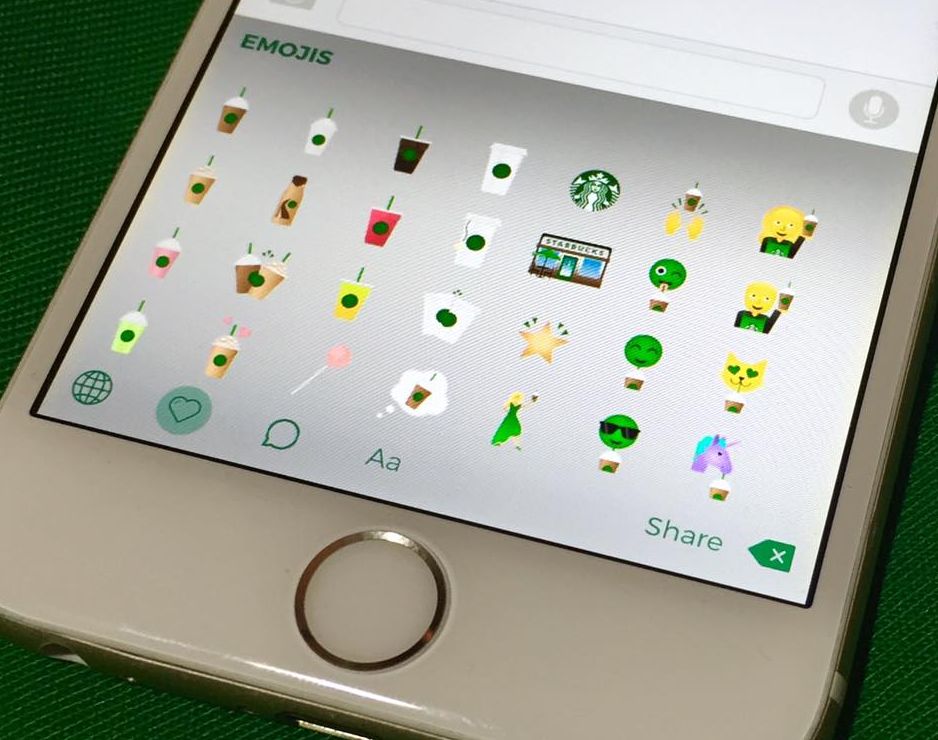
Available for free from the App Store, Starbucks Keyboard lets you add a little personality to your emails, texts, social media posts and more with branded “emojis” like Frappuccino blended beverages, iced tea, coffee and even a purple unicorn sipface.

It's a nicely done app that shows potential, but I dislike the fact that they're advertising it as an emoji keyboard because these things are more of stickers that get pasted as image attachments.

This free Apple Watch complication displays the time in words

When someone asks you what the time is and you glance at your Apple Watch, are you one of those people who struggle interpreting clock hands on a standard analog watch face? How cool would it be if your Apple Watch displayed the approximate time in words, such as “ten to six”, “quarter past three” or “about five o'clock”?

That's the problem that Roughly tries to solve. Created by Iain Anderson, Roughly is a complication that gives you approximate time, in words.

Available free of charge, it's just fun for most people but I think some users may actually find Roughly genuinely useful.

Microsoft’s Word Flow keyboard launches with one-handed mode, gestures, themes and more

After releasing an iOS edition of its Hub Keyboard last month, Windows giant Microsoft on Monday launched an iOS port of its predictive text Windows Phone keyboard, called Word Flow. The free of charge iPhone app brings many advanced features that speed up typing, like a cool one-handed mode, gesture based typing, predictive text input, custom themes and more. The Word Flow keyboard is available at no charge in the App Store.

SilentMessenger enhances your Facebook & Facebook Messenger privacy

Facebook and Facebook Messenger users who have a jailbroken iOS device are going to love the benefits of using a new jailbreak tweak called SilentMessenger.

This tweak is going to provide these users with additional steps to protect their privacy and keep their footprint in the Facebook apps as minimal as possible from the perspective of other users who are online. Moreover, it also supercharges some other features of the apps.

In this review, we'll talk about what SilentMessenger can do for your Facebook experience, and walk you through all of the tweak's options.

Ulysses brings its elegant writing environment to iPhone

As a writer, I'm always on the lookout for new apps that will help with the creative process and enable me to get work done more quickly and efficiently. I've gone through a variety of different apps on both Mac and iOS that provide their unique and not-so-unique feature sets in search of the ultimate writing tool.

With the power of iOS 9 on iPad, my goal has been to find a solid app that would give me the freedom of mobility while still syncing my thoughts and work to my Mac for those articles that only a physical keyboard could conquer. Today, I have found a solution that meets these goals in the form of Ulysses.