App Store Apps

New app can detect malware and tell if you’re jailbroken

There's a new app in the App Store called System and Security Info that shows detailed information about your device and running apps from a security standpoint. It can do a lot of things, including monitor memory and disk usage, show running processes, and it even detects malware and other anomalies.

A few other things about the app also caught our eye. One, it's capable of telling if your iPhone and iPad have been jailbroken, and two, it appears that former jailbreak contributor Stefan Esser (also known as i0n1c) is involved in the project. In fact, it was Esser who penned the announcement blog post.

How to use Snapchat’s new one-handed zoom

We don't hang out on Snapchat on a regular basis, but I myself use the app from time to time to check out new features. Earlier today, my boss Sébastien shared an amazing collection of handy Snapchat tips and trick, created by fifteen-year-old Victoria Samson.

Some of the tricks she demonstrates are quite brilliant, but her video how-tos don't cover Snapchat's latest feature addition—the ability to zoom while recording a video in one-handed mode using a simple gesture. That's precisely what this quick tutorial will discuss: using Snapchat's handy one-handed zoom mode during video capture.

Facer brings Instagram feeds, flash style cards and more to your Apple Watch face

About a month ago, Facer, a smartwatch customization platform, landed on the Apple Watch via a free of charge App Store app. Unlike most other apps for customizing watch faces, Facer puts your style and individuality on full display with thousands of custom watch faces and the ability to design your own with an online creator tool.

The app can pull watch face images from a variety of sources, including your Instagram feed, and it even has neat flash card style faces for learning things like languages, constellations, Solar System's planet names, the elements of the periodic table and so forth.

OneDrive implements 3D Touch previews for files and folders

Microsoft issued an update to OneDrive, its free of charge mobile cloud-storage client, adding some new features.

In addition to a fresh coat of paint and a revamped app icon, OneDrive for the iPhone, iPod touch and iPad was bumped in the App Store yesterday to version 7.1 with support for Peek and Pop in-app gestures for previewing content with 3D Touch on the iPhone 6s and iPhone 6s Plus.

In the refreshed app, you can now peek at any folder or file by pressing it lightly, or pop right into it by pressing a little deeper.

Google+ gains search autocomplete, Reply button on posts and more in latest update

Google+, the search giant's social thing, introduced a few new features in its mobile application for the iPhone, iPod touch and iPad, which can be downloaded at no charge from the App Store. Google+ 5.5 for iOS now includes search autocomplete, allowing you to search faster with suggestions appearing as you type.

The new Reply button on each comment lets you respond to posts with fewer taps and you can now create and delete circles from within the app's People tab.

New Tweetbot update makes tweetstorming easier

The Tapbots on Friday issued an update for their popular iOS Twitter client Tweetbot 4, bringing the app to version 4.3. The update includes a number of improvements, and a brand new feature called Topics that promises to make tweetstorming easier.

A Topic is a way to let you quickly Tweet a group of related Tweets without having to manually reply to yourself and/or add the same hashtags over and over. You can activate Topics by tapping the gear menu in the Compose screen, and they sync via iCloud.

How to repost Instagram photos, videos, and stories on iPhone

Repost photo to Instagram

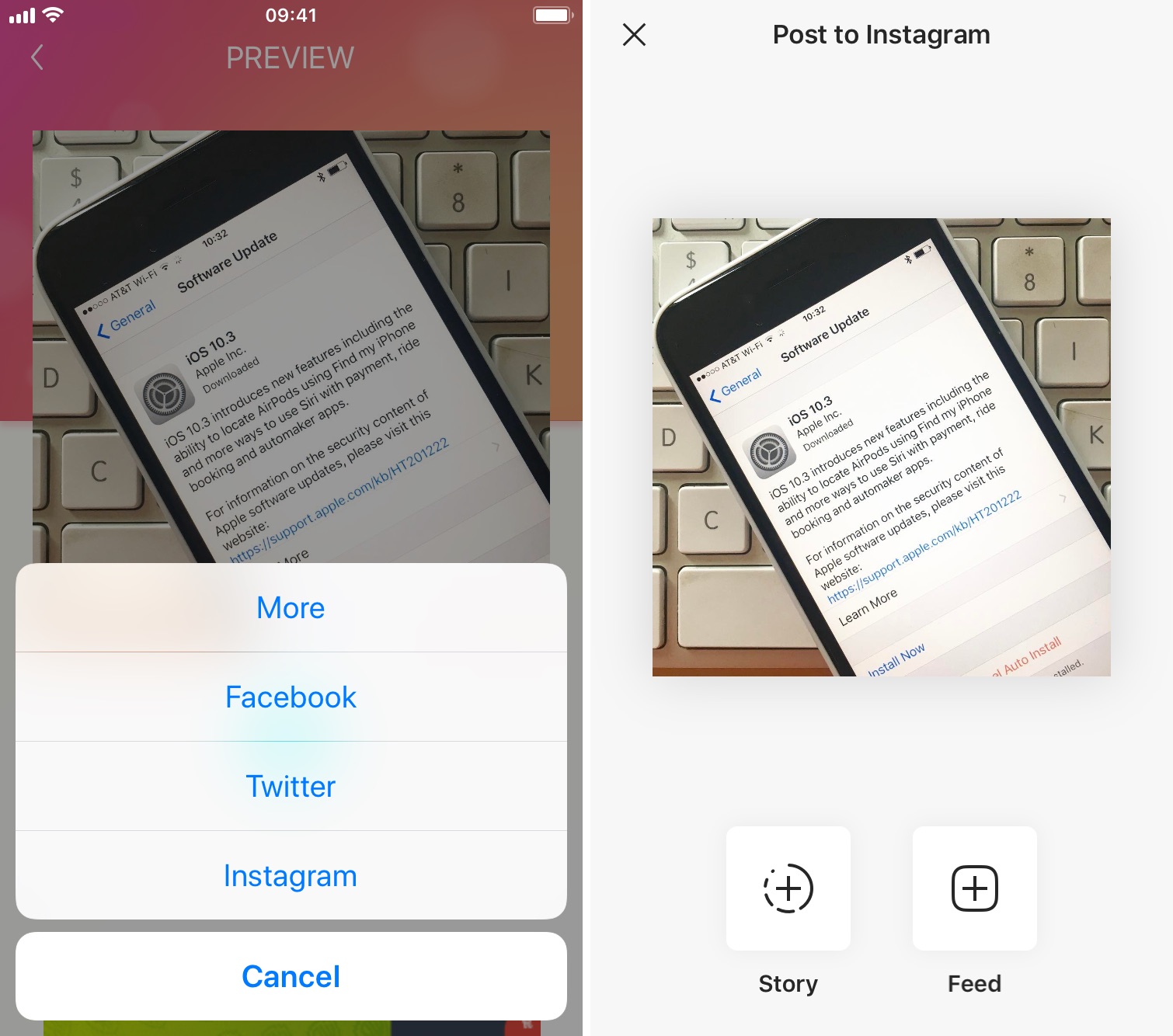
The Instagram app lacks the option to repost Instagram photos, videos, and stories natively, so people usually screenshot photos to post them as their own. This works fine as a workaround but requires extra steps, such as cropping the screenshot. Maybe more importantly, it generates photos of poor quality.

Reposting, also known as regramming, is quite a common practice, even though the Instagram application doesn't provide a way to easily do that. As a result, you must use third-party applications. In this post, we will show you how to repost Instagram photos, videos, and stories from your iPhone using an app we developed ourselves called Reposter for Instagram.

Camera Plus goes free as Apple’s App of the Week

Apple on Thursday updated its App of the Week promotion with the app Camera Plus (not to be confused with the popular Camera+). This means that from now through next Thursday, you’ll be able to pick up the photo editing app for free—a solid savings of a buck.

Camera Plus describes itself as the app for "the best macro photos and remote photography." It features the usual photo app options like filters and effects, but it also has special tools for taking close-up photos, and a feature called AirSnap for taking photos remotely.

How to use your iPhone as a mouse or trackpad

Your iOS devices have some of the best touch screens out there. As a matter of fact your iPhone screen makes for a great mouse, or trackpad.

The idea of using iOS devices as a trackpad for your computer isn't new, but Mobile Mouse Remote is a great app that provides this kind of functionality with ease of use in mind. It even packs some useful bonus features.

If you're interested in this kind of functionality for your iPhone, iPod touch, or iPad, then this is something you're going to want to check out.

Netflix picks up 3D Touch Home screen shortcuts, cellular video quality presets and more

Netflix today updated its iPhone, iPod touch and iPad application on the App Store with support for Quick Actions on the Home screen with 3D Touch.

This lets iPhone 6s or iPhone 6s Plus owners press the Netflix icon on their Home screen to quickly search, continue watching and access the Trending Now or My List sections from the shortcuts menu.

Other enhancements in this edition of Netflix for iOS include VoiceOver navigation improvements and new controls to manage streaming data usage on cellular networks.

Google Photos gains revamped search with emoji support, customizable movies and more

After introducing smarter albums with text, maps and locations back in March, the search giant Google today issued a refresh to its mobile Photos application on the App Store. Now available as a free download for the iPhone, iPod touch and iPad, Google Photos version 1.10 packs in a redesigned search experience with support for emoji search (it really works) and Spotlight integration, better movies with the ability to add your own music to them and other perks.

On the web, Google Photos has gained a handy overlay with keyboard shortcuts and new features when uploading images to the service.