App Store Apps

Periscope for iPhone now lets you search videos and broadcast live from DJI drones

Periscope, a Twitter-owned app that lets anyone start a live video broadcast from their iPhone, today received a pretty substantial update on the App Store. Bumped to version 1.4, Periscope for iPhone now lets you search videos and broadcast live to the service from a compatible DJI drone.

In addition, the team shared a preview of their full beyond 24 hours approach that will be available in the coming weeks.


Microsoft to sunset Sunrise Calendar on August 31, here are a few viable alternatives

If you rely on the excellent cross-platform Sunrise Calendar to keep up with your schedule, Microsoft has some bad news for you: your favorite calendar app is breaking up with you as the Windows maker announced plans to shut down Sunrise on August 31. For those wondering, Microsoft bought this popular calendar app in February of 2015.

Fortunately, Sunrise alternatives are plentiful.

Google Translate app gains offline mode, instant camera translation from Chinese and more

Google's native Translate application for the iPhone, iPod touch and iPad received a major update yesterday in the App Store, bringing version number to 5.0 and introducing some rather interesting advances. For starters, Google Translate now works without an Internet connection, allowing you to translate words, phrases and sentences in 52 of the 103 supported languages when there is no cellular or Wi-Fi connection available.

The instant camera translation feature, called Word Lens, now works with Chinese: it reads both to and from English, both Simplified and Traditional Chinese. This feature is ideal for traveling: you just point your camera at, say, a restaurant sign in a foreign language and witness the appropriate translation appear like magic in live video feed.

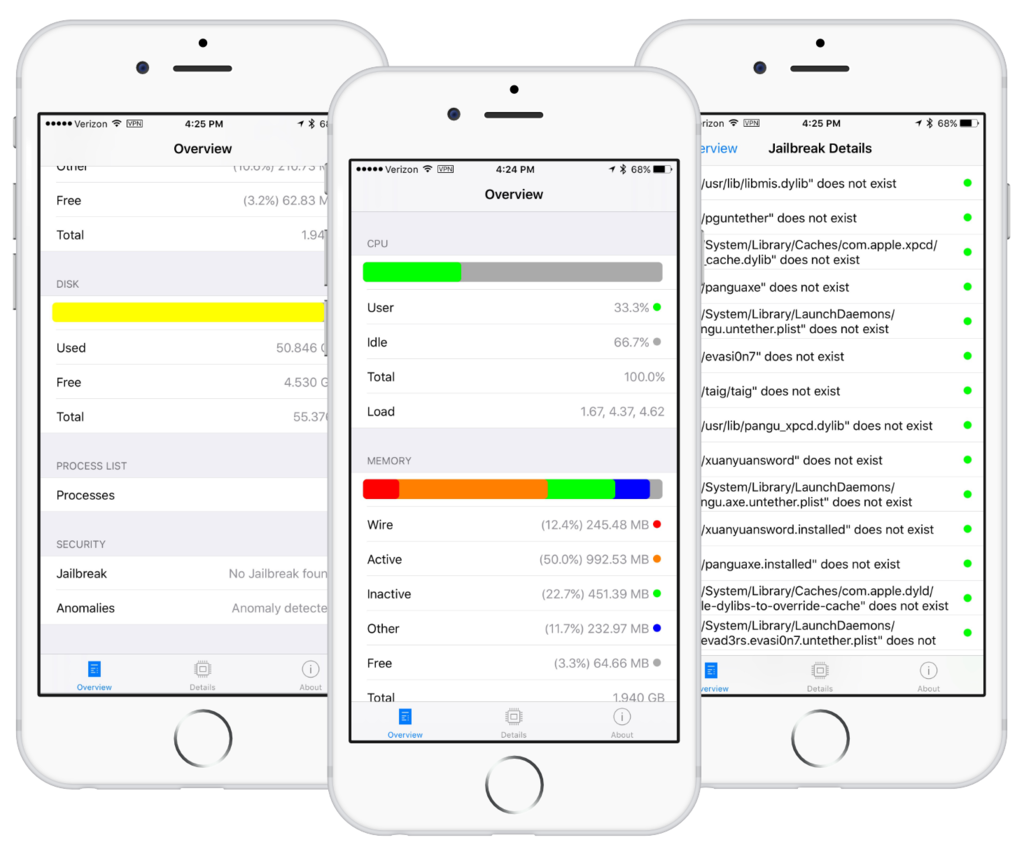
A quick overview of the new System and Security Info app

Security has always been a top priority for Apple and its ecosystem, especially as of late. Tim Cook has made it clear that maintaining encryption and tight security protocols are here to stay. Users that are equally as concerned about protecting their personal information have had few options in actually monitoring their security however. A new app called System and Security Info from security firm SektionEins aims to help with that.

Instagram revamps app with new icon and monochromatic interface

Facebook-owned Instagram today announced a major new version of its iPhone app with an overhauled user interface with bigger photos and an updated Home screen app icon.

“Inspired by the previous app icon, the new one represents a simpler camera and the rainbow lives on in gradient form,” explains the company. In addition, they've updated app icons for Layout, Boomerang and Hyperlapse, too.

Instagram is available free of charge on the App Store.

How to use one-handed zoom on Google Maps

Yesterday, iDownloadBlog detailed a cool new one-handed zoom gesture during video capture which Snapchat's latest update has implemented.

This incredibly convenient shortcut permits you to zoom in and out as you're shooting video with Snapchat's camera, in real time. As one of our commenters pointed out, Google Maps has long had a similar shortcut on its native iOS app.

With it, iPhone, iPod touch and iPad users can zoom in and pan around in one-handed mode, without needing to use a two-fingered pinch-zoom gesture. Here's how one-handed zoom mode works on Google Maps for iOS.

New app can detect malware and tell if you’re jailbroken

There's a new app in the App Store called System and Security Info that shows detailed information about your device and running apps from a security standpoint. It can do a lot of things, including monitor memory and disk usage, show running processes, and it even detects malware and other anomalies.

A few other things about the app also caught our eye. One, it's capable of telling if your iPhone and iPad have been jailbroken, and two, it appears that former jailbreak contributor Stefan Esser (also known as i0n1c) is involved in the project. In fact, it was Esser who penned the announcement blog post.

How to use Snapchat’s new one-handed zoom

We don't hang out on Snapchat on a regular basis, but I myself use the app from time to time to check out new features. Earlier today, my boss Sébastien shared an amazing collection of handy Snapchat tips and trick, created by fifteen-year-old Victoria Samson.

Some of the tricks she demonstrates are quite brilliant, but her video how-tos don't cover Snapchat's latest feature addition—the ability to zoom while recording a video in one-handed mode using a simple gesture. That's precisely what this quick tutorial will discuss: using Snapchat's handy one-handed zoom mode during video capture.

Facer brings Instagram feeds, flash style cards and more to your Apple Watch face

About a month ago, Facer, a smartwatch customization platform, landed on the Apple Watch via a free of charge App Store app. Unlike most other apps for customizing watch faces, Facer puts your style and individuality on full display with thousands of custom watch faces and the ability to design your own with an online creator tool.

The app can pull watch face images from a variety of sources, including your Instagram feed, and it even has neat flash card style faces for learning things like languages, constellations, Solar System's planet names, the elements of the periodic table and so forth.

OneDrive implements 3D Touch previews for files and folders

Microsoft issued an update to OneDrive, its free of charge mobile cloud-storage client, adding some new features.

In addition to a fresh coat of paint and a revamped app icon, OneDrive for the iPhone, iPod touch and iPad was bumped in the App Store yesterday to version 7.1 with support for Peek and Pop in-app gestures for previewing content with 3D Touch on the iPhone 6s and iPhone 6s Plus.

In the refreshed app, you can now peek at any folder or file by pressing it lightly, or pop right into it by pressing a little deeper.

Google+ gains search autocomplete, Reply button on posts and more in latest update

Google+, the search giant's social thing, introduced a few new features in its mobile application for the iPhone, iPod touch and iPad, which can be downloaded at no charge from the App Store. Google+ 5.5 for iOS now includes search autocomplete, allowing you to search faster with suggestions appearing as you type.

The new Reply button on each comment lets you respond to posts with fewer taps and you can now create and delete circles from within the app's People tab.