Safari

OS X El Capitan 10.11.4 is out with full Live Photos sharing, password-protected Notes and more

After spending more than two months in beta, OS X 10.11.4, a fourth major update to OS X El Capitan, today released for public consumption. The software update is now available and recommended for all OS X El Capitan users.

Even though it comes with a few noticeable outward-facing changes, OS X 10.11.4 does pack in some newsworthy improvements—namely in stock Messages, Notes and Photos apps. Full sharing of Live Photos via iMessages has been implemented throughout the system, too. Like other major OS X releases, 10.11.4 includes a handful of under-the-hood changes and tons of bug fixes and performance optimizations.

How to watch Apple’s ‘Let us loop you in’ event live

Apple will be streaming its 'Let us loop you in' media event live on the company's website. The Cupertino-based company is expected to unveil a number of new products related to iPhone, iPad, and the Apple Watch, but we'll have to wait and see to know for sure.

If you'll be tuning in to watch the Apple event live on your computer, there are some requirements you'll have to meet, and we'll touch on those requirements in this piece so you're prepared for it.

Why and how to use custom DNS settings on your iPhone, iPad, and Mac

DNS Settings on Mac

When you visit a website on your computer, such as iDownloadBlog or Google, you're using domain name system (DNS) protocol to exchange information between your computer and the server providing you with that website.

Depending on the DNS server you're using on your Mac or iOS device; you might not be experiencing the best speeds and web securities that you could be.

In this piece, we'll tell you why you may want to consider switching to a new DNS and show you how to use a custom DNS on your Mac, iPhone, or iPad.

SafariHistory lets you quickly and selectively delete Safari history on your iPhone

SafariHistory is a handy new jailbreak tweak that is now available for free in Cydia and it will give Safari users that don't use Private Browsing mode an easier way to delete their Safari history in bulk.

Although Safari on your iPhone and iPad includes a 'Clear' button to quickly delete all of your browsing history, the only way to delete individual history items is to swipe to the left on them to reveal the red "Delete" button, and this can take forever.

SafariHistory instead makes it easier to remove individual items in bulk without clearing your entire Safari browsing history, as you're about to see in this review.

How to quickly get your answers from a website you’ve searched before in Safari

In addition to finding all occurrences of a word within any webpage, Apple's Safari browser for the iPhone, iPod touch, iPad and Mac includes a nifty little feature called Quick Website Search which lets you get your answers from within a specific website as long as you've used its search box before.

Safari keeps tracks of the webpages as you surf the web so you can later find anything within a previously visited website, right from the Smart Search field.

In this tutorial, you'll learn how to leverage Safari's Quick Website Search feature to search within a website.

How to view, search and edit Safari passwords

If you're tired of always having to log in, Safari will happily save web passwords in your keychain. Even better, the browser can automatically fill in your user names and passwords the next time you visit your favorite websites.

And with the iCloud Keychain feature, your saved passwords can be synchronized across devices in a safe, secure manner. In this tutorial, you're going to learn how to search saved Safari passwords without needing to visit their websites, view your saved logins, as well as add, delete and manage saved passwords. 

Latest El Capitan beta has fixed Safari’s mishandling of shortened Twitter “t.co” links

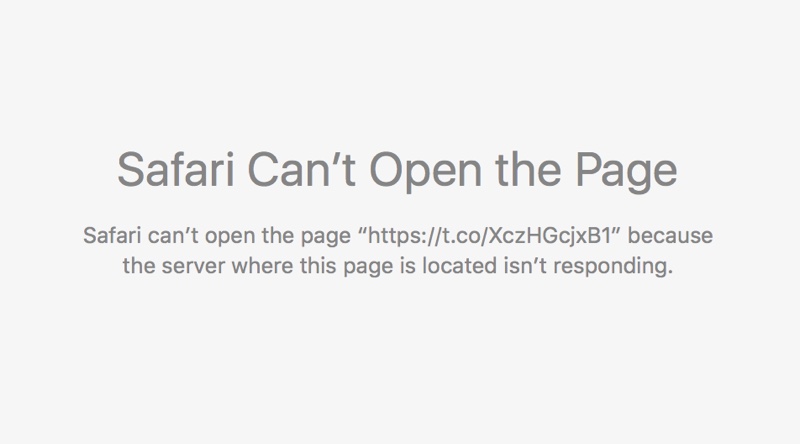
An annoying issue pertaining to broken Twitter links, which has persisted in Safari for Mac since November 2015, has been fixed in the third beta of the forthcoming OS X 10.11.4 El Capitan software update, according to user reports on the Apple Support Communities forums.

The “Safari can’t open the page because the server where this page is located is not responding” error page no longer appears when clicking shortened “t.co” Twitter links with the secure HTTPS protocol in Safari and third-party apps like Tweetbot.

Why and how to use a VPN on your iOS device or Mac

A virtual private network, commonly referred to as a VPN, is a type of connection you can use over the internet that helps to secure your identity as you surf the web.

Often times, they're used to improve your security and privacy on public Wi-Fi networks, but they're also used for a wide variety of other reasons. If you've been considering using a VPN on your iOS device(s) or Mac(s), then you've come to the right place. We're going to tell you all about why you should consider using one and how to use a VPN on iPhone, iPad, or Mac to your advantage.