The fine print of Google Photos and why you shouldn’t ditch iCloud Photo Library just yet

I jumped with joy after reading Cody's coverage of Google Photos. I mean, who wouldn't want a sleek photo service across iOS, Android and the web that came with truly unlimited storage, right?

Here's an iCloud Photo Library user who's been paying Apple happily 99 cents month-to-month for the privilege of using a meager twenty gigabytes of iCloud storage.

But I have a confession to make: I need way more storage for all my photos and am reluctant to fork out five bucks a month in exchange for just 200 gigs of iCloud storage.

Having said that, before you ditch Apple's iCloud Photo Library solution for Google Photos, here are a few facts Google didn't emphasize enough that you should consider.

Android M: Six headlining features from Google’s upcoming mobile OS update

Google's annual I/O conference is currently going on in San Francisco, and as expected, Android M, its latest update to Android, was officially unveiled. Although lots of new features will be packed in with Android M, six of those features were brought to the forefront during the beginning of the I/O keynote.

Google states that Android M is rethinking fundamental aspects of how the platform has worked for years, and focuses on polish and quality and improving the core user experience. From what we've seen thus far, we'd have to agree.

The following six areas—App Permissions, Web Experience, App Links, Android Pay, Fingerprint Support, and Power & Charging—were specially highlighted as new features for Android M. What do these new features mean for Android and the future of mobile?

Google announces new ‘Photos’ cloud service with free unlimited storage

Google hosted its annual developer conference this morning where it talked about Android M, Android Pay and other initiatives. It also announced a new cloud-based storage service for your photos and videos called Google Photos, and it's available on iOS today.

At first, Google Photos sounds a lot like iCloud Photo Library and other storage services: automatic back ups, integration with compatible apps, quick editing and sharing tools, and the ability to sort by various metrics. But there a few features that set Photos apart.

Google opens Inbox app to everyone: updated with Undo Send, Trip Bundles, new gesture options and more

Inbox, a gesture driven email application from the Gmail team built on Google-acquired Sparrow technology, got refreshed with new features this morning starting with Undo Send. Now, Undo Send has been available for quite some time through Gmail's web interface.

Now for the first time on your iPhone, Undo Send lets you take back an email right after sending in case you spotted a mistake, or have second thoughts. Also important, Inbox is now open to everyone so all Gmail fans can get in on the action right away.

IneffectivePower and Unicode Suppressor will protect jailbroken devices from the “effective power” Messages bug

There is a new bug in iOS that resprings most peoples phones due to a low memory crash. It is caused by iOS's inability to render certain strings of Arabic characters which overloads the memory, causing resprings and reboots or safe mode on a jailbroken device. Simply explained, when someone messages you those characters and you get a banner notification, your phone starts kicking the bucket.

A few developers have stepped in and saved the day for jailbreakers. This isn't the first or second time the jailbreak community receives a security fix quicker than Apple is able to push one to stock devices. It's a great example of the argument that jailbroken iOS, in the right hands, can be more secure than stock.

How to manage reminders on Apple Watch

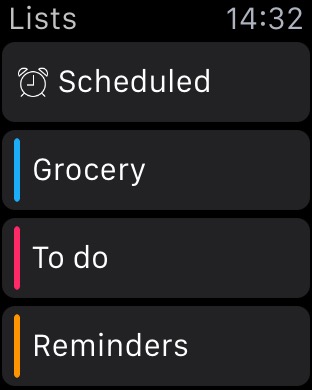
If you've been looking for an official Reminders app for the Apple Watch, your search has been in vain. That's because there simply isn't an app dedicated to Reminders on the Apple Watch like there is on the iPhone.

That doesn't mean that the Apple Watch is incapable of both managing reminders and setting reminders. Actually, with the help of Siri, it's easy to set up reminders on Apple Watch.

Take a glance at this latest entry into our full Apple Watch tutorial for a look at how to effectively set and manage reminders on the small screen.

Latest MacBook Pro supports 5K displays with up to 5,120-by-2,880 pixels at 60Hz

If you purchased Apple's new fifteen-inch MacBook Pro with Retina display and Force Touch trackpad, congratulate yourself as you're the proud owner of Apple's very first notebook capable of driving external displays in glorious 5K resolution.

The new 15-inch MacBook Pro also support single-stream 4K screens at a 4,096-by-2,160 display resolution at 60Hz, another first for Apple.

SwishSwitcher plays a sound when you kill an app from the App Switcher

SwishSwitcher by Metion is one of those 'why not' tweaks that are released here and there in Cydia that just add a little fun thing to a small part of iOS. They seem to be mostly projects that developers undertake in order to learn more about developing.

They can practice working with certain frameworks and passing information around by using Substrate to hook into Apple's private API's. There is also a lot more to learn about making a tweak than just coding it, and it's a great accomplishment to set everything up and create a deb file.

In this case the developer uses the 'whoosh' sound you hear when you hit Send from the stock Mail app, and calls it to play after a user has swiped up on a card in the App Switcher.

Both iPhone 6s and iPhone 6s Plus rumored to support Force Touch after all

Pressure sensing will be supported across both display sizes of Apple's next-generation iPhones, G for Games reported Thursday citing supply chain sources who spoke with Taiwanese media.

The same outlet originally claimed that Apple’s pressure sensitive Force Touch technology would make an exclusive appearance on a larger-screened iPhone 6s Plus.

Though it was initially supposed to be an iPhone 6s Plus exclusive, both devices should make use of pressure sensing after all. A credible report earlier this week asserted that iOS 9, which will be previewed alongside OS X 10.11 at next month's WWDC, features built-in Force Touch support.

Todoist launches Apple Watch app with Inbox, Today view, Projects, Filters and Labels

Todoist, the advanced to-do list and task manager for iOS and OS X, is now available for the Apple Watch. The app delivers a number of powerful features for managing tasks to your wrist, including Inbox, Today view, Projects, Filters and Labels. A Glance view gives you a quick overview of your upcoming tasks.

You can also respond to rich notifications with natural language processing. The main app provides more details related to your tasks and projects, allowing you to review tasks and projects, create new ones using dictation and much more.

How to use Digital Touch to send sketches, taps, and heartbeats on Apple Watch

The Digital Touch features available on Apple Watch are some of the device's most personal qualities. With it, you can do things like send sketches, taps, and yes, even your heartbeat, to friends. These three aspects make up the whole of the highly touted Digital Touch feature-set on Apple Watch. In this post, we'll break down how to send sketches, taps, and heartbeats with ease.