Jeff Benjamin

Jeff has been with iDownloadBlog since 2010, acting as resident video specialist, and tutorial expert. He earned his degree in Computer Network Systems back in 2001, but decided Cisco routers and the like just weren’t for him. Since then, he’s been heavily involved with online writing. He’s written for numerous tech and video game sites since the late 1990′s, and has a knack for explaining things in a simple, clear, and concise manner. Jeff works primarily from the east coast on his Retina Macbook Pro, and shoots video with a Canon DSLR. During downtime he likes to travel the world, visiting the various Apple Stores across the globe. You can email him at jeff [at] idownloadblog.com and follow him on Twitter @JeffBenjam or on Google+.

How to assign a keyboard shortcut to Notification Center on Mac

It might seem fairly obvious, but it might be a good idea to assign a keyboard shortcut to Notification Center on the Mac. Perhaps you already have, or maybe you still haven't. I hadn't, at least not up until a few days ago when a reader suggested that I do so, and I honestly can't come up with a reason as to why I waited so long. I think it's because I just never thought about doing it.

Assigning Notification Center to a keyboard shortcut just makes sense. It especially makes sense if you use a keyboard and mouse combination on your Mac, instead of a trackpad. Granted, MacBook users might not be so easily convinced, because invoking Notification Center can be accomplished via an effortless two-finger swipe on the trackpad.

But if you're working on an iMac, or if you're using a traditional mouse and keyboard combination with your MacBook, as I am, then I definitely recommend that you follow this uber-simple tip.

Upcoming Shrinkability iOS tweak mimics Samsung’s one-handed mode

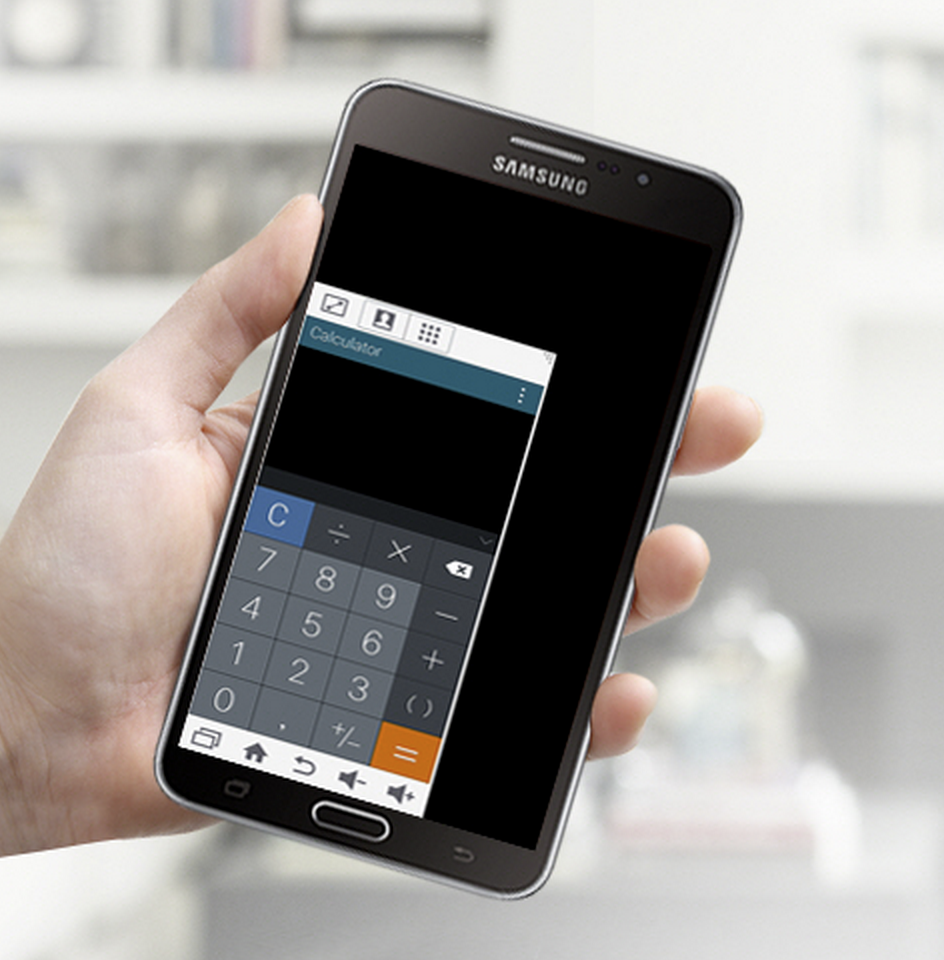
If you've ever used one of Samsung's flagship large phones or phablets, then you're likely well-aware of the Korean firm's so-called one-handed mode. One-handed mode is exactly what it sounds like—it makes it so that you can use a device that would normally take two hands to operate, with a single hand.

Of course, Samsung isn't the only company to offer such a feature. Apple revealed Reachability, a tool that allows users to pull down the iPhone 6 and 6 Plus' interface, for easy one-handed usage. Although both features are designed to make it possible to operate a larger device with one hand, the methodologies behind the features couldn't be any different.

Let’s Talk iOS 071: The Tim Cook Challenge

In episode 71 of Let's Talk iOS, Apple sends out media invites to its March 9th event, a discussion about Apple Watch battery life, Samsung reveals its latest smartphones and services, and Jeff signs up for a unique new sleeping regiment.

Subscribe on iTunes

Support Let's Talk iOS:

CASPER — Get $50 toward any mattress purchase by visiting www.casper.com/ios and using promo code ios.

How to add more Notification Center widgets on Mac

Like its iOS counterpart, Notification Center for Mac comes bundled with several stock Today widgets to get you started. However, it's possible to add third-party widgets to Notification Center's Today View by means of the Mac App Store and via direct download. Inside, we'll highlight how to add new widgets to Notification Center along with several widget recommendations.

10 Tweaks to try that aren’t on default Cydia repos

Yesterday, I found this thread on Reddit and was reminded of how many great jailbreak tweaks exist outside of Cydia's default repos. Of course, developers like Ryan Petrich are well-known for their beta repos, but there are some other lesser-known repos that you should be aware of as well. Here's a list of ten jailbreak tweaks that are available outside of the popular BigBoss and ModMyi repos.

InstallReset: reset the Home screen icon layout upon app installation

Are you extremely particular about your iPhone's Home screen app layout? If so, then InstallReset is going to be a tweak that you either hate or love.

InstallReset forces your iPhone's Home screen layout to reset to defaults upon a new app installation or an app uninstallation. It will therefore keep your apps organized in alphabetical order along with keeping the default Home screen app icons in stock order.

8 must-have jailbreak tweaks that solve real problems on iOS

It's been a while since I've told you about the must-have jailbreak tweaks for iOS. In this post, I'm going to highlight the staple tweaks that I use. But this isn't just some randomly generated and arbitrary list of tweaks put together for the sheer sake of doing so. No, this is a list of eight tweaks that makes the iPhone a better device overall.

Some people are claiming that jailbreaking is dead or that it's a mere shell of its once glorious self. I say baloney. Until iOS can solve the problems that these eight jailbreak tweaks solve natively, then jailbreaking will always be alive and kicking in my eyes.

Comex releases an alpha build of Substitute, a controversial Cydia Substrate replacement

Today, Comex made good on his promise and released an alpha build of Substitute—the hacker's polarizing new Cydia Substrate replacement for jailbroken iPhones. Back in January, it was revealed that Comex was helping the iMods team—a crew that is working on a Cydia replacement—with some of the necessary fundamentals to get the project off the ground.

One of the most needed pieces of a Cydia replacement is a Cydia Substrate replacement. Without Cydia Substrate, or something like it, then a Cydia replacement doesn't make much sense. Not only has Comex pledged his support for the project, but he's just brought one of its most important puzzle pieces to reality.

ReturnToSender: press the return key to send texts in the Messages app

Are you ever annoyed by the presence of the "return" key in the Messages app? Yes, sometimes it's nice to be able to quickly insert line breaks in messages by means of this key, but it's usually a rare need, and as such, some find such a key to be unnecessary.

Instead, wouldn't it be cool if you could replace the return key with a send button? That's the premise behind a beta tweak called ReturnToSender.