Jeff Benjamin

Jeff has been with iDownloadBlog since 2010, acting as resident video specialist, and tutorial expert. He earned his degree in Computer Network Systems back in 2001, but decided Cisco routers and the like just weren’t for him. Since then, he’s been heavily involved with online writing. He’s written for numerous tech and video game sites since the late 1990′s, and has a knack for explaining things in a simple, clear, and concise manner. Jeff works primarily from the east coast on his Retina Macbook Pro, and shoots video with a Canon DSLR. During downtime he likes to travel the world, visiting the various Apple Stores across the globe. You can email him at jeff [at] idownloadblog.com and follow him on Twitter @JeffBenjam or on Google+.

How to use the Lock screen passcode screen to dial phone numbers

Have you ever wanted to use your Lock screen passcode for more than just unlocking your iPhone? If so, then boy, do I have a jailbreak tweak for you.

PassDial is a brand new tweak that allows you to assign a speed-dial number to a passcode of your choice. For example, I can assign the passcode '1-2-1-2' to phone number 1-888-888-8000, and any time I enter that specific passcode, the number assigned will be dialed.

We've created a hands-on video to show you how PassDial works in action. Take a look inside to see what this jailbreak tweak is all about.

How to look up dictionary definitions via Control Center

Define for iOS 7 is a jailbreak tweak that allows users to look up definitions from the convenience of iOS 7's Control Center overlay panel. The tweak, which is available right now on Cydia's BigBoss repo for $0.99, was created by well-known developer ravirajm.

If you're looking for a quick and easy way to search for dictionary definitions or Wikipedia entries, it doesn't get much simpler than Define for iOS 7. Have a look at our full video walkthrough inside for all of the details.

Weasel: a system-wide search and shortcut utility for iOS

One of my favorite OS X utilities is Alfred. Alfred is a search utility, launcher, and workflow executer rolled into a simple interface that's accessible from anywhere via a keyboard shortcut. It's a tool that has saved me countless hours of time, and it's among the first apps that I install on my Mac whenever I do a system restore.

Weasel is sort of like Alfred for iOS. Obviously, it's doesn't feature as wide of a scope as Alfred, but it does its best to mimic some of the features that makes Alfred, or any launcher utility, so nice to have. Have a look at our walkthrough inside for more details.

Cylinder: a promising Barrel clone that makes your icons dance

I've always thought of Barrel as one of the flagship jailbreak tweaks that define why jailbreaking is so cool. I was vindicated in my reasoning when Saurik admitted to using Barrel on his own device.

Barrel, as you know, is the jailbreak tweak that allows you to have crazy app icon animations on your Home screen whenever you swipe between pages. It's a legendary tweak, and it's been updated for iOS 7.

In my opinion, no jailbreak tweak has ever really come close to challenging Barrel's feature-set and ease of use, and that remains the case to this day. But there is one interesting jailbreak tweak from developer Reed Weichler that you should definitely keep your eye on. The tweak is called Cylinder, and while it doesn't (yet) have all of the animations contained in Barrel, it does a good job at allowing for similar effects.

Arco brings an animated “now-playing” indicator to iOS 7

Arco is a jailbreak tweak that's been recently updated to support iOS 7. It's from the minds of the dynamic duo behind Auxo—my favorite jailbreak tweak—but it's simpler and smaller in scope.

Though it isn't on the same level of Auxo, Arco is a good tweak in its own right. It brings a useful animated now-playing indicator to the iOS 7 status bar. Have a look at our video walkthrough inside for more details on what makes Arco such a special release.

Let’s Talk Jailbreak 44: The dream show

Episode 44: We discuss evasi0n7 for iOS 7.0.5, and the latest 7.1 beta that patches key exploits. Jeff returns from vacation to talk about the latest jailbreak tweaks. This includes releases that allow you to secure specific apps with a passcode, add weather information to your Lock screen, enabled a guest mode for a second user, and more.

Let’s Talk iOS 015: The untimely demise of Flappy Bird

Episode 15: On this week’s episode we discuss the untimely demise of Flappy Bird, Apple’s recent hires for the iWatch, Tim Cook’s latest interview with the Wall Street Journal, the upcoming Apple TV refresh, and our thoughts on the new app store for the Pebble Smartwatch.

Subscribe on iTunes

Thanks to our sponsor:

lynda.com: Learn iOS, Apple software, programming, web design, and more from easy-to-follow video tutorials at lynda.com/letstalkios.

How to automatically submit complex passcodes in iOS 7

One of the downsides to using complex passcodes, outside of the fact that they generally take more time to enter than the standard 4-digit passcode, is that complex passcodes aren't auto-submitted upon entry. Unlike the standard passcode, which automatically unlocks your device upon correct entry, complex passcodes force you to tap the 'Done' button once you're finished typing.

AutoOK7 is an updated version of the original AutoOK tweak that we reviewed several months back, and it serves to eliminate the need to manually submit complex passcodes after typing them. It's not a tweak that will save you loads of time, but as the saying goes, every little second helps. Have a look at our full video walkthrough inside for a demonstration of how it works.

How to get rid of low power alerts when your battery dips to 10 or 20 percent

The low power alerts that pop up at the most inopportune times when using your iPhone need to die. At least that's according to developer hiroshit, the creator of a new jailbreak tweak dubbed NoLowPowerAlert.

NoLowPowerAlert is an extremely simple tweak with no options to configure. It allows you to completely disable the low power alerts that pop up on your iOS device when your battery hits 20 or 10 percent of remaining power. Have a look at our walkthrough inside to see how it works in action.

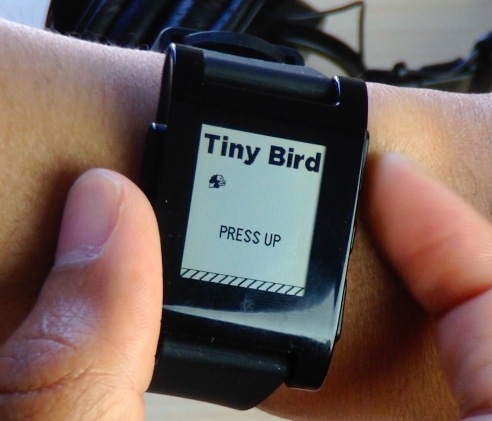
How to play a Flappy Bird clone on the Pebble Smartwatch

Flappy Bird continues to be all the rage even after it was removed from the App Store. In fact, it's so popular that a Flappy Bird clone named Tiny Bird was created for the diminutive Pebble Smartwatch. The gameplay is much the same, although it is significantly less forgiving than the game that inspired it (if you can believe that).

Inside I'll show you how to get Tiny Bird on your Pebble watch. And yes, I even have video of my embarrassing hands-on gameplay.

TinyGrid: customize folder mini-grid icons in iOS 7

TinyGrid+ is a new jailbreak tweak that lets you customize the look of the folder app mini-grid icons in iOS 7. Not only can you customize the mini-grid layout, but you can also adjust the icon size, spacing, and background alpha settings.

It goes without saying that TinyGrid+ is the perfect jailbreak tweak companion for themers and anyone else who wishes to change up the look of folders on the Home screen. We've taken TinyGrid+ for a spin on video, so have a look inside as we walkthrough each of the tweak's features.

FolderBoard: full screen folders for iOS 7

FolderBoard is a new jailbreak tweak that allows you to have a full screen view for your folders. The tweak, which doesn't add any additional functionality to your app folders, eschews the modest square boxed folder view in favor of a more dominant offering.

While FolderBoard may sound nice on paper, and may even look good while folders are open, it fails in a few key areas. Have a look inside as we break down FolderBoard's shortcomings...