Cody Lee

Cody Lee, iDownloadBlog.com’s longest-serving Editor, joined the site in 2008. He specializes in uncovering the best deals on Apple products, apps, and accessories. With years of experience in technology journalism, Cody helps readers save money while staying informed about the latest trends and updates in the Apple ecosystem. Cody’s history with smartphones goes almost as far back as he does. As the son of a Nokia employee, he was exposed early on to handsets like the N91 and the Communicator. He has since been involved in nearly every aspect of the mobile phone industry. While going to college, he worked at a Nokia factory, building handsets, and later moved on to a sales position at a major wireless carrier.

Watch Every March Madness Game for Free on Your iPhone

I love college basketball, particularly March Madness. Games go into overtime, double overtime, it's a fight to the finish. I also love my iPhone 4. It literally does everything.

So what happens when you combine my two favorite things? You get NCAA March Madness On Demand. The app that has been bringing every live March Madness game to your iDevice for the last two years is back and better than ever.

Microphone Differences Between Wi-Fi and 3G iPad 2?

If you're still on the fence about which iPad 2 model to go with, pay attention. The folks over at iLounge have been giving their next-gen iPads a workout. They've written an in depth comparison between the 3 models (Wi-Fi, 3G AT&T, 3G Verizon) and have found some unique differences.

One of the most interesting finds was the difference in microphone quality. In their review they found that the microphone on the Wi-Fi iPad 2 offered considerably better sound quality versus either of the 3G models.

They note that the 3G versions had a bit of an echo and sounded muffled. The microphone on the Verizon model seem to suffer from the issues more severely, but they were clearly evident in both.

What could be causing the deteriorated sound? The answer could be simple. The mic sits right above the FaceTime camera, which in the 3G models is exactly where they stick the plastic antenna strip.

They note the microphone problems were more evident when the iPad's screen is facing the user, such as in a FaceTime call.

If you are still looking for help in making your iPad 2 decision, check out Sebastien's review with sample pics and video.

Has anyone seen these mic issues with their iPad 2 3G? Tell us below!

Apple Adjusting iPad 2 Inventory Shipping Strategy?

Analysts are predicting that Apple sold close to a million next-gen iPads during launch weekend. They are so backed up, online orders are showing shipping dates 5 weeks out.

Apple Insider is reporting that the iPad 2 shipments that some stores got this past Tuesday actually arrived Monday. Their source, who claims to be familiar with Apple's retail operations, states that the change is a direct result of previous device launch issues.

Apple's previous strategy has been to get the products from truck to shelf as soon as possible. But apparently it led to inventory inaccuracies and other problems at Apple retail locations. The new 24 hour delay is to give retailers ample time to check the iPad 2 shipments in, calmly and properly.

To the majority of us, an extra 24 hours may not seem like a big deal. But to the faithful that are still lining up at Apple stores every time there's word of an iPad 2 shipment, it can be a lifetime.

Has anyone been able to snag an iPad 2 since launch weekend? Tell us below!

White CDMA iPhone 4 Icon Found in iTunes

The white iPhone 4 is more fiction than fact these days. After it was shown off during the original iPhone 4 announcement, the white device has been yet to be seen again. It started off as a two-week delay. Then Apple realized how serious the problem was and the weeks turned into months.

After several months in hiding, the white iPhone 4 might be making a come back in the near future. Although there's still no official release date, evidence is piling up that we may soon see this mythical gadget...

Yahoo! Finally Fixes iPhone IMAP Data Leak

I am a devoted Gmail user, and have been for a long time. I had a Yahoo! Mail account years ago. I switched over to Gmail because at that time, I couldn't sync my Yahoo! Calendar to my newly purchased iPhone. Even though the calendar issue has since been remedied, they keep giving me good reasons to stay away.

Earlier this year, a report claimed that Yahoo! Mail was the cause of false data usage by smartphone users. In the land where the unlimited plan is becoming more extinct, this could possibly amount to hundreds of dollars in overage fees. The study noted that Apple iPhone and Windows Phone users were among the most affected...

Want to Use Your iPad 2 With T-Mobile?

Go ahead! Just like its predecessor, the iPad 2 is sold unlocked in the united states. The news was confirmed this past weekend by MuscleNerd, a well known figure in the jailbreak community. What does this mean?

It means you can take your AT&T iPad 2, and activate it through T-Mobile. Since both companies use the same GSM technology, it can be pretty simple. You would just need a compatible Micro-SIM card from T-Mobile, and of course you'd have to snag a data plan.

"Cody, would the Verizon iPad 2 work on Sprint's network?" Probably not. The GSM technology we discussed earlier uses those SIM cards to authenticate devices on their network. CDMA technology, which Verizon and Sprint both use, uses a much more embedded and complex method of authentication. Layman's terms? It's not as easy as swapping SIM cards.

Is anyone using an unlocked iPad 2 on T-Mobile or another carrier? Tell us below!

Battery Issues May Be Another Reason to Stay Away From iOS 4.3

Here at iDB, we've certainly warned you of the dangers in upgrading to iOS 4.3. Until today, that warning was only meant for jailbreakers. Well, it looks like even stock users have a reason to hold off.

Several iLounge editors are reporting severe battery drain in their iDevices, after upgrading to iOS 4.3. Their experiences coincide with users across several Apple Support threads, dedicated  to this very topic...

How to Recover Your iPhone Restrictions Passcode

Passwords come by the hundreds these days. People are juggling multiple email accounts, online accounts, and computer logins. If one of those passwords should escape you for any reason, there's generally a way to get it back. I'm sure we've all clicked the famous 'Forgot Password' link at some point in our lives.

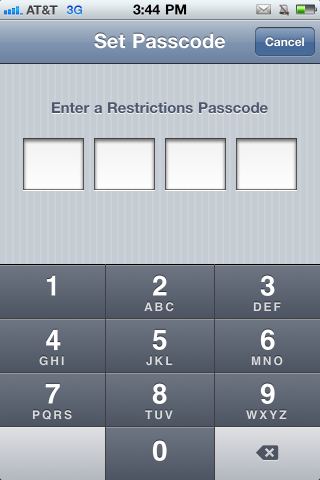
But what about your iPhone? What if you set a 'Restrictions Passcode' a long time ago and now you can't remember the digits? You've got a couple of options. For starters, you could restore your iPhone as a new device through iTunes. You can't restore from a previous backup, because your passcode is saved in that file.....

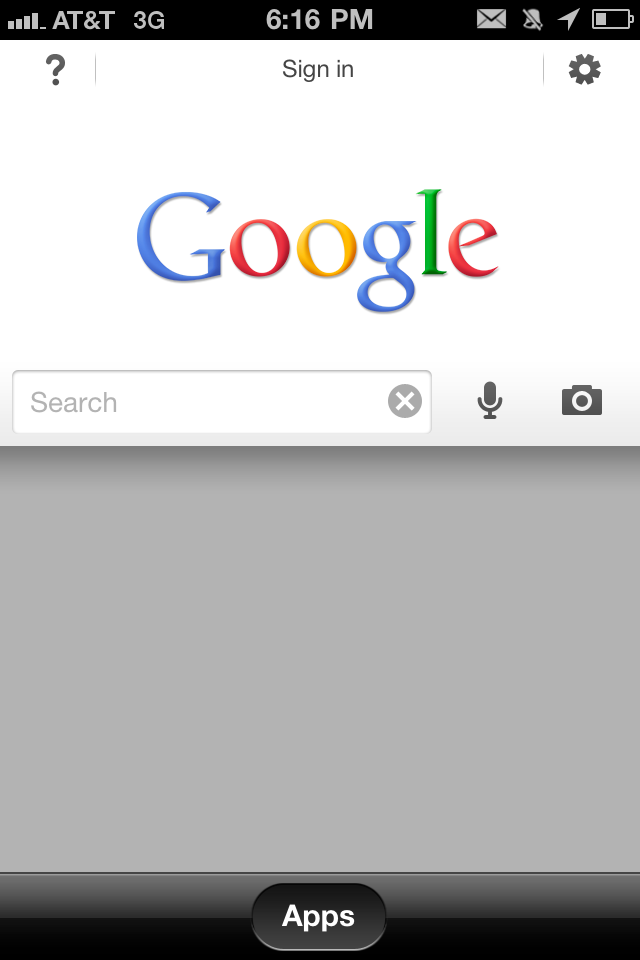
Google Search for iPhone Premiers Today in the App Store

Those of you who read iDB regularly know how particular I am when it comes to my apps. I like a clean and tidy home screen. One application that seemed to always find a spot on my iPhone was Google Mobile. It was simple, it loaded quickly, and the voice search option was extremely accurate. It was my go-to app for quick lookups.

Today, Google Mobile was replaced by Google Search. The name is different, but the concept is not too far off from its predecessor. It has an accurate voice search function, and uses your location to return local results. Although very similar, there are some notable differences in the new search app...

Is Apple Intentionally Handicapping Web Apps?

Whether you love them or hate them, no one can deny the success Apple has had with its iOS devices and the App Store. Although they are selling these products in record numbers, many still refuse to buy in due to multiple factors. The omission of Flash support, a technology used in many popular websites, is the first one that comes to mind.

But it doesn't stop there. Apple has also been attacked on its strict App Store policies, such as, denying applications for odd and unclear reasons. In fact, their unyielding control over their ecosystem is what leads many people to jailbreak...

How To Jailbreak Apple TV 4.3 Using Seas0nPass

Some of you might be familiar with the term 'jailbreak'. Apple products like the iPhone and iPad, have been jailbroken for a few years now. To jailbreak is to gain access, to the hard drive of the device, with read and write capabilities.

This allows you to load media and applications that aren't filtered through Apple's iTunes Store. Although you've probably heard of the above mentioned devices being jailbroken, you may not have known that the Apple TV2 is also susceptible to the same exploits.

"Why on earth would I want to jailbreak my Apple TV2?" Good question, it's not for everyone. The jailbreak alone will do you little good, but the possibilities it opens up are quite interesting.

For instance, you would have the ability to install software on your Apple TV2 that would allow you stream DivX and other media types from your computer. You can also install plugins, such as a web browser. There are also tweaks to enable a jailbroken Apple TV2 to receive input from a bluetooth keyboard.

So whether you are a veteran iPhone hacker or an audacious beginner, anyone is capable of jailbreaking their Apple TV2. Don't worry! There's no actual hacking involved, we use free software that makes the entire process simple. Let's begin!

Important Notes: Jailbreaking is not for everyone. Although deemed legal by federal law, it most likely will void your warranty. If something goes wrong during the jailbreak process, your Apple TV2 should be restorable through iTunes. Please follow directions carefully, and proceed at your own risk. This is also not a full jailbreak, it is tethered, meaning you must connect to your computer every time your Apple TV reboots to make it work. A full jailbreak, with no tether required, could be a ways away. Finally this is only for Mac OSX users, a Windows version of Seas0nPass has not been released yet.

Step 1: You are obviously going to need some tools. For starters, an Apple TV2 (Black) running the latest 4.3 iOS software.  You will also need a Micro-USB cable (extremely common charging chord in modern smart phones).

Step 2: The latest iTunes version 10.2.1, is required, so update it first if you need to. You will need to download Seas0nPass for Mac OSX.

Step 3: After your iTunes is updated and your 2 items are done downloading, launch Seas0nPass.

Step 4: Let it download the needed files, this took me about 20 min. (depends on your connection speed)

Step 5: Once done, Seas0nPass will prompt you connect your AppleTV2 to your computer via that micro-USB cable we mentioned earlier. DO NOT plug your power chord in yet.

Step 6: Follow the directions for putting your Apple TV2 in DFU mode. Basically you just hold down the 'Play/Pause' button and 'Menu' button, simultaneously for 7 seconds. If you did this correctly, iTunes should automatically launch and start the restore process.

Step 7: iTunes should confirm the restore is complete.  Your Apple TV2 is now jailbroken, you just have to do the tethered boot!

Important note: Before proceeding, disconnect your micro-USB cable. You will be prompted to plug it in soon. Never unplug your power chord during the process.

Step 8: Restart Seas0nPass and select the 'Boot Tethered' option this time. Again, when prompted by the software, connect your Apple TV2 to your computer via the micro-USB cable. It will prompt you to put your device in DFU mode again by holding the 'Menu' and 'Play/Pause' buttons for 7 seconds, simultaneously.

Step 9: You're done! Seas0nPass will now complete the tethered boot. Once done, remove the USB cable and plug in your HDMI chord.

Don't worry if you don't get it the first time, just unplug your chords and start it again.

Stay tuned for more Apple TV2 tutorials, including how to install jailbreak plug ins and software.

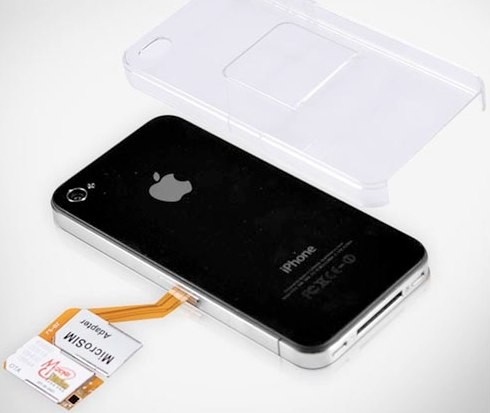
iPhone 5 to Have Two SIM Cards for Dual Phone Lines?

From the same website that brought us the iPhone 5 renderings comes more speculation on Apple's new iPhone. The site, iDealsChina, is a chinese parts reseller. They don't have a perfect track record, but they did correctly predict the iPhone 3G and iPod 4G design changes.

Their latest prediction is that the iPhone 5 will hold two SIM cards. They claim it will be for the purpose of supporting dual phone lines, but I've got a better guess. The iPhone 5 is rumored to include a Qualcomm Gobi cellular and data chipset. Why does that sound familar?