OS X

New QuickType-like feature found in OS X Yosemite

It's no secret that Apple is merging many iOS and OS X features into one seamless experience across devices, and one of these instances – QuickType, the predictive typing feature found in iOS 8 – has recently surfaced in OS X Yosemite.

By pressing the ESC key, Yosemite users can invoke a drop-down menu containing several suggested words that OS X thinks should be typed next. Pressing SPACE BAR will insert the highlighted word along with a space, so users can continue typing or press ESC again for the next suggestion. Note that this is different from a similar feature that has been present in OS X for a few years.

VMware Fusion 7 now available with OS X Yosemite and Windows 8.1 support

Following the recent release of Yosemite-enabled Parallels Desktop 10, rival WMware on Wednesday announced immediate availability of VMware Fusion 7 and VMware Fusion 7 Pro, major new versions of its virtualization software which now includes built-in support for OS X Yosemite, OS X Yosemite Server and Windows 8.1, along with a bunch of other perks.

Also compatible with OS X Mavericks and OS X Mountain Lion and available in English, German, French, Italian, Spanish, Simplified Chinese and Japanese, WMware Fusion 7 and VMware Fusion 7 Pro take virtualization on the Mac to the next level with a speedier performance, a redesigned appearance, improved connectivity, support for Macs with Retina displays and more.

Apple seeds OS X Yosemite Developer Preview 7

Coming two weeks and a day after its last Developer Preview release, Apple has released the seventh OS X Yosemite beta to developers.

The update, version 7 1.0, is available for download to users currently running DP 6 in the Mac App Store, and to developers in Apple's online developer center. Also available for download is Yosemite Recovery Update 2.0.

Clean up your Downloads folder to regain storage space on your Mac

Sometimes, the most simple and obvious tips are the best. Everybody knows about them because they're usually based on good old common sense, yet, we usually forget about them. One such tip is to periodically clean up the Downloads folder of your Mac, which, depending on your setup and habits, could quickly go out of control.

The Downloads folder is the default location where any file you download from the internet is saved. Downloading the PDF of your bank statement? It's downloaded to the Downloads folder. Downloading a song from an unofficial source? It's most likely going to the Downloads folder.

How to enable Enhanced Dictation in OS X for streaming speech-to-text with live feedback

OS X includes a nifty Dictation feature which allows you to control your Mac and apps with your voice. You can use “speakable items”, basically a set of spoken commands, to open apps, choose menu items, email contacts and convert whole spoken sentences to text, wherever you can type text.

This is much like iOS’s Dictation feature as both iOS and OS X use the same Nuance-powered technology that turns speech to text. iOS devices have limited computing power so the Dictation feature on the iPhone, iPod touch and iPad requires network connectivity in iOS 7 (iOS 8 supports streaming voice recognition and 22 new languages).

On the Mac, computing resources like CPU power, battery life and RAM are not of paramount importance as on mobile, Therefore, OS X Mavericks provides a new Enhanced Dictation feature which converts your words to text without utilizing Apple’s servers.

In other words, server-based Dictation lets you dictate without an active Internet connection. Because voice recognition processing runs locally on your Mac, text appears instantly as you speak. That is: continuos, streaming dictation with live feedback is made possible.

In this tutorial, I’m going to show you how to turn on Enhanced Dictation in OS X and take advantage of speech-to-text, even when you're off the grid...


Safari 7.0.6/6.1.6 with Mavericks/Mountain Lion security fixes now available

Late yesterday, Apple released Safari 7.0.6 for OS X Mavericks and Safari 6.1.6 for OS X Mountain Lion.

The releases contain improvements to security related to Apple's desktop browser and are both recommended for all OS X Mavericks and OS X Mountain Lion users.

These updates follow the release of a new version of OS X Mavericks 10.9.5 (build 13F14) that Apple released to developers yesterday...

StatusDuck moves your Mac dock to the Menu bar

The dock in OS X is one of the most used areas of the operating system, so replacing it with another program isn't an easy task. However, StatusDuck does an excellent job of compacting the dock into a much smaller collection of running applications. Whether the dock takes up too much precious screen real estate or right-clicking to exit programs is growing tedious, StatusDuck can help.

With StatusDuck installed, applications can be launched and terminated, Finder windows and folders can be opened, and active programs can be sorted and managed, all from your Mac's menu bar...

Use a Mac running OS X 10.5.8 and below? You can no longer run Skype

If you own a legacy Mac with OS X Leopard 10.5.8 and earlier, you can no longer run Skype, the Microsoft-owned company has confirmed today.

Following a string of complaints from disgruntled users who took to the Skype forum last week reporting they were being locked out from accessing the VoIP service, a Skype team member penned a note confirming that the program was no longer supported on Macs running OS X Leopard 10.5.8 and older.

People running Skype on OS X 10.6 Snow Leopard, 10.7 Lion and 10.8 Mountain Lion are unaffected so "there is no need to upgrade to Mavericks or Yosemite if you don't want to" reads the message...

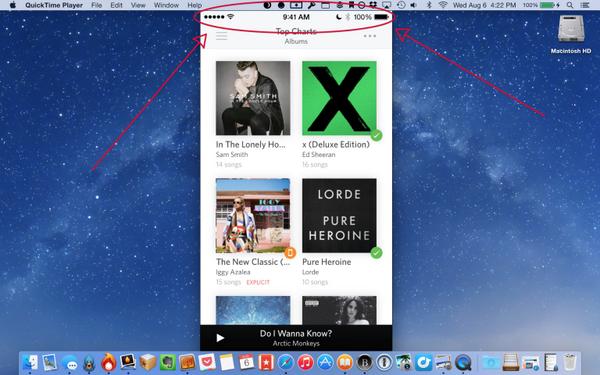
Yosemite’s QuickTime cleans up iOS status bar when screencasting so you don’t have to

The vast majority of Apple bloggers who grab screenshots of iPhone and iPad applications don't seem to be ashamed by the low or no cellular signal strength showing right in their status bar, or incomplete Wi-Fi or - worse of all - low battery.

And who could blame them?

Touching up the images to have the status bar show full cellular/Wi-Fi signal and 100 percent battery takes time and a great deal of effort to get it right.

I've seen folks like MacStories editor Federico Viticci obsess over the issue and even write scripts and devise complex workflows in order to correct the messed up status bar on their iOS screenshots. Having been constantly pressed for time, I'm not that particular about my screenshots.

Luckily, QuickTime in Yosemite includes a nifty little feature which automatically cleans up the status bar when capturing an iOS device's screen, so your screencasts look professional...

RebootToHDD: an easier way to switch between Mac partitions

Following our post on how to switch between Mavericks and Yosemite, iDownloadBlog reader Jack Stean took the script we featured and turned it into a full-fledged Mac application that sits in OS X's status bar. RebootToHDD does everything we explained in our tutorial, but without the hassle of copying and pasting script...

Also out: Apple TV Software Beta 4 (with new UI), Xcode 6 Beta 5 and more

As correctly estimated, Apple today unleashed new iOS 8 and OS X Yosemite betas to its registered iOS and Mac developers. While our team is combing through release notes and updating a running list of changes, please send us your very own submissions to tips@iDownloadBlog.com (do include screenshots as well).

In the meantime, additional updates have surfaced on Apple's Dev Center, including matching new betas of the upcoming Apple TV software featuring a brand spanking new user interface, updated Xcode developer tools and more.

Read on for the full reveal...

Apple seeds OS X Yosemite Developer Preview 5

In addition to seeding the fifth beta of iOS 8 this morning, Apple has also released the fifth Developer Preview of its new OS X Yosemite operating system. The update comes two weeks after Preview 4, and well over a month after Apple announced Yosemite at WWDC.

The update is labeled as build preview 5 1.0 and can be downloaded via an update in the Mac App Store, or as a full download from Apple’s online developer center. It does not, however, appear to be out in Apple’s recently-launched public Yosemite Beta Seed program yet…