OS X

MacID review: unlock your Mac using Touch ID

Thanks to Bluetooth LE connectivity, users are able to connect their smartphones to their computers to share content between devices quickly, easily, and without being too taxing for battery life. On iOS and OS X, you can even do stuff like lock or unlock your Mac. Mac ID for iOS is one such app. Not only can you set it up to unlock your computer, but you can also lock it and wake the screen remotely. We’ve got a hands-on review of MacID for iOS for you today.

Second Yosemite update looms: Wi-Fi fixes, iCloud Drive in Time Machine and more

Despite all the talk of a problematic decline in software quality, Apple is feeling your pain and isn't standing still.

Currently in testing, a second update to OS X Yosemite is due later this week. First of all, Mac OS X 10.10.2 apparently squashes that annoying bug which manifests itself annoyingly as intermittent Wi-Fi issues.

Another one resolves a bug preventing your Mac from reconnecting to a Wi-Fi network after waking from sleep, causing you to manually disable and re-enable Wi-Fi, which gets old fast.

Next, iCloud Drive should be now accessible directly in Time Machine, including the ability to track changes to files and documents.

Moreover, 10.10.2 prevents the so-called ‘Thunderstrike’ hardware exploit which targets Macs equipped with high-bandwidth Thunderbolt ports and also includes other important fixes.

How to jailbreak iOS 8.1.2 using Mac OS X

It is now possible to jailbreak iOS 8.1.2 using a Mac, and this has been confirmed by iDownloadBlog. Up until this point, no Mac option existed for jailbreaking iOS 8.1.2, but that is no longer the case. A new tool entitled PP jailbreak for Mac has surfaced, allowing Mac users to enjoy what Windows users have been enjoying for some time now. Inside, we have a tutorial that shows how to jailbreak iOS 8.1.2 using OS X with the PP jailbreak for Mac.

Poll: should iOS 9 pause on innovation?

Earlier in the month, Instapaper creator and Tumblr co-founder Marco Arment offered a scathing critique of Apple's declining software quality. I generally disagree with Marco on most topics he blogs about, but this time he got me thinking that Apple's “it just works” mantra no longer applies. And as software woes continue to persist, the problem clearly is much larger than the relatively benign Maps debacle.

From that botched iOS 8.0.1 update, delayed improvements and an over-the-air iOS 8 installer requiring a whopping 4.6 gigabytes of free space to a bunch of issues plaguing OS X 10.10 Yosemite such as performance bottlenecks, its insatiable resource requirements, ridiculous Apple Mail hiccups, intermittent Wi-Fi issues and more - the firm appears to have “lost the functional high ground,” as Arment put it.

And with plenty of far-reaching technologies being introduced simultaneously — Handoff, iCloud Drive, custom keyboards, photo and storage extensions, new ways to share content, HealthKit, HomeKit, WatchKit and CloudKit, to mention but a few — small wonder Apple is finding itself in the middle of a pretty rocky transition, to say the least.

Throw in things like iCloud and CarPlay and suddenly diminishing software quality exhibited in the latest releases of iOS and Mac OS X becomes a major customer pain point. Apple is an aspirational brand so winning back user trust is paramount.

So, what should Tim Cook & Co. do? Do they continue to stick to the annual OS release schedule? Or should they give engineers enough time to smooth out the rough edges and ship software when it's ready rather than for their marketing benefits, even if it means making us wait longer for latest and greatest software innovations?

Spotlight bug exposes your Mac’s IP address and more to spammers

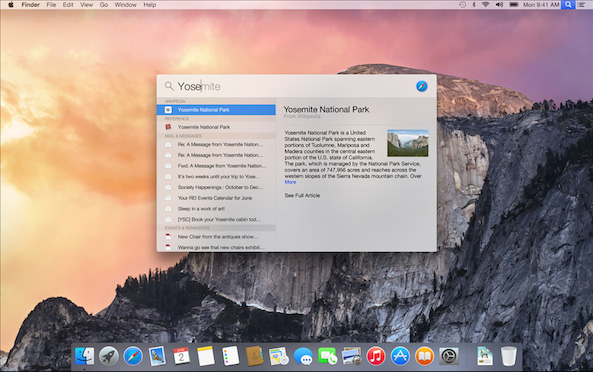
An unusual oversight in how OS X's Spotlight feature handles privacy settings in Apple Mail leaves the door open to spammers, phishers and online tracking companies who can obtain private data such as your IP address, current operating system version, browser details and more, whenever an email message is previewed in Spotlight.

First discovered by German technology news site Heise, the bug takes advantage of a common information harvesting technique and a Mail setting which determines whether or not the program loads remote content in emails.

How to enable text selection in Quick Look on Mac

Anyone who has used a Mac for more than a minuscule amount of time has more than likely come across Quick Look, the pop-up window that is invoked with a press of the space bar when a file or folder is highlighted on the desktop or in Finder. Quick Look's usefulness becomes evident when file names aren't descriptive enough by allowing users to view the contents of many different types of files without having to open them in a full-fledged application like Pages for documents or Preview for images.

By default Quick Look can only display a static view of a file that only grants users a peek at the contents without any real function. Imagine, however, being able to copy a document's text without having to open it in TextEdit or Pages. This is incredibly useful in a variety of situations, from dealing with templates to Word documents to code snippets, where having multiple applications and documents opened shouldn't be necessary for copying from one location and pasting to another. The good news is that this functionality is completely possible and perfectly easy to enable.

Apple posts Safari updates for OS X Yosemite, Mavericks and Mountain Lion

After releasing then pulling a update for the desktop Safari browser on OS X last week, Apple on Thursday posted Safari 8.0.2 for Yosemite.

In addition to allowing Yosemite users to import username and passwords from Mozilla's Firefox browser, Safari 8.0.2 fixes a few annoying issues, among them history not syncing across devices if iCloud Drive is disabled and another one prevent a saved password from being autofilled after two devices are added to iCloud Keychain.

The update is available through the Mac App Store's Updates tab. A standalone installer should be available shortly from the Apple Support website. Safari 7.1.2 for OS X Mavericks and Safari 6.2.2 for OS X Mountain Lion were also released on Thursday.

Apps like Pocket is why Handoff is my top new feature in iOS 8 and Yosemite

Pocket, a read-later service, with a recent Mac app update has completed its support for Apple's refreshed mobile and desktop operating systems.

According to developers last week, Pocket for Mac now includes Handoff and can send stuff to other apps that use the Mac's new multi-purpose Share menu. It's Pocket's largest Mac update in over a year.

The iOS edition of Pocket has had Handoff support in place for weeks. And with Handoff now live in the Mac edition of Pocket, I'm not sure how I've managed to do without such a useful feature. I'm a huge, huge Pocket fan and use it every day to bookmark and save dozens of articles that I find during the day for later reading.

With Handoff implemented in both Pocket editions, I now am able to seamlessly continue reading an article right where I left off on any of my Apple devices (Bluetooth must be enabled).

It's awesome and I couldn't imagine my daily computing without Handoff. It's the one feature I use the most, all the time. As I constantly move between my mobile and desktop devices, Handoff removes the friction completely without the mental burden of having to remember where I left off.

Handoff is tremendously convenient. It's fun, easy to use, a time-saver and bridges the gap between desktop and mobile like no other technology before it. And it's only getting started.

Pocket for Mac is available free of charge in the Mac App Store.