iPhone Photography

Turn ordinary photos into extraordinary iPhoneography with textures

Welcome back to another installment of Lessons in iPhone Photography here at iDownloadBlog. After seeing the amazing images you have been sharing on Instagram, it is clear you are all enjoying your newly discovered creativity. In today's lesson I hope to share a new idea to fuel your own creative adventures. Today's lesson is a bit subjective, but I hope you learn a new idea and use it to make some of your own magic.

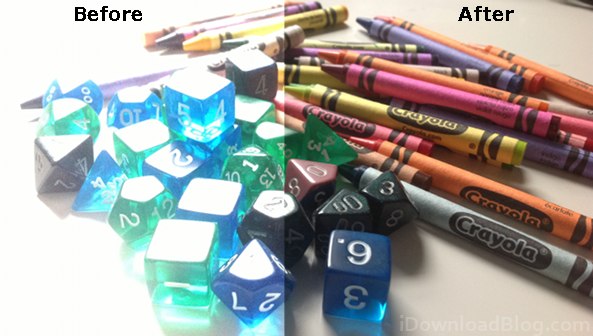
A fun way to add interest and mystery to your iPhone imagery is the use of textures. What are textures, you ask? In short, the idea is to take an image of the texture you might find in a burlap sack, brick wall, etc. Apply it over your original image so that only the texture can be seen and not the color. That's pretty much the idea behind it, but it might be better just to look at an example...

Quick review: Handy Photo for iPhone and iPad

http://www.youtube.com/watch?v=wNx7rUjOdeM

Sebastien and I share a passion for iPhone photography so when he asked me to take a look at Handy Photo the other day, I was overly excited. So what does this new photography app does that your favorite software can't? How about AntiCrop and TouchRetouch, two interesting features that work a lot like content-aware fill in Photoshop?

Or, perhaps you'll be impressed by the ability to perform complex touch ups and work with 36-megapixel images (not a typo)? The promo video is a bit cheesy and heavy on superlatives, but it does a nice job highlighting key features of this handy program. I've included more info and a few screenies after the break...

Apple researching high-res iPhone camera with optical zoom

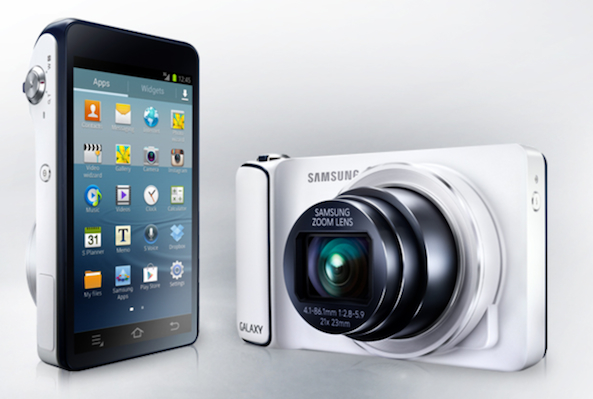
Cameras with optical lenses frequently produce images superior to all-digital alternatives most often required in mobile phones. Now Apple appears to have found a hybrid approach permitting future iPhones and iPads to offer a high-resolution camera with an optical zoom lens, but not disrupt the devices' slim lines.

While many patented Apple inventions never see the light of day, iPhone photography buffs in particular will welcome Apple's camera advancements, especially should the company decide to implement them on future iPhones and iPads.

Additionally, the patented technology could even save money for the consumer electronics giant. In 2011, the company filed for a patent entitled "Digital camera with light splitter." The iPhone or iPad camera includes a zoom lens with a moveable lens made possible by a cube which splits light into its component red, green and blue colors...

Make powerful iPhone photos by focusing on what’s important

Welcome back to our lessons in iPhone Photography. In today's lesson I'm going to do my best to share a fairly abstract creative tool illustrated with a few concrete examples. Last week I was in Belize working on a new iPhone Photography book. The book will feature iPhone images following the world famous Hummingbird Highway from the eastern coast of Belize to the Guatemalan border in the west.

I shared the context of this project with you so you could see how I use the tool I'm going to present in this lesson. When you are working on a photography project with a finite time-frame and budget, you have to make images. There's no option for returning the following day, or complaining that the muse isn't with you.

In previous lessons I've shared ideas about changing perspective and compositional aids that can help in our creativity. However, this one single piece of photographic wisdom has served me better than anything else I've learned. One of my personal photographic heroes, Bruce Percy, says (this is a bit paraphrased) "whatever it is that initially draws you to a scene... that is what you should focus on."

It is a simple, yet very powerful creative tool. I use this advice all the time by making whatever it is that attracted me to a scene the subject of my photograph and trying my best to reduce the other elements within the scene. As I mentioned in the beginning of this lesson, I want to illustrate how I've used this wisdom by sharing a few concrete examples from my recent trip to Belize...

PanoPerfect moves to the iPad and adds web galleries

Since our first look at PanoPerfect for the iPhone, it has become more widely accepted as a great way to share only panoramic photographs. I am a big fan of the ability to take panoramic photos with my iPhone and it only makes sense that HalfPeeled provides a great new way to view and share them. As featured in the App Store's "New and Noteworthy" section, PanoPerfect lands for the iPad and boasts a new web browsing feature...

Instagram surpasses a hundred million active users

Facebook-owned Instagram, despite negative publicity surrounding the controversial terms of service brouhaha, continues to grow its installed base. Today, the company announced a major milestone: Instagram now has over a hundred million active users across mobile platforms. That's ten million more active monthly users since it announced the 90 million milestone on January 17. By comparison, Twitter over a six-year time span hit 200 million active users, as of end of 2012.

Commenting on the development, Instagram co-founder Kevin Systrom shared an anecdote in a blog post about how he realized Instagram was going to be different when fans at the Giants Stadium starting posting their Instagrams after another co-founder "with a few quick commands at his terminal" filled the service with images of the game...

A dose of inspiration for your iPhone photography

http://vimeo.com/58026152#

Those of you looking for an inspiration boost might enjoy this video by iPhoneographer Jack Hollingsworth. All photos were shot and processed with an iPhone 5 during a trip covering several thousand miles all over India.

Beautiful and inspiring to say the least.

Now go out and shoot... Or stay in and peruse our iPhone photography tutorials.

Another try at group photo sharing: Albumatic

http://www.youtube.com/watch?v=jVfXuuLrnOI

A new iPhone app called Albumatic hopes to succeed where the likes of Color and Highlight have failed, to make sharing between groups of people easy and fun. It has a clean minimalistic interface that lets you easily start an album and add photos for others to see. Whenever you add a new photo, all the folks you've shared an album with get notified.

Folks nearby can join the album and add photos of their own and those that are farther away are only allowed to view the album, but not interact with the photos (likes, comments, etc.) We've seen this location-based photo sharing focus before and it didn't work out well (hint: Color), but Albumatic nonetheless bets party-goers will use it to share embarrassing cocktail snaps between themselves, Galaxy S III style...

Flickr updated with comment alerts, @username tags, volume shutter and more

After a long time, I recently fell in love with Yahoo's Flickr service, all over again. I mean, not everyone is on Facebook. More importantly, Instagram leaves a lot to be desired in terms of screen resolution so Flickr, which stores original-res photos, is becoming increasingly relevant to my iPhoneography workflow. The freshly updated software now supports @username tagging (with tags linked to users' photo stream) and can notify you via push alerts when someone tags you in their comment.

And if you happen to find the volume shutter feature of the stock iOS Camera app useful, you're going to love this update as it lets you snap a photo using your iPhone's volume up button. The program also includes a few other improvements, mentioned right below...

How to enable HDR Camera mode on iPad, and iPod touch 4G

HDR is a photography mode that stitches together several pictures along a range of exposure settings. Using various algorithms, the effect creates pictures that can have fewer dark or washed out spots than a conventional digital still, which is great if you intend to capture textures and detail instead of glare or shadow.

Apple introduced HDR photography to iOS 4.1, but the feature wasn't rolled out to every device. The devices that currently lack the option to enable HDR in the stock camera app include the iPod touch 4G, iPad mini, and the iPad 2 to the iPad 4. Lucky for us, this disabled feature is fairly easy to manually reintroduce on a jailbroken device...

Conceptualize your compositions to improve your iPhone photography

In today's lesson in iPhone photography, we will be digging a bit deeper into the mystical ideas of composition. Remember, before you consider the post processing of an image you need to expose and compose properly. In previous lessons we examined the Rule of Thirds. It is pretty straightforward and a great creative technique to have in your tool box. However, we never explored why, or how, it works. In this lesson, to better understand it, as well as other compositional guidelines, we will explore the idea of static vs. dynamic compositions.

Before we explore the ideas of composition, it's important we understand the concept of 'visual weight' (or strength). Every elements in our compositions have varying weight/strength associated with them. It could be heavy, light, dark, strong, soft, etc. Obvious properties that influence a subject's weight (or strength) are its size and position. Is the element in the background or in the foreground? Is it big or small?

Quickly snap photos from Notification Center with Kamera

Do you hate it when you're trying to take a picture, you load up the Camera app, and the wrong camera is active? In photography, every moment counts and the delay in fiddling with camera modes could cost you that perfect shot.

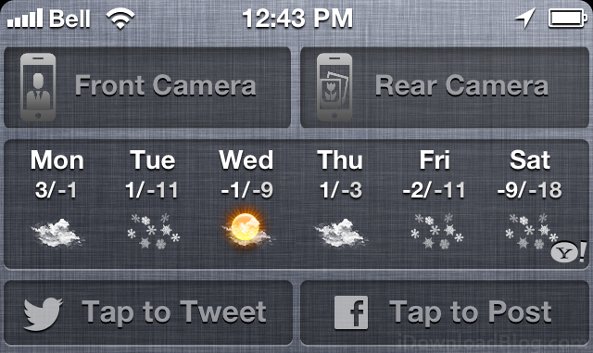
Kamera is a Notification Center shortcut for the native Camera overlay in iOS 5 and 6, allowing you to take pictures from anywhere. What makes Kamera special is it allows you to start the overlay with either the front or rear camera active, depending on the button pressed...