iPhone Photography

Instagram updated with caption editing, people finder, faster search and more

Facebook-owned Instagram on Monday received a nice feature upgrade enabling new things and elevating your experience “to help you discover more on Instagram,” as per the team's blog post.

For starters, you can now find other accounts to follow in the People tab on Explore. If you spot a typo in captions of your uploaded snap, Instagram now at last lets you fix typos or even change photo locations after the fact.

You will also notice faster searching, refreshed explore and profile icons, subtle changes to the user interface and more.

Instagram is available free in the App Store.
Camera+ gains lossless TIFF compression format, brings back iOS 7 support

Camera+ by Taptaptap has received a newsworthy refresh Monday that has brought back iOS 7 support killed in the previous release while enabling a new Auto setting for the front flash feature.

More importantly, Camera+ 6.1 introduces a Pro quality setting that lets those who are serious about iPhone photography save their snaps in the TIFF image format using lossless compression.

As if that weren't enough, the team teased “some big things coming down the pipeline” for both the latest iPhone edition of Camera+, along with “a huge, long-overdue update” for the iPad version.

Camera+ is available in the App Store for $2.99.

TinType by Hipstamatic brings 100-year-old photography to the iPhone

When I was a kid, I would dig around in my grandmother’s box of old photographs. I distinctly remember the first time I came across a tintype picture. It was so unusual. Not just because of the silly knickers the boys in the pictures wore, but because of the ornamental frame it came in with the location stamped on the backside. The strange, slivery-black high-contrast of the image also gave it a haunted look.

TinType by Hipstamatic is the next big thing in the company’s trendy photo filters. With this one-off app, you can make your selfies look they were taken in the 19th century.

Pixelmator for iPad is here

Announced at Apple's iPad media event earlier this month, Pixelmator for iPad launched on Thursday at a special introductory price of $4.99. Originally a Mac app, this incredible Photoshop replacement, built exclusively for the Apple tablet, has all of the hallmarks of its Mac counterpart.

The app's been especially optimized to take advantage of the power provided by the Apple-designed A8X processor ticking inside the new iPad Air 2, though it runs plenty smoothly on A7 devices like the iPad mini 2 and the original iPad Air.

The range of features and capabilities that have been ported over from the Mac edition is astounding and I don't think I'm exaggerating when I say that this is one hell of an image editing application that fans of mobile photography and productivity have been craving for since the iPad's inception.

Stop what you’re doing and grab Cycloramic for iPhone 6, free for a very limited time

Chances are you've heard about Cycloramic, a stupendously amazing iPhone photography software which allows you to capture stunning, accessory-free 360-degree video using custom vibration patterns in your device and an Apple power adapter.

If you haven't taken the plunge yet, please don't pass on this opportunity as Cycloramic has just gone free for the first time ever.

A $1.99 saving, only the iPhone 6 edition of the app is free, and for “a very limited time”, according to developer Egos Ventures. The iPhone 5/5s version, which hasn't been discounted and is available for $1.99 a pop, relies on the handset's squared base and the vibration motor to spin the device around its axis.

Take control of your camera with Manual

With the introduction of iOS 8 came new developer APIs allowing apps to have exacting control of several camera adjustments, including exposure, focus, and shutter speed. Manual is a photography app that implements these new freedoms in a beautiful package, granting users full control of their photos.

I went hands-on with Manual for a few days, venturing into my highly "unphotogenic" yard in an attempt to gather a few decent shots with both Manual and iOS's stock Camera for comparison to see exactly how much of an advantage the ability to manually adjust camera settings can give.

Artistic photography app Fragment is Apple’s new Free App of the Week

Artistry in iPhone photography can now be in everyone's hands with Fragment, Apple's new Free App of the Week. As you know, each Thursday the App Store editorial team cherry-picks a new app to slash from its regular price to zero bucks, for a week.

Fragment by Pixite is a nifty little iPhone and iPad app that puts cool prismatic effects in your pocket, allowing you to transform your snaps into unique artworks.

It also plays nice with iOS 8 and includes a handy extension to edit your images right within the stock Photos app. Fragment is free until next Thursday, a $1.99 saving.

Skew: a new photo app that lets you fix crooked lines and poorly aimed shots

I will be the first to admit that I am terrible at noticing lines and angles when I snap pictures. I even use the stock Camera app’s grid feature, but I don’t think about the Golden Ratio when trying to get a picture of my cat doing something funny.

Skew is a photo editing app that lets you fix those minor mistakes after the fact. Not only can you straighten angled lines by rotating the image, but you can also “skew” the photo so that objects in the picture are straight.

The Incipio Focal case will turn your iPhone into a point-and-shoot camera

Despite smart devices replacing point-and-shoot cameras in the mainstream, there still seems to be many people confused by the transition to an app-based camera. Every time I am out and ask someone to take a picture of my wife and me, it seems to be a shot in the dark, so to speak. People always fumble around with the screen, trying to zoom, or change the flash, or even take the picture.

I run into people that push the software button to take the picture instead of using the volume button. Either way, there always seems to still be an unfamiliarity with the way an iPhone takes pictures. Unless you were born in 2007 when the iPhone launched, there is a transition from point-and-shoot cameras to the iPhone, and it continues to be a struggle for some.

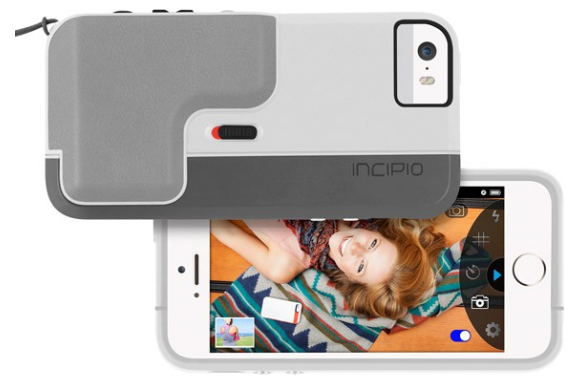
In that light, Incipio developed an app and hardware combination bringing point-and-shoot characteristics to iPhone. Focal is a camera case providing easy snap picture taking. Dedicated shutter and zoom buttons prevent screen pecking while trying to setup the perfect shot.

New Google app: Photo Sphere Camera for iPhone

Google has released a brand new iPhone photography application in the App Store. Dubbed Photo Sphere Camera, it provides functionality similar to the iOS Panorama shooting mode, and then some more.

By continuously taking images as you pan your device around, Photo Sphere Camera then stitches the individual photos together to create a nice sphere-like 360-degree image which can be published directly to Google Maps or shared with anyone on Facebook, Twitter, Google+ and via email.

The app is a free download. I've included additional tidbits right after the jump...

Camera+ picks up improvements ahead of ‘cool new things’ in forthcoming iOS 8 update

My favorite iPhone photography application, Camera+ by a developer called Tap tap tap, has received a few very nice additions ahead of an upcoming iOS 8 update.

Camera+ 5.2, a free update for existing users, contains several bug fixes while introducing a new adjustment to the Vignette effect, improvements to the Soft Focus and Film Grain effects and the Clarity Pro feature and more.

Oh, and this version has fixed broken Flickr sharing stemming from a recent change to the way third-party apps like Camera+ access Yahoo's photo-sharing service...

FX Photo Studio 6.0 for iPhone brings iOS 7 overhaul, new filters and sharing options and more

FX Photo Studio by MacPhun used to be my go-to iPhone photography tool, but I was forced to switch to other apps because it looked like the team had ceased further development (last update was in February of last year).

I'm glad I was wrong about that. As of today, the iPhone edition has been resurrected. Basically everything has changed and MacPhun bills it as "the biggest update in its four-year history".

Now available in the App Store as a free update for existing users, the new FX Photo Studio 6.0 of course sports an iOS 7-friendly user interface along with a brand new engine and tons of other new features.

All of the hallmarks of FX Photo Studio have been preserved and enhanced in this update, including great filters, special editing tools and sharing features...