iPad

From the latest news to the most comprehensive tutorials, learn how to get the most out of your iPad with our step-by-step guides and expert tips.

Facebook brings animated reactions, filters, masks and effects to Messenger calls

As part of celebrating its two billion monthly active users milestone, Facebook on Monday unveiled new video chat features for its mobile Messenger app, such as the beautifully animated reactions, interactive filters, masks and effects. “Video chats with your friends and family in Messenger just got a whole lot more fun,” said the firm.

You can use these new video features in one-on-one video calls, as well as in your group video conversations. The new capabilities let you easily share your emotions during a video call with one of the five Facebook reactions, alter your appearance (how about making your friend laugh with a bear mask?) by taking advantage of the many built-in filters and much more.

I like how reactions animate onto the screen and then disappear.

Many reactions have different versions, depending on whether your face is on or off the screen. For instance, tap the love reaction when the camera is facing you, then tap it again when the camera is facing outward to see the difference.

A variety of in-call filters are now available to Messenger users, ranging from subtle lighting tweaks to color changes, like black and white, red or yellow. Each one has a live preview so you can test it on yourself before letting others see it. Many new masks are available for video calls, too, including some with hidden effects that react to your facial movements.

From the Facebook blog:

We have also added animated effects, like falling hearts and twinkling stars, to give your video chats expressive flair. Check out what happens when you wave your arm in front of the camera while using one of those effects! Unlike reactions, masks and effects stay on the screen for the duration of the video chat (or until you take them off or switch to another one).

One of the best new in-call video features is the screenshotting ability.

During an one-on-one or group video call with one or more friends, tap the camera icon at the bottom to take a screenshot of your time together and share it with other friends via Messenger Day or other social media accounts

The image of your video conversation will be saved to your iPhone's Camera roll. Plus, you can quickly send the screenshot to the person or group that you’re video chatting with.

Check out the new Messenger video features in Facebook's video embedded below.

Earlier today, Microsoft started rolling out a much redesigned Skype for iPhone with a Snapchat-like Stories feature, dubbed Highlights.

Moreover, Skype for iPhone now lets you talk to Cortana and other chat bots, as well as post message and in-call reactions by adding huge emoticons, live text and photos with drawings to an overlay that appears on top of the call.

Facebook Messenger is available free on App Store.

You can now edit text files right from Dropbox app

Cloud storage provider Dropbox today updated its app on App Store with the ability to edit text files right from the mobile app. Now when you browse the files in your Dropbox, simply view any text file then tap a new Edit icon to enter the app's new built-in text editor.

When done editing, tap Save to save the changes directly to the text file in your Dropbox. No more emailing the file back and forth. The bast part is, no longer do you need to use a third-party editor just to make a few quick changes to a text file saved in your Dropbox.

Aside from the built-in text editor, Dropbox for iOS version 54.2 has gained a new auto-capture function. When scanning documents, simply focus on the document and this feature will take a picture automatically.

Dropbox for iOS is a free download via App Store.

Auto SilentMe silences your iPhone based on calendar events

There are times when you can take notifications, and then there are times when you just can't. While Do Not Disturb is a great tool for this, it’s not the perfect solution to avoiding unwanted notifications because it relies on you to manually enable or schedule it, and sometimes we forget.

That’s a weak link that a new jailbreak tweak called Auto SilentMe by iOS developer IArrays hopes to strengthen, as it brings new notification-suppressing features to your device that will prevent embarrassing notifications from coming in when you don't want them knocking at the door.

This tweak helps break the habit of recording videos in portrait orientation

It bothers me from time to time when I watch videos on social media or YouTube and realize just how many people record their videos while their smartphone is in portrait orientation.

These services are formatted for computer screens, which naturally have displays longer than they are tall, so recording videos in this way usually degrades the viewing experience for the viewer. That’s why a free jailbreak tweak called VerticalVideoSyndrome 2 by iOS developer Andreas Henriksson is now available.

Apple asks developers to update their pages for iOS 11’s all-new App Store

Apple on Tuesday invited its registered developers and members of the Apple Developer Program to update their product pages for iOS 11's much redesigned App Store.

Specifically, developers can showcase their content with subtitles, promotional text, additional app previews that they can localize and up to 20 promoted In-App Purchases that users can buy on App Store, even if they haven't downloaded an app that offers them.

A dedicated section on Apple's portal for developers offers useful resources for making the most of the new product pages. Like before, new metadata is entered in iTunes Connect.

“Metadata you provide in iTunes Connect is shared across App Store on iOS 11 and iOS 10.3 and earlier, so you only need one version of product page elements, such as app name, icon, screenshots and keywords,” notes Apple.

iOS 11's App Store features competently revamped product pages while providing dedicated Apps and Games tabs along with a new Today tab with original stories, editorial, tips, how-tos, interviews and more, updated daily, in a blog-like format.

https://www.youtube.com/watch?v=-hoPcMPvL88

Subscribe to iDownloadBlog on YouTube.

The App Store redesign lets developers spotlight apps with more engaging content, putting the most important information front and center for the customer making a download decision.

Developers can now submit up to three video app previews and five screenshots, which can now be localized so a user in any country can have a customized version of the video.

Accolades including Editors’ Choice and chart position are now highlighted by App Store, as are In-App Purchases and customer ratings and reviews.

The new App Store is now available as a preview to users of the iOS 11 public beta. Once iOS 11 launches for public consumption this fall, the redesigned App Store will be in the hands of hundreds of millions of users around the world.

App Store customers have now downloaded more than 180 billion apps and Apple has paid out over $70 billion to developers since the store launched in 2008, making it the most vibrant software marketplace in the world, according to the Cupertino giant.

How to stop Safari from caching Reading List via cellular connections

Safari has a built-in Reading List feature for saving webpages you'd like to revisit later. It's like bookmarks, but with full offline support. That is, any webpage saved in your Reading List prompt Safari to download and cache its text, images, layout and other assets on your device so that it can be read at any time, even without an Internet connection.

And with iCloud syncing, a webpage added to Reading List on one device gets individually cached across all your other devices, too. Caching webpages isn't the smartest idea if you're on a metered cellular plan, especially if you frequently use Reading List on the go.

Thankfully, iOS lets you decide whether or not Reading List items should be downloaded when your iPhone is connected to the Internet through your carrier's cellular data network.

About Safari Reading List

Reading List made its debut with the release of OS X Lion and iOS 5 in 2011.

The feature received offline support the following year in OS X Mountain Lion and iOS 6. Reading List is unavailable on a device unless Safari syncing is turned on in Settings → iCloud on iOS or in the iCloud preference pane in System Preferences on macOS.

Don't confuse Reading List with Safari's regular bookmarking feature, which simply stores a webpage URL rather than download and cache its full contents, like Reading List does.

Due to the fact that a vast majority of websites take advantage of high-resolution image assets, your offline Reading List cache can eat up a significant amount of on-device storage.

And because Safari syncs your Reading List, bookmarks and other data via iCloud, adding a webpage to Reading List on your iPad prompts your iPhone to  download it, and vice versa.

Thankfully, you can revert this behavior with a few taps, here's how.

How to stop Reading List caching via cellular

Safari on iPhone and iPad defaults to caching all Reading List items for offline access, whether you're connected to the network via Wi-Fi or through your carrier's cellular data network.

To tell Safari to cache your Reading List items for offline access only when your iPhone or cellular-enable iPad is connected to a Wi-Fi network, do the following:

1) Open Settings on your iPhone or cellular iPad.

2) Tap Safari.

3) Scroll to the bottom of the Safari settings screen, then slide the switch Use Cellular Data underneath the Reading List headline to the OFF position.

This will stop Reading List items from being downloaded through this device's cellular connection. You must do this on every iPhone and cellular iPad using the same Apple ID.

With cellular updates turned off, any webpages you add to your Reading List in the future will still show up in Safari's Reading List menu but they'll only get cached via Wi-Fi.

Deleting offline Reading List cache

To free up storage space taken up by Safari's offline Reading List cache, go to Settings → General → iCloud & Storage Usage, then tap Manage Storage under the Storage headline.

Find and tap Safari in the list of apps, swipe left over Offline Reading List, then hit Delete.

Wiping the cache clean won’t remove any items from your Reading List in iCloud.

You will still be able to open any webpage from your Reading List like you normally would, but your device will need to be connected to the Internet to display a non-cached item.

And one last tip before we sign off—knowing your Reading List is archived automatically in iCloud, you are actually able to easily restore it from an earlier version at any time.

Need help? Ask iDB!

If you like this how-to, pass it along to your support folks and leave a comment below.

Got stuck? Not sure how to do certain things on your Apple device? Let us know via help@iDownloadBlog.com and a future tutorial might provide a solution.

Submit your how-to suggestions via tips@iDownloadBlog.com.

More ARKit demos: Falcon 9 rocket landing, Van Gogh bedroom tour & more

Wouldn't it be great if you could take a tour of Van Gogh's virtual bedroom in augmented reality? How about witnessing a Falcon 9 rocket descending from the skies?

ARKit, Apple's new framework for building augmented reality apps for iPhone and iPad, has captured the imagination of many iOS developers out there who have already created some truly awesome examples of what's possible with ARKit.

For starters, here's an example of ARKit's accurate tracking.

https://www.youtube.com/watch?v=dMEWp45WAUg

Developer Mark Dawson used ARKit to create a virtual copy of Van Gogh’s bedroom which you can walk around and examine detailed furniture, paintings on the wall and more.

ARKit has “amazing tracking,” Dawson said.

https://www.youtube.com/watch?v=lvjVgt_ce5Q

ARKit combines live camera feed and sensor data to find tables, floors and other horizontal planes in your real world. Speaking of which, This example shows ARKit's plane detection.

https://www.youtube.com/watch?v=9ZnG9wrVxtM

And this is adding geometry and physics with ARKit.

https://www.youtube.com/watch?v=Vsk9erdCvdk

In this demo, ARKit is tracking a virtual cube and providing a light estimate for the scene, which makes it easy to change the light intensity of the virtual object to match the real world.

https://www.youtube.com/watch?v=7Kk6iVr5ULo

Notice how when the lights are dimmed down the virtual cube also automatically dims, then when the lights are raised the virtual cube also gets brighter. Pretty neat, wouldn't you say so?

And here you can see ARKit detecting horizontal planes in the real world and rendering content using SceneKit with physically based rendering.

https://www.youtube.com/watch?v=rNFQl7I4T6Y

Developer Tomás García shared this cool demo depicting a Falcon 9 landing at the ASDS in a swimming pool, which he accomplished using ARkit and Unity.

https://www.youtube.com/watch?v=NodGjd3C0SQ

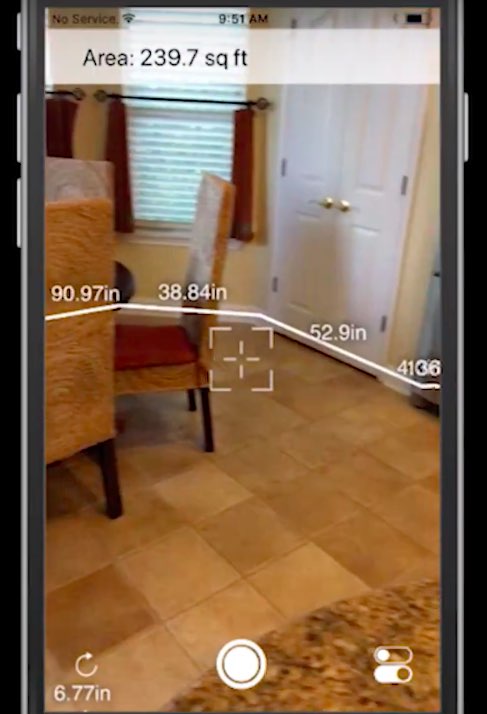
And lastly, German company Econsor Mobile GmbH has been working on an ARKit-powered app for commissioning of construction projects directly on the construction site.

https://www.youtube.com/watch?v=PJWTXefVDK8

Apple CEO Tim Cook thinks augmented reality is a big idea like the smartphone.

“The smartphone is for everyone, we don’t have to think iPhone is about a certain demographic, or country or vertical market: it’s for everyone. I think augmented reality is that big, it’s huge. I get excited because of the things that could be done that could improve a lot of lives. And be entertaining,” he said in the past.

How do you like these latest ARKit demos, which one is your favorite, and why? Does ARKit show a lot of promise, do you think? Share your thoughts by posting in the comment section.

This tweak lets you manually designate favorite Emojis

The iOS keyboard includes a key dedicated specifically to accessing the host of Emojis you can use to express your mood. Part of this interface includes a section for Emojis you use frequently, and while it can be useful, suggestions aren't always ideal.

With a new jailbreak tweak dubbed FavoriteEmojis by iOS developer Adeem Mawani, you can manually designate your favorite Emojis by choice; these are the ones that will begin populating the “Frequently Used."

QuietWhileUnlocked silences obtrusive notifications when your iPhone is unlocked

When you’re using your iPhone, sometimes the influx of notification sounds and vibrations can be enough to frustrate even the most tolerant of multitaskers who are trying to get things done.

Fortunately, a free jailbreak tweak called QuietWhileUnlocked by iOS developer The Holy Confluency of the Summer Triangle helps solve this problem by supressing notification sounds and vibrations whenever your device is unlocked.

Apple launches public betas of iOS 11 and tvOS 11

Following the June 5 release of developer-only previews of Apple's four main software platforms at the Worldwide Developers Conference, the Cupertino giant today released first public betas of iOS 11 and tvOS 11.

You must enroll in the official Apple Public Beta Software Program (available at no charge) and download a special configuration profile via the website beta.apple.com to your iPhone, iPad, or the fourth-generation Apple TV.

Sign in with your Apple ID through the website to get started. iOS 11 public beta has the same features as iOS 11 beta 2. The same goes for the tvOS 11 public betas.

After installing a configuration profile (click “Enroll Your Devices”), restart your iPhone, iPad, iPod touch or the fourth-generation Apple TV, then and use the built-in Software Update mechanism in the Settings app to download and install the public beta.

watchOS betas are not available to the general public.

https://www.youtube.com/watch?v=TZ5pwZMPRxI

Subscribe to iDownloadBlog on YouTube.

“If you were testing a prior operating system, please re-enroll your device to start testing the next release,” the company notes.

TUTORIAL: How to unenroll from Apple Beta Software Program

Be sure the check out the official system requirements for iOS 11 before installing their public betas. tvOS 11 requires a fourth-generation Apple TV.

Will you be taking iOS 11 and tvOS 11 for a spin, do you think? If so, what features are you looking forward to the most, and why?

Tell us in comments!

Updated builds of iOS 11 and tvOS 11 betas now available

Apple on Monday issued a slightly revised build of iOS 11 beta 2 for iPhone, iPad and iPod touch, as well as an updated build of tvOS 11 beta 2 for the fourth-generation Apple TV.

The new builds appear on select devices only.

iOS 11 Developer Beta 2 Update 1, as it's called, has the build number of 15A5304j, up from the build number of 15A5304i in iOS 11 beta 2 which was seeded to developers five days ago.

According to the official release notes on Apple's Dev Center portal, iOS 11 Developer Beta 2 Update 2 resolves an issue preventing reverting to iOS 10 from iOS 11 beta.

To revert to an earlier version of iOS, follow the instructions shown in Apple's support doc.

As for the updated tvOS 11 beta, the new version has a higher build number of 15J5310h versus build number of 15J5310e for the original tvOS 11 beta 2.

https://www.youtube.com/watch?v=TZ5pwZMPRxI

Subscribe to iDownloadBlog on YouTube.

The revised beta builds may also patch dangerous exploits while addressing performance issues on older hardware like iPhone 6.

iOS 11 cuts off 32-bit devices like the iPhone 4s/5/5c handsets.

The new builds are available over the air via the Software Update mechanism in Settings on iPhone, iPad, iPod touch and Apple TV. As mentioned before, they appear on select devices.

Build numbers for beta 2 of macOS High Sierra 10.13 and watchOS 4 have stayed intact. Public betas of iOS 11, macOS High Sierra 10.13 and tvOS 11 are coming later this month.

watchOS betas are currently unavailable for public beta-testing.