iPad 2

iPad 2 Jailbreak Exploit is Most likely Not Patched by Apple

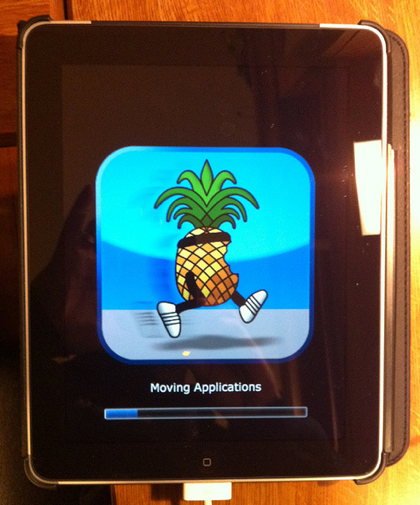
When we told you about Comex's jailbreak, we warned you about ASLR (Address Space Layout Randomization). It was one of the new security measures Apple implemented into iOS to thwart off jailbreakers, and was expected to delay a jailbreak release for quite some time.

Well Comex later commented that while he had an exploit that worked, he knew 4.3.1 would release very soon, and did not want to risk Apple patching his exploit with the new firmware. Thus he would wait until that release, which happened earlier today, to release a jailbreak solution.

Those worried that Apple somehow disabled the jailbreak in the update need not worry. Popular jailbreak spokesman MuscleNerd, confirmed via twitter today that it didn't look like Apple fixed the glitch that Comex used in his hacking of the iPad 2.

Of course he also warns to hold off on updating to 4.3.1 until things are confirmed and stable. It has also been confirmed that Comex's exploit is a 'userland' jailbreak, which means it can be done straight off the iDevice. Those who remember the 'Spirit' jailbreak series remember jailbreaking was as easy as typing jailbreakme.com into Safari.

Things are looking good for an official jailbreak release for the iPad 2 and other iDevices with iOS 4.3.1. Stay tuned to ziPadblog for the latest in jailbreak info.

Does anyone have an iPad 2 and is excited to jailbreak? Tell us in the comments below.

iPad 2 Glass Thinner and Stronger Than Original iPad

If you are still on the fence about purchasing an iPad 2, even after reading Sebastien's review, then listen up. One of the questions I get the most about purchasing Apple products is about durability.

Well we already know the iPhone 4 can survive a 1000 foot drop out of an airplane, but what about the iPad 2? It looks so thin and fragile, if I knock it off the couch or the bed am I going to break the glass screen into pieces?

9 to 5 mac is saying no. They are showing off a video, made by the folks at iFixyouri, that shows just how durable the iPad 2's screen is. They prove through several tests, that because the iPad 2's screen is so thin, it is extremely flexible. Thus allowing it to take some serious punishment.

Check out the video below and let us know how your iPad 2 is holding up in the comments!

Apple to Release iOS 4.3.1 Within Two Weeks?


The folks over at Boy Genius Report have just received word that Apple's next iOS release is coming within the next two weeks.

According to BGR's sources, iOS 4.3.1 will contain several minor bug fixes, including a patch to the iPad 2 jailbreak vulnerability and baseband updates to the iPhone 3GS and iPad...

Microphone Differences Between Wi-Fi and 3G iPad 2?

If you're still on the fence about which iPad 2 model to go with, pay attention. The folks over at iLounge have been giving their next-gen iPads a workout. They've written an in depth comparison between the 3 models (Wi-Fi, 3G AT&T, 3G Verizon) and have found some unique differences.

One of the most interesting finds was the difference in microphone quality. In their review they found that the microphone on the Wi-Fi iPad 2 offered considerably better sound quality versus either of the 3G models.

They note that the 3G versions had a bit of an echo and sounded muffled. The microphone on the Verizon model seem to suffer from the issues more severely, but they were clearly evident in both.

What could be causing the deteriorated sound? The answer could be simple. The mic sits right above the FaceTime camera, which in the 3G models is exactly where they stick the plastic antenna strip.

They note the microphone problems were more evident when the iPad's screen is facing the user, such as in a FaceTime call.

If you are still looking for help in making your iPad 2 decision, check out Sebastien's review with sample pics and video.

Has anyone seen these mic issues with their iPad 2 3G? Tell us below!

Apple Adjusting iPad 2 Inventory Shipping Strategy?

Analysts are predicting that Apple sold close to a million next-gen iPads during launch weekend. They are so backed up, online orders are showing shipping dates 5 weeks out.

Apple Insider is reporting that the iPad 2 shipments that some stores got this past Tuesday actually arrived Monday. Their source, who claims to be familiar with Apple's retail operations, states that the change is a direct result of previous device launch issues.

Apple's previous strategy has been to get the products from truck to shelf as soon as possible. But apparently it led to inventory inaccuracies and other problems at Apple retail locations. The new 24 hour delay is to give retailers ample time to check the iPad 2 shipments in, calmly and properly.

To the majority of us, an extra 24 hours may not seem like a big deal. But to the faithful that are still lining up at Apple stores every time there's word of an iPad 2 shipment, it can be a lifetime.

Has anyone been able to snag an iPad 2 since launch weekend? Tell us below!

Steve Jobs Sends Out Letter of Encouragement to Japanese Apple Staff

In an email that was reportedly sent out to all Apple employees, Steve Jobs and the rest of the Apple executive team took some time out from their day-to-day activities to acknowledge the pain and suffering in Japan due to the earthquake and tsunami disasters.

According to the email, Apple will supply the needed resources and supplies at employee request, and will arrange delivery; though obviously in the area's current state, logistics could prove to be an issue.

Apple has also delayed the iPad 2's Japanese launch in light of the recent events. To read the entire email from Steve and the rest of the executive team, take a look inside...

Use the iPhone to Enable GPS on the iPad While Tethering

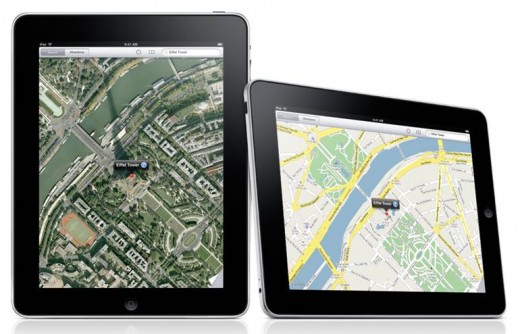
If you don't pony up the cash for a 3G-enabled iPad 2, you won't get the GPS capabilities of a carrier network connection. That means that, unless you are connected to a Wifi access point, the maps functionality of the iPad will not be able to track your location or give you live directions, etc.

The internal GPS is definitely one of the biggest pros for the 3G models of the iPad. With an internal GPS, the iPad can be a great navigation tool for your car's dashboard. So, what can you do to get GPS on the iPad 2 without a 3G connection?

A new report claims that you can use the iPhone's data connection through tethering to enable GPS functionality on the iPad...

iPad 2 Online Orders Delivered

In case you ordered an iPad 2 online on Friday early morning, then you should get it delivered soon. I ordered 2 iPads at exactly 12.53 am on Friday and I got them delivered today, even though the FedEx tracking system said I wouldn't get them until tomorrow.

I don't know why Apple shipped them in 2 separate boxes but they did come separately. In the end, it doesn't really matter. I'm just glad they're here.

In case you're wondering why I ordered 2 iPads when and also stood in line on Friday to get another one, it's simply because I want to surprise my Mom and my future mother in law with them. My Mom has always wanted an iPad since she first saw mine last year. Unfortunately she can't afford it so I'm glad I can, and I'm sure she's going to be very excited. The one iPad for my future in law is to thank her for putting up such a wonderful wedding for Tina and I (April 2nd).

Here you go, you have the story of my life.

Have you received your iPad 2 yet? If not, what does the FedEx tracking system is saying about the scheduled delivery date?

My iPad 2 Review

The iPad 2. I waited 6.5 hours in line to get it. That should tell you how excited I was about Apple's latest device. When I finally got my hands on it though, the excitement went down instantly. I already owned an iPad and I didn't think the 2 new cameras and a slightly slimmed down casing would make a huge difference. Boy was I wrong.

Since I bought it a few days ago, I can't seem to be able to let go of it. I want to touch it all the time, I want it to replace my laptop and my desktop computer. I want to use it for everything I do. In short, I fell in love all over again with the iPad.

If I had to make an analogy about going from the iPad 1 to the iPad 2, I'd have to say that it feels like I'm an older man ditching my wife of 45 years for a 20 something hottie. Not only the iPad 2 is lighter, it is also thinner, and snappier, making it this close to be a laptop replacement.

This being said, it kinda sets the tone for this review, which you guessed it, is going to be mostly positive.

The Design

First things first, let's talk about the design of the iPad 2. Esthetically speaking, the iPad 2 is a beauty, just like any other Apple product. While it's not a dramatic design change from the previous model, you can definitely tell it's newer because it simply looks better.

As I mentioned above, and as you probably read in many other reviews, the iPad 2 is definitely thinner and lighter.

While it's still too heavy to hold in one hand for more than a few minutes without developing a tendinitis, the iPad 2 is significantly lighter than its predecessor, which to me felt a little bulky and bloated. Holding the iPad 2 in your hand feels like you're holding a Kindle, or even better, an actual paper magazine. It feels good and it fits good.

I believe the iPad being thinner and lighter is what actually makes me like it even more than the older model. To me, it feels more natural. Again, I don't feel like I'm holding a piece of electronics in my hands, I feel like I'm holding a magazine.

The Speed

iPad 2 could have been named iPad S, in reference to the 3GS, which didn't bring anything new but speed to the older iPhone 3G. While the iPad 2 is not impressively faster than the first model it definitely feels snappier.

Apple didn't bother giving us the details of the new A5 processor, and that's fine by me because I couldn't care less. "512MB" doesn't mean anything to me. "Loads a web page twice as fast as the iPad 1" does speak to me though, and I assume it speaks to most people out there too (ie. my Mom, or your Mom, who don't even know what MB stands for).

Where I can tell the iPad 2 is faster is when using Safari. It loads websites much faster than the iPad 1. In a few informal tests I conducted, it seems iPad 2 was loading 50% faster than iPad 1. Because I use my iPad mostly for web browsing, this is a huge improvement to me.

I could also notice a speed difference when using Reeder for iPad, my favorite RSS reader. It seems to download news and display images much quicker than the old iPad did. Again, the speed improvement isn't amazing by any means, but faster is always better, no matter what.

I can really appreciate the speed improvement when using the app switcher. On my old iPad, the app switcher worked fine but was sometimes lagging when switching from one app to another. Forget that on the iPad 2. It's just blazing fast. Add this to the fact that the iPad 2 can cache more web pages without having to reload them if you get away from them for a few minutes, and you have an experience that gets a lot closer to true multitasking.

The Cameras

If you follow me on Twitter, you might remember me ranting about the cameras' quality a few days ago. Turns out it's not as bad as I thought. When I first tried the cameras, I was in our bedroom with very low light, which created terrible images.

For the purpose of this review though, I tried the camera during the day where there was much more light coming in the room. The results were different from my first attempt at reviewing the cameras, which got me to go from bashing them, to actually think they're not doing a bad job.

Although Apple doesn't give us the stats of the iPad 2 cameras on the spec page of the device, the camera module is supposed to take 0.7 MP photos, which obviously is well below any industry standards.

Apple fanboys like Gruber will tell you that it doesn't matter whether the camera is good or not because the iPad 2 wasn't made to be used as a camera. Of course the iPad wasn't made to be used as a camera. My car wasn't made to listen to music but I'm glad the manufacturer put a decent CD player in there, and I'd be glad if Apple had done the same with the iPad cameras.

Here are a few pictures I took with the iPad.

Front facing camera:

Back camera:

Another back camera picture (click on image for full size):

This camera was actually designed for video more than it was for still photos. I recorded a short video that will give you a quick idea of the quality. At some point in the video, I am accidentally covering the microphone with my hand, which explains why the sound gets partly muted.

So all in all the cameras on the iPad 2 aren't as bad as I thought and are definitely doing an ok job. As I read in a review of the iPad 2 last week (can't remember which one), the iPad 2 cameras are not good, they are at the bottom of acceptable, which of course gives plenty of room to Apple to upgrade the hardware next year.

The Battery

The battery on my first gen iPad is amazing. I've never actually ran out of batteries when I really needed my iPad (ie. on a flight, or while traveling). I expected a similar battery life on the iPad 2 but unfortunately it isn't.

Now I'm not going to go too much into details here because I think my battery problem comes from the fact that I set up this new iPad from my previous iPad's backup, which usually is a recipe for battery problems (and sometimes even worse issues).

I haven't had the courage to restore and set it up as a new iPad yet, which I assume will fix this issue.

But even with the battery problems I am experiencing, battery life on the iPad 2 is still more than acceptable. I've spent hours surfing the web, tweeting, reading news, and playing guitar (yes, playing guitar) on it before I had to recharge the battery, which I've done only once since last Friday. So, battery problem or not, we're still doing great on that side.

The Smart Cover

I've had a love/hate relationship with the Smart Cover since day 1.

While the concept of the Smart Cover is brilliant, it is not very practical for intensive usage of the iPad. It does a great job at protecting the front of your iPad but it will not do anything for the back, which led me to rename it the Dumb Cover.

When I complained about it on Twitter, someone sent me a quote from the Smart Cover description on Apple's website: "The slim, yet sturdy Smart Cover protects your iPad screen without covering up its durable aluminum back". Ok, I understand that the Smart Cover was designed to protect the screen only, but after a year of using the first iPad, I can tell that I'm actually more worried about the back of my iPad than the front.

By putting my first iPad on our coffee table or kitchen countertops many times before, it actually made hundreds of micro scratches (and some bigger ones) on the back of the iPad. I quickly bought a case for my first iPad but it was too late.

I suspect that without any kind of protection for the back, this iPad will get the same treatment. So far, I make sure to put my iPad on our coffee table screen first (protected by the Smart Cover), but it's just not practical or even logical.

I actually find myself taking off the Smart Cover more often than not while using it.

However, the cover becomes convenient when you need to type something. Simply roll up the cover in a triangle shape and start typing. This is probably the one reason why I haven't returned the Smart Cover to Apple yet.

I can't wait to see what other manufacturers come up with.

Should You Buy an iPad 2?

This is the question you might have on your lips if you haven't purchased an iPad 2 yet. Should you buy an iPad 2?

The answer is pretty simple. If you don't have an iPad yet, go for it. There is no reason why you should wait for the next iPad which is going to come out at the same period next year, even though rumors have it that Apple might release an iPad 3 in September (nonsense).

If you already have an iPad and you're satisfied with it, then save your money for the iPhone 5. If you already have an iPad but really want to do FaceTime, record videos, shoot photos, and enjoy a lighter device to hold in your hands, then go for it.

Ultimately, the decision is yours. I don't think the iPad 2 justifies spending another $500+ for a new device if you already own one, but Apple lovers like me can't help it.

At the end of the day, the iPad 2 is an amazing device. As we said before though, the iPad 2 is evolutionary, not revolutionary. It is right in the middle between your laptop and your iPhone. To me, it is still not enough to do any kind of productive work on it, but it is much better than your iPhone (or even your laptop) for browsing the web or Facebooking from the couch, which really is what the iPad was designed for. I know my Mom won't disagree with that when I offer her her very first iPad next week.
Want to Use Your iPad 2 With T-Mobile?

Go ahead! Just like its predecessor, the iPad 2 is sold unlocked in the united states. The news was confirmed this past weekend by MuscleNerd, a well known figure in the jailbreak community. What does this mean?

It means you can take your AT&T iPad 2, and activate it through T-Mobile. Since both companies use the same GSM technology, it can be pretty simple. You would just need a compatible Micro-SIM card from T-Mobile, and of course you'd have to snag a data plan.

"Cody, would the Verizon iPad 2 work on Sprint's network?" Probably not. The GSM technology we discussed earlier uses those SIM cards to authenticate devices on their network. CDMA technology, which Verizon and Sprint both use, uses a much more embedded and complex method of authentication. Layman's terms? It's not as easy as swapping SIM cards.

Is anyone using an unlocked iPad 2 on T-Mobile or another carrier? Tell us below!

iPad 2 Smart Cover Magnet Magic Revealed

Along with Apple's exciting new iPad 2 launch, was the unveiling of a new accessory. The Smart Cover, made by Apple, uses a magnet system to attach itself to the iPad 2's screen.

At first glance it can appear magical. The cover literally snaps itself into place. Need an impromptu stand for your iPad 2? The Smart Cover converts into a stand with ease, practically on its own. It certainly makes you wonder, "How did they do that?"

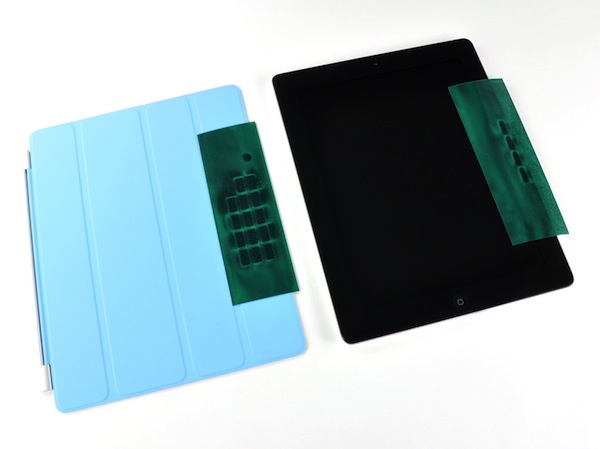
Luckily veteran iDevice dismantler, iFixit, had the guts to rip one open and find out. The answer was obviously simple, magnets. But how many magnets does it take to make a Smart Cover work? Thirty-one. Ten in the iPad 2, in the right bezel, and twenty-one in the Smart Cover.

Interestingly enough, they are just your run-of-the-mill, two-pole magnets. It's the way they are configured that makes manipulating the Smart Cover so easy. iFixit also noted that there is one, specific magnet, that is used to lock and unlock the iPad 2 as the cover's attached.

So it appears this magical magnet myth has been busted (say that 3 times fast). It turns out it was just really good engineering mixed with some good marketing, neither of which Apple is a stranger to.

Does anyone use a Smart Cover for their iPad 2? How does it work as a stand? Tell us below!

iPad 2 Jailbroken By Comex

Apple's latest version of its popular tablet is a hit. Analysts are predicting Apple sold close to a million iPad 2s over launch weekend. But if you are an early adopter and want to jailbreak, you're pretty much out of luck.

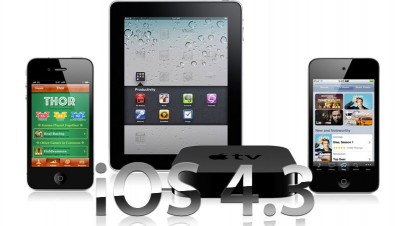
Apple's latest iOS 4.3, which the iPad 2 shipped with, has upped the anti for hackers with new security measures. The most notable being ASLR (Address Space Layout Randomization), which has slowed down jailbreakers in a 4.3 solution.

But thank goodness we have the devoted Dev-Team members and their pals. These guys always seem to do the impossible, and this time might have done it again. Long time iOS hacker, Comex, has jailbroken his iPad 2 within just a few days of its arrival.

Anyone in the jailbreak community should recognize the name, as he is the hacker behind previous jailbreak tools such as JailbreakMe and Spirit. There's no word on when his exploit will be ready in a user-friendly package but it shouldn't be too far off. We'll keep you updated.

Did anyone purchase an iPad 2 early and are anxious to jailbreak it? Let us know