iOS 13

Add more pizzazz to your iPhone’s native media player with CustoMedia

Upon tapping the play button for a video in Safari or the Photos app, iOS automatically loads the video in its native media player interface. This media player doesn’t apply to all apps, such as those with proprietary alternatives like the official YouTube app, but it applies almost everywhere else.

Jailbreakers who have an interest in customizing iOS’ default media player are likely to show an interest in a new and free jailbreak tweak dubbed CustoMedia by iOS developer gamehacker080, as it permits the end user to not only colorize the native media player, but also to adjust its behavior in several different ways.

Enhancer for YouTube Premium is a new jailbreak tweak for customizing the YouTube app

I’m a chronic YouTube user, and those in the same boat could probably find a use for one of the boat load of features offered by a newly released and free jailbreak tweak dubbed Enhancer for YouTube Premium by iOS developer LillieWeeb.

The previous name (YouTube Premium Plus) was a bit of a misnomer because it didn’t provide YouTube Premium features for free, nor did it only apply to YouTube Premium users. Rather, it offered a wide variety of options for augmenting YouTube for both YouTube basic and YouTube Premium users alike. The new name, we feel, is much more fitting.

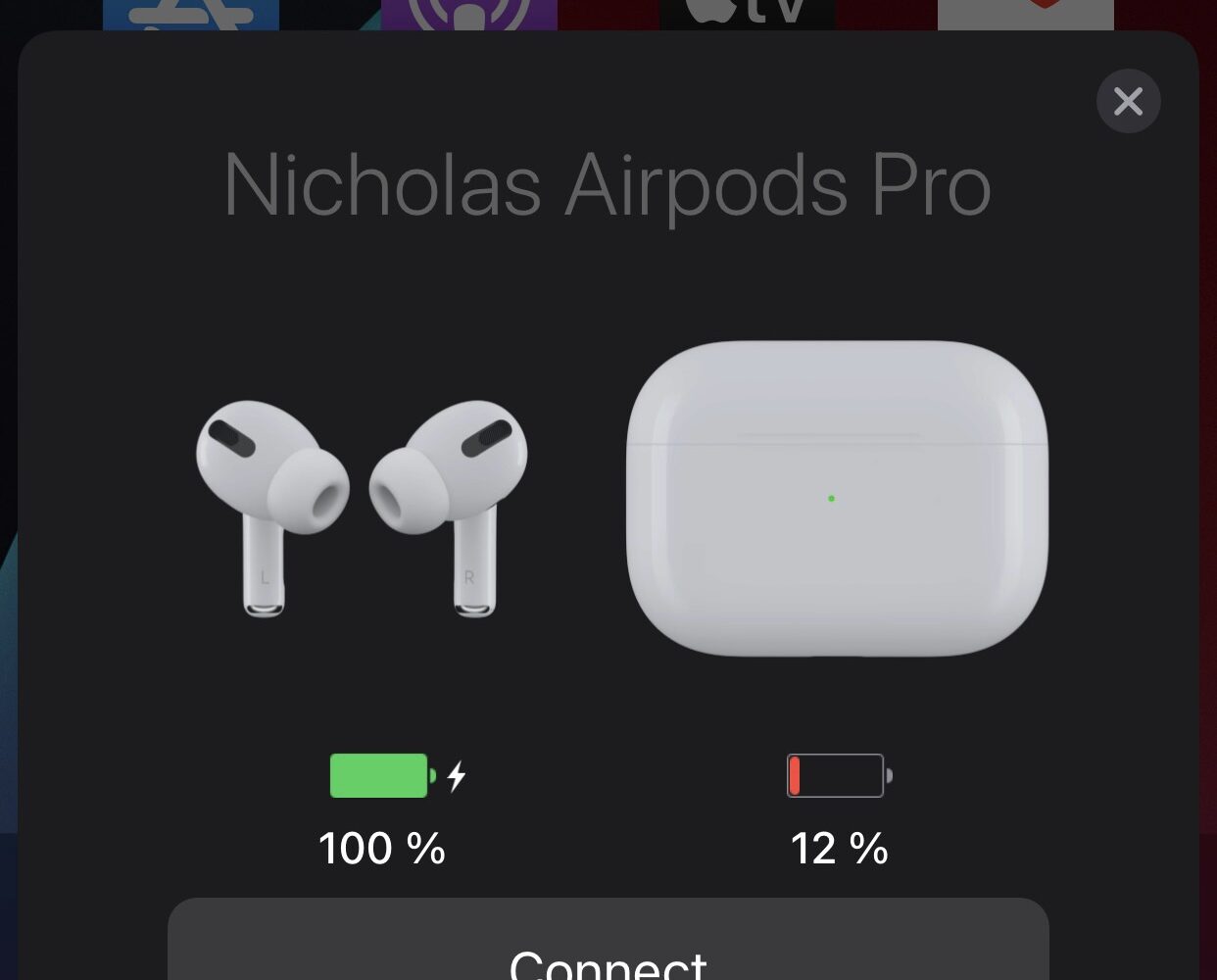
AirPopupConnect upgrades the H1 headphone pairing interface with dark mode & a connect button

A lot of magic happens when you bring a new pair of AirPods or Apple/Beats-branded equivalent headphones or earbuds with the proprietary H1 chip close to your iPhone for the first time. The pairing process is simply beautiful, complete with a stunning 3D render-equipped pairing interface and the works.

A similar interface appears when you bring any of the aforementioned audio devices close to your iPhone from then on so that you can view its current battery charge or just gawk at the gorgeous animations some more. But it’s noticeably missing something — a button for easily connecting to said device.

Colorize various apps on your jailbroken iPhone with this new tweak

Every app tends to have its own unique color scheme. But if you’d like to take things to the next level and you have a jailbroken handset at your disposal, then the jailbreak tweak we’re going show you might be of interest.

Enter Apps Colour Changer, a new and free extension for pwned handsets by iOS developer Lillie that lets the end user colorize various apps to their liking.

Jailbreak tweaks of the week: EarphoneReminder, IAmSpeed, Lucient, & more…

The jailbreak community continues to be the spawning ground of unique ideas for modifying stock iOS in the form of jailbreak tweaks. But a busy life can make  keeping tabs on everything a challenge.

Fortunately, iDownloadBlog has your back. We come at you every weekend with a dedicated roundup just like this one where we showcase all our favorite jailbreak tweak releases and jailbreak-centric news.

IAmSpeed simplifies the process of backing up jailbreak tweaks for when switching jailbreaks

So you’ve built up a rock-solid jailbreak tweak arsenal that you’re certain you want to continue using for the foreseeable future. And let’s hypothetically also say that you’re the type of person who likes to rootFS restore and switch jailbreaks from time to time, just to see what works best for you.

How can you make re-installing all your jailbreak tweaks a swift and painless process after switching to a different jailbreak? Why, with a jailbreak tweak backup solution, of course!

This tweak prevents pop-ups from appearing near the end of YouTube app videos

Hide the hovering cards in the YouTube app.

YouTube seems to be working overtime lately to shove all sorts of adverts and pop-ups in your face when you’re watching videos on their platform.

While we understand YouTube’s desire to recommend content you’ll enjoy so that the platform can generate ad-based revenue from your video consumption, the excessive adverts and pop-ups degrade the user experience since it covers part of the video playback.

Adam Demasi takes over as the lead maintainer of the Zebra package manager

Today’s jailbreak tools tend to install one of two different package manager apps: Cydia or Sileo. But those are far from the only package manager apps in existence today. Popular alternatives to Cydia and Sileo that can be installed by the end user include both Installer and Zebra.

We’re no stranger to either of the aforementioned package manager apps here at iDownloadBlog, but it’s worth noting that Zebra is now under new management as iOS developer Adam Demasi (@hkirb) has officially taken over this month as the project’s lead maintainer. Those shoes were previously filled by Wilson Styres (@willywurr).

Jailbreak tweaks of the week: IconShadow, MusicBanners, Visualyser, & more…

If you’ve been following the jailbreak community recently, then you’ve likely witnessed the release of  jailbreak tweaks that can be used to make iOS better than it is out of the box.

In this roundup, we show you all the latest jailbreak tweak and extension releases along with jailbreak-related news content from this past week, spanning the timeframe of Monday, July 12th to Sunday, July 18th.

Unc0ver jailbreak updated to v6.2.0 with major stability & reliability improvements for iOS 14

Team unc0ver is back at it once again following a long pause in updates after launching an updated version of the unc0ver jailbreak tool for all iOS & iPadOS versions spanning 11.0-14.3. Today’s update brings the unc0ver jailbreak tool up to version 6.2.0.

Hacker and unc0ver lead developer Pwn20wnd announced the updated version of the jailbreak via Twitter this Saturday afternoon.

This tweak makes the YouTube app conform to iOS’ system dark mode settings

Dark mode was perhaps one of the most sought-after features in iOS & iPadOS 13 when it debuted in 2019. Even today, a substantial percentage of iOS and iPadOS 14 users continue to use dark mode right out of the box, and there are no signs of that changing with iOS & iPadOS 15 this Fall.

Many apps for iOS and iPadOS automatically adapt to your system dark mode settings in an effort to blend in with other parts of the operating system, but some apps require the user to switch to a dark mode-friendly user interface manually.