How to

How to add location to photos and videos in Photos for Mac

With Photos for Mac, Apple pulled an iWork: that is, the re-imagining of how you should organize and manage your photos across devices originally wasn't as feature-complete as the now phased-out iPhoto used to be.

That's especially the case if you consider the need to edit location for some photos in your library: it wasn't before the OS X 10.11.3 El Capitan software update that Photos for Mac got this ability.

How to remove games you’ve uninstalled or no longer play from Game Center

With Game Center, you can play your favorite games with friends who have an iPhone, iPod touch, iPad or Mac. Game Center is also where your global leaderboards, achievements, challenges, high scores and other data are stored for each Game Center-compatible game you play.

Some people also find this particular feature a major nuisance over being bugged with notifications and invites for the games they no longer have installed on their device.

Thankfully, you can easily remove any game that you no longer play from Game Center with a quick swipe.

10+ things to do if your Mac won’t switch on

MacBook powering on and showing the Apple logo with a progress bar below it

Most of the time, when you want to use your Mac, you can just press the power button or lift the MacBook screen, hear a startup sound, and your computer will begin booting, so you can use it.

Sometimes, however, you don’t get so lucky. There may be a time when you go to use your Mac, and it doesn’t turn on at all.

As reliable as Macs can be, they can hiccup occasionally. In this piece, we talk about what you can do to troubleshoot if your Mac won’t power on after you press the power button.

How to remove unwanted email addresses from the Mail app on Mac

One thing I hate about the Mail app on my Mac is how when I go to enter someone's name to email them, macOS has a nasty habit of picking the wrong email address for that person and I always notice it when it's too late.

I had this happen to me the other day and my email was sent to the wrong inbox of that person – an email address that they don't even use anymore – so they never got the email I sent and I had to resend it.

If you've ever had this happen to you before, then you're reading the right tutorial, because we'll be showing you how to delete email addresses from Mac Mail history so they aren't auto-suggested for you when you start to type someone's name.

Simple tips for safely cleaning your Mac and other Apple devices

Cleaning Mac keyboard

Your Mac, iPhone, iPad, Apple Watch, and/or any other other fancy high-tech devices you have are fun to use, but they'll easily get dirty and collect dust, sneeze splatter, and bacteria from your fingers over time, whether they're used frequently or not.

To combat grime, you can clean your devices every so often, but like anything else, there's a right and a wrong way to do this.

In this piece, we'll share with you some handy tips for cleaning your Mac and other Apple devices safely so you don't accidentally damage them.

Common restore errors in iTunes and how to resolve them

Restoring your iPhone, iPod touch, or iPad can resolve a variety of issues, but sometimes you'll experience issues even when you try to restore your device(s) with iTunes.

You may have received a "This device cannot be restored Error XXX" message from iTunes before, and unfortunately, you may have been forced to do some research to even begin to understand why you're getting the error, which can cause tons of frustration.

In this piece, we'll talk about some of the most common iTunes restore errors and how to fix them so you don't have to spend hours researching for solutions by yourself.

The ultimate guide to protecting your private information in Notes from the prying eyes

According to Apple, Notes is one of the most popular and most-frequently used stock applications on the iPhone, iPod touch and iPad.

People use Notes for everything from memorizing recipes to keeping track of errands, creating shopping lists, storing inspirational quotes and even passwords, codes and medical data.

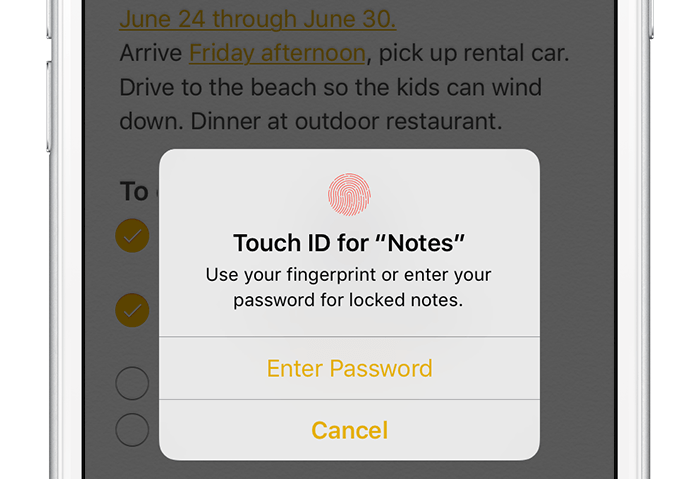
Not all notes contain sensitive information, but many do. Beginning with iOS 9.3 and OS X El Capitan 10.11.4, you can protect your notes with a password or Touch ID.

In this tutorial, you'll learn how to set up Notes protection, secure items on a note-by-note basis so no one can view their contents and more.