Call

LetMeKnow provides subtle feedback when your phone calls connect or disconnect

If you make and receive phone calls on a regular basis, then you may have something to gain by installing a new free jailbreak tweak called LetMeKnow by iOS developer Kiran Patil.

LetMeKnow provides iPhone users with an ounce of haptic feedback whenever a phone call connects or disconnects. It works regardless of which party disconnects the call, and it can prevent you from having to plaster your phone to your face until someone picks up your outgoing calls.

Have iPhone automatically answer incoming calls on your behalf

Many iOS 11 features seemed to be inspired by the jailbreak community. Among them, a brand new call audio routing option in accessibility settings that allows you to set your iPhone to automatically answer incoming calls on your behalf, should you wish so.

This optional feature supports regular calls via your carrier's mobile network, as well as Wi-Fi calls, FaceTime audio and video calls and any VoIP calls originating from third-party apps that use Apple's CallKit framework, such as WhatsApp, Skype, Viber and more.

To enable this feature, go to Settings → Accessibility → Touch → Call Audio Routing.

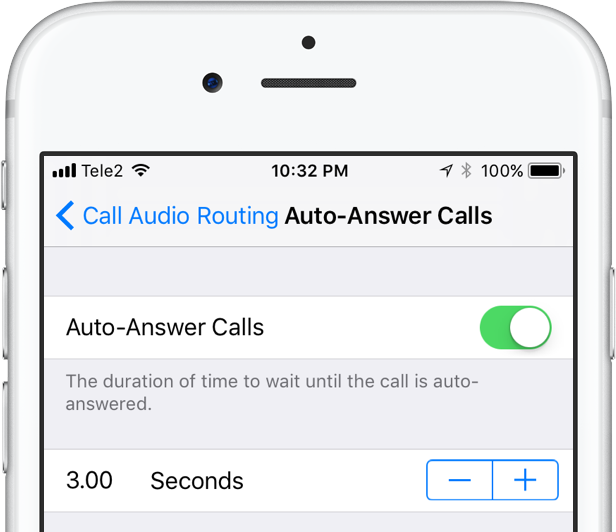
There, you'll see the call routing options which include settings like Bluetooth headsets, the iPhone speaker and more. These options are also available on prior iOS editions. But look at the bottom and you'll see a brand new menu, labeled Auto-Answer Calls.

Tapping it takes you to a new screen where you can enable or disable the feature and set the duration of time your iPhone will wait when a call comes in before it's auto-answered for you.

This handy new option, as I already mentioned, is nowhere to be found in iOS 10 or earlier.

I can see myself using Auto-Answer Calls a lot, not just while jogging with my AirPods or working out with my PowerBeats in my ears but also in other situations when interacting with the phone may be impractical, like driving a car or swimming with my Apple Watch on.

How do you like this nifty feature? Will you be using this auto-answer call setting, and why?

Do let us know by posting a comment below!

TUTORIAL: How to set your iPhone to automatically answer calls
Amazon launches VoIP and video conferencing service Chime

Amazon Web Services, a subsidiary of Amazon, today announced it's launched Chime, a new Voice over IP (VoIP) and video conferencing platform for iPhone, iPad, Mac, Windows and Android.

Aimed at business users, Chime allows you to host or join virtual meetings, take advantage of content and screen sharing across platforms and more.

Amazon promises noise-cancelling wideband audio and crystal clear high-definition video with the new service. Chime for iPhone is available at no charge from App Store. The Mac client can be downloaded directly from Amazon.

AT&T’s new Call Protect system blocks spam calls

AT&T on Tuesday introduced a new service for automated fraud and spam call-blocking. They're calling it Call Protect, and the system works like an email spam filter—identifying numbers believed to be associated with fraud and either blocking them or flagging them with a warning.

Also like other spam filters, users will be able to whitelist specific numbers to rectify any false positives, and even set temporary call blocking for unconfirmed spam calls. These more granular controls will be accessible from the Call Protect companion app on iOS and Android devices.

QuickDial Lite adds speed dial features to your iPhone

QuickDial Lite is a new free jailbreak tweak intended for iPhones that allows you to quickly dial up to 9 of your favorite phone numbers in fewer keystrokes.

With this tweak, you can assign certain phone numbers to individual number keys on the keypad in the Phone app. Afterwards, you will be able to tap and hold on any of those assigned keys to automatically initiate a phone call to the number assigned to the key you held down.

How to use voicemail transcription on iPhone

One of the more useful features for iPhones that comes packed inside of Apple’s new iOS 10 release is voicemail transcription, which transcribes your voicemails into text so you can read them rather than listen to them.

The feature is available to users in the United States and it’s very much still in its beta stages despite the fact that iOS 10 is now a public firmware, but if you want to know how to use it, or to see if you can use it yet, then you’ll be happy to know it’s quite easy to follow.

How to filter and block spam phone calls on iPhone

Starting with iOS 10, Apple is allowing a new type of applications in the App Store: apps that can detect and block spam phone calls from telemarketers, debt collectors, scammers, and automated systems. These apps act as an extension of the Phone application, and in theory, they can help you filter out those calls from people you don't want to talk to.

In this post, we will have a look at how these applications work and how to use them.