Apps

Pebble launches smartwatch app store with over 1,000 apps and watch faces

As promised back in December, Pebble launched its dedicated app store today. The store, which can be accessed via the official Pebble iOS app, features over 1000 apps and watch faces that can be installed on the company's line of smartwatches.

Like other app stores, the Pebble Shop pulls together all third-party apps developed for the Pebble and organizes them into categories like Fitness, Notifications and Games. This makes it easier to browse through existing apps and discover new ones...

Facebook’s new Paper app lands in the App Store

Facebook's new Paper for iPhone app has just landed in the App Store, download it free. The news-reading application, which employs beautiful edge-to-edge design and Flipboard-like gestures, serves both stories surfaced from your News Feed and cherry-picked items from big name publications curated by Facebook editors. The app can be customized with a choice of more than a dozen topics ranging photography and sports to food, science and design, with each section including "a rich mix of content from emerging voices and well-known publications"...

Apple now rejecting apps that use ad tracking but don’t show any ads

An interesting finding by TechCrunch this morning that Apple has now started to reject apps which retrieve users’ Identifier for Advertisers (IDFA), but don’t show any ads. IDFA was introduced alongside iOS 6 two years ago to replace the universal device identifier (UDID) from prior iOS versions amid privacy concerns and new regulatory requirements. The company last March stopped accepting apps into the App Store that use the now defunct UDID...

Pedometer++ totally revamped for iOS 7, now with data export and weekly timeline

David Smith's Pedometer++ was one of the first apps on the block to come out with support for Apple's new M7 motion coprocessor found inside the iPhone 5s. A bunch of health and fitness apps on the App Store have since integrated with M7 and today a new and totally revamped version on Pedometer++ has arrived.

Pedometer++ version 2.0, now available free in the App Store, includes a redesigned user interface that honors iOS 7 visual guidelines, in addition to a few new features...

Help Sherlock Holmes solve his latest case in this iOS game

Two weeks ago, the most popular show on PBS launched the first episode of its third season. The 90-minute episodes are possibly the most popular versions of Sherlock Holmes since Robert Downey Junior donned the cap. Frankly, I think the television show is better.

Sherlock: The Network HD is a puzzle game that stars Benedict Cumberbatch (Holmes) and Martin Freeman (Watson). Join the detecting duo as they solve crimes, stir up trouble, and act like smarty pants…

NBA Game Time app gets big update ahead of All-Star weekend

Now that the Super Bowl is over, and pro football is no more, the attention of many sports fans will now turn to basketball. College teams are just a month or so away from the big March Madness tournament, and the NBA is just two weeks away from All-Star weekend.

And because of that, the NBA pushed out a big update for its Game Time app this weekend. The update brings the app to version 5.2, and adds several new All-Star data points and features including rosters, schedules and everything you need to keep up with the action...

Assign various actions to app icons with App Activate
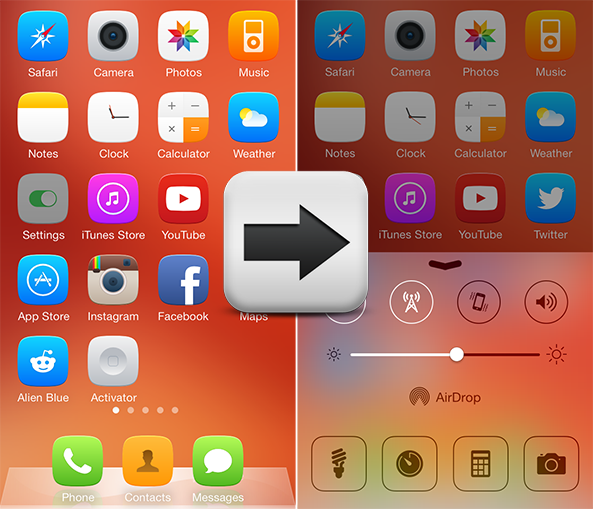
Activator is one of the most popular jailbreak tweaks available on Cydia, in addition to being part of the core functionality of several other iOS extensions. App Activate Pro is the perfect example, a new tweak that lets you assign an action to double tapping, triple tapping or long-hold tapping an icon on the Home screen. The actions are assigned using Activator and can be applied to all stock or third-party apps. Take a look… 

How to watch the Super Bowl on your iPhone or iPad

Over 100 million people are expected to gather in front of their television sets tomorrow to watch the Super Bowl. But for those of you that, for one reason or another, can’t get in front of a TV set, there are a few other ways to catch the Big Game.

If you’re going to have access to a computer, you can watch it there. The game will be streamed live via FoxSportsGo.com. No computer? No problem, iDB has you covered. We’ve compiled a list of ways to follow the action on your iOS devices…

List of iPhone games with controller support

XBox One game controller

The MFi game controller SDK allows third-party developers to create external gamepads for iOS devices. Over the years, this program has evolved, allowing iOS, iPadOS, tvOS, and macOS devices to work with Xbox and PlayStation wireless game controllers.

In this article, we list the best iPhone games with controller support that we think are the cream of the crop.

Apps of the week: Peek Calendar, Dungeon Keeper, and more

Well, after weeks of complaining about dry skies, my hometown finally got its first wet day. Unfortunately, the rain did not last more than a few hours, but something is better than nothing. I immediately took a shower. I probably used up any water that may have collected during the short rainfall. Oh, well.

This week, lots of cool apps and games made their way into the App Store. If you need a new calendar, love John Woo, or want to follow the winter Olympics, we’ve got a list you might find to be worth a read…

Tweetbot for Mac refreshed with conversation icon, ‘Save Image As’ option

Tapbots has just issued a maintenance update to Tweetbot for Mac which added a pair of feature tweaks and some bug fixes. Tweetbot version 1.4.2, now available as a free update in the Mac App Store, finally allows you to save images from tweets to folders other than the default Downloads folder.

There's also a new conversation icon next to tweets that are a reply to another tweet, which allows for a more visual navigation and helps make sense of your feed.

The full breakdown is after the break...

Peek Calendar for iPhone brings Clear-like gestures and marvelous UI

Fans of Realmac Software's Clear to-do app who've always wanted its gestural user interface in a calendar app need look no further than Peek Calendar for iPhone, $1.99 in the App Store. It's the calendar humanized, as developer Square Mountains puts it.

The premise behind Peek Calendar, as its name suggests, is the decluttering of your calendar entries by providing an effective at-a-glance overview of your day and some novel gestures allowing you to literally peek inside the events.

One of may favorite interactions: the shading gesture which allows you to see some Peek's life events. Check out Peek Calendar in a sweet promotional video included right after the break...