
Apps

App Watch: the day after Christmas

If you have kids, or if you were a kid at some point, you probably remember opening your presents each Christmas, using them to no end for the rest of the day, and forgetting about most of them the day after. That never happened to me, actually, but it's a long-standing stereotype, so go with it.

The difference between your RC car and your Apple Watch is that your car began collecting dust after a day or two, and your Apple Watch is becoming an integral part of your life. The initial novelty of the Digital Crown has become a natural scrolling mechanism, and the urge to constantly try a new watch face turned into changing the color to match today's shirt, or switching from an informative to a simple face from a work day to the weekend. Apple Watch has become a background track in your day-to-day life, and that's a good thing.

However, there is always more room for great apps to expand horizons and streamline workflows, which is why App Watch exists. So let's see what Santa (bearded app developers) has for us this week.

Bacteris, Enkl, Microgue, and more apps to check out this weekend

So, you’ve got your Apple Watch and all you want to do is look at its tiny screen and wait for that subtle tap. You’re not interested in any normal sized apps. Well, why don’t you just check out our Apple Watch app list.

The rest of our readers, the ones that are still waiting anxiously for Apple to tell them that their watch has shipped, we’ve got a list of apps and games we think will help you forget your woes.

Tweetbot 3 updated with support for new ‘Quote Tweet’ feature

The Tapbots issued an update for their iPhone Twitter client Tweetbot 3 today, bringing the app to version 3.6. The release includes a number of bug fixes, and it adds support for the new 'Quote Tweet' feature Twitter rolled out last month.

For those who haven't used the feature yet, it's actually pretty handy. Unlike the typical retweet, which will insert the tweet between quotation marks and count toward your character limit, Quote Tweet embeds the tweet like a card or photo.
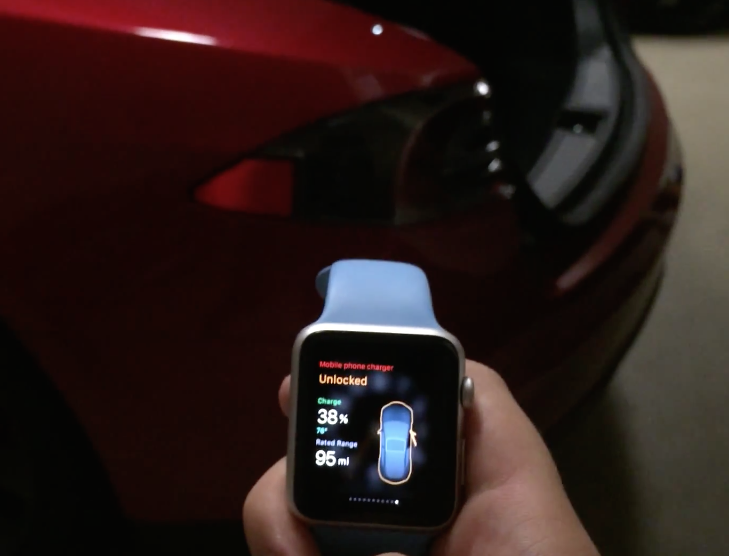

Developer builds Apple Watch app that can fully control his Tesla

Developer Allan Wong posted an interesting video on YouTube today, showcasing his new Apple Watch app Remote S. In the clip, he can be seen using the wearable to control his Tesla Model S, performing tasks such as opening the charging port and adjusting the temperature.

While Tesla's are pricey and not very common in most circles, the video is extremely impressive and worth watching. This is by far the most in-depth app we've seen demonstrated on the Watch, as Wong is able to use it to control nearly every function and feature of his vehicle.

T-Mobile again offering free MLB At Bat Premium subscription to customers

Football season has long been over and basketball is getting there, but baseball season is just getting started. And for fans of the sport who are either on T-Mobile, or thinking about it, you'll be interested to know that the carrier is once again offering MLB At Bat Premium to customers.

As noted by Droid-Life, the promotion is season-long, beginning May 1 and running through the end of September. To qualify, customers must download the MLB At Bat app on Android or iOS while on T-Mobile's network—you will not get the discount if you are on Wi-Fi or roaming.

Apple Store app updated with support for Apple Watch

Apple updated its Apple Store app on Thursday, bringing the software to version 3.2.1. The change log for the release is short, with just one new feature mentioned, but it's a significant one: Apple Watch support. Now, owners can use the wearable to access information both inside and outside of retail Apple Stores.

‘Mighty Switch Force! Hose It Down!’ goes free as Apple’s App of the Week

Apple has just named WayForward's "Might Switch Force! Hose it Down!" its App of the Week for this week. This means that from now through next Thursday, you’ll be able to download the award-winning pick-up-and-play puzzler for iPhone and iPad for free—a solid savings of $1.99.

For those unfamiliar with the game, you play as a member of Planet Land's Fire Brigade that has to help put out fires around Tangent City and evacuate any trapped Hooligan Sisters. You accomplish this by strategically moving and rotating tiles to direct your water towards the flames.

Premium Star Wars games discounted deeply on Mac App Store and App Store

With only five days left until the annual Star Wars Day celebration (May the Fourth Be With You, says the marketing tagline), Aspyr Media is celebrating the occasion in advance by temporarily slashing five premium Star Wars titles for the Mac by fifty percent.

The Star Wars: Knights of the Old Republic, Star Wars: Empire At War, Star Wars Jedi Knight: Jedi Academy, Star Wars Jedi Knight II: Jedi Outcast and Star Wars: The Force Unleashed games have gone half price each, in some cases even lower, on the Mac App Store. Put together, these downloads normally sell for a combined $70, so you're looking at a cool $40 saved if you download the five Mac games while this promotion lasts.

Amazon’s Instant Video for iOS can now stream content in HD and over cellular

Amazon's Instant Video client for the iPhone and iPad has received an update Thursday, bumping version number to 3.0 and bringing out several improvements to streaming video quality.

Users can now stream Instant Video content on their iOS device through their carrier's cellular network while controlling their mobile data usage settings. In addition, the ability to watch video streams in high-definition has been added, too.

Does Not Commute review: and you thought your morning drive was bad?

Driving in traffic can be one of the most stressful experiences of a person’s day. Navigating turns, freeway congestion, and distracted drivers can really put you off.

Does Not Commute takes the concept of daily driving and smashes it into a brick wall. After playing this game, you’ll appreciate the relaxing traffic jam you are stuck in every morning. We’ve got a game review of Does Not Commute for you today.

Pixelmator for Mac gains Photos app support, Force Touch drawing, enhanced Repair tool, more

Pixelmator for Mac received a sweet update last evening, adding a trio of noteworthy features and a plethora of bug fixes. A free update to existing users of the app, Pixelmator 3.3.2 brought out an even more remarkable — and way faster — Repair tool.

It also added support for pressure-sensitive drawing on Macs with the new Force Touch trackpad and importing photos from the Photos app on OS X Yosemite 10.10.3. In addition to these perks, the app contains other tweaks and bug fixes.