App Updates

Evernote gains business card scanning, Presentation mode and other goodies

Evernote for iPhone and iPad has been updated with a new Presentation mode and another feature allowing users to scan business cards using an iDevice camera and import contact data as Evernote notes, with the ability to connect contact data to LinkedIn, Facebook and your Address Book for richer results, among other enhancements. Both business card scanning and Presentation mode capabilities are however available only to paid Evernote Premium customers.

The Presentation mode supports AirPlay or HDMI video out to present your Evernote notes to an audience and comes with a 14-day complementary preview for Free users...
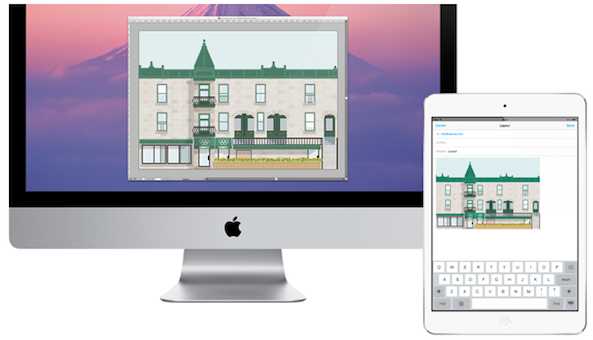
Remotely control your computer from your iOS device with Screens 3.0

Ever away from your desk, but need to access something on your desktop? What about copying something on your Mac and pasting it to your iPad? Thanks to a new updated version of Screens, Edovia dev team is making remote view a simple and easy task for any user.

Previously, remote viewing was a complicated task reserved for the super nerds and IT geeks. However, with the spawn of tablets, the common man is now capable of logging into remote desktop through simplified app clients. As I am frequently away from my desk traveling, I decided to take a closer look at Screens...

You can now control iTunes Radio via Remote app

After refreshing its free Remote app for the iPhone and iPad with some radical redesign to match the overall iOS 7 aesthetics, Apple has just put out a minor update adding a nicely done ability to control iTunes Radio from your iOS device.

But rather than stream iTunes Radio songs directly (and what would the point be in doing so knowing iTunes Radio is available within the stock iOS 7 Music app), the application simply controls the feature running in iTunes for Mac or Windows.

Previously, you could only control playback of music and other media kept locally in your iTunes library. If anything, this update will go down in history as a handy little enhancement that makes it ridiculously easy to control your iTunes Radio stations, skip songs and more, right across the room...

Twitter for Mac 3.0 is here with redesigned profiles, inline photo previews and more

The micro-blogging platform Twitter on Tuesday refreshed its free iPhone and iPad client with the simplified menu bar, improved search, tweaked design and the ability to send images in Direct Messages, the latter currently off limits to third-party clients such as Tweetbot or the completely redesigned Osfoora 2.

Today, Twitter's Mac counterpart has undergone a similarly substantial revision which includes a significant facelift and a few great new features, like image previews in timelines, detailed tweet view, revamped profiles and more.

Jump past the fold for the full reveal...

Dropbox app updated with support for viewing PDF annotations

Good news for Dropbox users this afternoon. The cloud storage company has posted an update for its iOS client, bringing the app to version 3.0.2. The update includes a number of bug fixes, as well as the ability to view PDF annotations.

For those unfamiliar with the term, PDF annotations are things like notes, highlights and other edits made to a PDF document. And until now, users were not able to see these edits in Dropbox without using a 3rd party app or workaround...

Sega releases remastered Sonic the Hedgehog 2 for iOS

This has been a big week for iOS games. Following the release of Grand Theft Auto: San Andreas and Lego Star Wars: The Complete Saga, Sega's anticipated, remastered Sonic the Hedgehog 2 update has landed in the App Store.

First announced in October, the free update sees the game rebuilt by Christian Whitehead and Simon Thomley— the same guys who did the first Sonic the Hedgehog iOS game remaster—with better graphics, FPS and much more...

IFTTT can now trigger actions based on your location

The increasingly popular iPhone automation app, IFTT, (stands for IF This Then That) has received a notable little update today which enables iOS Location Recipes, allowing you to build recipes that trigger various actions based on your device's GPS location.

The new iOS Location channel was created to allow apps and websites to use information from cellular, Wi-Fi and GPS networks, in addition to iBeacons, to determine your approximate location. This opens up some interesting and really useful possibilities.

For instance, you could program IFTTT to turn off lights when you get home, via the built-in support for the Philips Hue smart light bulb. Or, why not automate social announcements when you're at a not-to-be-missed party? And how about simply notifying your family about your whereabouts as you move about the day?

Launch Center Pro gains Fleksy keyboard integration, lists, Share Sheets and more

Earlier this morning, I told you about Fleksy, a free iPhone application that one-ups Apple's stock iOS keyboard with eyes-free typing experience.

The San Francisco-based startup behind the app has decided to open up its alternate keyboard methods to select-third party developers by way of an official software development kit (SDK). This is great news as Fleksy's keyboard sports a patent pending text prediction engine and a powerful autocorrect engine.

Contrast iPhone and iPad automation app, Launch Center Pro ($4.99 on the App Store), is one of Fleksy launch partners and today's update enables support for Fleksy's innovative input method for keyboard prompts.

More on that right after the break...

Instagram 5.0 launches in App Store with Instagram Direct support

And just like clockwork, Instagram's newly-updated mobile app is now live in the App Store with support for Instagram Direct, a new feature announced just an hour ago at the company's Share a Moment media event in Midtown Manhattan, New York City. This capability that some mistakenly refer to as a private messaging feature introduces much-needed granularity to sharing by allowing users to send a photo or video not only to a group of their Instagram followers, but also to those not following them on the service...

Google Maps now lets you see flight, hotel and restaurant reservations from Gmail

It's been some time since we've seen a meaningful update to Google Maps for iPhone and iPad, especially given Google Maps is probably the Internet giant's most popular product, after Search.

As if reading our mind, just an hour ago the firm has quietly pushed a minor update into the App Store. The new Google Maps version 2.5 comes with a few bug fixes and brings with it a cool new feature which lets you see your reservations from Gmail on the map.

Say you made a flight, hotel or restaurant reservation. Upon receiving the confirmation email in Gmail, Google can now take this information (they are already doing this for Google Now cards, by the way), extract the address and show you precise locations for these items within the Google Maps iOS app.

It's a minor, albeit welcome, enhancement that will up competition a notch for Apple’s own iOS Maps app. I love how little things like this make Google Maps more integrated with other Google apps. We've seen Google do this frequently and my guess is they'll continue to leverage their premium iOS apps to build a platform on top of iOS, so to speak...

Nike+ Move gains better Leaderboards and more accurate Where You Moved screen

I frequently use Nike's fitness app, Move for iPhone, which made its App Store debut in early-November. Apple highlighted Nike+ Move during the September double-iPhone event as a use case scenario on how health and fitness apps can benefit by taking advantage of the new M7 motion coprocessor found inside the iPhone 5s. Not only does Nike+ Move tracks your movement even when it's inactive - with little to no impact on your battery life - it really gets you moving on a daily basis.

Beautiful and light iOS design, nicely animated interface, easy to grasp features and inviting concept together made me fall in love with the software from day one. A fresh update which just surfaced on the App Store is now introducing a more comprehensive Leaderboards and a more accurate Where You Moved screen...

Pinterest revamps iPad interface

Just in time for the holidays, Pinterest has given its free iPhone and iPad app a revamped tablet interface which includes brand new iPad navigation via dedicated buttons alongside the bottom, the ability to show your most recent boards for faster pinning, new ways to discover boards, hidden boards and more.

"The iPad app has a fresh new look, just in time for the holidays," Pinterest wrote in iTunes release notes. "Also, you can send your favorite boards to your friends for gift giving inspiration".

The full details are included right below...